
To create a panic routine, start by selecting reliable triggers like flashing lights, sirens, or alarms that activate instantly. Connect these devices to a central control system, such as a smart hub or alarm panel, and program them to activate simultaneously in an emergency. Keep equipment accessible and test the system regularly to guarantee quick, reliable response. If you continue, you’ll discover detailed steps to set up and optimize your panic routine effectively.
Key Takeaways
- Select reliable triggers like flashing lights and loud alarms linked to a central control system.
- Program a quick-activation routine for all devices, ensuring simultaneous triggering during emergencies.
- Use high-visibility LED lights and loud sirens for immediate, unmistakable alerts.
- Test the system regularly to confirm all lights flash brightly and alarms sound loudly without delays.
- Educate all users on how to activate the panic routine quickly and practice frequently for preparedness.
Have you ever felt overwhelmed by sudden panic and wondered how to regain control? When chaos strikes, your instinct might be to freeze or panic, but creating a panic routine can help you respond swiftly and effectively. A well-designed routine ensures you have a clear plan that activates immediately, bringing order to the situation. The goal is to make all lights and alarms trigger simultaneously, grabbing your attention and alerting everyone around you. This approach not only helps you regain a sense of control but also minimizes confusion and delays during emergencies.
Start by identifying the triggers you want to activate in an emergency. These could include flashing lights, sirens, and alarms that are loud and unmistakable. Make sure your setup is reliable and fast-acting; delays can be dangerous. You’ll need to install or configure a system that links these triggers to a central control unit, such as a smart home hub or a dedicated alarm system. When activated, this system should simultaneously turn on all lights and sound all alarms, creating a powerful, attention-grabbing response. The key is synchronization—everything should go off at once, not in sequence, to maximize impact.
Identify reliable triggers and synchronize lights and alarms to activate simultaneously for maximum impact in emergencies.
Next, choose the right equipment. Use high-lumen strobe lights or flashing LED strips that can be easily connected to your control system. For alarms, select loud sirens or horns that can be triggered electronically. Many smart home systems allow you to customize routines, so you can set specific scenes for emergencies. For example, you might program a “panic mode” button that, when pressed, instantly triggers all connected devices. Make sure these devices are within easy reach so you can activate the routine quickly, without fumbling around. Additionally, ensure your system includes reliable emergency protocols to guarantee consistent activation when needed.
Testing is essential. Before an emergency occurs, run multiple drills to confirm everything works seamlessly. Check that the lights flash brightly and the alarms sound loudly, without delays or malfunctions. Adjust the settings if necessary to improve responsiveness. Remember, this routine should be simple enough to activate under stress, so avoid overly complicated procedures. In a real situation, you don’t want to waste precious seconds trying to figure out how to trigger the system.
Finally, inform everyone involved about the routine. Make sure all family members, coworkers, or roommates know how to activate it and understand what to expect. Practice regularly to ensure familiarity and quick response. By establishing this coordinated panic routine, you’re creating a powerful tool to help you regain control during emergencies, making sure that chaos doesn’t overwhelm you and everyone stays safe.

taoctee Panic Button Alarm for House Remote Control Office Siren Alarm System Sound & Light Emergency Panic Button for Security,Elderly,Home,Shop,Business,Luxury Store(Battery Operated & USB Charging)
Package Includes: You will receive 2 Strobe Alarm Siren and 4 Alarm Buttons and Instructions and some Accessories.Strobe…
As an affiliate, we earn on qualifying purchases.
As an affiliate, we earn on qualifying purchases.
Frequently Asked Questions
Can I Customize the Alarm Sounds for Different Emergencies?
Yes, you can customize alarm sounds for different emergencies. Many smart alarm systems and apps allow you to select or upload specific sounds for various alerts. You simply need to access your device’s settings, choose the alert type, and pick from available options or upload your own. This way, you’ll instantly recognize the emergency type, ensuring you respond quickly and appropriately.
How Do I Test My Panic Routine Safely?
Think of testing your panic routine like a fire drill for your home. First, set your alarms and lights to trigger without causing real alarm. Then, activate the routine in a safe, controlled environment—stay nearby, ready to stop it if needed. Check all devices respond correctly, ensuring they work seamlessly together. This way, you’ll know your system is reliable and ready to help you stay safe in an actual emergency.
Is It Possible to Include Voice Alerts in the Routine?
Yes, you can include voice alerts in your panic routine. To do this, integrate compatible voice assistant devices like Amazon Alexa or Google Assistant. Program your routine to trigger voice alerts alongside lights and alarms during an emergency. Make sure your devices are configured correctly and tested in a controlled setting. This setup helps deliver clear, immediate instructions or warnings, enhancing your safety response during emergencies.
What Security Measures Protect My Panic Routine From Hacking?
Did you know that over 80% of smart home devices face security risks? To protect your panic routine from hacking, you should enable two-factor authentication and use strong, unique passwords. Keep your firmware updated regularly, and avoid connecting to unsecured Wi-Fi networks. Additionally, consider setting up a separate network for your smart devices, so if one gets compromised, your main network stays safe.
How Often Should I Update or Review My Panic Routine?
You should review and update your panic routine at least every six months, or more often if there are changes to your home or technology. Regularly testing your system guarantees everything works smoothly during an emergency. Stay informed about new security features or updates, and adjust your routine accordingly. Consistent reviews help you stay prepared, confident, and ensure your safety measures remain effective against potential threats.
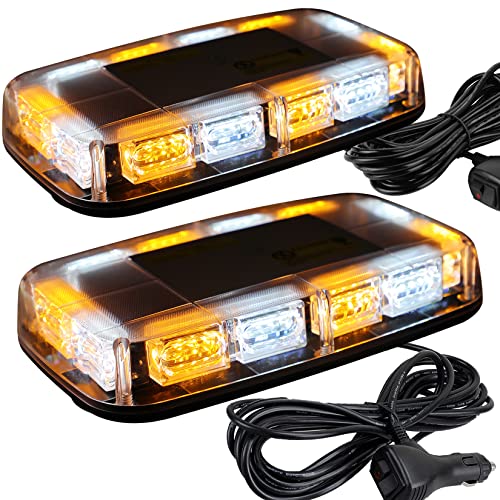
ASPL 2pcs 48LED Roof Top Strobe Lights, High Visibility Emergency Safety Warning LED Mini Strobe Light bar with Magnetic Base for 12-24V Snow Plow, Trucks, Construction Vehicles (Amber/White)
UPGRADED — ASPL Roof top strobe light bar use 48 high-intensity LED chips with magnifying lens to maximize…
As an affiliate, we earn on qualifying purchases.
As an affiliate, we earn on qualifying purchases.
Conclusion
Think of your panic routine as the lighthouse guiding everyone safely to shore during a storm. When you set it up, you’re illuminating the darkness with a clear signal, cutting through chaos. With lights and alarms ready to trigger in emergencies, you become the steady beacon that alerts and directs. Prepare your routine now, so when chaos strikes, you’re the unwavering lighthouse guiding everyone to safety, no matter how fierce the storm.

kbaoele AC110V Industrial Siren Alarm Strobe Light-120dB Loud Horn&Red Beacon Warning Light,Waterproof Indoor/Outdoor Safety Alarm for Emergency,Factory,Office,Fires,Tornado,Intruders,Animal Deterrent
【kbaoele HIGH DECIBEL ALARM】Large speaker arc shape, fast propagation of sound waves, sound up to 120dB, high volume…
As an affiliate, we earn on qualifying purchases.
As an affiliate, we earn on qualifying purchases.

Remote Emergency Strobe Siren Alarm Kit Waterproof Outdoor Loud Panic SOS Warning System for Business Home Shop Hotel School 300ft 1 Red Flashing Siren+ 2 Call Buttons
J008: 01. Red indicator light blinks with loud beep prompting, can last 5 minutes(Or press Cancel).
As an affiliate, we earn on qualifying purchases.
As an affiliate, we earn on qualifying purchases.