
Smart home study desk lamps have moved well beyond simple on/off lighting, and the best models now offer stepless dimming, adjustable color temperature, auto-dimming sensors, and remote or app control — but the category is crowded with lookalike clamp lamps that perform very differently. After comparing fifteen popular options, Micomlan LED Desk Lamp with Auto Dimming earns the best overall spot for its 24W brightness, sensor-driven auto dimming, and stepless control that adapts to changing daylight without manual fiddling. Budget shoppers should look at the Shinelife LED Desk Lamp with USB Charging, a low-cost eye-caring pick, while heavy multitaskers will prefer the Quntis 32.3-inch Eye Care Architect Lamp for its exceptional desk coverage. The core tradeoff in this category is brightness and desk coverage versus desk space and price: clamped architect lamps light more area but demand edge-mounted desks, while compact foldables save space but sacrifice spread. Keep reading for the full breakdown, including which features actually matter and which lamps are better skipped.

Get home appliances delivered free with Prime
- Fast, free delivery on millions of items
- Prime Video, Amazon Music and more included
- Member-only deals all year
Complete the kit



Key Takeaways
- Auto-dimming sensors proved the most useful ‘smart’ feature in the lineup — the Micomlan and Honeywell HWT-H2 adapt to ambient light automatically, while most competitors only offer manual presets despite similar marketing language.
- Desk coverage varied more than any other factor: the Quntis 32.3-inch and LitONES tall designs light an entire workstation, while compact models like the LEPOWER and Honeywell HWT-H01 suit a single laptop or monitor at best.
- Clamp quality separates the winners from the frustrating: several dual-head clamp lamps in this roundup wobble or limit monitor placement, so a sturdy swing arm matters as much as raw lumens.
- True smart home integration (app or voice control) is rare here — only a handful of models offer remote control, so buyers wanting Alexa or Google Home routines should verify compatibility before assuming any ‘smart’ label delivers it.
- 24W dual-head architect lamps deliver the best brightness-per-dollar for students with large desks, but they are overkill for small dorm setups where a simple dimmable lamp with USB charging does the job at a third of the price.






More Details on Our Top Picks
LEPOWER Desk Lamp, 800LM LED for Home Office, Eye-Caring
LEPOWER’s real selling point is its RG0 certification, a verified blue-light hazard rating that most budget lamps in this roundup can’t claim. If eye comfort during long study sessions is the deciding factor, this option stands out for translating that spec into genuinely reduced eye fatigue over multi-hour reading or crafting work. Compared with the Micomlan architect lamp, the light output is modest at 800 lumens, but the 360° gooseneck offers positioning freedom that fixed swing-arm designs can’t match, and the memory function means it powers on exactly how you left it. The tradeoff is simplicity: no clamp, no remote, no USB charging like the Honeywell HWT-H01 provides. This pick makes the most sense for buyers who want a plug-and-play, eye-safe lamp rather than a workspace command center.
Pros:- RG0 certification independently verifies blue-light safety
- 360° gooseneck allows aiming light exactly where needed
- Smart memory function restores previous settings on power-up
- Wide 50-inch lighting area for a lamp this size
Cons:- No USB charging ports, a feature cheaper lamps like the Honeywell HWT-H01 include
- 12W output struggles to illuminate very large desks or rooms
Best for: Students and readers who spend long hours at a standard desk and prioritize certified eye protection over smart features
Not ideal for: Owners of large multi-monitor workstations — 800 lumens and a freestanding base can’t match the coverage of clamp-mounted 24W lamps like the Micomlan or Quntis
- Brightness:800 lumens
- Power:12W
- Lighting Area:up to 50 inches
- Color Temperatures:5 options
- Brightness Levels:10 levels
- Adjustability:360° gooseneck
- Certification:RG0
Our verdict“Buy this if certified eye safety and simple, flexible lighting matter more to you than smart controls or raw brightness.”
Honeywell HWT-H01 LED Desk Lamp, Foldable & Stepless Dimmable, Black
The HWT-H01 earns its spot by bundling features that usually cost more: full-spectrum flicker-free light, a foldable design, and dual USB-A and USB-C charging ports. Compared with the LEPOWER, which skips charging entirely, this model effectively clears two desk devices off your power strip. Stepless dimming from 10% to 100% also gives finer control than the LEPOWER’s fixed 10 levels — useful for matching late-evening ambient light. Where it falls behind the Quntis 32.3-inch architect lamp is coverage and automation: three color presets (3000K, 4000K, 5500K) cover the basics but nothing more, and there’s no remote or auto-dimming. The foldable hinge is a genuine convenience for dorm shelves and travel, though repeated folding is the part most likely to wear over years of use.
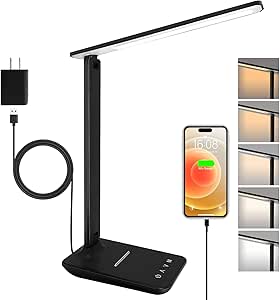
Pros:- Stepless 10%-100% dimming allows precise brightness matching
- USB-A and USB-C ports charge devices directly from the lamp
- Folding design collapses flat for storage or travel
- Full-spectrum light renders colors more naturally than standard LEDs
Cons:- Only three fixed color temperature presets, no stepless CCT adjustment
- Foldable hinge joints are the most likely failure point long-term
- No app, remote, or automation features of any kind
Best for: Dorm residents and home-office users on a budget who want full-spectrum light plus phone charging without a clamp installation
Not ideal for: Precision workers like illustrators or dual-monitor users — three fixed color modes and limited 180° adjustment can’t match clamp lamps like the Micomlan
- Color:Black
- Color Temperature:3000K / 4000K / 5500K
- Dimming:Stepless 10%–100%
- Charging Ports:USB-A + USB-C (5V/2.1A)
- Adjustability:0°–180° foldable
- Power Consumption:75% lower than incandescent
Our verdict“This is the smart buy for everyday desk work when you want quality light and charging convenience at a lower price than the smart-feature lamps here.”
LED Desk Lamp with Clamp, Dual Head Monitor Light, Remote
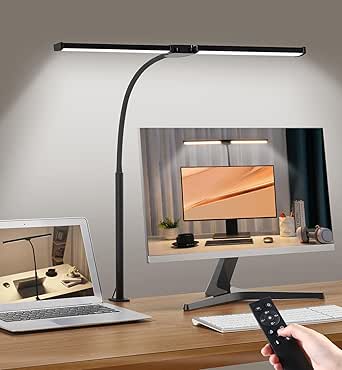
This dual-head clamp lamp solves a problem the freestanding LEPOWER and Honeywell HWT-H01 simply can’t: lighting a crowded desk without sacrificing surface area. The clamp mounts off the edge, and the 31.5-inch extendable span with two independent heads throws even light across a keyboard, notebook, and two monitors at once — coverage that single-head designs leave patchy. The included remote beats the touch-only controls on most competitors here, letting you adjust brightness or color temperature (3200K–6500K) without reaching across your workspace. Built-in 45-minute to 2-hour timers are a nice study aid, though some buyers will never touch them. The honest tradeoffs: assembly takes patience the fold-out Honeywell doesn’t demand, and at 24W with this many joints, the price sits well above basic desk lamps.
Pros:- Clamp mount frees desk surface and fits tight workspaces
- Dual heads with 31.5-inch span cover dual-monitor and paper workflows evenly
- Remote control avoids reaching for touch controls mid-task
- Timer options support structured study sessions
Cons:- Assembly and clamp setup take more effort than freestanding lamps
- 5 fixed dimming levels versus the stepless control on the Honeywell and Micomlan
Best for: People with shallow or cluttered desks and multi-monitor setups who need wide, even coverage without giving up surface space
Not ideal for: Anyone wanting a lamp they can set down and use immediately — assembly and clamp installation add friction the foldable Honeywell avoids
- Power:24W
- Color Temperature:3200K–6500K
- Dimming Levels:5
- Timer Options:45 min / 1 hr / 2 hr
- Extendable Length:31.5 inches
- Max Height:32.7 inches
- Control:Remote and touch buttons
- Design:Dual head, gooseneck, clamp mount
Our verdict“Choose this when desk real estate is scarce and you need broad, remotely controllable light across multiple work zones.”
Micomlan LED Desk Lamp with Clamp, Auto Dimming, 24W Ultra Bright
The Micomlan is the most adjustable lamp in this batch, and that precision is the whole point. Seven rotatable joints plus bilateral light bars let you shape light around obstacles — say, angling around a monitor edge to kill screen glare — in ways the dual-head clamp lamp or the Quntis can’t replicate. Its asymmetric optical design and ambient backlight reduce contrast strain during late-night sessions, and the light sensor auto-dims as room lighting changes, so your eyes aren’t shocked at dusk. A CRI above 90 means colors look accurate for design or craft work, where the cheaper Honeywell falls short. That capability comes at a real cost: this is the priciest tier here, the control scheme takes a learning curve before adjustment becomes second nature, and clamp installation is required.
Pros:- 7 rotatable joints enable glare-free positioning no fixed lamp can match
- Auto-dimming sensor and ambient backlight reduce eye strain across the day
- Stepless 20%-100% dimming and 3000K-6500K temperature control
- CRI above 90 renders accurate color for visual work
Cons:- Highest price in this batch by a clear margin
- Control scheme has a genuine learning curve
- Clamp installation and a nearby power outlet are mandatory
Best for: Designers, developers, and heavy desk users who work long hours and want precise glare control plus automatic brightness
Not ideal for: Casual users or gift buyers — the premium price and multi-joint controls are overkill for occasional reading or a student on a budget
- Power:24W
- Dimming:Stepless 20%–100%
- Color Temperature:Stepless 3000K–6500K
- CRI:>90
- Adjustability:7 rotatable joints, bilateral light bars, 45° angled LEDs
- Smart Features:Auto dimming, ambient light, light sensor, memory function
Our verdict“Worth the premium only if you work at your desk for hours daily and need surgical control over glare and brightness.”
Quntis 32.3″ Eye Care Architect Desk Lamp with Clamp
The Quntis differentiates itself with radar sensing: walk up to your desk and the lamp turns itself on, hands full or not. No other lamp in this lineup offers that, including the pricier Micomlan, which auto-dims but won’t switch on for you. With a 32.3-inch light bar and dual pivot points, it covers a full professional workspace — comparable spread to the dual-head clamp lamp but with cleaner, single-bar aesthetics in an aluminum build. The remote handles brightness and 3000K–6500K temperature from across the room, and the memory function keeps your preferred mix. One quirk worth knowing: the backlight dims on a narrower range than the front light, so ambient-mood lighting is limited. The Micomlan still wins for fine glare positioning, but for set-and-forget convenience the Quntis is ahead.
Pros:- Radar sensing turns the lamp on automatically when you approach
- 32.3-inch bar with dual pivots covers a full professional desk
- Aluminum construction feels built for years of daily adjustment
- Remote plus memory function keeps preferred settings one press away
Cons:- Backlight has a much narrower brightness range than the front light
- Clamp installation and outlet placement limit where it can live
Best for: Busy home-office and dorm users who want hands-free operation and broad coverage without managing settings daily
Not ideal for: Buyers who mainly want ambient or mood lighting — the limited backlight adjustment makes it a work lamp first and an atmosphere lamp second
- Light Bar Length:32.3 inches
- Power:24W
- Color Temperature:3000K–6500K
- Material:Aluminum
- Mounting:Clamp fits desks up to 2.8 inches thick
- Control:Remote and touch
- Smart Features:Radar auto on/off, dimmable, flicker-free, memory, non-glare
Our verdict“Pick this if automatic, walk-up lighting and wide glare-free coverage would genuinely change how you use your workspace.”
LED Desk Lamp with Clamp, 17-inch Stepless Dimming Light, Black
Most clamp lamps in this roundup lock you into preset brightness steps, but this 17-inch model offers true stepless dimming from 1% to 100%, which makes a real difference if you share a room with a sleeping partner or work late at night. The 360° gooseneck gives it more positional freedom than fixed-bar options like the Quntis 32.3-inch architect lamp, though it trades away the wide, even spread of a bar design. The 2700K–6500K range covers warm reading light through daylight-focused work modes. Compared with the Motumen dual-head clamp light, this one is simpler — no remote, no timer — but that simplicity is the point for buyers who just want precise dial-in lighting without menus.
Pros:- Stepless 1%-100% dimming allows extremely low minimum brightness
- Full 2700K-6500K color temperature range
- 360° flexible gooseneck positions light exactly where needed
- Clamp fits desks up to 2.36 inches thick, freeing desk surface
Cons:- 17-inch lamp bar is oversized for narrow desks or dorm workstations
- Requires a 5V/3A USB adapter, so you lose a wall outlet or port
Best for: Late-night studiers and crafters who need whisper-low minimum brightness and precise manual control
Not ideal for: Buyers who want hands-off convenience features like remote control or auto-off timers — this lamp has neither
- Length:17 inches
- Color Temperature:2700K-6500K
- Dimming:Stepless, 1%-100%
- Material:Aluminum and ABS
- Lifespan:60,000 hours
- Clamp Support:Up to 2.36 inches thick
- Power Supply:5V/3A USB adapter
Our verdict“This pick makes the most sense for anyone who values granular brightness control over smart features.”
Shinelife LED Desk Lamp with USB Charging, Dimmable and Adjustable for Office and Home
Where most lamps in this guide cost more because of clamps, swing arms, or dual heads, the Shinelife keeps things simple and throws in a feature that genuinely matters day to day: a built-in USB charging port, so your phone tops up without hunting for an adapter. At 500 lumens it’s far dimmer than the 2500-lumen 30W architect lamp in this lineup, which limits it to single-task lighting rather than illuminating a full desk. The five color modes and five brightness levels are preset-based rather than stepless like the 17-inch clamp lamp, so fine-grained tuning isn’t possible. Still, for a student desk or bedside table, the sleek footprint and flicker-free output cover the basics at a price point the bigger lamps can’t touch.
Pros:- Built-in USB charging port frees up a wall outlet
- Flicker-free LEDs reduce eye strain for evening study sessions
- Compact, space-saving design suits dorms and bedside tables
- 180° rotating head and 90° foldable base offer decent adjustability
Cons:- 500 lumens is modest compared with 2000+ lumen architect lamps here
- Preset 5×5 controls lack the stepless precision of pricier models
- USB output limited to 5V/2A, so slow charging for tablets
Best for: Students and budget-conscious buyers who want simple adjustable lighting plus a phone charging port
Not ideal for: Anyone lighting a multi-monitor or drafting workspace — 500 lumens won’t reach across a wide desk
- Brightness:500 lumens
- Color Modes:5 modes
- Brightness Levels:5 levels
- LED Lifespan:20,000 hours
- Power:5V/2A
- USB Charging Port:Yes
- Adjustability:180° rotating head, 90° foldable base
Our verdict“A sensible entry-level buy if your priority is affordability and a charging port rather than raw brightness.”
LitONES Tall LED Desk Lamp with 50 Light Modes, Eye-Care Edge-Lit Technology, Adjustable Height
The standout trait here is height: this lamp extends from 14 to 40 inches, letting it rise above dual monitors or a standing desk — something no clamp-style option in this roundup, including the 22-inch architect lamp, can match from a tabletop base. With 50 light modes and a CRI above 97.8, color accuracy is strong enough for photo editing and content work, a step up from the Shinelife’s five preset modes. The metal base feels more stable than gooseneck clamp designs when fully extended. The tradeoffs: no battery or portability, no smart home integration mentioned, and the sheer number of settings can overwhelm someone who just wants a reading light. Compared with the Motumen dual-head, you get vertical reach instead of lateral spread — choose based on your desk layout.
Pros:- Height range of 14 to 40 inches clears monitors and standing desks
- CRI >97.8 delivers accurate color rendering for creative work
- Smart memory function recalls your last settings
- 45-minute auto-off timer supports work-break routines
Cons:- No battery option — it’s tethered to an outlet at all times
- No smart home ecosystem compatibility mentioned
- Learning curve from the large number of modes and settings
Best for: Standing-desk users and content creators who need tall, color-accurate light over multiple monitors
Not ideal for: Minimalists who want one-button operation — 50 modes and menu-driven controls add friction
- Power:15W
- Light Modes:50
- Color Temperatures:2700K-6500K
- Brightness Levels:10
- CRI:>97.8
- Height Adjustment:14 to 40 inches
- Base Material:Metal
- Timer:45 minutes
Our verdict“This model is better suited to monitor-heavy or height-adjustable workstations than simple study desks.”
LED Architect Desk Lamp with Clamp, 30W 2500LM, White 30CCT
If raw output is the deciding factor, this lamp wins the lineup: 30 watts and 2500 lumens from 324 Samsung LED beads spread across a 22-inch head, roughly five times the brightness of the Shinelife. That makes it a fit for drafting tables, makeup stations, and detail work where shadows are the enemy. The wide bar throws light across a full desk the way gooseneck models like the Motumen can’t match evenly. On the downside, there’s no adjustable arm height or length, so once clamped, your coverage zone is fixed — the LitONES tall lamp offers far more positioning flexibility. It’s also physically substantial, and the clamp plus large head demand a sturdy, spacious desk. Buyers wanting smart features should look elsewhere; this one is all about sheer, even illumination.
Pros:- 2500 lumens of output is the brightest in this batch
- 22-inch lamp head covers an entire workspace evenly
- 324 Samsung LED beads deliver consistent, flicker-minimized light
- Rust-resistant, durable construction suits studio environments
Cons:- No adjustable arm height or length limits positioning after mounting
- Large and heavy relative to compact desk lamps
- Full brightness may be excessive for casual evening reading
Best for: Drafters, artists, and detail-oriented professionals who need maximum even brightness across a large desk
Not ideal for: Small or cramped desks — the 22-inch head and fixed positioning overwhelm limited surfaces
- Power:30W
- Brightness:2500 lumens
- Lamp Head Width:22 inches
- Color Temperature:30CCT
- Lamp Beads:324 Samsung LED beads
- Lifespan:50,000 hours
Our verdict“Choose this only if your workspace genuinely demands studio-level brightness across a wide surface.”
Motumen LED Desk Lamp for Home Office, Eye-Care Clamp Light, Black
The dual-head design is what separates the Motumen from every single-bar lamp here: two independently aimable light sources mean you can light a keyboard and a document simultaneously, or angle one head away to kill glare on a monitor. Add a remote control with timer and memory functions, and it becomes the most convenient hands-off option in this batch — the 17-inch stepless clamp lamp offers finer dimming but no remote at all. Compared with the LitONES tall lamp, brightness is modest at 14 watts, so it suits standard desk work rather than precision tasks needing high output. The five color temperature modes span 3000K–6500K, slightly narrower than the full 2700K range elsewhere. It costs more than basic lamps, and the corded-only power limits placement, but the flexibility justifies it for multitaskers.
Pros:- Dual heads aim light at two separate work zones independently
- Remote control plus timer enables adjustment without reaching over
- 360° goosenecks with memory function store preferred setups
- Clamp mount saves desk space on crowded workstations
Cons:- Corded electric only — no battery or USB flexibility for placement
- 14W output is modest for detailed or professional work
- Priced above basic single-head desk lamps
Best for: Home-office multitaskers who want independently aimable lighting and remote-controlled convenience
Not ideal for: Buyers on a tight budget or those needing maximum brightness — 14W output lags the 30W architect lamp
- Wattage:14 watts
- Light Sources:2 (dual head)
- Color Temperature Modes:5 (3000K-6500K)
- Brightness Levels:5 (20%-100%)
- Control Method:Remote and push button
- Mounting Type:Tabletop clamp
- Adjustable Features:360° gooseneck, memory function
- Power Source:Corded electric
Our verdict“This option stands out for desk workers who value two-zone lighting and remote control over sheer brightness.”
Pzloz LED Desk Lamp for Office and Home – Eye Caring Architect Lamp with Clamp, Dual Screen Compatibility, 24W, 5 Color Temperatures, Adjustable Brightness
Most clamp lamps struggle to light two screens at once, and that gap is exactly where this 24W Pzloz model earns its place. The 180° swing arms and 270° rotating head let the beam stretch across a dual-monitor setup without leaving dark corners — something the shorter single-arm Shinelife LED Desk Lamp simply can’t match. The wireless remote is a genuine convenience for anyone who adjusts brightness throughout the day, though it becomes a liability if it fails: there’s no full app fallback like the Micomlan Auto Dimming lamp offers. Compared with the 3-Head Clip-On Light (B0FXGFHTKT), this one trades maximum coverage for tighter, more directional control. The tradeoff is a real one: you’re buying remote-dependent operation and zero waterproofing in exchange for that dual-screen reach.
Pros:- Wide adjustability (360° stand, 180° arms, 270° head) covers dual screens
- 24W output with 5 color temperatures for varied tasks
- Flicker-free, blue-light-reduced illumination for long sessions
- Wireless remote enables adjustments without reaching across the desk
Cons:- Remote is a single point of failure with no obvious replacement path
- Clamp mounting limits placement to desks with accessible edges
Best for: Remote workers and students with dual monitors who need wide, adjustable, eye-friendly coverage
Not ideal for: Buyers who want app control or a self-contained base — the remote is the primary interface and the clamp requires a suitable desk edge
- Power:24 watts
- Color Temperatures:3000K–5500K (5 modes)
- Adjustability:360° stand, 180° swing arms, 270° rotatable head
- Control:Wireless remote
- Light Source:LED
- Voltage:24V DC
- Mounting Type:Tabletop clamp
Our verdict“This pick makes the most sense for dual-monitor users who value reach and remote convenience over app integration.”
Honeywell HWT-H2 LED Desk Lamp, Eye-Caring Full Spectrum, USB Charging
If color accuracy and eye comfort are the deciding factors, this Honeywell stands apart. Its CRI of 94 and full-spectrum output render pages and screens more naturally than the Quntis 32.3-inch Architect Lamp, which prioritizes coverage over spectral fidelity — a meaningful difference for anyone doing design work or long reading sessions. The built-in USB-A and USB-C ports are a smarter charging solution than the Shinelife lamp’s basic USB port, effectively replacing a wall adapter. The 30-minute auto-off timer is a nice touch for bedtime readers. Where it falls short of clamp-mounted rivals: it’s a freestanding lamp that occupies desk real estate, and the 11-inch head limits coverage to a single workstation. This model is better suited to quality-of-light purists than to sprawling multi-monitor setups.
Pros:- CRI 94 full-spectrum light reduces visual fatigue
- USB-A and USB-C charging ports built into the base
- Foldable design makes it easy to store or transport
- Stepless dimming from 10% to 100% across 4 color modes
Cons:- Takes up desk space rather than clamping out of the way
- Requires a stable outlet — no battery or USB-power option
Best for: Readers, students, and design-conscious users who value natural, accurate light and device charging at their desk
Not ideal for: Large or multi-monitor workstations — the 11-inch head and freestanding base can’t cover wide desks
- CRI:94
- Color Modes:4 (2700K–5700K)
- Dimming Range:10%–100% stepless
- Lamp Head Size:11 inches
- Charging Ports:USB-A and USB-C
- Timer:30-minute auto-off
- Power Source:Plug-in
Our verdict“This option stands out for buyers who put light quality and eye comfort above raw coverage.”
LED Desk Lamp for Office and Home, 3-Head Adjustable Clip-On Light with Adapter
Sometimes the job is simply lighting everything, and this 3-head clip-on does that better than lamps twice its price. With a coverage area up to 70 inches wide, it out-lights even the Pzloz dual-screen lamp, making it the go-to for oversized desks, drafting tables, or triple-monitor arrangements. The three independently flexible 360° goosenecks allow genuinely custom light shaping, while the memory function keeps your preferred mode after shutdown — a feature the Honeywell HWT-H2 omits. The compromises are obvious: it’s USB-powered at 5V/2A, so brightness per head trails plug-in architect lamps like the Quntis 32.3-inch, and the clamp tops out at 2.65 inches of desk thickness. For raw lighting territory per dollar, though, nothing else in this lineup competes.
Pros:- Covers up to 70 inches of desk width from a single clamp
- 3 independently adjustable goosenecks for directional lighting
- 5 modes and 10 brightness levels with memory function
- Auto-off timer adds convenience for study sessions
Cons:- USB power limits per-head brightness versus plug-in lamps
- Clamp won’t fit thick slab desktops or ledges
Best for: Owners of very wide desks, craft tables, or multi-monitor setups who need maximum coverage cheaply
Not ideal for: Anyone with thick desktops (over 2.65 inches) or those wanting premium build quality and refined light character
- Light Modes:5
- Brightness Levels:10
- Color Temperature Range:3000K–6500K
- CRI:90+
- Coverage Area:Up to 70 inches wide
- Lamp Length:27.75 inches
- Clamp Thickness:Up to 2.65 inches
- Power Supply:USB 5V/2A adapter
Our verdict“The strongest value pick here for sprawling workspaces that other clamp lamps can’t fully light.”
LED Desk Lamp with Clamp, Dual Light, Adjustable Swing Arm, 4 CCT Modes & 5 Brightness Levels
Where most lamps in this price bracket lean on plastic, this one’s all-aluminum body changes the ownership experience — it feels like a tool, not an accessory. Its CRI of 95 edges out even the Honeywell HWT-H2’s lauded 94, making it the most color-accurate pick in the entire roundup, which matters for artists and anyone judging color on paper. The 7 rotatable arm joints offer more positioning nuance than the Pzloz’s three-axis design, letting you tuck light exactly where it’s needed. Tradeoffs exist: aluminum construction adds heft that makes repositioning less casual, and the clamp demands careful installation to stay stable under that weight. There’s no remote either — unlike the LED Desk Lamp (B0F8HM1Z99) — so all adjustments happen at the lamp head.
Pros:- CRI 95 delivers the most accurate color rendering in this roundup
- All-aluminum body resists wear far better than plastic rivals
- 7 rotatable joints allow precise, stable light positioning
- Timer and memory functions streamline daily use
Cons:- Heavier than plastic alternatives, complicating repositioning
- No remote control — all adjustments require touching the lamp
- Clamp needs careful mounting to support the metal build
Best for: Buyers who want a durable, premium-feeling lamp with the best color accuracy in the lineup
Not ideal for: Renters or frequent rearrangers — the weight and clamp installation make it a set-it-and-forget-it fixture
- Light Source:Dual LED
- CRI:95
- Color Temperature Modes:4 (Warm White to Daylight)
- Brightness Levels:5
- Adjustability:7 rotatable parts
- Material:All-aluminum body
- Clamp Support:Up to 2.5 inches
- Features:Timer, memory function
Our verdict“This model is better suited to buyers who prioritize durability and color fidelity over convenience features like remotes.”
LED Desk Lamp for Home Office with Clamp, Adjustable Double Head, 24W, Eye-Care, Dimmable, Color Temperature Control, Remote and Button Control
Dual control methods are this lamp’s defining advantage: unlike the aluminum-arm model (B09YV633PL), which forces you to reach the lamp head for every change, this one offers both a remote and onboard buttons — so if the remote goes missing, the lamp still works fully. The double-head design splits coverage between ambient desk light and focused task light, a more versatile arrangement than the Honeywell HWT-H2’s single fixed head. With 1800 lumens at 24W and a 3000K–6500K range, output comfortably covers a standard work desk, though it trails the 3-Head Clip-On’s 70-inch sprawl. The 1.7-inch clamp limit is the tightest in this batch, and some users report spotty remote responsiveness — a reason to test it early within any return window.
Pros:- Remote plus button controls provide redundancy no single-control rival offers
- Adjustable double head handles both ambient and task lighting
- 1800 lumens with 3000K–6500K range covers most desk scenarios
- Timer and memory functions preserve settings between sessions
Cons:- Clamp limit of 1.7 inches excludes many thicker desktops
- Reported inconsistent remote responsiveness
- Outlet-only power means no portability
Best for: Home office workers who want both remote and physical controls plus flexible dual-head lighting on a standard desk
Not ideal for: Desks with thick tops or edges over 1.7 inches — the clamp simply won’t grip them
- Power:24W
- Lumens:1800
- Color Temperature:3000K–6500K
- CRI:>90
- Flexible Neck:180°
- Clamp Size:Up to 1.7 inches
- Control Methods:Remote and button
- Memory Function:Yes
Our verdict“A sensible pick for anyone who values control redundancy and dual-zone lighting over maximum clamp compatibility.”

How We Picked
My ranking process started with what actually affects study sessions: light quality and eye comfort (flicker-free output, full-spectrum or eye-caring diffusion, and a wide color temperature range), followed by brightness and coverage — a lamp rated at 800 lumens behaves very differently from a 2500-lumen architect model, and matching output to desk size matters more than chasing peak specs. I then weighed smart and convenience features: auto-dimming sensors, stepless dimming, remote control, and USB charging earned real credit, while app-claimed features without reliable execution did not.
Build quality and mounting flexibility came next, since a wobbly clamp or a stiff swing arm undermines daily use faster than any spec sheet suggests. Finally, I judged value for the intended buyer — a $30 dorm lamp and a $100+ workstation lamp were scored against their own price class, not each other. That lens is why the order favors lamps that pair genuine brightness with adaptable controls at the top, and why space-saving or budget models rank where they do rather than being penalized for lower output.
Factors to Consider When Choosing Smart Home Study Desk Lamps
Before choosing a study lamp from the lineup above, it helps to understand the tradeoffs that shape this entire category. The fifteen lamps I compared fall into a few distinct designs — clamp-mounted architect arms, compact desk bases, and tall edge-lit towers — and the right choice depends less on brand and more on how your desk, monitor setup, and study habits align with each design. These are the factors I would weigh before clicking buy.
Desk Compatibility Before Anything Else
The single most common mistake in this category is buying a clamp lamp for a desk that cannot hold one. Clamp models dominate this roundup because they free up surface space, but they need a desk edge of roughly 2 to 6 centimeters thick, a flat underside, and enough clearance beside your monitor. Glass desks, kneeling-edge designs, and shelf-style desktops often fail all three tests. If your desk cannot take a clamp, a weighted base lamp like the LEPOWER or Shinelife becomes the safer route even if it costs you desk space. Measure first — returning a lamp because the clamp does not fit wastes more time than any feature comparison.
Brightness Must Match Desk Size, Not Ambition
More lumens is not automatically better. An 800-lumen compact lamp is genuinely sufficient for a single laptop, textbook, and notepad — anything brighter at that scale creates glare and harsh shadows on glossy pages. The 24W to 30W dual-head architect models in this roundup exist because large desks, dual monitors, and drafting work need light spread across 60+ centimeters of surface. Buyers routinely overbuy brightness for small dorm desks and end up dimming a premium lamp to settings a budget model would have delivered. Match output to your actual workspace and you will spend money where it counts.
What ‘Smart’ Actually Means on the Box
This is where marketing language causes the most buyer regret. Many lamps labeled smart simply offer touch controls and multiple presets — convenient, but not smart in the home-automation sense. Genuine smart features worth paying for include auto-dimming sensors that read ambient light and adjust output, stepless dimming that lets you hit exact brightness levels rather than fixed steps, and remote control for adjusting light from your chair. If voice assistant or app integration is part of your home setup, confirm it explicitly before buying, because most lamps in this category — including several here — do not support it. Decide which level of smart you actually need and pay only for that.
Color Temperature Range and Eye Comfort
Students studying for long hours should care about color temperature more than peak brightness. Warm light around 3000K suits evening reading and reduces sleep disruption before bed, while cooler 5000K to 6500K light improves alertness for detail work — a lamp offering the full range lets you shift modes across a study session. Flicker-free drivers and edge-lit or diffused panels matter just as much, because invisible flicker causes the eye strain that eye-caring labels promise to prevent. The Honeywell HWT-H2’s full-spectrum approach and the LitONES edge-lit panel illustrate two different paths to the same comfort goal. Cheap lamps with narrow temperature ranges force compromise you will feel by midnight.
Budget Tiers and Where the Money Goes
Under $30 buys reliable basic dimming and USB charging — perfectly adequate for a dorm or secondary desk. The $40 to $70 tier is where the category’s best value lives: auto-dimming sensors, stepless control, sturdy swing arms, and 24W output all appear at this level, which is why the mid-tier models dominate my rankings. Above that, you are paying for premium light quality (full-spectrum output, edge-lit diffusion), exceptional coverage, or build refinement — worthwhile for daily heavy users, hard to justify for occasional studying. The mistake to avoid is paying premium prices for features like 50 light modes that sound impressive but rarely get used beyond the first week.
Mounting Style Shapes Your Whole Setup
Clamp lamps, tall towers, and desk bases change how you position monitors and materials more than most buyers expect. A dual-head clamp lamp mounted behind a monitor creates even, shadow-free task lighting and keeps the desk clear — but it fixes your lighting position, so if you rearrange often, that rigidity becomes a annoyance. Tall adjustable lamps like the LitONES offer flexible height and repositioning at the cost of desk footprint. Foldable compact lamps travel well between home and office but limit coverage. Think about how often your setup changes: stable workstations reward clamps, flexible ones reward freestanding designs.
Frequently Asked Questions
Are clamp-mounted architect lamps actually better than regular desk lamps for studying?
For medium and large desks, yes — but the advantage comes from light placement, not inherent quality. A clamp lamp with a long swing arm positions its light source directly above your work surface without a base consuming desk space, which produces fewer shadows from your own hands and head. Dual-head versions mounted behind a monitor deliver the most even coverage for reading and note-taking. On a small desk with a single laptop, however, a compact base lamp delivers comparable results with less setup fuss. Choose the clamp design when desk space is tight or coverage matters; choose a base lamp when simplicity wins.
Is auto-dimming worth paying extra for, or is manual dimming enough?
Auto-dimming earns its price if you study across different times of day, because ambient light changes constantly and most people never re-adjust a manual lamp after the first week. A sensor-equipped model like the Micomlan keeps page brightness consistent whether you sit down at noon or midnight, which reduces squinting and the gradual eye fatigue most students blame on screen time. If you study at roughly the same hour daily in a room with stable lighting, manual stepless dimming set once will serve nearly as well. The feature matters most for anyone working near windows with shifting daylight. Treat it as a genuine upgrade, not a gimmick — but an unnecessary one for fixed routines.
Do these lamps work with Alexa, Google Home, or smart home routines?
Most lamps in this category do not, despite the smart label that appears across the market. The majority offer smart-style conveniences — touch panels, presets, remote controls, memory functions — rather than actual wireless home integration. If app control or voice assistant routines are part of your requirements, check the product listing for explicit Wi-Fi, Bluetooth, or Matter support before buying, because none of the mainstream study lamps compared here advertise full smart home platform compatibility as a core feature. Remote control models come closest, letting you adjust brightness and color temperature without reaching over your monitor. For most students, that level of convenience covers the real need.
How much brightness do I actually need for studying?
For a single textbook or laptop workspace, roughly 800 to 1000 lumens provides comfortable, glare-free task lighting — anything brighter at that scale tends to create reflections on glossy pages and screens. Desks over about 100 centimeters wide, or setups with dual monitors, justify the 24W dual-head architect models pushing 1500 to 2500 lumens, because the extra output is spread across more surface rather than concentrated. Pair brightness with an adjustable color temperature so you can drop to warm light for evening reading. The common mistake is equating brightness with quality; consistency and coverage reduce eye strain far more than raw lumen counts. Buy output for your desk size, not the biggest number on the listing.
Are cheap dimmable lamps under $30 bad for your eyes?
Not automatically — but the risk profile changes at that price. The legitimate concerns with very cheap lamps are invisible flicker at low brightness settings and poor color rendering, both of which contribute to eye strain over long sessions even when the light looks fine at a glance. Established budget brands generally use acceptable flicker-free drivers, and models marketed specifically as eye-caring typically address this directly. A practical test: if the lamp flickers visibly when filmed on a phone camera at low brightness, return it. For daily multi-hour studying, moving up to the $40 to $60 tier buys better drivers and diffusion, which is why the best-value picks in this roundup sit there rather than at the bottom of the price range.
Conclusion
Matching the right lamp to your situation is simpler than the fifteen-option lineup suggests, because the models cluster into clear roles. For best overall, the Micomlan LED Desk Lamp with Clamp pairs 24W brightness with auto-dimming and stepless control at a price that undercuts less capable competitors — it is the pick I would point most students toward. The Shinelife LED Desk Lamp with USB Charging takes best value for dorm rooms and secondary desks where basic dimmable lighting plus a charging port covers every real need. For a premium choice, the Honeywell HWT-H2 with full-spectrum output and USB charging suits buyers who study long hours and want the most comfortable light quality in the group. Beginners and anyone who dislikes fiddly setups should start with the LEPOWER Desk Lamp — simple, eye-caring, and effective without a learning curve. For specific needs: the Quntis 32.3-inch Architect Lamp for large desks and dual-monitor workstations, the LitONES Tall LED Lamp for flexible height and edge-lit comfort, and the Honeywell HWT-H01 foldable for anyone moving a lamp between rooms. Whatever you choose, let desk size and daily routine drive the decision — the best lamp is the one whose features match how you actually study.
Columbus Day / Indigenous Peoples' Day Picks
long weekend sales
As an affiliate, we earn on qualifying purchases.