To keep your robot vacuum working well, turn it off first. Empty the main bin, wipe it clean, and check the filters—clean or replace them if needed. Inspect the brushes for hair and debris, rinsing if recommended, then dry thoroughly. Clean the sensors and charging contacts to guarantee proper operation. Regular firmware updates and routine care will extend its lifespan. Stay with us to discover more tips for maintaining your device and keeping it in top shape.
Key Takeaways
- Turn off the robot and empty the main bin, then clean the interior and exterior with a damp cloth.
- Inspect and remove hair and debris from brushes; rinse and dry brushes if permitted.
- Clean sensors and charging contacts with a soft cloth or cotton swab for optimal performance.
- Regularly update firmware and software to enhance features and fix bugs.
- Maintain wheels, axles, and the charging dock to ensure smooth operation and efficient charging.
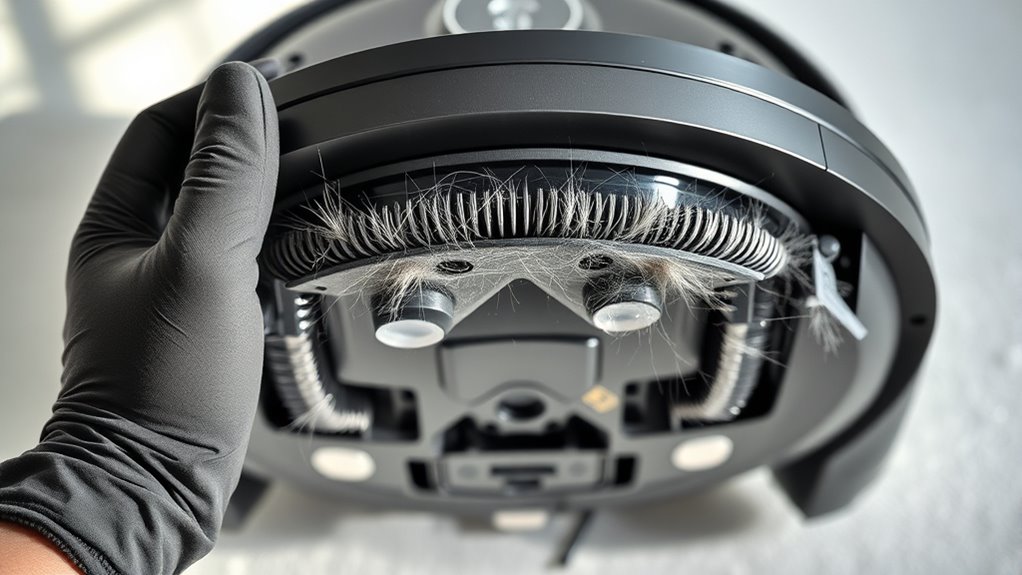
Every cleaner needs a little cleaning sometimes. Even your robot vacuum, which handles the dirt and dust so effortlessly, requires regular attention to keep performing at its best. Maintaining your robot vacuum isn’t complicated, but neglecting it can lead to reduced efficiency, strange noises, or even breakdowns. The good news is, a few simple steps can extend its lifespan and ensure it keeps cleaning your space effectively.
Regular cleaning and maintenance keep your robot vacuum working efficiently and extend its lifespan.
Start by turning off your robot vacuum before you begin cleaning it. Remove the main bin and empty it into the trash. Dust and debris can quickly accumulate there, and if it’s full, your robot might not pick up as well or could strain its motor. Take a damp cloth and wipe down the bin’s interior and exterior, removing any stuck dust or pet hair. Some models have filters that need regular cleaning or replacement. Check your user manual to see how often they should be cleaned, but generally, cleaning filters every couple of weeks prevents clogging and maintains suction power. Regular filter maintenance is essential for optimal air quality and device performance.
Next, inspect the brushes. Most robot vacuums have spinning brushes and side brushes that gather dirt from floors. Hair and fibers tend to wrap around the brushes, reducing their effectiveness. Carefully remove hair and debris from the brushes, using scissors if necessary to cut through tangled strands. Rinse the brushes with water if your model allows, then dry thoroughly before reinstalling. Don’t forget to check the wheels and axles for trapped dust or hair, which can impair movement. Wiping these parts with a soft cloth keeps them rolling smoothly.
Another essential step is cleaning the sensors and charging contacts. Dust buildup on sensors can confuse the robot, causing it to miss spots or get stuck. Use a dry, soft cloth or a cotton swab to gently wipe sensor areas. Similarly, dirt on charging contacts can prevent proper charging. Keep these spots clean to ensure your vacuum charges fully and quickly. Also, periodically check the charging dock and cables for dust or damage. Keeping the dock clean ensures your robot always has a good connection for charging.
Lastly, review your robot’s software settings and update its firmware if updates are available. Manufacturers often release updates that improve performance or fix bugs. Keeping your robot’s software current ensures it operates with the latest features and improvements. Additionally, regular cleaning and replacing filters is vital for maintaining air quality and the vacuum’s efficiency. With consistent cleaning and maintenance routines, your robot vacuum will continue to serve you well, keeping your floors spotless without breaking a sweat. Regular upkeep is the key to prolonging its life and maximizing its cleaning power, so treat it like you would any important appliance, and it will reward you with many efficient years of service.
Frequently Asked Questions
How Often Should I Replace the Robot Vacuum’s Filters?
You should replace your robot vacuum’s filters every 2 to 3 months for ideal performance. If you have pets or allergy sufferers in your home, consider changing them more frequently, like every 1 to 2 months. Regularly check the filters for dirt buildup or damage, and clean them monthly to extend their lifespan. Staying on top of filter replacements keeps your vacuum running efficiently and maintains good air quality.
Can I Use Regular Household Cleaners on My Robot Vacuum?
You shouldn’t use regular household cleaners on your robot vacuum because they can damage the sensors and internal components. Instead, use a damp cloth or a mild, non-abrasive cleaner specifically designed for electronics to wipe down the exterior. Always unplug the device first, and avoid getting water into any openings. Regular gentle cleaning helps keep your vacuum running smoothly without risking damage from harsh chemicals.
How Do I Troubleshoot if My Vacuum Isn’t Charging?
If your robot vacuum isn’t charging, first check the power source and make certain the charging cable is securely connected. Clean the charging contacts on both the vacuum and the dock to remove dust or debris. Make sure the dock is plugged in and placed on a flat, stable surface. If it still doesn’t work, try resetting the vacuum or replacing the charger. If issues persist, contact customer support for further assistance.
What Should I Do if the Brushes Are Tangled?
Imagine you’re Marie Antoinette, and your vacuum’s brushes are tangled like a royal mess. First, turn off and unplug your robot. Remove the brushes carefully, using scissors if needed to cut away hair or string. Clean any debris from the brush bearings and axles. Once clear, reassemble, turn on your vacuum, and watch it glide smoothly. Regularly check to prevent future tangles and keep your robot running like a well-oiled machine.
Is It Safe to Wash the Robot Vacuum’s Batteries?
No, it’s not safe to wash your robot vacuum’s batteries. Batteries contain chemicals and components that can be harmed by water, which might cause leaks, corrosion, or even fires. Instead, gently wipe the battery with a dry or slightly damp cloth if needed. Always turn off the vacuum before removing the battery, and avoid exposing it to moisture to ensure safe operation and longevity.
Conclusion
Now that you know how to keep your robot vacuum in top shape, remember: it’s not just about maintenance, but about giving your cleaner the care it deserves. A well-maintained robot isn’t just a device; it’s your silent partner in a cleaner home. So, stay consistent, stay attentive, and let your little helper work its magic. Because when you nurture it, your home stays spotless—simple as that, a rhythm of care and clean.