If you’re looking for the best smart locks with auto-unlock, I’ve found options that blend security with convenience. These locks offer multiple unlocking methods like biometrics, passcodes, apps, and voice commands, plus features like auto-lock and real-time alerts. They’re built with durable, weatherproof materials and support seamless integration with smart home systems. For a quick upgrade to your home security that’s easy to install and use, these options are worth considering. Keep exploring to find out more.
Key Takeaways
- Features multiple unlocking methods including app control, biometrics, passcodes, keys, and voice commands for flexible access.
- Supports auto-unlock via geofencing and Bluetooth, offering hands-free convenience when approaching the door.
- Ensures high security with anti-tamper alerts, encrypted data, and ANSI Grade 1 standards for durability.
- Easy DIY installation compatible with standard doors, with weatherproof options for outdoor use.
- Provides remote management, real-time notifications, and customizable access codes for seamless home security.

Philips Wi-Fi Smart Deadbolt Lock, Keyless Entry Door Locks for Front Door
- Multiple Unlock Methods: App, passcode, fingerprint, key, voice
- Remote Access: Control lock remotely via Wi-Fi
- Voice Control Compatibility: Works with Alexa and Google Assistant
As an affiliate, we earn on qualifying purchases.
Philips Wi-Fi Smart Door Lock with App and Voice Control

If you’re looking for a smart lock that offers maximum convenience and flexibility, the Philips Wi-Fi Smart Door Lock with App and Voice Control is an excellent choice. It lets you open your door using an app, passcodes, fingerprints, physical keys, or voice commands with Alexa and Google Assistant. You can create up to 100 custom passcodes or share one-time codes remotely, perfect for family, friends, or renters. The lock supports instant opening with fingerprints or passcodes, making your mornings smoother. Built-in Wi-Fi means you can control it from anywhere, and real-time notifications keep you informed about access activity, ensuring your home stays secure.
Best For: homeowners and renters seeking a secure, flexible, and convenient smart lock with remote access and voice control.
Pros:
- Offers multiple unlocking options including app control, passcodes, fingerprints, physical keys, and voice commands with Alexa and Google Assistant
- Built-in Wi-Fi allows remote locking and unlocking from anywhere without additional hubs
- Supports up to 100 custom passcodes and real-time activity notifications for enhanced security
Cons:
- Requires 4 or 8 AA alkaline batteries (not included), which need periodic replacement
- Does not include a door sensor, so it cannot automatically detect door open/close status
- Compatibility limited to doors between 1-3/8 to 2 inches thick, which may not fit all door types
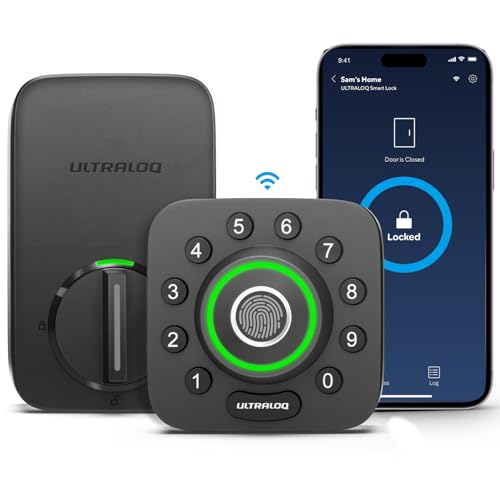
ULTRALOQ U-Bolt Pro WiFi Smart Lock with Door Sensor, App Remote Control
- Remote Control via Smartphone: Lock, unlock, and monitor remotely
- WiFi Connectivity: Connects directly to home WiFi, no hub needed
- 8-in-1 Keyless Entry: Fingerprint, passcode, app, auto unlock, web, eKey, voice, keys
As an affiliate, we earn on qualifying purchases.
ULTRALOQ U-Bolt Pro WiFi Smart Lock with Door Sensor

The ULTRALOQ U-Bolt Pro WiFi Smart Lock with Door Sensor stands out as an ideal choice for homeowners seeking a secure, feature-rich lock that offers effortless access management. It allows remote control via a smartphone app, so you can secure, open, and view entry logs anytime, anywhere. No extra hub needed—just connect directly to your WiFi—and it supports voice commands through Alexa, Google Assistant, and more. With 8-in-1 keyless entry options, including fingerprint, keypad, and auto-lock, it’s versatile and secure. Its weatherproof design and ANSI Grade 1 security standards ensure durability and peace of mind, indoors or out.
Best For: homeowners, Airbnb hosts, and small business owners seeking a secure, versatile, and remote-controlled smart lock solution with easy installation and weatherproof durability.
Pros:
- Supports remote control and access sharing via smartphone app without needing an extra hub.
- Meets ANSI Grade 1 security standards, ensuring high durability and security.
- Weatherproof (IP65-rated) design suitable for outdoor use in various environmental conditions.
Cons:
- Requires a stable 2.4GHz WiFi network for optimal performance.
- Installation may be challenging on non-standard door configurations.
- The electronic components and app reliance could pose issues if software updates or connectivity problems occur.

Philips Wi-Fi Smart Deadbolt with 2 Handles, Front Lock Set with Gateway
- Keypad Door Lock with Handles: Stylish and functional smart lock set
- Remote Control via App: Manage lock remotely with smartphone
- Real-Time Notifications: Get updates on door status
As an affiliate, we earn on qualifying purchases.
Philips Wi-Fi Smart Lock with Handle

The Philips Wi-Fi Smart Lock with Handle stands out for those seeking a stylish yet highly secure smart lock that offers flexible entry options. Its sleek design combines a keypad and handle for a seamless look, fitting most standard doors effortlessly. You can open it via the app, fingerprint, PIN codes, physical keys, or voice commands with Alexa or Google Assistant. The ultra-fast fingerprint recognition and customizable auto-lock feature enhance security and convenience. Easy to install and manage remotely through the Philips app, it provides real-time notifications and access control. Crafted from durable materials and finished in matte black, it’s both functional and aesthetically pleasing.
Best For: homeowners seeking a stylish, highly secure smart lock with versatile unlocking options and easy remote management.
Pros:
- Offers multiple unlocking methods including app control, fingerprint, PIN codes, physical keys, and voice commands for maximum flexibility.
- Features ultra-fast fingerprint recognition (0.3 seconds) with high biometric accuracy, enhancing security and convenience.
- Easy installation on most standard doors with real-time app notifications, access management, and auto-lock settings for enhanced security.
Cons:
- Requires a Wi-Fi gateway (included) for remote voice control with Alexa and Google Assistant, adding an extra component to setup.
- Limited to door thicknesses of 35-50mm, which may not fit non-standard or thicker doors.
- Customer reviews indicate occasional issues with connectivity or app stability, requiring troubleshooting or support.

Yale Assure Lock 2 Keypad Deadbolt with Wi-Fi, Black Suede
- Key-Free Access Options: Keypad, voice, Auto-Unlock, app
- Easy Installation: Replaces standard deadbolt with screwdriver
- Auto-Lock Feature: Automatically locks when door is closed
As an affiliate, we earn on qualifying purchases.
Yale Assure Lock 2 with Wi-Fi (YRD410-WF1-BSP)

Designed for homeowners who want seamless access combined with robust security, the Yale Assure Lock 2 with Wi-Fi makes unblocking effortless. It offers multiple unlocking options, including a keypad, voice assistant, Auto-Unlock, and the Yale Access App on your phone or Apple Watch. Installation is straightforward, replacing most standard US deadbolts with just a screwdriver—no professional help needed. The lock features Auto-Lock, which activates when DoorSense detects the door is closed, ensuring it stays secure. You can control it remotely, share access, and receive notifications from anywhere, providing convenience without sacrificing security.
Best For: homeowners seeking a secure, easy-to-install smart lock with multiple access options and remote management capabilities.
Pros:
- Easy installation that replaces most standard US deadbolts with just a screwdriver, no professional help needed
- Multiple unlocking options including keypad, voice assistant, Auto-Unlock, and smartphone app for added convenience
- Auto-Lock feature and DoorSense technology enhance security by ensuring the door remains securely closed
Cons:
- Supports only 2.4 GHz Wi-Fi, which may limit compatibility with some network setups
- Limited to U.S. and Canada markets, reducing availability elsewhere
- Requires smartphone or Apple Watch for remote management and some features
Philips WiFi Smart Keyless Door Lock with Handle Set

If you’re looking for a smart lock that offers seamless remote management without extra gadgets, the Philips WiFi Smart Keyless Door Lock with Handle Set is an excellent choice. Its built-in WiFi allows direct connection, letting you control your lock via the mobile app anytime, anywhere—no hub needed. You can remotely lock or open, share access with others, and receive real-time activity notifications. The lock features fast fingerprint unlocking in just 0.3 seconds, multiple passcode options, and a backlit keypad for easy use in low light. With voice control support for Alexa and Google Assistant, plus a stylish handle set, it combines security, convenience, and sleek design effortlessly.
Best For: homeowners seeking a secure, stylish, and easy-to-manage smart lock that offers remote access without additional hubs.
Pros:
- Built-in WiFi enables direct connection and remote management without extra gateway
- Fast fingerprint unlocking in only 0.3 seconds with advanced biometric recognition
- Supports voice commands with Alexa and Google Assistant for hands-free control
Cons:
- May require a stable WiFi connection for optimal performance
- Installation could be complex for some DIY users due to hardware setup
- Limited information on battery life and backup power options
Philips WiFi Smart Lock with Keypad and App Control

For homeowners seeking seamless security and modern convenience, the Philips WiFi Smart Lock with Keypad and App Control stands out as an excellent choice. With built-in Wi-Fi, I can control the lock remotely through the Philips Home Access App, managing users, reviewing access history, and receiving notifications from anywhere. It supports voice commands via Alexa and Google Assistant, making locking and *unblocking* effortless even when my hands are full. The lock features quick fingerprint recognition and a backlit keypad for keyless access. Auto-locking and real-time status updates give me peace of mind, all with easy installation and reliable support.
Best For: homeowners seeking a secure, convenient, and modern smart lock solution with remote access and voice control capabilities.
Pros:
- Easy to install with compatible door levels and no extra hardware needed
- Supports remote control, user management, access history, and notifications via Wi-Fi app
- Features biometric fingerprint recognition, digital keypad, and auto-locking for enhanced security
Cons:
- Requires a stable Wi-Fi connection for optimal remote functionality
- Limited to 50 stored fingerprints, which may be insufficient for larger households
- Dependence on smartphone app and voice assistants may pose challenges for non-tech-savvy users
Philips WiFi Smart Keypad Deadbolt Lock

The Philips WiFi Smart Keypad Deadbolt Lock stands out as an ideal choice for homeowners seeking versatile, keyless access combined with remote control capabilities. With built-in WiFi, I can control it from anywhere using the app, and it supports voice commands via Alexa and Google Assistant. The lock offers multiple unlocking options: keypad passcodes, keys, mobile app, and voice. I can create up to 100 custom passwords, set auto-lock timers, and receive real-time alerts. Its durable aluminum construction withstands harsh weather, and installation takes just about 15 minutes. Plus, with features like anti-peeping mode and event history, I feel confident in my home’s security.
Best For: homeowners seeking a durable, versatile, and remotely controllable keyless lock with multiple access options and robust security features.
Pros:
- Supports app remote control, voice commands via Alexa and Google Assistant, and multiple unlocking methods.
- Creates up to 100 customizable passcodes with options for permanent, one-time, or timed access.
- Constructed from durable aluminum with weather resistance and anti-peeping password mode for enhanced security.
Cons:
- Requires 8 AA batteries (not included), with an estimated 6-month lifespan depending on usage.
- Installation, while straightforward, may be incompatible with some non-standard or older deadbolt setups.
- Limited to US standard deadbolt measurements, potentially restricting use on non-standard doors or international models.
ULTRALOQ Smart Lock U-Bolt Pro with App Control and Keyless Entry

The ULTRALOQ U-Bolt Pro stands out as an ideal choice for homeowners who want versatile access options combined with robust security features. It offers 7-in-1 opening methods, including fingerprint ID, keypad, smartphone app, auto open, shake-to-open, and a mechanical key backup. With the ULTRALOQ app, you can remotely control locks, manage access, and view logs. Its anti-peep keypad and customizable codes boost security. Designed for durability with IP65 waterproof rating, it’s easy to install and operates on a year-long battery life. Plus, it integrates seamlessly with voice assistants and smart home platforms, making it a truly modern, reliable smart lock.
Best For: homeowners seeking a versatile, secure, and modern smart lock with multiple access options and seamless smart home integration.
Pros:
- Offers 7-in-1 unlocking methods including fingerprint, keypad, app, auto open, shake-to-open, and mechanical key backup.
- Equipped with anti-peep keypad and customizable codes for enhanced security.
- IP65 waterproof rating ensures durability against weather conditions.
Cons:
- Requires separate purchase of ULTRALOQ Bridge for remote access via WiFi.
- Battery life is approximately one year, necessitating periodic replacements.
- Some users may find the installation process slightly complex without prior experience.
eufy Security Smart Lock C220 with Wi-Fi and Keyless Entry

If you want a smart lock that combines quick, reliable biometric access with seamless remote control, the eufy Security Smart Lock C220 is an excellent choice. It offers six unlocking methods, including fingerprint recognition that learns and improves over time, a smartphone app, keypad, physical key, Apple Watch, and voice commands through Alexa or Google Assistant. The lock’s battery lasts around eight months, with built-in power management and security alarms. With built-in Wi-Fi, I can control it remotely, view event logs, and receive alerts anytime. Designed for outdoor use, it’s durable, waterproof, and easy to install on most standard doors.
Best For: homeowners and busy families seeking a reliable, versatile, and easy-to-install smart lock with multiple access options and remote control capabilities.
Pros:
- Supports six unlocking methods, including fingerprint recognition with self-learning AI for increased accuracy
- Built-in Wi-Fi allows for remote management, real-time notifications, and event viewing without additional hubs
- Designed for outdoor use with waterproof IP53 rating and temperature tolerance from -22℉ to 158℉
Cons:
- Battery life lasts approximately 8 months, which may require periodic replacement
- Installation assumes compatibility with standard US and Canada deadbolts; may need adjustments for non-standard doors
- The lock’s advanced features and app management may have a learning curve for some users
Keyless Entry Door Lock with Handle Set, Smart Door Lock with Fingerprint

For homeowners seeking a seamless blend of security and convenience, the Keyless Entry Door Lock with Handle Set and fingerprint recognition stands out. Its sleek black finish fits most standard U.S. doors and supports both left- and right-hand setups. Installation is straightforward, taking under 15 minutes with just a screwdriver. It offers five unlocking methods: fingerprint (50 users), keypad codes (50), app via Bluetooth, one-time codes, and a mechanical key. With fingerprint recognition in just 0.3 seconds and 99.99% accuracy, it’s reliable in all weather conditions. The auto-lock feature and emergency USB-C port add extra layers of security and peace of mind.
Best For: homeowners and renters seeking a secure, easy-to-install smart lock with multiple access options and reliable biometric recognition.
Pros:
- Quick and easy DIY installation under 15 minutes with no extra tools needed
- Supports multiple access methods, including fingerprint, keypad, app, one-time code, and mechanical key
- High-precision fingerprint recognition with 0.3-second response time and 99.99% accuracy in various weather conditions
Cons:
- Bluetooth-only connectivity; no WiFi or remote unlocking capabilities
- Battery life details are not specified, which may be a concern for long-term use
- Limited to 50 fingerprint and keypad codes, which might be restrictive for larger households or businesses
Philips WiFi Keypad Door Lock with Handle

When seeking a smart lock that combines convenience with robust security, the Philips WiFi Keypad Door Lock with Handle stands out, especially for homeowners who want keyless entry without the hassle of hubs or additional devices. It connects directly to your WiFi network, allowing remote control via the Philips Home Access App. With multiple unlocking options—including fingerprint, passcodes, voice commands, and physical key—it offers versatile access. The digital deadbolt features auto-lock, anti-drill protection, and a backlit keypad for easy use. Its sleek brushed metal finish ensures style and durability, making it an excellent choice for seamless security and convenience.
Best For: homeowners seeking a secure, keyless entry solution with easy DIY installation and remote access capabilities.
Pros:
- Connects directly to WiFi without requiring a hub or bridge, simplifying setup.
- Multiple unlocking options including fingerprint, passcodes, voice commands, and physical key for versatile access.
- Auto-lock and anti-drill features enhance security and peace of mind.
Cons:
- Batteries (8 AA alkaline) are not included, requiring additional purchase.
- Compatible with standard door thicknesses but users should verify dimensions before installation.
- 24/7 customer support availability may vary depending on location and time zone.
DESLOC Smart Door Lock B200, Keyless Entry and Fingerprint Smart Lock

The DESLOC Smart Door Lock B200 stands out as an excellent choice for tech-savvy homeowners seeking a versatile, secure, and easy-to-use lock. It offers keyless entry, a smart deadbolt, touchscreen keypad, fingerprint recognition, and app control, making access simple and flexible. The lock also supports voice commands via Alexa and Google Assistant, plus physical keys for backup. Built to meet BHMA Grade 3 standards and weather-resistant, it’s durable enough for extreme environments. Features like auto-lock, anti-peeping PIN, temporary codes, and scheduled access enhance security. With a battery life of around 12 months and optional remote control upgrade, it’s a reliable, convenient smart lock solution.
Best For: homeowners and tech enthusiasts seeking a reliable, versatile, and secure smart lock with keyless entry and remote access capabilities.
Pros:
- Offers multiple access options including fingerprint, keypad, app control, and physical keys for maximum flexibility.
- Meets BHMA Grade 3 standards and features weather resistance, ensuring durability in extreme environments.
- Supports voice commands via Alexa and Google Assistant, enhancing convenience and smart home integration.
Cons:
- Requires 4 AA batteries (not included) with a lifespan of approximately 12 months, which may need frequent replacement depending on usage.
- Remote control functionality needs an optional G2 Gateway upgrade, adding to the overall cost.
- Installation requires careful setup, including ensuring door alignment and proper engagement of the deadbolt.
Kwikset Halo Wi-Fi Smart Lock, Keyless Entry Door Deadbolt

If you want a smart lock that combines ease of use with seamless remote access, the Kwikset Halo Wi-Fi Smart Lock is an excellent choice. It connects directly to your Wi-Fi, so you don’t need a hub, and lets you lock or open your door from anywhere via the Kwikset app. Compatible with Alexa and Google Home, it offers voice control and automations for added convenience. You can create up to 250 access codes for family or guests, and the backlit keypad makes code entry easy in low light. Its auto-unlock feature activates as you approach, while intrusion alerts keep your home secure. Installation is simple, and it’s built for long-term durability.
Best For: homeowners seeking a reliable, easy-to-install smart lock with remote access and voice control capabilities.
Pros:
- No hub required, Wi-Fi connectivity allows for direct remote control via the app.
- Supports up to 250 access codes, making it ideal for family and guests.
- Compatible with Alexa and Google Home for voice commands and automations.
Cons:
- Electronics come with only a 1-year warranty, while the mechanical parts have a lifetime warranty.
- Requires a door thickness of 1-3/8 to 1-3/4 inches, which may not fit all doors.
- Auto-unlock relies on geofence technology, which might occasionally misfire or require calibration.
ULTRALOQ U-Bolt Smart Lock with App Control and Keypad

The ULTRALOQ U-Bolt Smart Lock with App Control and Keypad stands out as an ideal choice for users who want versatile access options combined with robust security. It offers five ways to open: an anti-peep keypad with random digit addition, smartphone app control, auto unlock, shake-to-open, and a mechanical key backup. The backlit keypad ensures easy nighttime entry, while voice controls via Alexa and Google Assistant add convenience. With compatibility for smart home systems and remote management through the ULTRALOQ Bridge, it provides seamless automation. Its high security rating, durability, and simple DIY installation make it a reliable, user-friendly upgrade for any home.
Best For: homeowners and renters seeking a versatile, high-security smart lock with multiple access options and easy DIY installation.
Pros:
- Offers 5-in-1 access methods including keypad, app, auto unlock, shake-to-open, and mechanical key backup for maximum flexibility.
- Meets ANSI Grade 1 security standards, providing top-tier durability and protection.
- Easy to install on most US standard doors within approximately 10 minutes without professional help.
Cons:
- Requires a ULTRALOQ Bridge (sold separately) for remote control and advanced automation features.
- Battery life may require replacement or recharging over time, and low battery alerts are necessary to prevent lockouts.
- Compatibility with some smart home systems may need additional setup or updates for seamless integration.
Keyless Entry Door Lock with Camera and App Control

For homeowners who want a seamless, secure way to manage access, the Keyless Entry Door Lock with Camera and App Control offers unmatched convenience. It provides five access methods: remote WiFi, fingerprint, password, key, and temporary password, with space for 50 fingerprints and passwords. You can generate offline temporary codes for guests or service providers. The lock connects via Bluetooth and Wi-Fi to the TUYA app, allowing you to control your door remotely, receive visitor notifications, view live video, and communicate directly. Its auto-lock feature, adjustable from 10 to 90 seconds, guarantees your home stays secure without manual effort.
Best For: homeowners, frequent travelers, and households seeking secure, flexible, and remote access control for their doors.
Pros:
- Multiple access methods including remote WiFi, fingerprint, password, key, and temporary codes for versatile entry options
- App integration with TUYA allows remote control, real-time visitor notifications, live video viewing, and two-way communication
- Auto-lock feature with adjustable timing enhances security by preventing forgetfulness
Cons:
- Requires a stable Wi-Fi or Bluetooth connection for remote features to function effectively
- Setup and configuration may be complex for users unfamiliar with smart locks or app controls
- Dependence on app and electronic components could pose issues during power outages or technical malfunctions
Factors to Consider When Choosing a Smart Lock With Auto Unlock

When choosing a smart lock with auto unlock, I consider how well it fits my door and the available unlocking options. I also look at the connectivity features and app capabilities, along with security measures to protect my home. Finally, I check the power sources and battery life to guarantee reliable performance.
Compatibility With Doors
Choosing a smart lock with auto unlock requires guaranteeing it fits your door perfectly. First, check the lock’s compatibility with your door thickness, usually between 1-3/8 to 2 inches, to ensure proper fit and operation. It’s also important to verify if the lock supports your door type, such as standard deadbolt or handle set, for an easy installation. Measure your door’s backset and cross bore size to match the lock’s specifications. Don’t forget to confirm the lock’s compatibility with your door’s handedness—left or right—to guarantee smooth functioning. Lastly, review the manufacturer’s guidelines or compatibility list to make sure the lock works seamlessly with your specific door model and hardware setup. Proper fit is key to reliable auto unlock performance.
Unlocking Method Options
Selecting a smart lock with auto unlock features means considering the various methods it offers to guarantee convenience and security. Many locks support multiple unlocking options, like fingerprint, passcodes, app control, physical keys, and voice commands, providing flexible access methods. Some locks utilize Bluetooth proximity to detect your approach and open automatically, making entry effortless. Quick biometric recognition, such as a fingerprint scan in 0.3 seconds, adds a layer of convenience with high accuracy. Customizable passcodes, including temporary or scheduled ones, enable secure access for guests or service providers when auto-unlock is active. Compatibility with voice assistants and smart home platforms allows for hands-free opening through voice commands or routines. These options let you tailor your smart lock’s unlocking method to fit your lifestyle and security preferences.
Connectivity and App Features
Ever wondered how reliable and convenient your smart lock’s connectivity and app features are? Ensuring the lock supports strong Wi-Fi or Bluetooth connections is key for smooth auto-unlock functionality. I always check if the app offers real-time notifications, access logs, and remote control options—these features give me full control and awareness of my lock’s activity. Compatibility with voice assistants like Alexa or Google Assistant allows for hands-free opening, which is a game-changer. I also look for apps that let me customize auto-lock timing and manage user permissions easily, tailoring security to my needs. Plus, security features like tamper alerts, encrypted data transmission, and activity history are essential for peace of mind, ensuring my lock remains both convenient and secure.
Security and Privacy Measures
When evaluating smart locks with auto-unlock features, prioritizing security and privacy measures is essential to protect your home and data. I look for locks that use end-to-end encryption for all remote communications, ensuring my information stays private and safe from hacking attempts. Multi-layer authentication, such as biometric verification combined with passcodes, adds an extra layer of security during auto-unlock processes. Tamper alerts and unauthorized access notifications are vital for early detection of security breaches, giving me peace of mind. I also prefer locks that allow temporary or limited access codes, which I can revoke remotely whenever needed. Ultimately, I verify that the device meets security standards like ANSI Grade ratings, confirming it adheres to rigorous security and privacy requirements.
Power and Battery Life
A smart lock’s power and battery life are crucial factors that can make or break your experience with auto-unlock features. I recommend choosing locks that use high-capacity batteries, like 8 AA batteries, for longer periods between replacements. Typically, battery life ranges from six months to over a year, depending on how often you use auto-unlock. It’s important to look for low-battery alerts, either through app notifications or audible alarms, so you’re never caught off guard. Some locks also offer emergency power options, like USB-C ports, for quick recharging if the battery runs out unexpectedly. Keep in mind that frequent auto-unlock use can drain batteries faster, so selecting a lock with efficient power management is essential for hassle-free security and convenience.
Frequently Asked Questions
How Secure Are Smart Locks Against Hacking and Unauthorized Access?
Smart locks are generally quite secure, but no system is completely hacker-proof. I make sure to choose models with strong encryption, regular updates, and multi-factor authentication. I also use complex passcodes and keep my app and firmware updated to protect against vulnerabilities. While there’s always some risk, staying vigilant and following best security practices helps me feel confident that my smart lock keeps my home safe.
Can Smart Locks Be Integrated With Existing Home Automation Systems?
Yes, smart locks can be integrated with existing home automation systems. I’ve found that many models are compatible with platforms like Apple HomeKit, Google Home, and Amazon Alexa, allowing me to control my lock alongside other smart devices. This seamless integration makes managing my home security easier, whether I’m opening the door remotely or setting automation routines. Just make certain your chosen lock supports your current system for smooth setup and operation.
What Is the Battery Life Expectancy for Auto-Unlock Smart Locks?
Auto-unlock smart locks typically last between 6 months to a year on a set of batteries, depending on usage and the model. I recommend checking the lock’s battery indicator regularly—most notify you when power’s low. To extend battery life, I suggest using high-quality batteries and disabling auto-unlock when not needed. This way, your lock stays functional and reliable, giving you peace of mind without frequent replacements.
Are Smart Locks Suitable for Rental Properties or Short-Term Rentals?
Absolutely, smart locks suit short-term rentals perfectly! I’ve found they offer flexible, fuss-free access for guests and hosts alike, with simple setup and seamless sharing features. They provide a secure, smart solution that minimizes physical key exchanges, reducing risk. Plus, temporary codes or remote access allow me to control who enters and when, making my rental both reliable and remarkably convenient. It’s a smart, secure way to manage my property smoothly.
How Easy Is It to Install and Set up Auto-Unlock Smart Locks?
Installing and setting up auto-unlock smart locks is pretty straightforward. I usually find the process involves downloading an app, pairing the lock via Bluetooth or Wi-Fi, and following step-by-step instructions. Most models come with clear guides, making it easy even for beginners. Once installed, I appreciate how quickly I can customize access and enjoy hands-free entry, which adds a lot of convenience to daily life.
Conclusion
Choosing the right smart lock is like finding the perfect key to your digital castle—it open peace of mind and convenience. With options offering auto unlock, app control, and sleek design, you can secure your home effortlessly. Remember to weigh factors like compatibility and features. When you pick the right lock, you’re not just locking a door; you’re opening a gateway to smarter, safer living.