
This checklist is for homeowners planning appliance upgrades and looking for practical ways to manage energy use at home. It covers options for heating and cooling, monitoring electricity, controlling connected devices, lighting, cooking, and water heating. Start with your household’s needs, since the right fit depends on the equipment and routines you already have.

Get home appliances delivered free with Prime
- Fast, free delivery on millions of items
- Prime Video, Amazon Music and more included
- Member-only deals all year
The sections follow those jobs, from tracking and controlling energy use to replacing larger appliances. Each one focuses on a single pick and the details to check before deciding. Compatibility and installation deserve special attention, especially for products that connect to existing wiring, plumbing, ventilation, or smart-home systems.
Use the look-for points as a short shopping checklist, then compare them with the product documentation and your home’s setup. Consider which needs are most pressing and whether a product requires professional installation. Confirm fit before buying: verify dimensions, electrical requirements, supported platforms, and any included sensors or accessories.
Smart Thermostat
A smart thermostat can be a useful control point for a home’s heating and cooling. Before choosing one, check that it works with your HVAC system and that the wiring at the thermostat location supports the installation. A product name that mentions Wi-Fi and voice assistants does not establish compatibility with every system or guarantee that every feature is available in every setup. Check system compatibility against the manufacturer’s requirements before removing an existing thermostat.
Common buying mistakes include assuming that a familiar thermostat shape means a straightforward replacement, overlooking wiring needs, or buying based only on a list of smart features. Verify whether your system needs an accessory or a professional installer, and confirm that the thermostat can be placed where its sensors and controls make sense for your household. If you plan to use voice control, check the current platform support and setup steps. Review the installation details and return policy before purchase, particularly if you are not comfortable working with thermostat wiring.
What to look for:
- Compatibility with your specific HVAC equipment
- Required wiring and any included installation accessories
- Supported voice assistants and smart-home platforms
- Thermostat dimensions and placement requirements
- Whether installation is suitable for your experience level
ecobee Smart Thermostat Premium – WiFi, Siri & Alexa Built-In, Smart Sensor

The ecobee Smart Thermostat Premium offers energy savings, room-by-room comfort, air quality monitoring, and built-in voice assistants. It features smart sensors, security integrations, and easy installation for a comprehensive smart home experience.
Pros:
- Energy-efficient with smart temperature adjustments
- Includes smart sensors for room-specific comfort
- Built-in air quality monitor for healthier indoor air
- Voice control with Siri and Alexa
Cons:
- Requires subscription for some security features
- Siri functionality needs an Apple home hub
- Premium price point
Best for: Homeowners seeking a connected thermostat with voice-assistant features
Not ideal for: Homes with HVAC systems that are not confirmed compatible
Bottom line: Confirm HVAC and wiring compatibility before choosing this smart thermostat.
Energy Monitor
An energy monitor can help you understand electricity use by measuring it at the main panel or individual circuits, depending on the product and installation. This pick’s name refers to main and circuit sensors, so check the product documentation to confirm which sensors are included and how many circuits can be monitored. Match sensor coverage to the appliances or circuits you want to track rather than assuming every load will be measured separately.
A frequent mistake is buying a panel monitor without checking whether it fits the home’s electrical panel or can be installed safely. Confirm panel type, available space, sensor placement, connectivity requirements, and whether installation calls for a licensed electrician. Also review how the companion app presents data and whether your home network meets its requirements. If your goal is to compare individual appliance use, verify that the monitor can isolate those circuits; a main sensor alone may not provide the detail you expect. Plan the installation first, since panel access and sensor fit affect whether the product is practical for your home.
What to look for:
- Compatibility with your electrical panel and service
- Which main and circuit sensors are included
- Number of circuits the monitor can cover
- Network and app requirements for viewing data
- Installation instructions and electrician requirements
Siemens Inhab Smart Home Energy Monitor with Circuit and Main Sensors

The Siemens Inhab monitors whole-home and individual circuit electricity use in real time through a mobile app, with usage history and customizable alerts. It installs in common electrical panels and supports energy management features such as peak demand management, solar management, net metering, and load shedding for compatible devices.
Pros:
- Measures whole-home and up to 16 individual circuits directly
- Provides real-time and historical usage data through a mobile app
- Customizable alerts for energy use and abnormal activity
- Supports solar, peak demand, and load management features
Cons:
- Available for use in the USA and Canada only
- Requires installation in an electrical panel
Best for: Homeowners who want to inspect usage across monitored circuits
Not ideal for: Homes whose panel or wiring does not match the monitor requirements
Bottom line: Verify panel fit, sensor coverage, and installation needs before ordering.
Smart Power Strip
A smart power strip can add app-based control to several plugged-in devices while keeping them together at one outlet. The HS300 product name indicates six individually controlled outlets, so consider whether that layout suits the devices you plan to connect. Check the documentation for total electrical limits and any requirements for Wi-Fi or app setup. Plan the outlet layout around plug size and cord direction, since bulky adapters can affect access to neighboring sockets.
One common mistake is treating a smart strip like a substitute for a surge protector or assuming that every outlet has the same smart controls. Confirm the product’s safety and electrical specifications, whether any outlets are always on, and how each outlet is controlled. Check the devices’ power requirements against the strip’s limits, and avoid connecting high-draw appliances unless the documentation explicitly allows it. Also make sure the strip can reach the router and the intended wall outlet without an extension cord. Check the load limits and placement before plugging in multiple devices, especially equipment that runs unattended.
What to look for:
- Six outlet layout and individual control details
- Maximum load and electrical safety specifications
- Wi-Fi band, app, and account requirements
- Spacing for larger plugs and adapters
- Whether your connected devices are suitable for a smart strip
Kasa Smart Plug Power Strip HS300 with 6 Individually Controlled Outlets and 3 U

The HS300 is a Wi-Fi power strip with six independently controlled outlets and three USB ports for charging devices. It offers surge protection, energy monitoring, and remote or voice control through the Kasa app, Alexa, Google Assistant, or Microsoft Cortana.
Pros:
- Six outlets can be controlled independently
- Three USB ports charge additional devices
- Includes ETL-certified surge protection
- Supports energy monitoring and voice control
Cons:
- Requires a compatible smartphone operating system to use the Kasa app
- USB ports share a 2.4A total output
Best for: People who want app control over several compatible devices
Not ideal for: Setups with devices that exceed the strip’s stated limits
Bottom line: Check outlet spacing, network needs, and each device’s power draw.
LED Smart Bulbs
Smart bulbs combine lighting with connected controls, and this pick is described as an Edison-style bulb with color-changing features. Before buying, confirm the bulb base, shape, and size against the fixture. Check whether the fixture is enclosed or has other restrictions that affect bulb use, and verify that the bulb’s light output and color options meet your needs. Start with the socket and fixture, since a bulb that does not physically fit cannot deliver its smart features.
Buyers can overlook dimmer compatibility, app setup, or the need to leave a wall switch on for smart control. Check the manufacturer’s instructions for supported dimmers, Wi-Fi requirements, and voice-assistant integration. If you are replacing several bulbs, confirm that the product is available in the quantity and style needed to keep a room consistent. Do not assume that color-changing means every shade or scene behaves the same across devices; review the feature details. Check control requirements before purchase, especially if the lights are operated by a traditional switch or a third-party dimmer.
What to look for:
- Bulb base, dimensions, and fixture compatibility
- Light output and color features listed by the maker
- Dimmer and enclosed-fixture restrictions
- App, Wi-Fi, and voice-assistant requirements
- Quantity and consistency for multi-bulb fixtures
Govee Edison Bulbs, Smart Vintage Light Bulbs, RGB Color Changing and Tunable Wh
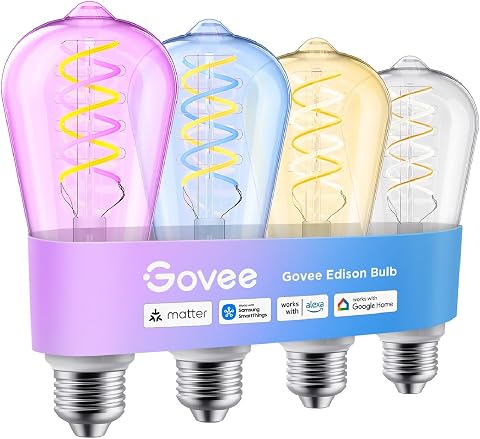
These Govee vintage Edison-style smart bulbs feature RGB color changing and tunable white lighting, compatible with Matter, Alexa, and Google Assistant. They offer customizable scene modes, high brightness, and a decorative filament design, ideal for home decor and ambiance.
Pros:
- Easy voice and app control with Alexa, Google Assistant, and Matter compatibility.
- Adjustable color temperature and multiple scene modes for personalized ambiance.
- Vintage filament design adds decorative charm to home decor.
- High brightness and long lifespan of 25,000 hours.
Cons:
- Not compatible with dimmer switches, which may limit certain lighting setups.
- Only supports 2.4GHz WiFi, not compatible with 5GHz networks.
- Smart home compatibility is limited to voice and app control, no integration with other smart systems.
Best for: Shoppers who want smart controls and vintage-style bulbs
Not ideal for: Fixtures with incompatible bases, dimmers, or enclosure limits
Bottom line: Confirm the bulb fits the fixture and supports your preferred controls.
Induction Cooktop
A built-in induction cooktop is a major kitchen decision because its dimensions, electrical needs, cookware, and ventilation all have to work together. This pick is named as a 30-inch, four-burner model with a downdraft vent. Confirm the cutout dimensions in the installation guide rather than relying on the nominal width, and compare its electrical requirements with the circuit available at the cooktop location. Verify the cutout and circuit before planning a replacement or remodel.
A frequent mistake is assuming existing cookware will work with induction or that a downdraft vent can replace every other ventilation plan. Check cookware compatibility with the manufacturer’s guidance, and review how the vent is installed and where it directs air. Confirm cabinet clearances, countertop thickness, duct or recirculation requirements, and whether a qualified installer is needed. If replacing a different cooktop type, account for changes to the countertop opening and electrical connection. Coordinate the installation details with the kitchen layout before committing to a built-in appliance.
What to look for:
- Exact countertop cutout and clearance requirements
- Electrical circuit and connection specifications
- Cookware compatibility with induction
- Downdraft vent routing and installation requirements
- Cabinet and countertop fit for a 30-inch unit
WABK 30-Inch 4-Burner Induction Cooktop with Downdraft Vent

This 30-inch induction cooktop has four burners with a combined 6,600W output and a built-in three-speed ductless downdraft vent. It includes nine heat levels per burner, a 99-minute timer, automatic shut-off, residual-heat indicator, overheat protection, and a child safety lock.
Pros:
- Four burners with nine heat levels each
- Built-in ductless downdraft vent
- Includes timer and multiple safety features
- Smooth glass surface is easy to clean
Cons:
- Requires hardwired 220–240V installation
- Compatible only with magnetic cookware
Best for: Kitchen projects planned around a compatible built-in cooktop
Not ideal for: Kitchens without matching cutout, circuit, or vent routing
Bottom line: Check cookware, electrical service, dimensions, and ventilation together.
Heat Pump Water Heater
A heat pump water heater involves more than selecting a model name: the unit must suit the household’s hot-water needs and the space where it will be installed. This pick is described as a 138,000 BTU, one-phase model, but the name alone does not establish that it is a domestic water heater or that it fits a particular home. Confirm the intended application in the product documentation before comparing it with residential water-heating requirements.
Common mistakes include assuming that the stated capacity maps directly to household demand, overlooking the electrical supply, or ignoring site requirements for air movement, drainage, and service access. Check the manufacturer’s specifications for application, dimensions, connections, operating conditions, and installation clearances. Have a qualified professional confirm that the model is appropriate for the existing plumbing and electrical setup. If the product documentation does not clearly describe domestic water-heating use, pause the purchase and ask the seller or manufacturer to clarify. Verify the model’s purpose and installation needs before planning a replacement.
What to look for:
- Documentation confirming the unit’s intended use
- Capacity and performance details relevant to household demand
- Electrical phase and circuit requirements
- Dimensions, service access, and site conditions
- Plumbing connections and professional installation guidance
AquaCal HeatWave SuperQuiet SQ200R 138,000 BTU Heat Pump, 1-Phase 60 Hz, 230V, R

The AquaCal HeatWave SuperQuiet SQ200R delivers a massive 138,000 BTU output for rapid pool heating and cooling. Featuring a patented ThermoLink Titanium heat exchanger and scroll compressor, it provides high energy efficiency with ultra‑quiet operation in a rugged, corrosion‑proof cabinet.
Pros:
- Very high heating capacity (138,000 BTU).
- Energy‑efficient ThermoLink Titanium heat exchanger.
- Ultra‑quiet operation thanks to scroll compressor and microprocessor controls.
- Durable, corrosion‑proof cabinet suitable for harsh outdoor conditions.
Cons:
- Heavy unit (304 lb) can make installation challenging.
- Requires single‑phase 208–230V power supply.
Best for: Buyers who can confirm the model suits their water-heating system
Not ideal for: Households without clear documentation of domestic use and fit
Bottom line: Confirm intended use and professional installation requirements before purchase.
For a budget-first buying order, begin with the product that addresses the clearest need in your home, then compare the installation work and supporting equipment each option requires. Check connected controls and lighting against existing systems, and consider larger appliance changes only after confirming dimensions, wiring, ventilation, and plumbing. Prioritize verified fit so the purchase does not create avoidable installation costs or delays.
Use this checklist as a starting point, then review current manufacturer documentation and ask an installer about uncertainties specific to your home. A careful check of compatibility, capacity, and setup can make the decision easier. Choose with confidence by matching each product to the job you want it to do.
NFL season / tailgating Picks
team gear
As an affiliate, we earn on qualifying purchases.