To connect your washer and dryer to Wi-Fi, first check if they support smart features by reviewing the manuals or manufacturer’s website. Then, download the device’s app and create an account if needed. Power on your appliances, put them in pairing mode, and follow the on-screen instructions to connect them to your Wi-Fi network, preferably on the 2.4 GHz band. Keep your devices close to your router during setup. If you continue, you’ll find more tips to guarantee a smooth connection.
Key Takeaways
- Confirm your washer and dryer support Wi-Fi and download the manufacturer’s app.
- Connect your appliances to your home Wi-Fi network, preferably using the 2.4 GHz band.
- Follow in-app instructions to put appliances into pairing mode and add them to your account.
- Ensure firmware is up-to-date and name devices for easy management.
- Test the connection by starting a load remotely and check notifications for successful setup.

Connecting your washer and dryer to Wi-Fi can simplify your laundry routine by giving you remote control and real-time updates. This setup allows you to start, stop, and monitor your laundry from anywhere, saving you time and effort. To get started, confirm your appliances are compatible with Wi-Fi connectivity. Check their manuals or manufacturer’s website to verify they support smart features and Wi-Fi integration.
Next, download the manufacturer’s dedicated app onto your smartphone or tablet. Most brands, like Samsung, LG, or Whirlpool, have their own apps designed specifically for their smart appliances. Once downloaded, create an account if needed, and make sure your device is connected to a stable Wi-Fi network. For the best performance, connect your appliances to a 2.4 GHz Wi-Fi band, as some smart devices have limited compatibility with 5 GHz networks.
Now, turn on your washer and dryer and follow the pairing instructions outlined in the user manual. Usually, this involves putting the appliance into pairing mode, which often requires pressing specific buttons or holding a button for a few seconds. Once the appliances are in pairing mode, open the app and follow the on-screen prompts to add your devices. The app will typically ask you to select your Wi-Fi network and enter your password to establish a connection.
During this process, make sure your smartphone remains close to the appliance and Wi-Fi router to avoid connectivity issues. If the app prompts you to update the firmware, do so promptly, as firmware updates often improve performance and security. After successfully connecting, name your appliances within the app for easy identification, especially if you have multiple smart devices.
Once everything is set up, test the connection by starting a load remotely through the app. You should receive notifications when the cycle begins, ends, or if there’s an issue like a door left open or a water supply problem. Explore additional features such as customizing wash cycles, scheduling laundry times, or receiving maintenance alerts. These features help you manage your laundry more efficiently and catch potential problems early. Keeping your firmware up-to-date is essential for maintaining security and compatibility with other smart home devices.
Remember to keep your Wi-Fi network secure with a strong password to prevent unauthorized access to your appliances. Regularly check for firmware updates within the app to keep your smart appliances functioning at their best. Connecting your washer and dryer to Wi-Fi might take a little time initially, but once set up, it offers a more convenient, flexible laundry experience, streamlining your routine and giving you peace of mind.

Samsung Smart 4.7 Cu Ft Top Load Washer & 7.4 Cu Ft Electric Dryer, Sensor Stops Overdrying, Low Vibration Quiet Wash, WaterJet w/Power Cords, Hoses, Vent Duct, 1 Year CPS Protection Bundle (Black)
- Installation Bundle Included: Power cords, hoses, vent, protection plan
- Wi-Fi Enabled Control: Remote operation via SmartThings app
- Large Capacity Washer: 4.7 cu ft with WaterJet and vibration tech
As an affiliate, we earn on qualifying purchases.
As an affiliate, we earn on qualifying purchases.
Frequently Asked Questions
Can I Connect Multiple Washers and Dryers to the Same Wi-Fi Network?
Yes, you can connect multiple washers and dryers to the same Wi-Fi network. Just make sure your network has enough bandwidth and a strong signal to support all devices simultaneously. Each appliance needs to be set up individually using its app or control panel. Keep your Wi-Fi password handy, and follow the manufacturer’s instructions for each device. This way, you can control and monitor all your appliances conveniently from one network.
What Should I Do if My Wi-Fi Connection Drops Frequently?
Did you know that over 50% of Wi-Fi users experience frequent disconnections? If your connection drops often, start by restarting your router and modem to refresh the network. Keep your devices close to the router, and check for interference from other electronics. Update your Wi-Fi firmware regularly. If problems persist, consider upgrading your router or contacting your internet provider for assistance to guarantee a stable connection.
Are There Security Risks When Connecting Appliances to Wi-Fi?
Connecting your washer and dryer to Wi-Fi can introduce some security risks, like unauthorized access or data breaches. To protect yourself, use strong, unique passwords for your network, keep your device firmware updated, and enable security features like WPA3 encryption. Avoid connecting appliances to public or unsecured networks. Regularly monitor your network activity to spot any suspicious behavior, ensuring your smart appliances remain safe and secure.
How Do I Update the Firmware on My Smart Washer and Dryer?
You can update your smart washer and dryer’s firmware through their respective apps. First, open the app and navigate to the device settings. Look for a “Firmware Update” or “Software Update” option—this might be under “Help” or “Support.” If an update is available, you’ll see a prompt. Tap to install, and your appliances will automatically download and install the latest firmware, ensuring peak performance and security.
Can I Control My Washer and Dryer Remotely Without an App?
No, you typically need the app to control your washer and dryer remotely. The app connects to your devices via Wi-Fi, allowing you to start, stop, or monitor cycles from anywhere. Without the app, remote control isn’t usually possible because the communication happens through the internet. Make sure your devices are connected correctly and your app is up to date for seamless remote operation.

LG WM4200HBA / WM4200HBA / WM4200HBA 5.0 Cu. Ft. Mega Capacity Smart wi-fi Enabled Front Load Washer with TurboWash 360 and Built-in Intelligence
- Energy Efficient Design: ENERGY STAR certified for low energy use
- Large Capacity: 5.0 Cu. Ft. for bulky loads
- Easy Loading Access: Maximum 55-inch depth with door open
As an affiliate, we earn on qualifying purchases.
As an affiliate, we earn on qualifying purchases.
Conclusion
Connecting your washer and dryer to Wi-Fi might seem tricky at first, but once you get the hang of it, it’s a simple way to make laundry easier. Don’t worry if you hit a snag—most issues are easy to fix with a quick restart or checking your internet connection. Embrace the convenience of smart appliances; they save you time and effort, making laundry day less of a chore. You’ve got this!
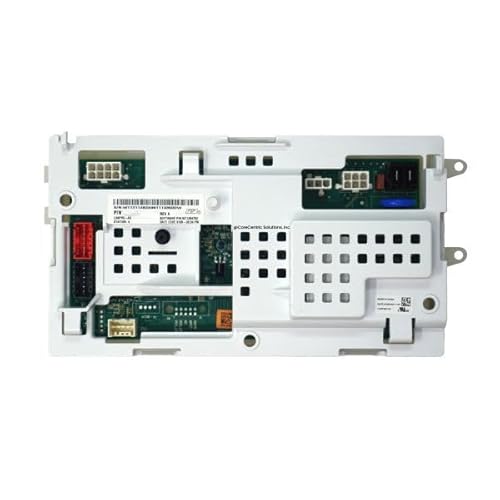
W11603811 Washer Control Board Fits for Whirlpool Compatible with NTW4516FW4 VAW3584GW2 ATW4516MW0
- Model Compatibility: Fits Whirlpool NTW4516FW4 and more
- Smart Control: Central processing for washer operations
- Easy Troubleshooting: Includes comprehensive repair guide
As an affiliate, we earn on qualifying purchases.
As an affiliate, we earn on qualifying purchases.

LG 27 Inch Smart Gas Single Unit WashTower with 5.0 cu. ft. Washer Capacity, 7.4 cu. ft. Dryer Capacity in Black Steel WKGX301HBA
- Space-Saving Design: Vertical washer and dryer combo
- Large Capacity: 5.0 cu. ft. washer, 7.4 cu. ft. dryer
- AI Smart Technology: Automatic optimal wash and dry settings
As an affiliate, we earn on qualifying purchases.
As an affiliate, we earn on qualifying purchases.