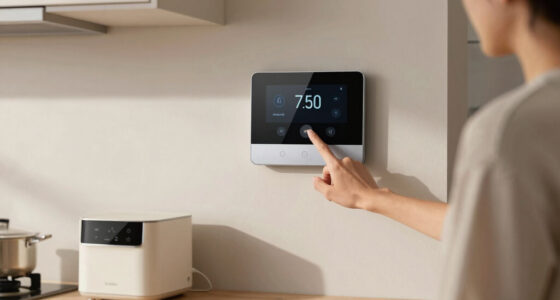
To install a smart thermostat without an electrician, first turn off your power at the breaker and carefully remove the old thermostat’s cover. Snap a photo of your wiring and use the included diagram to identify each wire’s purpose. Connect the wires to the new thermostat, mount it securely, then turn the power back on. Follow the setup prompts and connect to Wi-Fi. For detailed steps and safety tips, keep exploring the installation process.

Get home appliances delivered free with Prime
- Fast, free delivery on millions of items
- Prime Video, Amazon Music and more included
- Member-only deals all year
Key Takeaways
- Turn off power at the breaker to ensure safety before starting installation.
- Take a photo of existing wiring and identify wire functions using the provided diagram.
- Connect the wires to the corresponding terminals on the smart thermostat base securely.
- Mount the thermostat on the wall, ensuring it is level and firmly attached.
- Power on the system, follow on-screen setup, and connect to Wi-Fi to complete installation.

Installing a smart thermostat is a straightforward process that can enhance your home’s comfort and energy efficiency. You don’t need to be an electrician to set it up, but you do need to pay close attention to the wiring and compatibility details. Before you start, turn off your furnace or air conditioning system at the breaker to ensure safety. Once the power is off, remove your old thermostat cover carefully, exposing the wiring behind it. Take a picture of the wiring for reference, as this will help you during the installation process.
Turning off your system at the breaker is essential for safe thermostat installation.
Next, identify the wires connected to your existing thermostat. Most thermostats use standard color codes, but it’s always best to verify each wire’s function. Your smart thermostat will come with a wiring diagram and instructions, so consult those to determine where each wire should go. Connect the wires to the corresponding terminals on the smart thermostat base, pressing firmly to ensure a secure fit. If your system uses a wire not compatible with the smart thermostat, you might need an adapter or consider professional help.
Once all wires are connected, mount the smart thermostat on the wall using the provided screws. Make sure it’s level and firmly attached. After mounting, attach the thermostat faceplate or cover. Turn the power back on at the breaker, then follow the device’s on-screen prompts to complete the setup. This typically involves connecting to your Wi-Fi network, creating an account, and customizing your preferences. Many smart thermostats will automatically detect your system type and guide you through configuration.
During the setup, you’ll be prompted to choose your heating and cooling methods, set your schedule, and integrate any smart home devices. Pay attention to these options, as proper setup ensures efficient operation and comfort. Once configured, test your system by adjusting the temperature via the app or thermostat interface to verify it turns on and off correctly. If something doesn’t seem right, double-check your wiring connections and system compatibility. Additionally, understanding HVAC system compatibility can help prevent setup issues and ensure optimal performance.
smart thermostat installation kit
As an affiliate, we earn on qualifying purchases.
As an affiliate, we earn on qualifying purchases.
Frequently Asked Questions
Can I Install a Smart Thermostat on Any HVAC System?
You can install a smart thermostat on most HVAC systems, but it’s crucial to check compatibility first. Look at your system type—whether it’s a traditional, heat pump, or multi-stage system—and make certain the thermostat supports it. Some older or specialized systems may require additional wiring or a C-wire. Always review the manufacturer’s guidelines to confirm compatibility, and if unsure, consult the product details or contact a professional.
Do I Need Wi-Fi to Operate a Smart Thermostat?
You don’t need Wi-Fi to operate your smart thermostat, but it’s highly recommended. Without Wi-Fi, you can still manually control the thermostat, but you’ll miss out on remote access, scheduling, and app features. Wi-Fi allows you to adjust settings from anywhere and receive energy reports. To maximize your smart thermostat’s capabilities, connect it to your Wi-Fi network during installation. If Wi-Fi isn’t available, check if your model offers offline functions.
How Long Does the Installation Process Take?
The installation process usually takes about 30 to 60 minutes. You’ll need to turn off power, remove your old thermostat, and connect the wires to the new smart thermostat. The exact time depends on your familiarity with wiring and your home’s setup. If you follow the instructions carefully and have all necessary tools ready, you can complete the installation efficiently without professional help.
Will Installing a Smart Thermostat Affect My Current Warranty?
Installing a smart thermostat is like adding a new chapter to your home’s story—careful steps keep the narrative smooth. Generally, it won’t affect your current warranty if you follow the manufacturer’s instructions diligently. Just make certain you don’t bypass safety features or make unauthorized modifications. Keep your installation neat and documented, and if in doubt, consult your warranty terms or the manufacturer. Your home’s warranty stays intact when you proceed thoughtfully.
What Safety Precautions Should I Follow During Installation?
You should turn off power at your breaker box before starting installation to prevent electrical shock. Use insulated tools and wear rubber gloves for added safety. Double-check that the wires are correctly connected to avoid short circuits. Keep the work area dry and clear of clutter. If you’re unsure about any step, consult the thermostat’s manual or consider contacting a professional to guarantee safety.
As an affiliate, we earn on qualifying purchases.
Conclusion
Installing a smart thermostat yourself saves money and gives you control over your home’s comfort. Just remember, “A stitch in time saves nine”—take your time, follow the steps carefully, and you’ll enjoy a cozy home in no time. With patience and attention, you can successfully upgrade your thermostat without calling in an electrician. Confidence and caution go hand in hand—trust your skills, but don’t rush the process. Your smarter, more efficient home is within reach!
As an affiliate, we earn on qualifying purchases.
As an affiliate, we earn on qualifying purchases.
Cold & flu season Picks
humidifiers
As an affiliate, we earn on qualifying purchases.