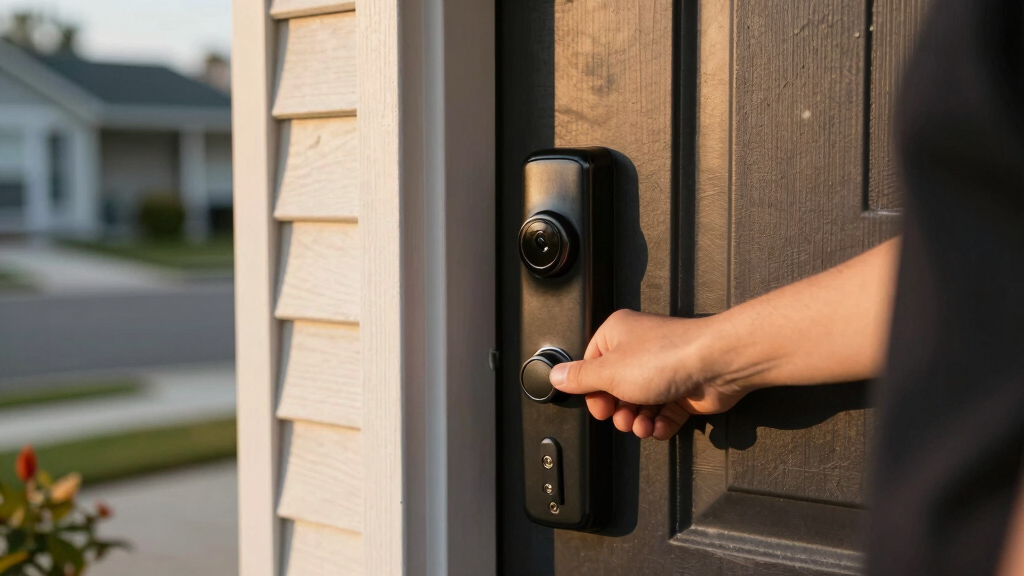

If you’re searching for the best smart deadbolt, you’re looking for a lock that combines security with modern convenience. The Philips Wi-Fi Smart Lock stands out as the overall top choice for its reliable Wi-Fi connection and seamless integration with voice assistants. The Yale Assure Lock 2 offers a sleek design and easy installation, while the Schlage Encode provides a robust feature set with a touchscreen keypad. The main challenge in this category is balancing security features, smart home compatibility, and ease of use—often, upgrading features means higher costs or complexity. Continue reading for a detailed breakdown of each option to find your perfect fit.
Key Takeaways
- Top picks excel in Wi-Fi connectivity, ensuring remote access without hubs.
- Design and build quality vary, with some locks offering more durable and aesthetic options.
- Compatibility with voice assistants like Alexa and Google Assistant is common but not universal.
- More advanced features like fingerprint unlock or keypad entry often come at a premium price.
- Ease of installation and user interface can significantly impact daily convenience.




More Details on Our Top Picks
Philips Wi-Fi Smart Lock Keyless Entry Deadbolt for Front Door, Compatible with Alexa & Google Assistant
This Philips model stands out for its flexible access options, including app control, fingerprint, passcode, and voice commands, making it the most adaptable choice for households with varied preferences. Compared with the Yale Assure, it offers more real-time notifications and activity history, but it requires a 2.4GHz Wi-Fi network, unlike some Zigbee or Z-Wave options. Its easy DIY installation suits those who want a quick upgrade without professional help, though the absence of a door sensor is a notable omission for enhanced security monitoring. The auto-lock feature adds convenience, and the remote control range of 65 ft ensures reliable access management. However, batteries are not included, which could be an inconvenience.
Pros:- Multiple unlocking options including app, fingerprint, passcode, and voice commands
- Real-time alerts and activity logs improve security oversight
- Easy DIY installation fits most standard doors
Cons:- Requires 2.4GHz Wi-Fi network, limiting compatibility for some
- Batteries are not included, adding extra cost
Best for: Busy homeowners seeking a highly flexible and easy-to-install smart lock with multiple unlocking methods.
Not ideal for: Users with a 5GHz Wi-Fi network or those preferring integrated door sensors for open/closed status detection.
- Connectivity:Wi-Fi (2.4GHz only)
- Power:4 or 8 AA alkaline batteries (not included)
- Compatibility:Doors 1-3/8″ to 2″ thick
- Auto Lock Timer:10 to 180 seconds
- Remote Control Range:Up to 65 ft
- Voice Assistant Compatibility:Alexa & Google Assistant
Bottom line: This model is ideal for households wanting flexible, remote control access with straightforward installation.
Yale Assure Lock 2 Deadbolt, Black Suede Keyed Smart Entry Door Lock with Wi-Fi
The Yale Assure Lock 2 excels in straightforward, keyless entry with a sleek keypad and auto-lock feature, offering a familiar feel for those replacing traditional deadbolts. It is more compatible with US standard doors than the Schlage Encode, but it relies solely on 2.4 GHz Wi-Fi, limiting connectivity options. Its easy installation makes it suitable for DIY enthusiasts, yet it’s region-specific—only supporting US and Canada. Compared to the Philips Wi-Fi Smart Lock, it lacks real-time activity notifications but compensates with a more traditional, integrated keypad experience. The Auto-Unlock feature is a bonus for convenience, though full remote management requires the Yale Access App and a compatible smartphone.
Pros:- Multiple access methods including keypad, app, and voice
- Auto-lock for added security without manual locking
- Easy to install without professional help
Cons:- Limited to 2.4 GHz Wi-Fi networks
- Only compatible with North American regions
Best for: Homeowners in the US or Canada seeking a reliable, auto-locking deadbolt with keypad entry and simple installation.
Not ideal for: International users outside North America or those who want extensive remote notifications without regional restrictions.
- Color:Black Suede
- Connectivity:Wi-Fi (2.4 GHz only)
- Auto-Lock:Yes
- Lock Type:Deadbolt
- App Compatibility:Yale Access App, Apple Watch
- Compatibility:US standard doors
Bottom line: This lock suits users wanting a straightforward, auto-locking deadbolt with keypad access in North America.
Schlage Encode Smart Wi-Fi Deadbolt Lock with Touchscreen Keypad, Keyless Entry, App Control, Alexa & Google Compatibility, Satin Nickel
The Schlage Encode is a strong contender for those prioritizing security and ease of remote management. Its BHMA highest security rating and built-in alarm system make it more resilient against tampering than the Yale or Philips models. Its remote access via the Schlage Home app allows management from anywhere, similar to the Philips lock but with the added security of a durable, high-grade finish. The touchscreen keypad offers a secondary access point, though it may be fingerprint-prone, unlike the fingerprint sensors on other models like the Philips or Philips keypad lock. Battery life is solid at up to 6 months, but heavy use could require more frequent replacements. Its compatibility with Alexa and Google simplifies voice control, matching the Yale lock’s options but surpassing the Philips in security ratings.
Pros:- High-security rating with durable finish and built-in alarm
- Remote management and control via app
- Works seamlessly with Alexa and Google Home
Cons:- Battery life may require frequent replacements under heavy use
- Touchscreen keypad can be fingerprint-prone
Best for: Security-conscious homeowners who want a high-grade, durable smart deadbolt with remote management and voice control.
Not ideal for: Those seeking a more budget-friendly option or looking for a lock with integrated fingerprint unlocking.
- Material:Satin Nickel
- Connectivity:Wi-Fi
- Control:App, Touchscreen Keypad
- Compatibility:Alexa, Google Home
- Battery:4 AA batteries (included)
- Battery Life:Up to 6 months
Bottom line: Ideal for users who want top-tier security and remote control with a premium build quality.
Philips WiFi Keypad Door Lock with Handle, Built-in WiFi, APP Remote Control, Voice & Fingerprint Unlock, Digital Front Door Lock Set
This Philips keypad door lock offers a comprehensive package with built-in Wi-Fi, enabling remote access and management via the Philips Home Access app, similar to the other Philips model but with an integrated handle for easier installation. Its fast fingerprint recognition of 0.3 seconds makes it highly responsive for quick access, rivaling the Ultraloq U-Bolt Pro’s fingerprint speed while adding keypad versatility. The auto-lock feature can be set from 0 to 180 seconds, providing flexible security timing. However, it requires 8 AA batteries, which are not included, and some users might find the app setup a bit complex. It’s best suited for those who want a complete, easy-to-install lock with multiple access options and a handle set included.
Pros:- Fast fingerprint recognition in 0.3 seconds
- Easy installation with handle set included
- Supports multiple passcode types and remote management
Cons:- Requires 8 AA batteries (not included)
- App setup can be complex for some users
Best for: Homeowners seeking a versatile, easy-to-install smart lock with handle set and fast fingerprint unlocking.
Not ideal for: Users who prefer a simpler keypad-only lock or those with limited space for a larger lock mechanism.
- Connectivity:WiFi 2.4GHz
- Fingerprint Recognition:Yes, 0.3 seconds
- Auto Lock:Yes, 0-180 seconds
- Included Components:Door lever, latch, hardware
- App Control:Yes
- Compatibility:Alexa, Google Assistant
Bottom line: This lock is perfect for those wanting quick, versatile access with straightforward installation and a handle set.
Desloc Smart Door Lock B200, Keyless Entry with Fingerprint, App Control, Touchscreen Keypad, Bluetooth, Alexa/Google Voice Compatibility, BHMA Grade 3
The Desloc B200 stands out for offering multiple unlocking methods, including fingerprint, PIN, app, and voice, making it highly adaptable for various users. Its long 12-month battery life and weather-resistant build make it suitable for outdoor front doors, while its easy installation appeals to DIY homeowners. Compared with the ULTRALOQ U-Bolt Pro, the B200’s control range is limited to Bluetooth, which may restrict remote access unless paired with voice assistants. The B200’s use of standard batteries and local data storage enhances security but requires periodic battery changes. This lock makes the most sense for homeowners who want flexible access options and a weatherproof design, but those expecting extensive remote control from a distance might find the Bluetooth range insufficient.
Pros:- Multiple unlocking methods including fingerprint, PIN, app, and voice control
- Long battery life with low-battery alerts and emergency USB port
- Weather-resistant construction suitable for outdoor use
Cons:- Bluetooth control range limited to 2 meters, reducing remote usability
- Requires batteries, which need replacement every 12 months
Best for: Homeowners seeking a durable, multi-method smart lock with reliable outdoor performance
Not ideal for: People who need long-distance remote access via WiFi or extensive smart home integration
- Model:B200
- Control:Bluetooth, App (TTLock)
- Unlock Methods:Fingerprint, PIN, physical keys, app, fobs, voice
- Battery Life:12 months
- Battery Type:4 AA batteries (not included)
- Weather Resistance:IP54
Bottom line: Ideal for users who prioritize flexible access options and weather resistance over extensive remote control features.
TEEHO TE001 Keyless Entry Door Lock with Keypad – Satin Nickel
The TEEHO TE001 offers straightforward keypad access with 20 user codes, making it an excellent choice for families or rentals. Its simple installation with just a screwdriver and durable weather-resistant build make it accessible for most DIYers. Compared with the ULTRALOQ Bolt SE, the TE001 lacks app control and remote access but excels in affordability and ease of use. Its automatic locking feature enhances daily security, yet it’s limited to specific door hole sizes and uses batteries that need regular replacement—up to a year of use. This lock is best for users who want reliable keypad entry without the complexity of smart features, but those seeking remote or voice control should look elsewhere.
Pros:- Easy to install with a screwdriver
- Multiple access codes for family and guests
- Automatic locking enhances security
Cons:- Requires 4 AA batteries (not included), replacing annually
- Limited compatibility with door sizes
Best for: Families or rental property owners needing simple, reliable keypad security
Not ideal for: Tech-savvy users wanting remote access or integration with smart home systems
- Material:Aluminum alloy
- Finish:Satin Nickel
- Battery:4 AA batteries (not included)
- Battery Life:Up to 365 days
- IP Rating:IP54
- Compatible Door Hole Size:2-1/8″ (54mm)
Bottom line: Perfect for users seeking a straightforward, keypad-only deadbolt without smart home integration.
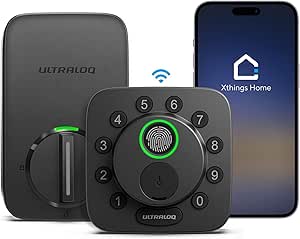
ULTRALOQ U-Bolt Pro WiFi Smart Lock with Door Sensor, 8-in-1 Keyless Entry, Fingerprint ID, App Control, Auto Unlock, IP65 Waterproof
The ULTRALOQ U-Bolt Pro excels with 8-in-1 access options, including fingerprint, keypad, and app control, making it suitable for a variety of users. Its IP65 waterproof rating ensures dependable outdoor use, and the inclusion of a door sensor adds real-time status updates, unlike many competitors. Compared with the ULTRALOQ Bolt SE, the U-Bolt Pro has a slightly higher security grade (ANSI Grade 1) and broader compatibility with smart home ecosystems. However, it relies on 2.4GHz WiFi, which can limit connectivity if your network is primarily 5GHz. Its 18-month battery life and straightforward installation make it appealing, but some users might find initial setup complex. This lock suits tech-savvy homeowners wanting extensive control and integration, with a focus on security and durability.
Pros:- Supports multiple access methods including fingerprint, keypad, app, and voice
- Weatherproof IP65 design with door sensor included
- Auto-lock and remote unlocking for convenience and security
Cons:- Requires 2.4GHz WiFi, limiting compatibility with 5GHz networks
- Electronic warranty limited to 18 months
Best for: Smart home owners seeking a highly versatile, weatherproof deadbolt with comprehensive access options
Not ideal for: Users with limited WiFi bandwidth or those wanting longer electronic warranty coverage
- Model Number:U-BOLT-PRO-WiFi
- Connectivity:2.4GHz WiFi
- Power:4 AA Alkaline Batteries
- Material:Metal with IP65 rating
- Security Grade:ANSI Grade 1
- Included Components:Smart deadbolt, door sensor
Bottom line: Best for users who prioritize extensive access options, smart home integration, and outdoor durability.
ULTRALOQ Bolt SE Smart Lock with Wi-Fi and Matter Compatibility
The ULTRALOQ Bolt SE offers a compelling mix of convenience and compatibility, supporting fingerprint, passcodes, app control, and voice commands. Its support for Matter over Thread makes it an attractive choice for integrating with a broad range of smart home devices. Its 18-month battery life and easy installation on standard doors appeal to busy homeowners. Compared to the ULTRALOQ U-Bolt Pro, the Bolt SE is slightly more streamlined, focusing on essential features with a strong emphasis on ecosystem compatibility. However, it lacks a door sensor and has a shorter warranty period, which may be a concern for those wanting comprehensive monitoring. This lock is well-suited for those who want a reliable smart lock that works seamlessly with various ecosystems and smart home standards.
Pros:- Supports multiple access methods including fingerprint, passcodes, app, and voice
- Compatibility with Apple Home, Alexa, Google, and Matter
- Long battery life with low battery alerts
Cons:- No door sensor included for status updates
- Limited to smart lock functions without additional security features
Best for: Homeowners looking for a smart lock that integrates effortlessly with Apple, Alexa, Google, and Matter ecosystems
Not ideal for: Users needing built-in door sensors or advanced security features beyond basic lock functions
- Model Number:ULTRALOQ BOLT SE
- Connectivity:Wi-Fi (2.4GHz), Matter over Thread
- Battery Life:18 months
- Material:Zinc alloy
- Warranty:Lifetime mechanical, 18 months electronic
- Customer Ratings:4.3/5 from 10,111 reviews
Bottom line: Ideal for users who want a versatile, ecosystem-friendly smart lock with broad device compatibility.
Philips WiFi Smart Keypad Deadbolt Lock with App Control, Alexa & Google Assistant Support, No Hub Required, Satin Nickel
The Philips WiFi Smart Keypad Deadbolt offers convenient remote control directly through its app, supporting voice commands via Alexa and Google Assistant. Its customizable access codes and auto-lock feature make it a solid choice for families or rental properties. Compared to the TEEHO TE001, this lock provides app control and remote monitoring, which adds flexibility but requires 8 AA batteries, with a typical lifespan of six months. Its weather-resistant design suits outdoor use, but the larger battery requirement and battery life may lead to more frequent replacements. This lock makes the most sense for users who want the convenience of remote control and multiple access options without the need for a hub, but those on a tighter budget or with less frequent access needs might prefer simpler locks.
Pros:- Remote control and monitoring via mobile app
- Supports voice commands with Alexa and Google Assistant
- Multiple access options including passcodes, keys, and app
Cons:- Requires 8 AA batteries, replacing approximately every 6 months
- Setup process can be complex for some users
Best for: Families or rental hosts wanting remote management and flexible access codes
Not ideal for: Users who prefer low-maintenance locks with longer battery life or basic keypad entry only
- Material:Satin Nickel
- Connectivity:WiFi
- Power:8 AA batteries (not included)
- Battery Life:Up to 6 months
- Auto Lock Timer:10-180 seconds
- Weather Resistance:IP54
Bottom line: Best suited for users wanting remote access and multiple control options without a hub dependency.
Schlage Encode Smart Wi-Fi Deadbolt Lock with Touchscreen Keypad, Matte Black, BE489WB CEN 622
The Schlage Encode stands out for its blend of high security, seamless connectivity, and ease of installation. Unlike the Yale Assure Lock 2, which offers more customizable finishes, the Encode emphasizes robust security and reliable Wi-Fi access without a hub. It supports remote locking, unlocking, and monitoring directly through its app, making it ideal for those who want convenience without extra equipment. However, its battery life can require more frequent replacements if heavily used, and the touchscreen fingerprinting can detract from the sleek appearance over time. Compared to simpler Bluetooth options, the Encode’s Wi-Fi capability provides broader control but demands a stable internet connection. Its easy installation suits DIYers, especially those who prioritize security and remote management. Still, heavy users should consider spare batteries, and those with unstable Wi-Fi may face occasional frustrations.
Pros:- Remote control and monitoring via app from anywhere
- Supports voice commands with Alexa and Google Home
- Easy to install without hardwiring
- High security rating with durable finish
Cons:- Battery life may require frequent replacement with heavy use
- Requires Wi-Fi for full functionality
- Touchscreen can be fingerprint-prone
Best for: Homeowners seeking a highly secure, Wi-Fi-enabled deadbolt with keyless entry and voice control integration
Not ideal for: Renters or those with limited Wi-Fi stability who prefer simpler, Bluetooth-only locks
- Material:Matte Black finish
- Connectivity:Wi-Fi
- Control:App, Touchscreen keypad, Voice (Alexa, Google Home)
- Battery:4 AA batteries (included)
- Battery Life:Up to 6 months
- Backset:2-3/8 in or 2-3/4 in
- Door Thickness:1-3/8 in to 1-3/4 in
- Security Rating:BHMA highest residential security, durability, and finish
Bottom line: This pick offers top-tier security and remote access, making it ideal for tech-savvy homeowners who value convenience and security.

How We Picked
I evaluated these smart deadbolts based on core factors that matter most for security, usability, and compatibility. Performance was assessed through connection stability, app responsiveness, and feature reliability. Usability considerations included installation complexity and app interface clarity. Build quality and durability influenced the selection, ensuring longevity in everyday use. Price was also a factor, with a focus on delivering value—balancing features against costs. The ranking reflects a combination of these factors, prioritizing options that offer the best blend of security, convenience, and smart home integration for a wide range of users.Factors to Consider When Choosing Best Smart Deadbolt
Choosing the best smart deadbolt involves more than just comparing features. You’ll want to consider how the lock integrates with your existing smart home setup, the level of security it provides, and how user-friendly it is for your household. Understanding these factors can help prevent costly mistakes or frustration later. Here are key areas to focus on when selecting a smart deadbolt:Connectivity and Compatibility
Ensure the lock supports your preferred smart home ecosystem, whether it’s Alexa, Google Assistant, or Apple HomeKit. Wi-Fi-enabled models allow remote access without hubs, but they may require a stable internet connection. Compatibility with your existing smart devices can streamline automation and voice control, making daily use more seamless. Consider whether the lock supports Bluetooth as a backup or for local control, especially if internet disruptions are a concern.
Security Features and Ratings
Look beyond basic locking mechanisms—check if the lock offers encryption, tamper alerts, and robust build quality. BHMA or ANSI ratings indicate durability and resistance to physical attacks, which is critical for outdoor locks. Some models include alarm systems or auto-lock features that add layers of security, but these can also increase costs. Prioritize locks with proven security credentials to protect your home effectively.
Ease of Installation and Use
Many smart deadbolts claim simple DIY installation, but actual ease can vary. Consider whether your door’s existing setup is compatible and if additional hardware or adjustments are needed. User interface matters—app design, keypad responsiveness, and voice command integration can drastically affect daily convenience. Choose a model that offers clear instructions and a straightforward setup process, especially if you’re less tech-savvy.
Battery Life and Power Backup
Smart deadbolts rely on batteries, so check their estimated lifespan and how easy it is to replace them. Some models include low-battery alerts via the app, preventing lockouts. A backup power option, like an external battery or physical key, can be invaluable during power failures or battery drainage. Considering these factors can save you from inconvenient lockouts and maintenance headaches.
Price and Value
While premium models offer advanced features, they come with higher costs. Balance your budget against the features you need—such as fingerprint access, keypad, or auto-unlock. Sometimes, investing a bit more upfront yields better durability and security. Look for products with good warranties and customer support, which can improve long-term value and peace of mind.
Frequently Asked Questions
Can I install a smart deadbolt myself, or do I need a professional?
Most smart deadbolts are designed for DIY installation, with detailed instructions and common tools included. If your door’s existing hardware is standard, you should be able to install it without professional help. However, if your door has unusual dimensions, multiple locks, or complex wiring, consulting a professional might save time and ensure proper security. Reading user reviews for installation tips can also help simplify the process.
Will a smart deadbolt work if my Wi-Fi goes down?
Many smart deadbolts rely on Wi-Fi for remote control, but most also support Bluetooth or keypad access as a fallback. This means you can usually still lock or unlock the door locally even if your internet connection fails. Some models also include physical keys or hybrid options to provide additional backup access. Confirming these features before purchase can prevent lockout issues in case of connectivity problems.
Are smart deadbolts secure from hacking?
Reputable smart deadbolts use encryption and security protocols to protect against hacking attempts. Regular firmware updates from manufacturers help patch vulnerabilities. However, no device is entirely immune—using strong, unique passwords and enabling two-factor authentication adds extra layers of security. Avoid models with known security flaws, and always purchase from trusted brands with good reviews regarding cybersecurity.
How long do the batteries last in a smart deadbolt?
Battery life varies by model, but most smart deadbolts offer between 6 months to a year of operation on a set of batteries. Features like auto-lock and remote alerts can drain batteries faster, so checking the manufacturer’s estimated lifespan is important. Many locks notify you when batteries are low, giving ample time to replace them. Using high-quality batteries can also extend overall lifespan.
Is it worth paying extra for features like fingerprint or keypad access?
Adding biometric or keypad options can significantly enhance convenience, especially for households with multiple users or frequent guests. These features reduce dependence on keys and can improve security by allowing code or fingerprint management. However, they often come at a higher price and may increase complexity or maintenance needs. Consider your specific security needs and daily routine before investing in these extras.
Conclusion
For those seeking the best overall smart deadbolt, the Philips Wi-Fi Smart Lock balances reliable performance with broad smart home compatibility. If budget-conscious buyers want great value without sacrificing core features, models like the Yale Assure Lock 2 or Schlage Encode stand out. Premium users who prioritize advanced security features and sleek design should consider higher-end models like the ULTRALOQ U-Bolt Pro. Beginners or less tech-savvy homeowners will appreciate locks with straightforward installation and user-friendly apps. Ultimately, your choice depends on your specific needs, budget, and the importance of features like remote access, biometric entry, or integrated voice control.