Smart home study area lighting splits into two camps: task-focused desk lamps that prioritize eye comfort and brightness control, and smart floor lamps that bring voice control and ambient color to the room. After comparing ten options, the Micomlan LED Desk Lamp with Clamp stands out as the best overall pick for a study area thanks to its 24W auto-dimming and atmosphere lighting — exactly what long reading sessions demand. The Pzloz Architect Lamp is the better value for dual-monitor setups, while the SwitchBot Smart Floor Lamp wins if you want Matter compatibility and voice control without giving up 1200 lumens of real brightness. The main tradeoff readers face here is convenience versus precision: Wi-Fi color lamps are fun but rarely match the fine brightness and color-temperature tuning of a dedicated eye-care desk lamp. Keep reading for the full breakdown.

Get home appliances delivered free with Prime
- Fast, free delivery on millions of items
- Prime Video, Amazon Music and more included
- Member-only deals all year
Complete the kit



Key Takeaways
- Clamp-style architect lamps (Pzloz, Motumen, Micomlan) dominated for pure study tasks because they free up desk space and deliver higher wattage (24W) than any smart bulb or floor lamp in the lineup.
- Only one floor lamp in this roundup — the SwitchBot — supports Apple Home and Matter; the rest lock you into Alexa/Google ecosystems, which matters if your household mixes platforms.
- RGB color features were the weakest link for study use: music sync and color scenes are fun for gaming corners but add nothing to reading comprehension or focus.
- Auto-dimming and eye-care flicker reduction appeared on just three of ten products, and those three took the top spots for study-heavy buyers.
- Several ‘smart’ floor lamps (YHW, Qaubauyt, PESRAE) overlap heavily in features; the real differentiators became shade design, brightness output, and remote versus app control preferences.




| smart home study area lighting | Controls | Wattage |
|---|---|---|
| Pzloz LED Desk Lamp for Office | — | — |
| Smart Floor Lamp Compatible wi | App, remote, pedal switch | 9 watts |
| SwitchBot Smart Floor Lamp RGB | Voice, app, wired | — |
| Motumen LED Desk Lamp for Home | Remote and push button | 14 watts |
| Qaubauyt Smart LED Floor Lamp | App, remote, foot switch | 9 watts |
| YHW Smart Floor Lamp for Livin | App, remote, voice | 9 watts |
| Micomlan LED Desk Lamp with Cl | Touch, stepless dimming | — |
| LED Floor Lamp for Living Room | Remote and button | — |
| PESRAE RGB Floor Lamp with Ste | App, remote, voice | 9 watts |
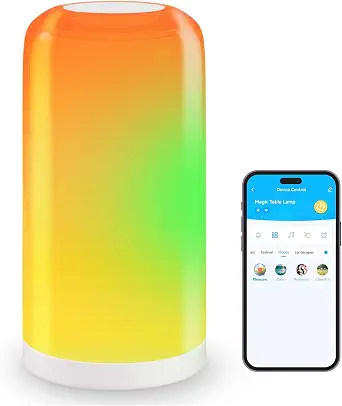
| DAYBETTER BGRIC Smart Bedside | Touch, app, voice | — |
More Details on Our Top Picks
Pzloz LED Desk Lamp for Office and Home – Eye Caring Architect Lamp with Clamp
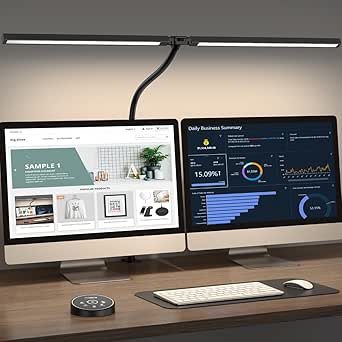
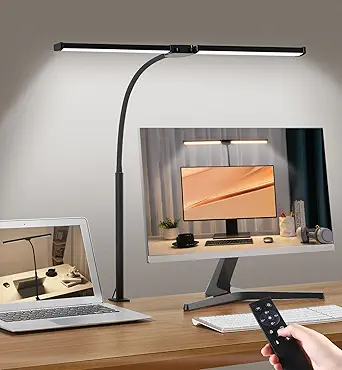
This model earns the top spot because it solves the core problem of study lighting: broad, adjustable, eye-friendly illumination that doesn’t hog desk space. The clamp mount and 24W output mean it can wash an entire work surface — even a dual-monitor setup — in flicker-free light, something the Motumen can’t match on raw coverage despite its dual heads. With 25 mode combinations across the 3000K–5500K range, tuning light for late-night reading versus daytime drafting is genuinely quick, and the wireless remote keeps you from hunching over a base button mid-task.
The tradeoff is smart-home absence. Unlike the SwitchBot floor lamp or the Alexa-compatible smart floor lamps in this guide, there’s no voice control, app scheduling, or ecosystem integration. It’s also arguably overkill for someone who just wants a small bedside reading light.
Pros:- Clamp mounting frees up the entire desk surface
- 24W output covers dual-monitor workspaces
- 25 lighting mode combinations across 5 color temperatures
- Remote control with wide 360°/180°/270° adjustability
Cons:- No smart-home or voice integration at all
- Remote is a single point of failure — if it breaks, convenience drops sharply
- Clamp requires a desk edge of suitable thickness
Best for: Students and remote workers with large desks or dual monitors who want serious, adjustable task lighting without smart-home complexity
Not ideal for: Buyers building an Alexa or Google Home lighting routine — this lamp has no app, voice control, or scheduling
- Power:24 watts
- Color Temperature:3000K–5500K
- Lighting Modes:25 combinations
- Control Method:Wireless remote
- Mounting:Tabletop clamp
- Adjustability:360° stand, 180° swing arms, 270° rotatable head
- Voltage:24V DC
Our verdict“If your priority is pure study performance over smarts, this is the strongest task light in the lineup.”
Smart Floor Lamp Compatible with Alexa & Google Home, Color Changing, Dimmable, Modern Standing WiFi Lamp – Black
Where the Pzloz is a dumb-but-excellent task light, this floor lamp goes all-in on smart-home integration. Alexa, Google Home, and Siri voice control, app scheduling, a physical pedal switch, and music-sync RGB make it a genuine hub-friendly centerpiece. Compared with the Qaubauyt, it offers the same app-plus-remote convenience but adds true voice assistant support and stepless dimming rather than preset steps — a real difference for anyone building automated study or wind-down routines.
The catch: at 9W with a single downlight and a linen shade, it’s ambient lighting, not task lighting. It won’t replace a proper desk lamp for reading fine print, and it’s locked to 110V power and a stable Wi-Fi connection for its smart features to function at all.
Pros:- Works with Alexa, Google Home, and Siri
- Multiple control methods: app, remote, and pedal switch
- Stepless dimming with millions of RGB color options
- Assembles in about five minutes
Cons:- Wi-Fi dependency — smart features fail without a connection
- Ambient downlight output can’t substitute for a desk lamp
- 110V only, so not usable in many regions without conversion
Best for: Smart-home owners who want their study area’s background lighting tied into Alexa or Google routines
Not ideal for: Anyone needing focused task illumination for reading or detailed work — the output is too soft and diffused
- Wattage:9 watts
- Bulb Base:E26
- Connectivity:Wi-Fi, Bluetooth
- Compatibility:Alexa, Google Assistant, Siri
- Controls:App, remote, pedal switch
- Voltage:110 volts
- Height:Standard floor lamp, freestanding
Our verdict“Choose this when ecosystem integration matters more than raw workspace brightness.”
SwitchBot Smart Floor Lamp RGBICWW Voice/App Controlled with Alexa, Apple Home & Google, Matter
This is the most future-proofed smart option in the roundup. Matter support plus native Apple Home compatibility put it a step ahead of the Alexa/Google-only floor lamp — Apple users finally aren’t left out. The 2700–6500K white range is the widest here, meaning it can shift from warm evening reading glow to cool, focus-friendly daylight, and 1200 lumens is noticeably brighter than the 9W ambient floor lamps it competes against.
That said, RGBIC effects and music sync are entertainment features, not study features — if you’re buying purely for work, you’re paying for capabilities you won’t touch. And compared with the Pzloz’s clear spec sheet, SwitchBot’s vague power and dimension details make pre-purchase planning harder, especially in tight study nooks.
Pros:- Matter support with Alexa, Apple Home, and Google
- Widest white range in the roundup: 2700–6500K
- 1200 lumens with 1–100% dimming
- 26 dynamic presets and music sync
Cons:- No published power consumption or dimensions
- Full functionality depends on a compatible smart ecosystem
- Entertainment-focused features add cost for study-only buyers
Best for: Apple Home users and multi-ecosystem households who want the widest white tuning range and Matter compatibility
Not ideal for: Budget-focused buyers who only need task lighting — the RGBIC and effects features inflate the price without helping study sessions
- Brightness:1200 lumens
- White Temperature:2700–6500K
- Color Options:16 million colors (RGBIC)
- Dimming:1–100%
- Lighting Effects:26 presets, 8 effects
- Compatibility:Alexa, Apple Home, Google, Matter
- Controls:Voice, app, wired
Our verdict“The pick for buyers who want one lamp to serve both focused study lighting and whole-room smart ambiance.”
Motumen LED Desk Lamp for Home Office, Eye-Care Clamp Light, Black
This model makes the list as the budget-friendly workhorse. The dual gooseneck heads can be aimed independently — one at a keyboard, one at a textbook — a flexibility the single-head Pzloz can’t quite replicate, and it does so at lower wattage. The timer function is a quietly useful study feature, and the memory function means your preferred 3000K reading tone survives every power cycle.
Tradeoffs are clear against both higher-ranked picks: 14W is dimmer than the Pzloz’s 24W for large desks, and unlike every floor lamp here, there’s zero smart capability. The gooseneck design also reads distinctly modern-minimal, which may clash with a traditional wood study.
Pros:- Independently aimable dual gooseneck heads
- Timer and memory functions built in
- Flicker-free, glare-free eye-care lighting
- Both remote and physical button controls
Cons:- 14W output limits coverage on larger workspaces
- No smart-home or app features
- Modern black styling may not suit traditional decor
Best for: Students on a budget who need aimable, dual-zone task lighting for textbooks and laptops
Not ideal for: Owners of wide desks or dual monitors — the lower output can’t match 24W architect lamps for coverage
- Wattage:14 watts
- Color Temperature:3000K–6500K (5 modes)
- Brightness Levels:5 (20%–100%)
- Controls:Remote and push button
- Light Heads:2 dual-head, 360° gooseneck
- Special Features:Timer, memory function, no flicker/glare
- Mounting:Tabletop
Our verdict“The smart buy when you want functional, aimable study light and don’t want to pay for features you’ll never use.”
Qaubauyt Smart LED Floor Lamp with APP Control & RGB Colors – 67″ Modern Tall Lamp
This one earns its place as the entertainment-leaning smart lamp for study spaces that double as gaming corners. At 67 inches with a linen shade and stable weighted base, it delivers room-filling RGB, music sync, and scene modes — more of a showpiece than the SwitchBot, which trades some flair for broader ecosystem support. The app and remote combo plus a timer function work well for scheduled study-to-relax lighting transitions.
Compared with the Motumen or Pzloz, it’s not a task light at all — 9W of diffused ambient output won’t illuminate a textbook page. The remote also needs AAA batteries, an ongoing cost and annoyance the app can only partially offset.
Pros:- Music sync and scene modes for gaming and entertainment
- App, remote, and timer control options
- Heavy weighted base resists tipping
- Elegant beige-black styling fits most decor
Cons:- Remote requires AAA batteries
- Only 9W ambient output — no real task-lighting capability
- Foot switch behavior may confuse some users
Best for: Gamers and students whose study area doubles as an entertainment space who want music-synced ambient lighting
Not ideal for: Anyone whose primary need is focused reading or writing light — the diffused 9W output is decorative, not functional
- Height:67 inches
- Wattage:9 watts
- Bulb Base:E26
- Controls:App, remote, foot switch
- Special Features:RGB colors, dimmable, timer, music sync
- Shade:Linen, 13.7 inches
- Base Material:Iron (weighted)
- Voltage:110 volts
Our verdict“A stylish ambiance layer for gaming-study hybrids, provided a proper desk lamp handles the actual work lighting.”
YHW Smart Floor Lamp for Living Room, Bedroom, Office
Between the white linen drum shade and the color-changing RGB bulb inside, this lamp splits the difference between a normal piece of furniture and a smart gadget. That fabric shade is the real differentiator here — the PESRAE RGB Floor Lamp and the Qaubauyt Smart LED Floor Lamp both leave their bulbs exposed, which looks great for gaming setups but harsh in a reading nook. This option stands out for music sync, scheduling, and triple voice assistant support (Alexa, Google, and Siri), giving it broader compatibility than the DAYBETTER bedside lamp, which skips Siri. The tradeoff is raw output: at 9 watts behind a linen diffuser, this is mood lighting, not task lighting. Students who need serious illumination for late-night study sessions should pair it with a dedicated desk lamp rather than rely on it alone.
Pros:- Fabric shade diffuses color light more softly than exposed RGB bulbs
- Works with Alexa, Google Assistant, and Siri — wider assistant support than most rivals
- Music sync and scheduling built in for study-break ambiance
- Assembles in about five minutes with no tools
Cons:- 9W output is dim for task work, especially through the linen shade
- Full feature set depends on a stable Wi-Fi connection and a somewhat fussy app setup
Best for: Students and remote workers who want a study corner that shifts from warm reading light to ambient color for gaming or music, without the exposed-bulb gamer aesthetic
Not ideal for: Anyone counting on a single lamp for actual coursework illumination — 9 watts through a linen shade won’t light a desk adequately
- Bulb Base:E26 (A19 bulb)
- Wattage:9 watts
- Controls:App, remote, voice
- Voice Assistants:Alexa, Google Assistant, Siri
- Connectivity:Wi-Fi, Bluetooth, RF
- Features:Color changing, dimmable, music sync, schedules
- Design:White linen drum shade, freestanding floor lamp
Our verdict“Buy this if your study area doubles as a relaxation zone and you want soft, voice-controlled ambiance — skip it if illumination for reading is the priority.”
Micomlan LED Desk Lamp with Clamp, Architect Desk Light
If the roundup’s floor lamps are about mood, this one is about actually seeing your work. At 24 watts with a CRI above 90, it delivers the brightest, most color-accurate light in this batch — far beyond what the YHW or PESRAE floor lamps can manage. The asymmetric 45° angled LED design pushes glare away from your eyes, which matters more than any color mode when you’re three hours into an essay. Its seven rotatable joints out-position the Motumen clamp lamp and the Pzloz architect lamp, letting you swing light around dual monitors. The catch: this is the least “smart” pick here. There’s no app, no voice control, no Wi-Fi — just touch controls and a light sensor that auto-dims. Buyers who want everything automated will find it basic; buyers who care about eye strain will find it the most functional option on this list.
Pros:- 24W output with CRI above 90 — brightest, most accurate light in this lineup
- 7 rotatable joints allow positioning around dual monitors
- Asymmetric 45° light design and ambient backlight actively reduce eye strain
- Auto-dimming light sensor adjusts to room conditions
Cons:- Zero smart home integration compared with Wi-Fi rivals like the YHW or SwitchBot lamps
- Seven adjustment points can feel overwhelming if you just want to switch on a light
Best for: Students and professionals with multi-monitor setups who prioritize glare reduction and precise positioning over smart home features
Not ideal for: Smart home enthusiasts — there’s no app, voice control, or ecosystem integration of any kind
- Power:24 watts
- Color Temperature:3000K – 6500K
- CRI:>90
- Controls:Touch, stepless dimming
- Design:Clamp-mount, 7 rotatable joints
- Special Features:45° asymmetric light, ambient backlight, smart light sensor
- Light Sources:3 LEDs
Our verdict“This is the pick when studying is the job and eye comfort matters more than color-changing gimmicks.”
LED Floor Lamp for Living Room and Office
This dual-head lamp is the pragmatic middle ground in a roundup full of app-dependent lights. With 180° rotating heads, a 360° goose-neck, and stepless dimming from 10% to 100%, it covers a desk and a reading chair simultaneously — something neither the single-head YHW nor the PESRAE can do. The remote works through obstacles at up to 50 feet and magnetically docks to the pole, a small detail that beats the loose remotes typical of this category. The honest tradeoff: there’s no smart home integration whatsoever. No Alexa, no Google, no scheduling, no color RGB modes — just white light from 2700K to 6500K. Compared with the SwitchBot Smart Floor Lamp, you give up app control and Matter support, but you gain a setup that never drops off Wi-Fi and a price that likely undercuts it. For buyers who find app pairing a chore rather than a feature, that simplicity is the selling point.
Pros:- Dual adjustable heads light two zones at once, unlike single-head rivals
- Stepless 10%–100% dimming across 2700K–6500K
- Long-range remote with magnetic storage on the lamp body
- Tool-free setup with a weighted, stable base
Cons:- No smart home or voice integration at all
- Likely priced above basic single-head floor lamps given the dual-head feature set
Best for: Buyers who want flexible, bright, dual-zone lighting without app accounts, Wi-Fi pairing, or ecosystem lock-in
Not ideal for: Anyone building an automated study setup — no voice assistants, schedules, or smart home platform support
- Design:Dual-head, 180° rotation, 360° goose-neck
- Color Temperature:2700K – 6500K
- Brightness:Stepless dimming, 10%–100%
- Remote Range:50 ft with obstacle penetration
- Controls:Remote and button
- Base:Weighted, stable
- Installation:Tool-free
Our verdict“The right choice if you want dependable, adjustable light and consider Wi-Fi setup a bug, not a feature.”
PESRAE RGB Floor Lamp with Stepless Brightness & Color Temperature
The PESRAE does most of what the pricier YHW Smart Floor Lamp does — 16 million colors, 2700K–6500K white adjustment, Alexa and Google voice control, music sync, scheduling — usually at a lower price. The difference comes down to presentation: where the YHW wraps its bulb in a linen shade for a softer, room-friendly look, the PESRAE leaves the bulb exposed, which throws more vivid color into the space and fits a gaming-adjacent study corner better than a living room. It also skips Siri support, so Apple households should look at the SwitchBot lamp with Matter instead. App navigation gets clunky at times, and like every Wi-Fi lamp in this roundup, it’s useless without a connection and a nearby outlet. As a budget entry into smart color lighting for a study area, though, this model makes the most sense for cost-conscious buyers who don’t need the fabric-shade polish.
Pros:- 16 million colors plus 2700K–6500K adjustable white in one budget package
- Alexa and Google voice control plus app and remote operation
- Music sync and scheduling match features of pricier rivals
- Strong value compared with the YHW and SwitchBot lamps
Cons:- No Siri or Apple Home compatibility
- Exposed bulb design looks more gamer-desk than furniture; app navigation can frustrate
Best for: Budget-minded students and gamers who want full RGB smart lighting with voice control without paying for premium finishes
Not ideal for: Apple Home users and anyone wanting diffused, living-room-ready light — no Siri support and no shade
- Bulb Base:E26 (A19 bulb)
- Wattage:9 watts
- Colors:16 million RGB options
- White Range:2700K – 6500K
- Controls:App, remote, voice
- Voice Assistants:Alexa, Google Assistant
- Connectivity:Wi-Fi, Bluetooth
Our verdict“The most affordable way to get full smart color lighting into a study space, as long as you’re in the Alexa/Google camp.”
DAYBETTER BGRIC Smart Bedside Lamp, WiFi Touch Control
Not every study area has room for a 67-inch floor lamp — dorm nightstands and shared bedrooms don’t. The DAYBETTER BGRIC covers the small-format case: touch control, 16 million RGB colors, adjustable white, preset scenes, and hub-free Alexa and Google voice control in a tabletop footprint. Compared with the PESRAE or YHW floor lamps, it obviously can’t light a whole room, but for focused bedside reading and late-night wind-down after studying, its scale is the point. The limitations are real, though. It requires 2.4GHz Wi-Fi only, which trips up buyers on modern mesh routers, and it won’t work with Tuya, SmartLife, Magic Home, or Home Assistant — so serious smart home tinkerers should pay more for the Matter-capable SwitchBot instead. Music sync also needs the microphone permission, a privacy tradeoff some will decline. For a simple, colorful bedside companion light, though, it delivers without a hub or a big spend.
Pros:- Compact tabletop size fits nightstands and dorm shelves
- Hub-free Alexa and Google voice control
- 16 million RGB colors, adjustable white, and preset scenes
- Touch control plus app operation for quick adjustments
Cons:- 2.4GHz Wi-Fi only; incompatible with 5GHz networks and Home Assistant/Tuya platforms
- Music sync requires microphone access — a privacy concession
Best for: Dorm residents and students with tiny nightstands who want voice-controlled color light in a small footprint
Not ideal for: Home Assistant users and 5GHz-only households — ecosystem incompatibility and 2.4GHz-only Wi-Fi will cause headaches
- Mounting:Tabletop, compact
- Controls:Touch, app, voice
- Voice Assistants:Alexa, Google Assistant (no hub)
- Colors:16 million RGB plus adjustable white
- Connectivity:Wi-Fi (2.4GHz only)
- Special Features:Preset scenes, music sync
- Power:Corded electric
Our verdict“A low-cost, space-smart bedside light for Alexa and Google users; serious smart home builders should look elsewhere.”
How We Picked
I ranked these products through one specific lens: how well they light a study area, not how impressive they look at a party. That meant prioritizing usable brightness (lumens and wattage), color temperature range for daytime focus versus evening wind-down, flicker-free and glare-reduced output for eye comfort, and adjustability — both physical (swing arms, clamp rotation) and digital (dimming steps, scheduling, app control).
Smart features were judged on substance, not spec count. Matter support, reliable voice assistant integration, and app scheduling earned real weight; music sync and RGB scenes were treated as bonuses rather than ranking factors. Build quality and value completed the picture, since a study lamp gets touched, adjusted, and used daily for years. Products that excelled at focused task work rose to the top, while ambient-heavy options were placed where they make sense — as secondary or room-lighting picks rather than primary study lights.
Factors to Consider When Choosing Smart Home Study Area Lighting
Choosing smart lighting for a study area involves more than picking the brightest lamp. These are the factors that actually change how a lamp performs over months of daily studying.Task Light vs. Room Light: Know Which Problem You’re Solving
The most common mistake buyers make is treating all smart lighting as interchangeable. A clamped architect lamp lights your desk surface — your books, keyboard, and notes — and is what actually reduces eye strain during study sessions. A smart floor lamp lights the room, which sets mood and reduces harsh contrast between your bright screen and dark surroundings. Ideally a study area has both, but if budget forces a choice, task lighting wins for anyone studying more than an hour a day. If you already have a decent desk lamp and your room feels like a cave, a floor lamp solves the opposite problem.
Brightness and Color Temperature Range
For focused work, look for lamps offering cooler color temperatures (4000K–6500K), which research consistently links to alertness, plus a warm mode (2700K–3000K) for evening sessions that won’t wreck your sleep. Brightness matters more than buyers expect: many smart floor lamps output only 800–1000 lumens, which is fine for ambiance but weak as a sole reading light. Desk lamps in the 24W class deliver concentrated light right where you need it. Also check whether dimming is stepless or preset — five fixed levels frustrate people who want just slightly less light than the lowest preset offers.
Ecosystem Compatibility and the Matter Question
Before buying any Wi-Fi lamp, check which assistants it actually supports. Many budget smart lamps work with Alexa and Google but not Apple Home, and some only function through a proprietary app with no voice control at all. If you own iPhones, a Matter-certified lamp like the SwitchBot avoids being locked out of automations later. Also consider whether the lamp needs a hub, whether it works on 2.4GHz-only networks (common, and a frequent setup headache), and whether guests can control it without your app — a physical remote or touch panel matters more than people admit.
Eye Comfort Features That Actually Matter
Look for flicker-free drivers, diffuse shades, and glare-reduction claims backed by standards rather than marketing language. A lamp that produces visible flicker at low brightness causes headaches over long sessions, and this is where cheap RGB lamps most often cut corners. Clamp lamps with wide, rectangular heads spread light evenly across a desk, while exposed bulb-style floor lamps create hotspots and shadows. Auto-dimming — where the lamp senses ambient light and adjusts — is genuinely useful if you study at different times of day, and it’s worth paying extra for compared to manual-only models.
Desk Real Estate and Mounting Options
Every inch of desk matters in a study area, and this is the strongest argument for clamp-mounted lamps over base models: they attach to the desk edge and put their arm overhead instead of occupying a footprint. Before buying, measure your desk thickness — most clamps handle 10–60mm, and thicker tabletops or drawer-front edges can be incompatible. Dual-arm designs cover wider desks or dual monitors, but they need headroom above your monitors. If your desk is glass or very thin, a floor lamp placed beside the desk becomes the practical alternative.
When RGB Is Worth It (and When It Isn’t)
Color-changing features have a legitimate place in a study area — just not for studying. Warm ambient color in the evening can make a study corner feel less clinical, and gamers or students who record content get real value from RGB. But if you’re buying primarily to read and write, color modes are a distraction you’re paying for. A useful rule: spend your budget on brightness and color temperature accuracy first, then let RGB be the bonus. The lamps in this lineup that leaned hardest on color effects tended to be the weakest at the basics, which tells you where the manufacturer’s priorities were.
Frequently Asked Questions
Can a smart floor lamp replace a desk lamp for studying?
Generally no, and the comparison made this clear. Floor lamps like the YHW or Qaubauyt diffuse light across a room, which means only a fraction of their output reaches your desk surface — fine for ambiance, weak for reading small text. A 24W clamped desk lamp concentrates light exactly on your work, which is what reduces eye strain over long sessions. The exception is the SwitchBot at 1200 lumens, which is bright enough to work as supplemental task lighting when positioned beside a desk. The best setup pairs a task lamp for your work surface with a floor lamp to soften the room around it.
Do I need Matter support, or is Alexa/Google compatibility enough?
It depends on your household’s devices and how long you plan to keep the lamp. If everyone uses Alexa or Google speakers, standard compatibility covers voice control and routines just fine, and paying extra for Matter buys little. Matter becomes worth it if you use Apple Home, if you expect to switch ecosystems, or if you want the lamp to work locally rather than depending on a manufacturer’s cloud — which occasionally shuts down when brands exit the smart home business. Among these ten products, only the SwitchBot supports Matter and Apple Home. For buyers planning a growing smart home over five-plus years, that future-proofing has real value.
Are clamp lamps stable enough for a wobbly or thin desk?
Most clamps handle desks between roughly 10mm and 60mm thick, so very thin tabletops and glass desks are the problem cases. A clamp on a wobbly desk amplifies the wobble because the lamp’s arm adds leverage above the surface — the Pzloz and Micomlan are lighter than they look, but a flimsy particleboard desk will still rock. If your desk moves when you type, either reinforce it, clamp to a sturdier section away from your elbows, or skip the clamp format for a floor lamp beside the desk. Also check that your desk edge is square; rounded or beveled edges reduce grip and cause slow slippage over months.
Is auto-dimming worth paying extra for?
For anyone studying at different times of day, yes — it’s one of the few smart features that directly serves the studying itself rather than convenience theater. Auto-dimming sensors read ambient light and raise output when sunlight floods the room or lower it at night, keeping contrast between your screen and desk consistent, which is a known factor in visual fatigue. Manual dimming works too, but people rarely adjust it, so they end up over-lit at night and under-lit at noon. If you study at a fixed hour under controlled conditions, save the money and buy brightness instead. The Micomlan makes the strongest case for the feature in this lineup.
What’s the realistic budget split between a good desk lamp and a smart floor lamp?
In this category, a quality eye-care clamp lamp and a decent smart floor lamp land in overlapping price ranges, which surprises buyers. The practical strategy is deciding which job is unfilled in your space first. If you have no proper task light, a 24W clamp lamp around the mid-range delivers more study value per dollar than any floor lamp at any price. If your desk lighting is sorted and the room feels dark or sterile, a $40–60 smart floor lamp with app control and scheduling covers ambiance and evening routines well. Spending premium money only makes sense on the SwitchBot-class floor lamp if ecosystem integration is the priority.
Conclusion
The right pick here depends entirely on what your study area is missing. For best overall, the Micomlan LED Desk Lamp takes it — auto-dimming, atmosphere lighting, and a space-saving clamp make it the most complete study tool in the lineup. The Pzloz Architect Lamp is my best value pick, delivering 24W of dual-monitor-covering light for less than fancier rivals. On the premium side, the SwitchBot Smart Floor Lamp justifies its price with Matter support, Apple Home compatibility, and 1200 lumens — the only floor lamp here bright enough to take task lighting semi-seriously. Beginners who want the simplest possible setup should grab the DAYBETTER Touch Bedside Lamp: no app complexity, touch control, and instant voice assistant pairing. For specific needs, the Motumen suits minimalists who want a no-frills eye-care clamp light, and the PESRAE RGB Floor Lamp fits gaming corners where color matters as much as brightness. Whatever you choose, remember the pattern that ran through this entire comparison: precision beats novelty for studying, and ambiance is the bonus — not the foundation.
Fall yard work Picks
leaf blowers
As an affiliate, we earn on qualifying purchases.