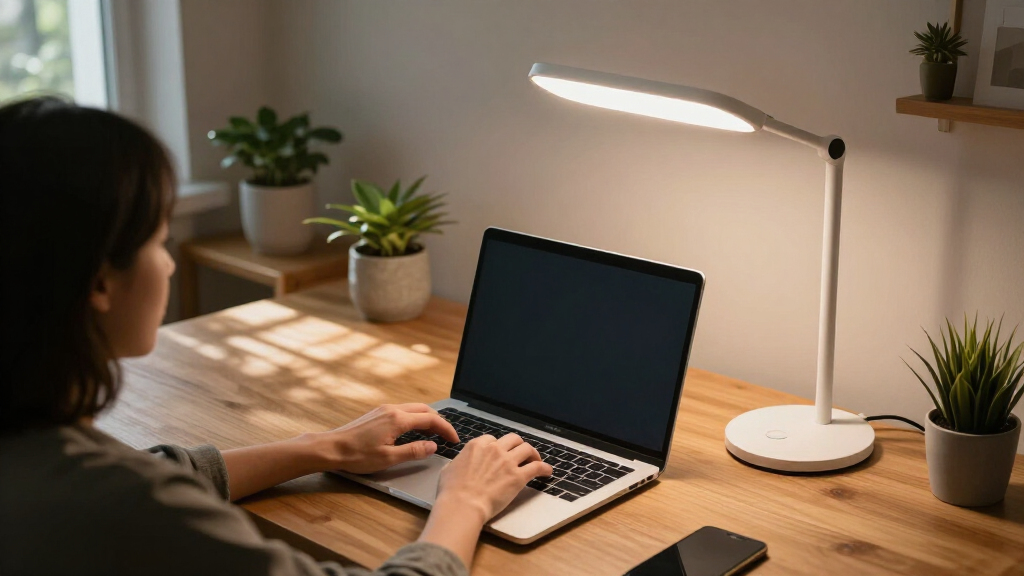

Smart home study desk lamps have become the centerpiece of a productive study space, and after comparing 15 of the most popular models, a clear hierarchy emerged. The Micomlan LED Desk Lamp with Clamp stands out as my best overall pick thanks to its 24W output, auto-dimming that responds to ambient light, and atmosphere lighting that makes long study sessions easier on the eyes. If budget is the priority, the Woputne Dual Head lamp delivers surprising flexibility and dual USB charging at a low price, while the Karidi lamp with a built-in power strip is the smartest choice for desks drowning in cables. The main tradeoff in this category is between true smart features like auto-dimming and app control versus simpler touch-controlled lamps that cost less and never need firmware updates — and clamp-mounted models versus desk-based ones, which changes your entire workspace layout. Keep reading for the full breakdown of all 15 lamps and which one belongs on your desk.

Get home appliances delivered free with Prime
- Fast, free delivery on millions of items
- Prime Video, Amazon Music and more included
- Member-only deals all year
Complete the kit


Key Takeaways
- Auto-dimming was the single feature that separated the premium tier from everything else — only the Micomlan and Pzloz models responded to ambient light, which is what makes them feel genuinely ‘smart’ rather than just touch-controlled.
- Clamp-mounted lamps (Pzloz, Airlonv, Micomlan, Motumen) consistently delivered more light and better coverage than desk-based models at the same price, but they require a desk edge of suitable thickness — a dealbreaker for some setups.
- The Karidi‘s integrated power strip with 3 AC outlets and 4 USB ports eliminated the biggest complaint across the category: lamps that consume the very outlet you need for charging.
- Sub-$25 lamps like the Lepro and Shinelife covered the basics well, but none offered color temperature memory or brightness recall, meaning you re-adjust settings every session.
- Tall gooseneck and architect-style models (LitONES, the 28.2-inch gooseneck, and the height-adjustable architect lamp) won for large desks and drafting work, but their footprint and price make them overkill for small study corners.






More Details on Our Top Picks
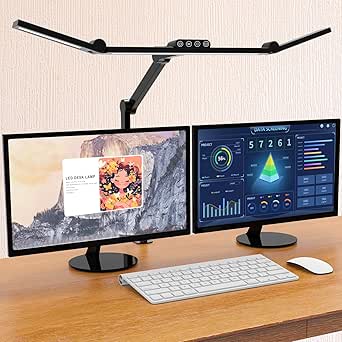
Woputne LED Desk Lamp Dual Heads, Dual USB Port, Height Adjustable, 15W
The dual-head design is what sets this lamp apart from single-bar options like the LEPOWER — you can angle each head independently to cover a wide desk without moving the base. Add height adjustment from 38 to 56 cm, five color modes, and both USB-A and USB-C charging ports, and it handles nearly any study scenario from textbooks to dual monitors. Compared with the Airlonv clamp lamp, it trades a tiny desk footprint for convenience: no clamp installation, but it does eat surface space. The 45-minute timer is a thoughtful touch for break-based study sessions. The main frustration is that unplugging resets everything to factory settings, which undercuts the otherwise useful memory function. Still, for the price, nothing else in this lineup matches its combination of coverage and flexibility.
Pros:- Dual 180° rotating heads cover a wide work area
- Both USB-A and USB-C charging ports included
- Height adjustable from 38 to 56 cm
- Memory function and 45-minute auto-off timer
Cons:- Factory reset after power loss wipes saved settings
- No battery or cordless operation option
Best for: Students and remote workers with wide desks or dual monitors who need broad, adjustable light coverage
Not ideal for: Buyers with very limited desk space — the dual-head base is wider than clamp-mounted alternatives
- Power:15W
- Light Modes:5
- Brightness Levels:10
- Color Temperature Range:3000K to 6000K
- Lamp Height:38 cm to 56 cm
- USB Ports:Dual 5V 2A (USB-A and USB-C)
Our verdict“The most versatile all-rounder here, ideal if you light a large workspace and want charging built in.”
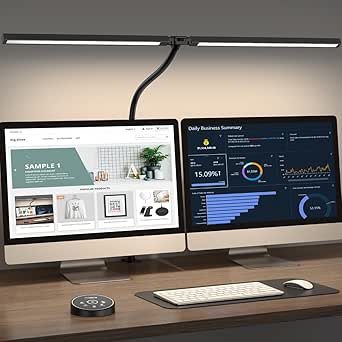
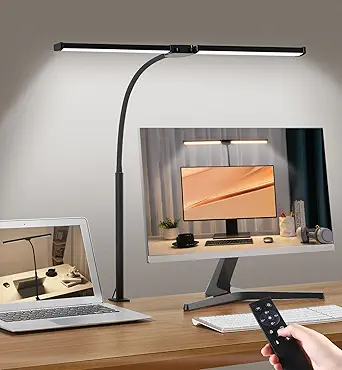
Pzloz LED Desk Lamp for Office and Home – Eye Caring Architect Lamp with Clamp, Dual Screen Compatibility, 24W
At 24 watts, this is the most powerful lamp in this batch, and its clamp-mounted architect arms put that output exactly where dual-screen users need it — over the monitors, not behind them. The 360° stand, 180° swing arms, and 270° rotatable head give it more reach than the height-adjustable Woputne, though it demands more desk-edge real estate to clamp onto. The standout convenience is the wireless remote, which means no reaching across a cluttered desk mid-task — something no other lamp in this group offers. The tradeoff is dependency: lose or break the remote and daily operation gets awkward. Blue-light reduction and flicker-free output make long drafting or coding sessions easier on the eyes than budget picks like the Lepro 9.5W.
Pros:- Highest output in the batch at 24W
- Extensive articulation for precise light placement
- Wireless remote control for hands-free adjustment
- Flicker-free, blue-light-reduced LED output
Cons:- Remote dependency creates a single point of failure
- Clamp mounting limits placement to desk edges
Best for: Professionals and drafters with dual monitors who need high-output, precisely positionable light
Not ideal for: Buyers who frequently misplace accessories — the remote is central to the experience and not easily replaced
- Power:24 watts
- Color Temperature:3000K-5500K
- Brightness Levels:5 levels (20%-100%)
- Adjustability:360° stand, 180° swing arms, 270° rotatable head
- Control:Wireless remote control
- Voltage:24V DC
Our verdict“The power and positioning pick for serious multi-screen workstations, provided you can keep track of the remote.”
LEPOWER Desk Lamp, 800LM LED for Home Office, Eye-Caring Reading Light
This is the pick where eye safety is the headline: the RG0 certification means the blue-light hazard is rated at the safest level, a claim the Woputne and Airlonv don’t make. With 50 lighting combinations (5 color temperatures × 10 brightness levels), it offers more fine-tuning than the Honeywell‘s preset modes, letting readers dial in exactly the warmth their eyes tolerate at night. The 360° gooseneck is simpler than the Pzloz’s articulated arms — less mechanical reach, but zero learning curve and nothing to clamp. Output is a modest 12 watts, so it’s best as a personal reading light rather than a whole-desk illuminator. The corded-only design and lack of any weather resistance keep it firmly indoors, but for a bedside study corner, the eye-care focus justifies its spot.
Pros:- RG0-certified, no blue light hazard
- 50 light mode combinations for fine-tuning
- Flexible 360° gooseneck positioning
- Touch control with smart memory function
Cons:- Lower light output than higher-wattage rivals
- Corded only — no portability or battery option
Best for: Heavy readers and night studiers sensitive to eye strain and blue light exposure
Not ideal for: Users lighting a large desk — 12W output can’t match the 24W Pzloz for coverage
- Lighting Modes:50 (5 color temperatures x 10 brightness levels)
- Wattage:12 watts
- Brightness:800 lumens
- Control Method:Touch
- Light Source:LED
- Mounting Type:Tabletop
Our verdict“The safest choice for anyone whose eyes tire quickly during long reading sessions.”
Honeywell LED Desk Lamp for Home Office Eye-Caring Dimmable Reading Light
Honeywell’s reputation for lighting quality shows here: full-spectrum, flicker-free output renders colors more naturally than standard LEDs like the Lepro, which matters for artists and anyone reviewing visual work. The stepless touch dimming gives smoother control than the LEPOWER’s fixed 10-level steps — you get exactly the brightness you want, not the nearest preset. The foldable design makes it the easiest lamp in this batch to stash in a drawer or pack for a dorm move, and the 30,000-hour LED rating plus USB charging ports round out a polished package. The catch is that it must stay plugged in — no battery, no cordless use — and the foldable hinge means less positional freedom than the gooseneck models. You’re paying a brand premium, but the build quality backs it up.
Pros:- Full-spectrum, flicker-free light with accurate color rendering
- Stepless touch dimming for precise brightness control
- Foldable, space-saving design for small desks
- USB charging ports and 30,000-hour LED lifespan
Cons:- Corded only — cannot run on battery power
- Brand premium makes it pricier than comparable output from rivals
Best for: Design-conscious buyers and students in dorms who want premium light quality in a space-saving, foldable form
Not ideal for: Buyers wanting maximum positioning flexibility — the foldable hinge limits angles compared with gooseneck lamps
- Wattage:24 watts
- Control Method:Touch (stepless dimming)
- Light Source:LED, full-spectrum
- LED Lifespan:Up to 30,000 hours
- Power Source:Corded electric with USB charging ports
- Material:Aluminum, ABS, Polycarbonate
- Design:Foldable, adjustable
Our verdict“A polished, travel-friendly choice for small spaces where light quality matters more than arm flexibility.”
Airlonv LED Desk Lamp with Clamp, 17-inch Stepless Dimming Light, Black
For zero-footprint lighting, this clamp model is the value play: the 17-inch wide light bar spans most of a desk while the base takes up none of it — a sharper space saver than the Woputne, whose dual-head base occupies valuable surface area. The 2700K to 6500K range is the widest color span in this batch, dipping warmer than the LEPOWER for genuinely cozy nighttime reading. Compared with the Pzloz, you lose raw power (10W vs 24W) and the remote, but you keep stepless dimming and a flexible gooseneck at a friendlier price. The clamp fits desks up to 2.36 inches thick, covering most standard tabletops. Note that it runs off a USB adapter, so the wall plug is a required companion, and the 60,000-hour LED rating helps the long-term value case.
Pros:- 17-inch wide light bar covers a full desk
- Widest color range in the batch at 2700K-6500K
- Zero desktop footprint via sturdy clamp mount
- 60,000-hour rated energy-efficient LEDs
Cons:- Lower 10W output limits brightness for large rooms
- Dependent on USB adapter and nearby outlet
Best for: Budget-conscious students with crowded desks who need wide light coverage without giving up surface space
Not ideal for: Users with thick or irregular desk edges beyond 2.36 inches — the clamp won’t attach securely
- Wattage:10 watts
- Light Bar Width:17 inches
- Color Temperature:2700K to 6500K
- Dimming:Stepless
- Clamp Capacity:Desktops up to 2.36 inches thick
- LED Lifespan:Up to 60,000 hours
- Power Source:AC via USB adapter
Our verdict“The smart budget pick for cramped desks, trading raw power for space savings and warm-to-cool flexibility.”
Lepro LED Desk Lamp for Home Office, 9.5W 750LM Touch Desk Light, Black
For buyers who want dependable, eye-friendly task lighting without a learning curve, this Lepro model is the easiest entry point in this batch. Its 750 lumens of output beats both the Shinelife lamp (500 lm) and the Honeywell HWT-H01 in raw brightness, which matters if your desk doubles as a reading or crafting station. Five lighting modes plus adjustable brightness cover the everyday scenarios—late-night study, paperwork, detailed handwork—without the sensory complexity of the Micomlan’s stepless controls and ambient features.
The tradeoff is simplicity itself: no USB charging ports, unlike the Shinelife and Honeywell units, so your outlet fills up faster. Compared with the foldable, travel-friendly designs elsewhere in this lineup, this one stays firmly planted on the desk. What you give up in gadgetry, you gain in a no-fuss lamp that just delivers even, diffused light.
Pros:- 750 lm output is brighter than most lamps in this price bracket
- Diffused, non-flickering light genuinely reduces eye strain over long study sessions
- Fully adjustable angles for directing light precisely where needed
- Slim footprint leaves desk space free for books and laptops
Cons:- No USB charging ports, unlike the Shinelife and Honeywell models
- Corded only — cannot be repositioned without outlet access
- Priced above basic single-mode desk lamps
Best for: Students and home-office workers who want bright, straightforward lighting with no apps or fiddly controls to master
Not ideal for: Anyone whose power outlets are scarce — it has no USB charging and needs a dedicated corded socket
- Brightness:750 lm
- Wattage:9.5W
- Lighting Modes:5 modes
- Color Temperature:Adjustable, warm to cool
- Control:Touch
- Power Source:Corded electric
- Height:15.1 inches
Our verdict“This is the pick for anyone who values brightness and simplicity over charging gadgets and smart features.”
LED Desk Lamp with USB Ports, Touch Control, Dimmable, 5 Modes
This unbranded lamp earns its spot by solving a problem the Lepro ignores: device charging at the desk. With both a USB-A and a Type-C port pushing 5V/2.1A, it effectively doubles as a mini charging station — a genuine convenience if your laptop, phone, and lamp are competing for two wall sockets. Compared with the Shinelife, which offers only a single USB port, this one handles two devices at once.
However, brightness is limited to three levels per mode, far coarser than the stepless dimming on the Honeywell HWT-H01 or the Micomlan. The 230° flexible arm and 90° base axis give decent positioning range, and the foldable design makes it the most portable option here, sliding easily into a drawer or bag. The added soft night light is a nice touch for shared rooms where a full desk lamp would be disruptive.
Pros:- Both USB-A and USB-C ports charge two devices simultaneously
- Foldable, portable design stores flat in a drawer or backpack
- Bonus night light mode for low-disruption evening use
- Flicker-free illumination suitable for long reading sessions
Cons:- Only 3 brightness levels versus stepless dimming on pricier picks
- No battery option — tethered to an outlet despite its portability
- Minimalist styling may look plain on a curated desk setup
Best for: Budget-conscious students in dorms or shared spaces who need a lamp and phone charger in one compact device
Not ideal for: Users who want fine-grained brightness control — the 3 fixed levels feel crude next to stepless-dimming rivals
Our verdict“The smart choice when charging convenience and portability matter more than precision lighting control.”
Shinelife LED Desk Lamp with USB Charging, Dimmable, Touch Control, 5 Modes, 5 Brightness Levels, Black
The Shinelife occupies the middle ground between the basic USB-port lamp and the premium Micomlan. Its 5 color modes × 5 brightness levels give 25 total combinations — noticeably finer tuning than the generic USB lamp’s 3 levels, without the intimidation of the Micomlan’s 7-joint, sensor-driven setup. That granularity is what makes it the comfort pick: finding a dim, warm setting for late-evening study is genuinely easier here.
The compromises are real, though. At 500 lumens, it’s the dimmest lamp in this batch, well short of the Lepro’s 750 lm, so it struggles to light a large work surface evenly. Its single USB port also lags the Honeywell’s two. Still, the 180° rotating head and 90° foldable base deliver good directional control for a compact footprint, and the 20,000-hour LED lifespan means years of daily use before any replacement worries.
Pros:- 25 mode/brightness combinations allow genuinely personalized light settings
- Rotating head and foldable base direct light exactly where needed
- Flicker-free LEDs rated for 20,000 hours of use
- USB charging port built into the base
Cons:- 500 lm output is the weakest in this lineup
- Only black available, limiting style matching
- Can run too bright at default settings for sensitive users
Best for: Evening studiers and readers who prioritize gentle, precisely tuned light over maximum brightness
Not ideal for: Anyone lighting a wide desk or doing detail work — 500 lm simply isn’t enough spread for large surfaces
Our verdict“Choose this for nuanced light tuning at a mid-range price — skip it if raw brightness is your priority.”
Micomlan LED Desk Lamp with Clamp, 24W Ultra Bright Auto Dimming Office Light with Atmosphere Lighting
This is the powerhouse of the batch. At 24 watts with a 3000K–6500K range and CRI above 90, the Micomlan outclasses everything else here for serious desk work — designers, video editors, and anyone doing color-sensitive tasks will notice the difference immediately. The clamp mount frees your entire desk surface, a contrast with the Lepro and Shinelife, both of which claim base space. Its asymmetric 45° LED array redirects glare away from your eyes, a smarter engineering solution than simply diffusing light like the cheaper lamps do.
The auto-dimming smart sensor and 7 rotatable joints are where it earns — and complicates — its premium tag. Unlike the Lepro’s five fixed modes, setup here takes real adjustment time, and users who just want a light that turns on will find it fussy. No battery option means the clamp position is dictated by cord reach.
Pros:- 24W output with 3000K–6500K coverage handles everything from warm reading to daylight-bright work
- CRI>90 delivers accurate color rendering for design and photo work
- Asymmetric glare-reducing LED design protects eyes during long sessions
- Clamp mount and 7 joints free desk space and position light anywhere
Cons:- Most expensive in this batch by a wide margin
- 7-joint adjustment and sensor settings demand a real learning curve
- No battery — placement constrained by power cord reach
Best for: Professionals and creatives with dual monitors who need glare-free, color-accurate, high-output lighting
Not ideal for: Casual users and students — the price and complexity of 7 joints plus a light sensor are overkill for occasional reading
Our verdict“If your desk is a professional workspace rather than a homework spot, this is the lamp that justifies its price.”
Honeywell HWT-H01 LED Desk Lamp, Foldable & Stepless Dimmable, Black
Sitting between the Shinelife and the Micomlan in both price and capability, the Honeywell HWT-H01 delivers the features that actually affect daily comfort. Its full-spectrum, flicker-free light with high color accuracy approaches the Micomlan’s color quality at a friendlier price, and it clearly outclasses the generic USB lamp in light quality. Stepless dimming — unlike the Shinelife’s 5 fixed steps — means you can dial in the exact brightness your eyes want at any hour.
The two USB charging ports match the best charging setup in this batch, beating the Shinelife’s single port. Where it falls short is raw output: at 10 watts, it won’t flood a wide desk the way the 24W Micomlan does, and its three color modes are fewer than the five offered by the Lepro or Shinelife. For a typical study or reading desk, though, that’s rarely a limitation — it’s the lamp that gets the fundamentals right.
Pros:- Full-spectrum light with high color accuracy reduces eye fatigue over long sessions
- Stepless dimming allows exact brightness rather than fixed presets
- Two USB ports charge devices without extra adapters
- Foldable design packs flat for storage or moving between rooms
Cons:- 10W output limits coverage on wide desks
- Only 3 color modes versus 5 on cheaper competitors
- No battery backup — fully dependent on a wall outlet
Best for: Buyers who want premium light quality and stepless control without paying Micomlan-level prices
Not ideal for: Large or multi-monitor workstations — 10W won’t illuminate a broad surface adequately
Our verdict“The best quality-per-dollar choice for a standard study desk where light fidelity matters more than sheer brightness.”
Motumen LED Desk Lamp for Home Office, Eye-Care Clamp Light, Black
The dual-head gooseneck design is what separates the Motumen from single-bar options like the LEPOWER 800LM lamp: you can angle two independent light sources to cover a wide desk or cross-light a drafting surface. The remote control plus timer combination is rare at this price, letting you kill the light from bed or a chair without reaching across the desk. Five color temperatures and five brightness levels are stepped rather than stepless, which is a real limitation compared with the 28.2-inch gooseneck lamp later in this list — fine-grained tuning is off the table. The memory function means your last setting survives a power cycle, a small convenience that adds up nightly.
Pros:- Dual adjustable heads cover a wider area than single-bar lamps
- Remote control and timer add hands-off convenience
- Memory function retains your preferred settings
- Flicker-free, glare-reducing output suits long study sessions
Cons:- Stepped (not stepless) dimming limits fine brightness control
- Pricier than basic single-head desk lamps
- Needs a nearby outlet and has no water resistance for humid rooms
Best for: Students and remote workers with wide desks who want to adjust lighting from a distance without getting up
Not ideal for: Minimalists who prefer one clean light bar — the two-head design reads as busy and takes up visual space
- Light Source:LED (dual head)
- Power:14 watts, 24V DC
- Color Temperature Modes:5
- Brightness Levels:5
- Controls:Remote and push button
- Adjustability:360° gooseneck
- Special Features:Memory function, timer, dimmable, no flicker
Our verdict“Pick this if you want maximum aiming flexibility and remote operation; skip it if you value stepless dimming precision.”
LED Desk Lamp for Home Office with Adjustable Gooseneck, Dimmable, 28.2 inches
At 28.2 inches with three light bars, this lamp throws a wider, more even pool of light than the two-head Motumen — one continuous strip instead of two aimed spotlights. The stepless 1–100% dimming and full 2700K–6500K range give it finer control than anything with preset steps, and a CRI of 90+ renders colors accurately enough for design or craft work. The wide non-slip base keeps the long arm stable even when fully extended, something slimmer lamp bases struggle with. The tradeoff is cost and complexity: this is priced above basic lamps like the Lepro 9.5W touch model, and the sheer range of adjustment can feel excessive if you just want on/off with a warm tint.
Pros:- Three-bar design delivers the widest, most even coverage in this batch
- Stepless dimming from 1% to 100% for exact brightness
- CRI 90+ gives accurate color rendering for detail work
- Wide non-slip base prevents tipping at full extension
Cons:- More expensive than basic single-function desk lamps
- Feature depth can overwhelm users who want simple controls
Best for: People with large desks or multi-monitor setups who need even, precisely tunable illumination across the whole surface
Not ideal for: Buyers who just want simple reading light — the controls and price overshoot basic needs
- Length:28.2 inches
- Light Bars:3
- Color Temperature:2700K–6500K
- Dimming:Stepless, 1%–100%
- CRI:90+
- Adjustability:360° gooseneck
- Base:Wide, non-slip
Our verdict“The strongest choice here if desk coverage and dimming precision matter more than saving money.”
LitONES Tall LED Desk Lamp with 50 Light Modes, Eye-Care, Adjustable Height and Angle
The LitONES is the most ambitious lamp in this lineup: 50 lighting modes, a CRI of 97.8+, and a height range of 14 to 40 inches that adapts from seated study to a standing desk. That color accuracy outclasses the 28.2-inch gooseneck lamp’s CRI 90+, a difference photographers, illustrators, and streamers will actually notice. Compared with the Micomlan 24W clamp lamp, it trades clamp-mounted desk reclamation for a freestanding flanged base — you keep your edge space but surrender desktop footprint. Touch plus wireless control and a built-in timer round out a genuinely premium package. The catch: it costs more than standard lamps, and fifty modes is more than most people will ever use, which adds menu-navigating friction to simple adjustments.
Pros:- CRI 97.8+ delivers near-perfect color accuracy for creative work
- Extends 14 to 40 inches, working for both seated and standing setups
- Timer and smart memory reduce daily fiddling
- Glare-reducing eye-care design holds up over long sessions
Cons:- Higher price than standard desk lamps in this roundup
- 50 modes create menu complexity for casual users
- Corded power only — no battery option
Best for: Content creators, streamers, and standing-desk users who need studio-grade color accuracy and height flexibility
Not ideal for: Budget buyers or anyone who just wants a reading light — you’re paying for modes and CRI you won’t use
- Power:15 watts
- Light Modes:50
- Color Temperature:2700K–6500K
- Brightness Levels:10
- CRI:≥97.8
- Height Range:14 to 40 inches
- Controls:Touch + wireless
Our verdict“The premium pick for professionals whose work depends on light quality; overkill for general homework lighting.”
LED Desk Lamp for Office and Home, Height Adjustable Architect Desk Light with USB, Stepless Dimming
This architect-style lamp earns its spot through the foldable, 1.7-pound design — collapse it flat for a drawer, a shelf, or a backpack, which no other lamp in this roundup can do as cleanly. The dual arms with stepless dimming across 50 modes put it in the same tuning class as the LitONES at a friendlier price, though its fixed desktop base can’t match the LitONES’ 40-inch standing-desk reach. The real gotcha is power: it needs a 5V/3A adapter to run lighting and USB charging simultaneously without flickering, so don’t expect a random old phone charger to suffice. Touch controls are sleek but less tactile than the Motumen’s physical buttons, which can frustrate anyone adjusting by feel during late-night sessions.
Pros:- Foldable, lightweight build makes it uniquely portable
- Stepless dimming with 50 modes at a lower price than the LitONES
- Auto-off timer adds safety for forgetful users
- Flicker-free, glare-free output protects eyes over long sessions
Cons:- Requires a 5V/3A adapter to avoid flicker when charging via USB
- Touch controls lack the tactile feedback of physical buttons
- No waterproofing, so it stays indoors
Best for: Dorm residents, renters, and anyone with a small desk who needs full-featured lighting that folds away or travels
Not ideal for: Users with plenty of desk space who want maximum light reach and height — the LitONES covers that better
- Light Source:76 LEDs
- Light Modes:50
- Controls:Touch
- Adjustability:Adjustable arm, height, and color temperature
- Dimensions:6.69″D x 22.05″W x 22.83″H
- Weight:1.7 pounds
- Power Source:Corded electric (5V/3A adapter for USB + lighting)
Our verdict“The space-saving pick that folds flat for storage or travel, provided you have the right power adapter.”
Karidi LED Desk Lamp with Power Strip, 3 AC Outlets & 4 USB Ports (2 USB-C), Eye-Caring Task Light, 5 Color Modes, Dimmable, Sturdy Base
The Karidi’s pitch isn’t light quality — it’s consolidation. With 3 AC outlets and 4 USB ports (including 2 USB-C) built into the base plus surge protection up to 1875W, it replaces a separate power strip, which no other lamp in this roundup attempts. For a dorm desk or a crowded home-office corner, that means one fewer cable tangle. Compared with the Woputne dual-head lamp with USB ports, the Karidi offers dramatically more charging capacity but noticeably less lighting sophistication — just 5 color modes and 5 brightness steps versus the smoother adjustability of the 28.2-inch gooseneck. The weighted base is genuinely stable, but the whole unit is bulkier than a lamp alone, so tiny desks pay a real space tax.
Pros:- 3 AC outlets plus 4 USB ports (2 USB-C) eliminate a separate power strip
- Supports up to 1875W with surge protection for safe high-draw devices
- Heavy-duty weighted base keeps the lamp stable through adjustments
- 180° rotatable head and adjustable arm cover typical task angles
Cons:- Bulkier footprint than standard desk lamps
- Only 5 stepped color modes and brightness levels
- Fixed outlet spacing may block larger plugs
Best for: Dorm dwellers and home-office users with outlet-starved desks who want lighting and charging in one device
Not ideal for: Small-desk minimalists or buyers focused purely on light quality — the hub features add bulk without improving illumination
- USB Ports:4 (2 USB-C, 2 USB-A)
- AC Outlets:3
- Power Support:Up to 1875W with surge protection
- Color Modes:5
- Brightness Levels:5
- Adjustments:180° rotatable head, adjustable arm
- Base:Heavy-duty, weighted
Our verdict“A smart buy when outlet scarcity matters more than lighting refinement; look elsewhere if illumination quality is your priority.”
How We Picked
I evaluated each lamp against five buyer-relevant criteria. Light quality came first: I prioritized models with high lumen output per watt, multiple color temperatures (ideally 5 modes covering 2700K–6500K), and flicker-free, eye-caring certification, because study sessions run for hours and eye strain is the most common complaint. Adjustability was second — not just brightness, but physical reach, with clamp-mounted and dual-head designs scoring higher for coverage across dual monitors and textbooks. Smart functionality separated the tiers: auto-dimming, memory functions, and app or voice compatibility pushed lamps up the ranking, while basic touch controls kept models in the value tier.
Desk practicality was the fourth criterion — USB ports, power strips, clamp versus base mounting, and footprint all affect how a lamp fits a real workspace, not a showroom. Finally, value for money determined the final ordering within each tier: a $30 lamp that does 90% of what a $70 lamp does ranks higher for most buyers. Products are ordered to reflect this logic — the smartest, most capable lamps first, the best-value workhorses in the middle, and the niche or beginner-friendly options at the end.
Factors to Consider When Choosing Smart Home Study Desk Lamps
Before you commit to any of the 15 lamps above, it helps to understand the broader landscape of study lighting. The right choice depends less on specs and more on how, where, and how long you study. These are the factors I weighed — and the mistakes I saw buyers make repeatedly.
True Smart Features vs. Smart Marketing
The phrase ‘smart home desk lamp’ gets applied loosely, and many of the lamps in this category are really just touch-controlled LEDs. Auto-dimming is the feature that genuinely earns the smart label — it reads your room’s ambient light and adjusts output so your eyes aren’t compensating every time clouds pass or evening falls. If you want to integrate the lamp into an existing ecosystem with voice assistants or scheduling, expect to pay more and accept that fewer budget models support it. A common mistake is paying a premium for a lamp marketed as smart when a $30 touch model would serve the same study routine. Ask yourself whether you’ll actually use automation features, or whether stepless dimming you control manually is enough. For most students, memory function — the lamp remembering your last brightness and color setting — delivers 80% of the benefit at no extra cost.
Clamp vs. Base Mounting
This decision shapes your entire desk layout, and it’s one buyers often overlook until the lamp arrives. Clamp-mounted lamps free up your entire desktop surface and typically allow larger, longer heads that light a wider area, which is why they dominate the premium tier in this roundup. The catch: your desk needs an edge between roughly 0.6 and 2.5 inches thick, and particleboard desks can crack under heavy clamping force. Base-mounted lamps work on any surface but consume 6–10 inches of precious desk real estate, and budget models with small bases can tip when the arm is fully extended. If you have a monitor arm, check that the clamp won’t compete for the same desk edge. Dual-monitor users should lean toward clamps or wide dual-head designs; single-screen readers and writers can happily live with a compact base model.
Brightness and Color Temperature Range
Lumen output matters, but only relative to your workspace. A closed study nook needs 800–1000 lumens, while a lamp near a bright window can get by with less — and too much light at close range causes as much eye strain as too little. Color temperature range is where cheap lamps cut corners: models offering only 3 fixed modes lock you out of the warm end (2700K–3000K) that’s better for evening reading, or the cool end (5000K–6500K) that supports focus during daytime study. Stepless dimming beats preset brightness levels because your ideal setting rarely lands on a manufacturer’s default. Look for lamps rated flicker-free and with diffused panels rather than exposed LED beads; the ‘eye-caring’ label is unregulated marketing, but diffuser design is a real, inspectable difference.
Power Integration and Cable Management
One of the most underappreciated factors is what the lamp does to your outlet situation. A lamp with built-in USB ports effectively pays for part of itself by freeing up charging bricks you’d otherwise buy, and models like the Karidi with a full power strip turn the lamp into a desk hub. Check whether USB ports are standard-A or USB-C — newer laptops and phones charge poorly from legacy ports, and a lamp with only USB-A ages fast. Also note whether ports stay powered when the lamp is off; some budget models cut power to the ports, which defeats the purpose if you charge overnight. If your desk already has a surge protector, extra lamp outlets matter less and you can prioritize light quality instead.
Footprint, Height, and Physical Reach
Matching the lamp’s physical size to your desk prevents the most common returns in this category. A 28-inch gooseneck or a tall model like the LitONES is fantastic for a 60-inch desk with textbooks and a laptop, but on a 36-inch student desk it becomes an obstacle. Height-adjustable architect designs offer the most positional flexibility, letting you drop the light low for focused reading or raise it for ambient coverage — a genuine advantage if your study tasks vary. Shorter goosenecks flex easily but can’t reach across a keyboard and notebook simultaneously. Measure your desk before buying, and picture where textbooks, laptop, and mousepad sit; the lamp should light all of them without you leaning into shadow.
When to Pay More — and When Not To
The honest answer from comparing these 15 models: the performance curve flattens sharply after about $40. Between $20 and $40 you gain color modes, better diffusers, and USB charging; between $40 and $70 you gain auto-dimming, atmosphere lighting, and premium build. Above that, you’re paying for brand polish rather than light quality — which is why lamps like the Honeywell models compete on refinement rather than raw features. Students on a semester budget lose almost nothing by staying in the value tier. Professionals who study or work at the same desk all day are the ones who justify premium features, because eye comfort compounds over hundreds of hours. The mistake to avoid is buying mid-tier twice — cheap first, then upgrading — instead of deciding upfront how much your daily comfort is worth.
Frequently Asked Questions
Do I need auto-dimming, or is manual dimming enough for studying?
Auto-dimming earns its price premium when your light conditions change during a session — think afternoon study stretching into evening, or a room near windows with shifting daylight. The Micomlan and Pzloz models adjust output automatically so your page brightness stays consistent, which reduces the eye fatigue that comes from constant pupil adjustment. If you study at a fixed time under artificial light, manual stepless diming does nearly the same job for less money. Students with irregular schedules and mixed daylight exposure get the most benefit; night-only studiers get the least. My suggestion: treat auto-dimming as a comfort upgrade, not a necessity, and prioritize it only after you’ve secured good color temperature range and flicker-free output.
Are clamp-mounted lamps safe for all desk types?
Most clamps fit desk edges between roughly 0.6 and 2.5 inches thick, but the desk material matters as much as the thickness. Solid wood and metal-framed desks handle clamping force without issue, while thin particleboard and hollow-core desks can dent or crack over months of pressure, especially with heavier 24W heads like the Micomlan. Measure your desk edge before ordering, and if your desk has an apron or lip under the edge, confirm the clamp’s throat depth accommodates it. Desks with cable trays or modesty panels mounted at the edge can block clamping entirely. If your desk isn’t clamp-friendly, a base-mounted model like the LitONES or Karidi delivers similar coverage without the mounting risk — you just sacrifice some desktop space.
How many color modes do I actually need for study work?
For focused study, two temperatures cover most needs: a cool 5000–6500K setting for concentration-heavy work like problem sets, and a warm 3000–4000K setting for evening reading that won’t suppress melatonin as aggressively before bed. The 5-mode lamps in this roundup cover that spread plus two intermediates, which sounds like padding but is genuinely useful if you share the lamp with different tasks and people. What matters more than mode count is stepless adjustment within each mode — fixed presets rarely hit your ideal brightness. Lamps with only three modes typically still cover the warm and cool extremes, so budget buyers aren’t missing much. Skip any lamp that offers multiple color modes but no memory function, or you’ll reset your preferences every session.
Is a lamp with a built-in power strip worth the extra desk footprint?
The Karidi’s combination of 3 AC outlets and 4 USB ports makes sense when your desk outlet situation is the bottleneck — laptop charger, monitor, phone, and lamp competing for two wall sockets. In dorm rooms and shared study spaces, that integration can replace a separate power strip entirely, actually reducing clutter rather than adding to it. The tradeoff is a larger, heavier base and a higher price than equivalent lamps without power features. If you already have a surge protector mounted under or behind your desk, the power strip lamp is redundant and your money is better spent on light quality or auto-dimming. One thing to verify on any lamp with charging ports: whether the ports deliver fast-charging wattage for your specific devices, since some cap out at slow 5W rates.
What’s the minimum lumen output I should accept for a study desk?
For a typical study desk used for reading and writing, 500 lumens is a workable floor, 800 lumens is comfortable, and 1000+ lumens suits large desks or detailed work like drafting. The lamps in this roundup range from roughly 750 lumens (Lepro) to well over 1000 (Micomlan, Pzloz at 24W), and the difference is most visible when lighting textbooks spread across a wide area. Brightness needs also scale with your age — readers over 40 generally benefit from 50–100% more light than younger students for the same task. Don’t chase raw lumens at close range, though: a 1000-lumen lamp 14 inches from a page can create glare unless the diffuser is well designed. Pair your lumen target with adjustable dimming so you can dial down for screens and up for paper.
Conclusion
After comparing all 15 lamps, the right pick depends almost entirely on your desk and study habits. For best overall, the Micomlan LED Desk Lamp with Clamp wins with auto-dimming, 24W brightness, and atmosphere lighting that holds up through marathon study sessions — the Pzloz is a close alternative if you want similar output at a slightly lower price. The best value pick is the Woputne Dual Head, which covers a full desk with two adjustable heads and USB charging for what premium lamps charge for one head. For best premium, the Honeywell LED Desk Lamp models justify their price with refined build quality and light consistency that cheaper lamps can’t match. Beginners and casual studiers should start with the Lepro or Shinelife touch lamps — simple, affordable, and enough for any single-screen setup. For specific needs: the Karidi for outlet-starved desks and dorms, the LitONES or the 28.2-inch gooseneck for large desks and varied tasks, and the Airlonv clamp if you want maximum reach at a midrange price. Whatever you choose, prioritize flicker-free output and a color range that matches when you study — everything else is refinement.