TL;DR

Get home appliances delivered free with Prime
- Fast, free delivery on millions of items
- Prime Video, Amazon Music and more included
- Member-only deals all year
A wired video doorbell uses your door’s electrical wiring for power, while Wi-Fi usually carries video and alerts to your phone. Before choosing one, check transformer requirements, chime compatibility, Wi-Fi strength, video coverage, storage terms, and privacy controls. If you are replacing a Ring Video Doorbell Wired with Floodlight Cam Wired Plus, compare current alternatives feature by feature and confirm compatibility with your home before buying.
A wired video doorbell can stay powered at your front door without the routine of taking a battery inside to charge. But that wire does not guarantee a strong Wi-Fi signal, continuous recording, or compatibility with the chime already mounted in your hallway. Those details decide whether the doorbell feels seamless or becomes another gadget you have to troubleshoot.
This guide explains what a wired video doorbell does, which specifications matter in everyday use, and how to compare replacement models if you are looking beyond the Ring Video Doorbell Wired with Floodlight Cam Wired Plus. You’ll learn how to check your transformer and chime, read camera specs in context, think through storage and privacy, and handle installation safely. The goal is simple: choose a doorbell that fits your entryway and your habits, not just one with an impressive number on the box.
“Wired” usually means power comes from the doorbell circuit; Wi-Fi still carries remote video and alerts.
Check transformer requirements and mechanical or digital chime compatibility for the exact model before buying.
Compare camera resolution alongside field of view, low-light performance, lighting conditions, and mounting angle.
Confirm whether recordings are event-based or continuous, where they are stored, how long they remain, and which features need a subscription.
Aim the camera at your entrance, test Wi-Fi and alerts at the door, and use a qualified professional for unfamiliar or unsuitable wiring.
What a wired video doorbell does—and what “wired” leaves out
A wired video doorbell combines a camera, doorbell button, microphone, speaker, and network connection in one entryway device, drawing power from electrical wiring at the door. Most models use Wi-Fi for video and alerts, so “wired” describes the power source, not a wired internet connection. It may also ring an indoor chime, depending on the model and your home’s circuit.[1]
In practice, a visitor presses the button, the doorbell sends a notification to your phone, and you can open a live view or speak through the speaker. Motion can trigger an alert or recording too. Imagine you’re upstairs when a delivery driver leaves a parcel: you can check the camera, tell them where to place it, and review a saved clip later if your model and storage plan support that feature.
That convenience has limits. A doorbell with power but weak Wi-Fi may send late notifications or struggle to load live video. A cloud-based model may also depend on the maker’s service and an internet connection. A useful way to define “wired” is this: the cable keeps the doorbell powered; it does not, by itself, keep it online or decide what gets recorded.
Wiring can spare you routine battery charging, but it does not guarantee continuous recording. Many models save short clips when someone presses the button or motion is detected, while continuous recording depends on the particular device, power arrangement, storage, and plan. If you want a record of every moment, check that capability directly instead of inferring it from the power connection.
Products Worth Considering

Bose SoundLink Plus Portable Bluetooth Speaker, Black

Logitech MX Mechanical Wireless Illuminated Keyboard, Tactile Quiet, Graphite

Samsung Galaxy Tab A11 Wi-Fi Tablet, 8.7-Inch, 64GB, 4GB RAM, Gray (SM-X133, International Version)
As an affiliate, we earn on qualifying purchases.
Check your transformer and chime before you choose a model
A wired video doorbell needs an electrical supply that meets the manufacturer’s voltage and transformer requirements, and it may need a compatible chime or adapter. Before you buy, check the model’s installation guide against your existing circuit and chime type. Older doorbell systems can have an underpowered transformer, and “it rang the old chime” does not prove that the new camera will receive enough power.[1]
For example, say your current bell works, but its transformer was installed decades ago and the new doorbell repeatedly disconnects or restarts. The fault might not be the camera: the transformer, chime wiring, or a required bypass module could be the issue. Mechanical chimes use a physical striker; digital chimes use electronics, so their compatibility needs can differ. A supplied chime adapter may be part of the installation, but instructions vary by product.
Put the manufacturer’s wiring requirements next to the details you can confirm about your home. Check whether the doorbell supports your transformer, whether it can use the existing indoor chime, and whether it needs an adapter. If the information is unclear, contact the manufacturer or a qualified installer before ordering. That small check can save you from pulling off an attractive new unit only to discover the circuit needs work.
Safety first: Turn off power at the breaker before handling doorbell wiring, follow the product instructions, and use appropriate PPE. If you cannot identify the circuit or transformer, or the work involves unfamiliar wiring, get a qualified professional. Do not treat electrical requirements or local codes as optional.
A typical low-voltage doorbell circuit is different from working on mains wiring, but it still connects to an electrical system. If an installation calls for a transformer upgrade or touches wiring you are not trained to handle, let a licensed professional do that work. The best doorbell choice is one your home can safely support.
Compare video coverage, not just resolution numbers
Video resolution tells you how many pixels the camera records, but useful coverage also depends on field of view, lighting, camera angle, and what you need to see. A 2K label alone cannot tell you whether you’ll spot a face at night or see a parcel on the ground. Compare resolution and field of view together, then consider HDR or backlight handling and night performance for your doorway.[1]
Think about a visitor standing close to the door, a child arriving after school, or a package tucked beside a step. A wide horizontal view may show more of the porch, while vertical coverage can help capture a person from head to parcel level. Yet the camera can have a broad view and still miss a low parcel if it points too high. The mounting angle matters as much as the specification sheet.
Different products make different tradeoffs. The supplied comparison lists the Google Nest Doorbell (Wired, 3rd Gen) at 2000 HDR with a stated 166-degree field of view, while the Ring Wired Doorbell 2K – Retinal lists 2K video, 6x enhanced zoom, and 140-degree horizontal by 140-degree vertical coverage. The Ring Wired Doorbell Plus (2nd Gen) lists 140 by 140 degrees, but its supplied comparison does not specify video resolution. Treat these as model-specific claims to verify on current manufacturer pages, not as a complete measure of image quality.
Picture a north-facing porch where bright afternoon light spills behind a visitor. In that scenario, HDR and exposure handling may matter more than a jump in resolution because a blown-out face is hard to identify at any pixel count. At night, look for stated night-vision or low-light features, but also consider porch lighting and reflections from glass or pale walls. Choose the view that answers your real question: who is here, and what did they leave?
Use this table to compare replacement candidates
If you are replacing a Ring Video Doorbell Wired with Floodlight Cam Wired Plus, compare the closest available candidates on the features that matter to your entryway. The supplied specifications show several alternatives with overlapping dimensions, connectivity, field of view, or video claims, but each model leaves some details unspecified. Treat the table as a shortlist for further checking, not as a guarantee that a particular product is available or compatible with your house.
| Candidate | Supplied video and view details | Power and connection details | Useful follow-up check |
|---|---|---|---|
| Ring Wired Doorbell Plus (2nd Gen) | 140° × 140° field of view; low-light sight with adaptive night vision | Wi-Fi 6, dual-band 2.4/5 GHz; dimensions listed as 2.11 × 1.18 × 5.22 inches | Confirm resolution, power requirements, chime support, and current features |
| Google Nest Doorbell (Wired, 3rd Gen) | 2000 HDR; 166° field of view; night vision listed | Wired electric; dimensions listed as 5.16 × 1.65 × 1.14 inches | Confirm transformer and chime compatibility, storage terms, and platform support |
| Ring Wired Doorbell 2K – Retinal | 2K video, 6x enhanced zoom; 140° × 140° field of view | WiFi 4, single-band 2.4 GHz; dimensions listed as 2.1 × 5.2 × 1.02 inches | Check wiring, chime support, and whether your Wi-Fi reaches the door |
| Wyze Video Doorbell v2 | 2K video; field of view not specified in the supplied comparison | Corded electric; Wi-Fi and Bluetooth; dimensions listed as 2.9 × 1.4 × 4.7 inches | Confirm exact wiring and chime requirements, storage options, and current model status |
The table shows why a simple “best replacement” label can mislead. If your priority is a broad view, compare the listed angles and the camera’s actual mounting position. If you need to match a narrow space beside a storm door, dimensions and wall-mount clearance may decide the fit before video features do.
For instance, a household with a 2.4 GHz-only router near the front hall may care less about dual-band Wi-Fi than about reliable signal at the porch. Another household may already use a particular smart-home platform and prefer a model that works well with its display and app. Verify current manufacturer documentation for each candidate, including features and terms that may change over time. Model names and specifications can be revised, so use the exact generation and regional version when you compare.
Test Wi-Fi at the door before blaming the camera
A wired video doorbell can still go offline if the Wi-Fi signal at the front door is weak, because wiring usually supplies power while Wi-Fi carries the remote video and notifications. Check the network where the doorbell will sit, not just beside your router. Slow alerts, failed live views, or clips that stop loading can come from connectivity problems even when the doorbell has steady power.[1]
Suppose your router sits at the back of a long house, separated from the entry by brick walls. Your phone may show Wi-Fi in the living room, while the doorbell struggles on the porch. Test with your phone near the intended mounting spot, ideally with the door closed; then check the manufacturer’s signal guidance. A phone test is a useful clue, not a perfect measurement, because devices have different antennas.
Band support matters too. The supplied comparison lists the Ring Wired Doorbell Plus (2nd Gen) as Wi-Fi 6 with 2.4 GHz and 5 GHz support, while the Ring Wired Doorbell 2K – Retinal uses WiFi 4 on 2.4 GHz. The Google Nest model’s supplied entry simply says Wi-Fi. Those distinctions can help you form questions, but they do not tell you how strong the signal will be at your actual door or whether your router settings are compatible.
If a weak signal is likely, consider router placement or a suitable access point before installation. A mesh node near the entry may help, though walls and outdoor placement can still affect performance. For example, moving a node from a basement office to the hallway can turn delayed alerts into timely ones. Make one change at a time and check live video again so you can tell what improved the connection.
Know what gets recorded and what a subscription includes
A wired video doorbell does not automatically record every second. Many models save short clips after a button press or motion event; continuous recording, longer video history, and advanced detection depend on the specific device, storage setup, and service plan. Check whether footage is stored locally, in the cloud, or both, how long it remains available, and whether you can download or delete it.[1]
Imagine a delivery arrives while you are on a call and you only see the alert ten minutes later. With event-based recording, you might review the arrival clip if the plan retains it. Without recording—or if the clip has expired—you may only see a live feed after the driver has left. That difference is practical: choose a retention period that fits how often you check alerts and how useful past footage would be to your household.
Subscription terms vary, and product features can change. Some brands keep basic alerts or live viewing available without a paid plan, while others reserve longer history, richer detection, or continuous recording for subscribers. Do not assume that “wired” means subscription-free, and do not assume that a feature advertised today is part of every plan or region. Read the current terms for the exact model before you buy.
Make a short list of what you actually need: live view, motion clips, person or package detection, or a longer archive. Then compare which functions work without a subscription and what happens when a trial ends. A household that only wants to screen visitors may be comfortable with live view and basic alerts. Someone who wants to review a parcel theft several days later may care much more about retention and download access.
Tune motion alerts so every passing car doesn’t buzz your phone
Useful motion detection focuses on the space you care about, such as your steps and package drop-off area, instead of alerting you about everything in view. Look for adjustable motion zones, sensitivity controls, person detection, and options to reduce alerts from passing traffic. These features vary by model, so confirm what the specific doorbell supports and whether any advanced detection requires a plan.[1]
Consider a front door that faces a busy sidewalk. With a broad default zone, each stroller, dog walker, and headlight could trigger an alert. Narrowing the zone to the path and porch may reduce noise, while a sensitivity adjustment can stop distant movement from dominating your notifications. If a courier tends to leave parcels on a side bench, make sure that area remains inside the detection zone.
Think of motion settings like aiming a flashlight: point it at the doorstep, and you can see the details you need; sweep it across the whole street, and you mostly collect distractions. Still, tighter zones create tradeoffs. If someone approaches from the side or leaves a package outside the selected area, you could miss the event. Start with a zone wide enough to catch the approach and delivery, then adjust it after you see how the porch behaves over several days.
Try the settings during different conditions. A sunny afternoon, a windy evening with moving branches, and a dark night can produce very different alerts. For example, if a bush sways into view and repeatedly triggers motion, change the zone or camera angle before turning sensitivity so low that a visitor walking up the steps goes unnoticed. The best configuration gives you fewer irrelevant pings without hiding the activity you installed the camera to see.
Protect your privacy while keeping the doorstep in view
A video doorbell should capture the entrance you need to monitor while collecting as little unrelated footage as practical. Aim it at your door and package area, review account protections and sharing controls, and check how recordings can be retained, downloaded, or deleted. Camera privacy rules vary by location, so check local law and building rules before recording shared spaces or neighboring property.[1]
For example, a doorbell mounted beside an apartment entrance may show a shared corridor every time a neighbor leaves home. A small change in angle or an available privacy mask could limit that view while still showing visitors at your own threshold. In a detached home, the lens may catch a neighbor’s window or public walkway; re-aiming the camera or restricting the motion zone can reduce unnecessary capture.
Privacy also depends on who can access the feed. Use a strong, unique account password and available multi-factor authentication. Review household sharing so former residents or temporary guests do not retain access, and check the brand’s security and encryption statements rather than relying on assumptions. If the app lets you download or delete clips, learn where those controls live before an incident makes you search in a hurry.
Camera placement can be a compromise between a useful view and a narrow one. A low angle may capture parcels clearly but include more of a shared path; a high angle may protect the view from tampering but miss faces. Walk through the intended view from the camera’s position, then check the live preview. A privacy-conscious setup is one you can explain to a visitor: it watches the threshold, not the whole neighborhood.
Install safely and check the view before calling the job finished
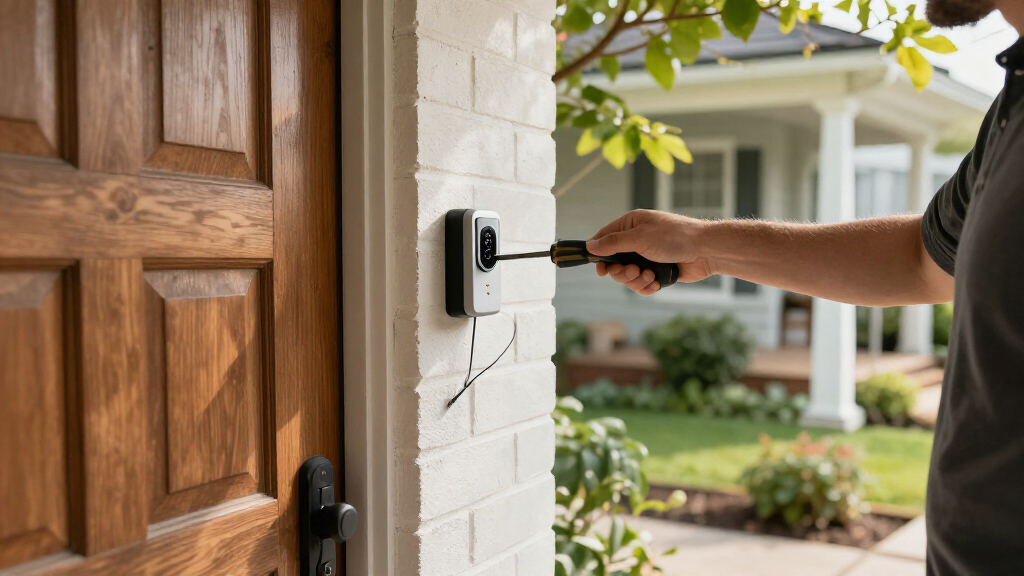
Install a wired video doorbell only after confirming the circuit, transformer, chime, mounting dimensions, and manufacturer instructions. Turn power off at the breaker before handling wiring, use appropriate PPE, and follow the product’s safety steps. If the wiring is unfamiliar, the transformer needs an upgrade, or the instructions do not match what you find, call a qualified professional rather than improvising.[1]
- Confirm the fit: Compare the device dimensions with the existing mounting space, trim, and storm door. Make sure the camera can point toward visitors and the parcel area.
- Check the system: Verify transformer requirements and chime compatibility for the exact model. Identify whether the installation needs an adapter or bypass module.
- Shut off power: Use the breaker and follow the manufacturer’s instructions before touching conductors. If you cannot confirm power is off, stop and get qualified help.
- Mount and connect: Follow the supplied wiring diagram, weather-sealing guidance, and mounting steps. Do not force a wire or skip a required component.
- Restore power and test: Check the button, indoor chime, live view, motion alerts, two-way audio, and night image. Adjust the angle and zones before relying on it.
Take a practical example: the camera powers on and the app shows a crisp image, but the indoor chime does not ring. That is not a reason to assume the whole installation works; it may indicate an incompatibility or a missed adapter step. Likewise, a successful button press does not prove that motion alerts reach your phone promptly or that the package area appears in frame.
Test the doorbell at different times of day. Have someone stand at the threshold, walk up the path, and place a parcel where deliveries usually go. Check whether voices sound clear through the speaker and whether porch lighting causes glare after dark. A few minutes of deliberate testing can reveal a poor angle or weak connection before the first delivery depends on it.
Choose the doorbell that fits your household’s real routine
The right wired video doorbell is the one that fits your home’s power, chime, Wi-Fi, viewing needs, storage preferences, and privacy expectations. No single headline spec answers all of those questions. The most useful shortlist starts with practical constraints: does the model suit your circuit, can your router reach the door, and will its recordings and app features work the way your household expects?[1]
Picture two households choosing between similar-looking devices. One has a reliable porch signal, a compatible mechanical chime, and wants to see who is at the door; basic live view and motion alerts may be enough. The other receives deliveries throughout the day, wants a longer video history, and has a public sidewalk close to the entrance. That household may value retention controls and adjustable zones more than a small difference in resolution.
Write down your three non-negotiables before comparing products. You might choose transformer compatibility, a clear view of parcels, and no paid plan for the functions you use most. Then check the manufacturer’s current documentation for model generation, dimensions, Wi-Fi bands, video claims, chime support, storage terms, and smart-home compatibility. Matter and assistant logos do not guarantee that every doorbell feature works across every platform; verify the exact model and function.[1]
There is also a sensible “it depends” case: if wiring is unreliable or the home cannot meet the manufacturer’s power requirements without substantial work, a battery model may suit you better. If you want to avoid routine charging and the circuit is suitable, wired power can be a good fit. Match the device to the house you have, not the idealized setup on a product page.
Frequently Asked Questions
Does a wired video doorbell need existing doorbell wiring?
Usually, yes. Most wired models connect to a low-voltage doorbell circuit, though some can use a separate power adapter or dedicated transformer. Check the exact model’s power requirements and your existing transformer before installation.
Will a wired video doorbell work with my existing chime?
Possibly. Compatibility depends on the doorbell, transformer, and whether your chime is mechanical or digital. Check the manufacturer’s compatibility guide and whether it requires a supplied adapter or bypass module before you buy.
Does “wired” mean the doorbell works without Wi-Fi?
Usually not. The wiring supplies power, while Wi-Fi typically carries video and alerts to your phone. If your internet goes down, remote viewing or cloud access may stop; local features depend on the model and storage setup.
Does a wired video doorbell record continuously?
Not necessarily. Many models save motion-triggered or button-triggered clips. Continuous recording depends on the device, power and storage arrangement, and sometimes a subscription, so check the exact terms.
Do I need a monthly subscription to use a wired video doorbell?
It depends on the brand and model. Live viewing or basic alerts may be included, while longer video history, advanced detection, or continuous recording may require a paid plan. Confirm what happens after any trial period ends.
Can I install a wired video doorbell myself?
Some homeowners can follow the manufacturer’s instructions on a suitable low-voltage circuit. Turn off power at the breaker and use appropriate PPE before handling wiring. If the transformer or chime is unsuitable, the circuit is unclear, or the work involves unfamiliar electrical changes, use a qualified professional.
What happens if the power or internet goes out?
A power outage generally stops a wired doorbell unless the model has backup power. An internet outage may prevent remote alerts and cloud access, while any continued local recording depends on the device and its storage setup.
Where should I point the camera?
Follow the manufacturer’s mounting guidance and aim for visitors’ faces and the usual package drop-off area. Keep the view as narrow as practical, use privacy masks if available, and check local laws and building rules when the camera could capture shared spaces or a neighbor’s property.
Conclusion
Before choosing a wired video doorbell, check the parts of your home that the product page cannot see: the transformer, the chime, the Wi-Fi at the door, and the angle on your porch. Then compare the exact model’s camera, storage, privacy, and platform features against what you actually need.
A well-chosen doorbell should make the front step easier to manage: a clear face on the screen, a useful alert, and a package where you asked for it. Start with your wiring and your daily routine, and let the specifications follow.