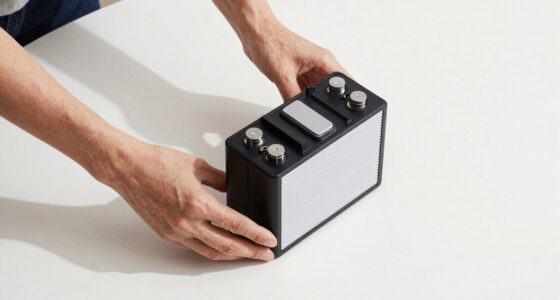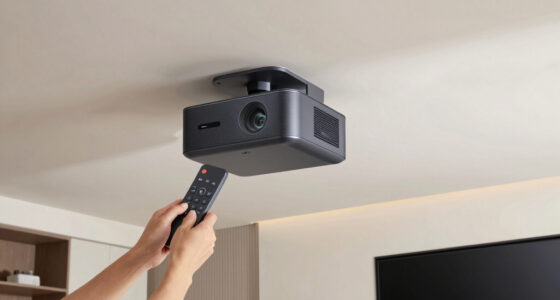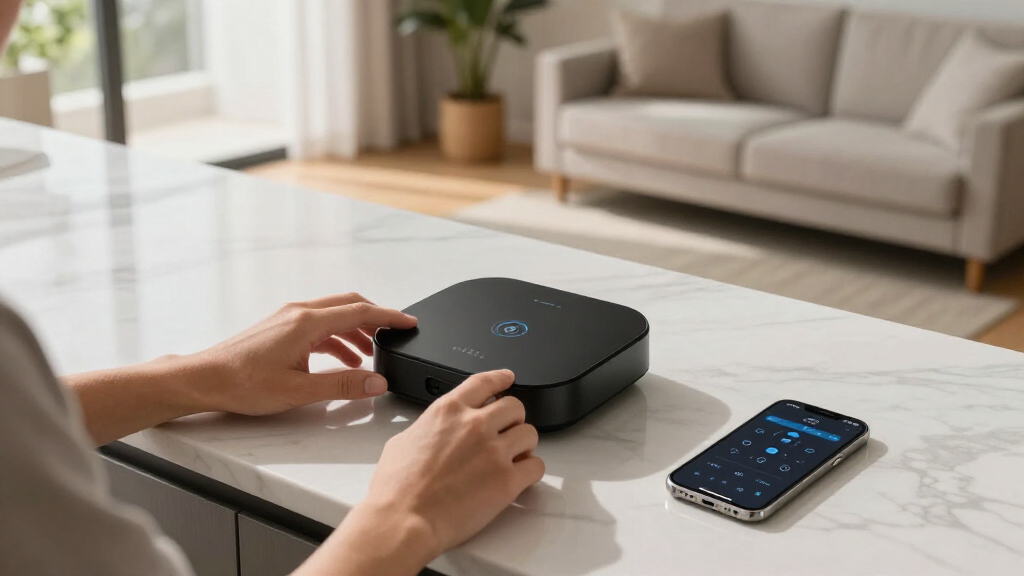
When selecting a Wi-Fi smart home hub, the main considerations revolve around compatibility, ease of use, and future-proof features. The Aeotec Smart Home Hub stands out as the best overall, offering extensive protocol support and broad device compatibility. For those seeking a budget-friendly option, the YoLink Smart Home Hub YS1603 provides reliable performance at a lower price point. Meanwhile, the Lutron Caseta Hub excels for users invested in Apple or Alexa ecosystems. Keep in mind that tradeoffs often include complexity versus simplicity, protocol support versus ease of setup, and cost versus feature set. Continue reading for a detailed breakdown of each option and how they compare.

Get home appliances delivered free — and shop member deals
- Fast, free delivery on millions of items
- Access to Prime Big Deal Days deals on October 6–7
- Prime Video, Amazon Music and more included
Complete the kit


Key Takeaways
- Compatibility across multiple protocols like Zigbee, Z-Wave, and Matter is a key differentiator for top picks.
- Ease of setup and user interface significantly impact the overall user experience.
- More advanced hubs tend to support additional smart home ecosystems, but may come with increased complexity.
- Budget options often sacrifice protocol support or automation features for affordability.
- Future-proofing is crucial; hubs supporting Matter are better equipped for long-term smart home integration.
| Aeotec Smart Home Hub, Works as a SmartThings Hub, Z-Wave, Zigbee, Matter Gateway, Compatible with Alexa, Google Assistant, WiFi |  | Best Overall Wi-Fi Smart Home Hub | Connectivity: Wi-Fi, Ethernet | Protocols: Z-Wave, Zigbee, Matter | Compatibility: Alexa, Google Assistant, SmartThings | VIEW LATEST PRICE | See Our Full Breakdown |
| YoLink Smart Home Hub YS1603 |  | Best for Simplicity and Remote Control | VIEW LATEST PRICE | See Our Full Breakdown | |||
| Aqara Smart Hub M100 for Home Automation, Matter Controller, Wi-Fi |  | Best for Multi-Protocol Compatibility with Compact Design | Compatibility: Zigbee (Aqara only), Thread, Matter | Device Support: Up to 20 Zigbee, 20 Thread devices | Connectivity: Wi-Fi 6, 2.4GHz | VIEW LATEST PRICE | See Our Full Breakdown |
| Aeotec Smart Home Hub 2 – V4, Zigbee & Matter Gateway, Compatible with Alexa & Google Assistant |  | Best for Future-Proof Zigbee and Matter Automation | Compatibility: Zigbee, Matter | Standards: Zigbee, Matter | Connectivity: Wi-Fi, Ethernet | VIEW LATEST PRICE | See Our Full Breakdown |
| YEELIGHT E1 Smart Home Hub, Matter Controller and Thread Border Router, Wi-Fi and Ethernet Gateway |  | Best for Large-Scale Matter and Thread Integration | Compatibility: Apple Home, Alexa, Google Home, SmartThings | Supports: Matter devices, color-capable lights | Device Capacity: Up to 150 devices | VIEW LATEST PRICE | See Our Full Breakdown |
| Tapo Smart Hub with Built-in Chime, H100, 2.4GHz Wi-Fi Required | 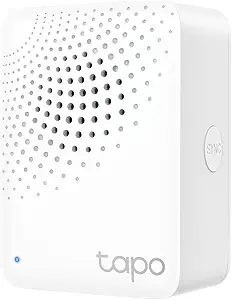 | Best for Extended Range and Security in Large Homes | Connectivity: 2.4 GHz Wi-Fi | Range: 30 meters | Device Capacity: Up to 64 devices | VIEW LATEST PRICE | See Our Full Breakdown |
| Aqara Smart Hub M200, Matter Controller with Zigbee, Wi-Fi, IR, PoE |  | Best for Multi-Protocol Compatibility and Local Automation | Protocols Supported: Zigbee, Thread, Matter | Device Capacity: Up to 40 Zigbee and 40 Thread devices | Connectivity: Wi-Fi 2.4/5 GHz, PoE, USB-C | VIEW LATEST PRICE | See Our Full Breakdown |
| Lutron Caseta Smart Hub Compatible with Alexa, Apple, Google Home & More |  | Best for Extensive Ecosystem Integration and Ease of Use | Compatibility: Alexa, Apple HomeKit, Google Assistant, Ring, Sonos, Serena shades | Device Capacity: 75 devices | Connectivity: Wi-Fi, Clear Connect | VIEW LATEST PRICE | See Our Full Breakdown |
| Wi-Fi smart home hub | Connectivity | Compatibility | Device Capacity |
|---|---|---|---|
| Aeotec Smart Home Hub | Wi-Fi, Ethernet | Alexa, Google Assistant, SmartThings | — |
| YoLink Smart Home Hub YS1603 | — | — | — |
| Aqara Smart Hub M100 for Home | Wi-Fi 6, 2.4GHz | Zigbee (Aqara only), Thread, Matter | — |
| Aeotec Smart Home Hub 2 | Wi-Fi, Ethernet | Zigbee, Matter | — |
| YEELIGHT E1 Smart Home Hub | Wi-Fi, Ethernet, Thread Border Router | Apple Home, Alexa, Google Home, SmartThings | Up to 150 devices |
| Tapo Smart Hub with Built-in C | 2.4 GHz Wi-Fi | — | Up to 64 devices |
| Aqara Smart Hub M200 | Wi-Fi 2.4/5 GHz, PoE, USB-C | — | Up to 40 Zigbee and 40 Thread devices |
| Lutron Caseta Smart Hub Compat | Wi-Fi, Clear Connect | Alexa, Apple HomeKit, Google Assistant, Ring, Sonos, Serena shades | 75 devices |
More Details on Our Top Picks
Aeotec Smart Home Hub, Works as a SmartThings Hub, Z-Wave, Zigbee, Matter Gateway, Compatible with Alexa, Google Assistant, WiFi
This hub stands out for its broad protocol support, including Z-Wave, Zigbee, and Matter, making it highly versatile for integrating various smart devices. Unlike the Aqara M100, which supports fewer protocols and is limited to Zigbee and Thread, the Aeotec hub offers greater flexibility. Its ability to run automations locally enhances reliability during internet disruptions, a key advantage over hubs that depend heavily on cloud processing. However, its primary focus on North American compatibility may restrict use elsewhere, and setup requires a smartphone app, which could be a hurdle for some users. Its compatibility with popular voice assistants simplifies control, making it a comprehensive choice for those seeking a reliable, multi-protocol hub.
Pros:- Supports multiple protocols including Z-Wave, Zigbee, and Matter for extensive device compatibility
- Easy setup via Wi-Fi or Ethernet, accommodating different network preferences
- Local automations enhance speed and reliability during internet outages
- Compatible with Alexa and Google Assistant for voice control
Cons:- Designed primarily for North American regions, limiting global use
- Setup requires a smartphone app, which may be inconvenient for some users
- Some advanced features require additional compatible devices
Best for: Homeowners who want a flexible, multi-protocol hub that supports a wide range of devices and automations.
Not ideal for: Users outside North America or those preferring a hub with Z-Wave support, since this model lacks Z-Wave compatibility.
- Connectivity:Wi-Fi, Ethernet
- Protocols:Z-Wave, Zigbee, Matter
- Compatibility:Alexa, Google Assistant, SmartThings
- Supported Regions:North America
Our verdict“This hub is best suited for tech-savvy homeowners seeking a highly compatible, reliable automation platform with broad protocol support.”
YoLink Smart Home Hub YS1603
The YoLink YS1603 offers straightforward central control for compatible devices, focusing on simplicity and remote access. Compared with the Aeotec hub, it provides fewer details on protocol support, which might limit understanding of device compatibility, but it excels in offering a dedicated hub for remote management. Its minimalistic approach is ideal for users who want basic automation without complex setup, but the lack of detailed specs and limited compatibility info could be a drawback for those with diverse devices. If your smart home needs are straightforward, this hub could be a convenient choice, though it may fall short for more advanced, protocol-heavy setups like those supported by the Aeotec model.
Pros:- Provides centralized control for compatible smart devices
- Supports automation and remote access for convenience
- Simple setup for users who prefer minimal configuration
Cons:- Limited information on protocol support and compatibility
- No detailed specifications or broad device support info
- Potentially limited future expandability
Best for: Homeowners seeking an easy-to-use, centralized control for basic smart devices with remote access.
Not ideal for: Users with complex, multi-protocol smart homes or those needing extensive device compatibility, due to limited info and support.
Our verdict“This hub is ideal for users who prioritize simplicity and remote control over extensive protocol support or advanced automation.”
Aqara Smart Hub M100 for Home Automation, Matter Controller, Wi-Fi
The Aqara M100 excels in supporting Zigbee, Thread, and Matter, making it adaptable for users invested in Apple Home or Amazon Alexa ecosystems. Its compact, adjustable design allows flexible placement, unlike larger hubs that can be intrusive. However, it’s limited to Aqara Zigbee devices and some cloud-dependent automations, which might restrict customization for users wanting broader device support. Compared to the Aeotec hub, it offers local automation but at the expense of fewer supported protocols, and the need for a power adapter adds complexity. This pick makes the most sense for those seeking a sleek, multi-protocol hub focused on local automation within the Aqara ecosystem.
Pros:- Supports Zigbee, Thread, and Matter protocols for versatile integration
- Compact and adjustable design for flexible placement
- Enables local automation for faster response and reliability
Cons:- Limited to Aqara Zigbee devices, restricting third-party device support
- Power adapter not included, requiring additional purchase
- Cloud-dependent automations may limit offline capabilities
Best for: Smart home enthusiasts wanting a multi-protocol, compact hub that integrates with Apple Home or Alexa for local automation.
Not ideal for: Users aiming to connect third-party Zigbee devices outside Aqara’s ecosystem or seeking extensive protocol support beyond Zigbee, Thread, and Matter.
- Compatibility:Zigbee (Aqara only), Thread, Matter
- Device Support:Up to 20 Zigbee, 20 Thread devices
- Connectivity:Wi-Fi 6, 2.4GHz
- Power:USB-A port (power adapter not included)
- Range:Supports placement within 6-19 feet from router
- Size:Adjustable shaft within 210-degree range
Our verdict“This hub suits users who prioritize multi-protocol support and local automation in a small, flexible device within the Aqara ecosystem.”
Aeotec Smart Home Hub 2 – V4, Zigbee & Matter Gateway, Compatible with Alexa & Google Assistant
The Aeotec Smart Home Hub 2 V4 emphasizes future-ready support for Zigbee and Matter, providing broad device compatibility without Z-Wave. Its straightforward setup via Wi-Fi or Ethernet, combined with local processing, makes it a reliable choice during internet outages. Compared to the Aeotec Wi-Fi hub, this model drops Z-Wave support but focuses on the latest standards, appealing to users who want to future-proof their setup. The requirement of a SmartThings account could add complexity for some, but the hub’s emphasis on local automation ensures consistent performance. If Z-Wave isn’t a priority, this hub offers a streamlined, standards-focused experience for expanding your smart home ecosystem.
Pros:- Supports the latest Zigbee and Matter standards for broad device compatibility
- Easy setup with Wi-Fi or Ethernet options
- Local processing ensures automations work during internet outages
- Compatible with Alexa and Google Assistant
Cons:- Does not support Z-Wave devices, limiting compatibility for some users
- Requires a SmartThings account for full functionality, adding setup complexity
Best for: Homeowners wanting a Zigbee and Matter-compatible hub with local automation, especially those invested in the latest standards.
Not ideal for: Users needing Z-Wave device support or those who prefer a fully integrated SmartThings ecosystem, due to the lack of Z-Wave compatibility and SmartThings account requirement.
- Compatibility:Zigbee, Matter
- Standards:Zigbee, Matter
- Connectivity:Wi-Fi, Ethernet
- Supports Z-Wave:No
- Local Automation:Yes
Our verdict“This hub is perfect for users focused on Zigbee and Matter devices seeking future-proof automation with local processing.”
YEELIGHT E1 Smart Home Hub, Matter Controller and Thread Border Router, Wi-Fi and Ethernet Gateway
The YEELIGHT E1 hub supports up to 150 devices, making it ideal for large smart home setups that rely on Matter and Thread protocols. Its integration across multiple platforms like Apple Home, Alexa, and Google enhances flexibility, while the inclusion of a Thread Border Router adds advanced connectivity options. Compared to the Aqara M100, it offers broader device support and a higher capacity, suitable for extensive smart homes. However, its focus on Matter-only devices limits compatibility with older or non-Matter devices, and the setup might be more complex for users unfamiliar with Thread networks. This hub is best for those planning a sizable, future-ready smart home with a need for local automation and multi-platform support.
Pros:- Supports up to 150 devices for extensive smart home networks
- Includes Thread Border Router for advanced connectivity
- Local automation ensures fast responses without internet dependency
- Compatible with multiple platforms including Apple Home, Alexa, and Google
Cons:- Limited to Matter-enabled devices, restricting support for older devices
- Requires some technical knowledge to set up and optimize Thread networks
- Supports only specific device types like color-capable lights
Best for: Large households or smart home enthusiasts designing expansive systems with Matter and Thread devices, prioritizing local automation and multi-platform control.
Not ideal for: Users with smaller setups or those who want compatibility with existing non-Matter devices, due to its focus on Matter-compatible hardware.
- Compatibility:Apple Home, Alexa, Google Home, SmartThings
- Supports:Matter devices, color-capable lights
- Device Capacity:Up to 150 devices
- Connectivity:Wi-Fi, Ethernet, Thread Border Router
- Home Assistant Compatibility:Yes
- Migration:One-click data migration
Our verdict“This hub is best suited for large-scale, future-proof smart homes focused on Matter and Thread protocols with local automation needs.”
Tapo Smart Hub with Built-in Chime, H100, 2.4GHz Wi-Fi Required
The Tapo H100 stands out for its impressive 30-meter range, making it ideal for larger homes where signal strength can be an issue. Unlike the Lutron Caseta Hub, which relies on proprietary connections and requires accessories for full functionality, the H100 uses standard 2.4 GHz Wi-Fi, simplifying setup in Wi-Fi-centric smart ecosystems. It supports up to 64 devices, offering a solid capacity for comprehensive home automation, but it doesn’t support direct connections to Tapo smart plugs or lighting, which could limit integration options for some users. The built-in siren and long-range connectivity bolster security, especially in detached or sprawling properties. However, performance can vary depending on environmental factors, and it’s incompatible with 5 GHz Wi-Fi, which might limit speed or stability in congested networks.
Pros:- Long-range connectivity up to 30 meters, ideal for large homes
- Supports up to 64 devices for extensive automation
- Built-in siren enhances security
- Extends device battery life significantly
Cons:- Requires 2.4 GHz Wi-Fi network, limiting compatibility in mixed networks
- Cannot connect directly to Tapo smart plugs or lighting
- Performance may fluctuate based on environmental conditions
Best for: Homeowners needing reliable long-range connectivity and security features in larger or spread-out spaces
Not ideal for: Users seeking direct integration with Tapo smart plugs or lighting, or those with a 5 GHz Wi-Fi-only network
- Connectivity:2.4 GHz Wi-Fi
- Range:30 meters
- Device Capacity:Up to 64 devices
- Siren Volume:90 dB
- Power Efficiency:Extends device battery life by up to 10 times
Our verdict“This hub suits users prioritizing range and security over direct device integration with proprietary Tapo accessories.”
Aqara Smart Hub M200, Matter Controller with Zigbee, Wi-Fi, IR, PoE
The Aqara M200 excels in supporting multiple protocols like Zigbee, Thread, and Matter, making it a smart choice for users who want broad device compatibility. Compared with the Lutron Caseta Hub, which is primarily focused on lighting and shades, the M200 offers a more versatile ecosystem for various device types—though it supports fewer Zigbee and Thread devices overall. Its integrated IR blaster adds the ability to control traditional remote-controlled devices, a feature not found in the Caseta. The inclusion of PoE and USB-C connectivity makes it highly adaptable to different setups, but the need for a separate power adapter and some cloud-dependent automation can complicate local control. The M200 is ideal for tech-savvy users wanting a flexible, multi-protocol hub that can handle complex automations across brands.
Pros:- Supports Zigbee, Thread, and Matter for broad device compatibility
- Includes a smart IR blaster with learning features
- Flexible connectivity options with PoE and USB-C
- Supports local automations for quick responses
Cons:- Power adapter sold separately, adding to setup cost
- Limited Matter exposure via IR only, not direct device support
- Some automation features depend on cloud connectivity
Best for: Advanced users seeking broad protocol support and local automations for a diverse smart home setup
Not ideal for: Beginners or those preferring plug-and-play simplicity, as it requires additional setup and accessories
- Protocols Supported:Zigbee, Thread, Matter
- Device Capacity:Up to 40 Zigbee and 40 Thread devices
- Connectivity:Wi-Fi 2.4/5 GHz, PoE, USB-C
- IR Blaster:360°, with learning
- Power:PoE, USB-C (adapter not included)
- Automation:Local and cloud-based
Our verdict“This hub is ideal for experienced users needing multi-protocol support and local automation flexibility, despite extra setup complexity.”
Lutron Caseta Smart Hub Compatible with Alexa, Apple, Google Home & More
The Lutron Caseta Hub is a strong choice for those who want a reliable, easy-to-set-up hub supporting multiple major platforms. Its compatibility with Alexa, Apple HomeKit, and Google Assistant makes it highly versatile for diverse smart home setups. Unlike the Aqara M200, which supports a wide range of protocols, Caseta relies on Clear Connect technology and Wi-Fi, focusing on seamless integration with lighting and shades. It supports up to 75 devices, perfect for expanding automation without complexity, but some features require additional accessories or hubs, which can increase overall costs. Installation is straightforward, making it ideal for users who prefer a simple, stable foundation for their smart home, though it may require extra purchases for full ecosystem functionality.
Pros:- Supports multiple major platforms including Alexa, Apple, and Google
- Supports up to 75 devices for comprehensive automation
- Easy to install with minimal setup steps
- Reliable connection via Clear Connect technology
Cons:- Requires additional accessories or hubs for certain features
- Limited protocol support compared to multi-protocol hubs
- Some advanced automation features may need extra purchases
Best for: Homeowners seeking a reliable, easy-to-install hub that integrates smoothly with major voice assistants and supports extensive device networks
Not ideal for: Tech enthusiasts wanting multi-protocol support like Zigbee or Thread, or those seeking a fully integrated remote control ecosystem without additional accessories
- Compatibility:Alexa, Apple HomeKit, Google Assistant, Ring, Sonos, Serena shades
- Device Capacity:75 devices
- Connectivity:Wi-Fi, Clear Connect
- Includes:1 Smart Hub
- Installation:Plug into outlet and connect to Wi-Fi
Our verdict“This hub offers a straightforward, dependable solution for users wanting broad voice platform support and large device capacity without complex setup.”
How We Picked
Products were evaluated based on a combination of protocol support, ease of setup, build quality, user interface, compatibility with popular voice assistants, and future-proofing features like Matter support. We prioritized hubs that offer broad device compatibility and reliable performance across different smart home ecosystems. Cost was considered, but not at the expense of essential features. The ranking reflects a balance between versatility, usability, and value, ensuring options suit a range of user needs from beginners to advanced smart home enthusiasts.| Wi-Fi smart home hub | Compatibility |
|---|---|
| Aeotec Smart Home Hub | Alexa, Google Assistant, SmartThings |
| YoLink Smart Home Hub YS1603 | — |
| Aqara Smart Hub M100 for Home | Zigbee (Aqara only), Thread, Matter |
| Aeotec Smart Home Hub 2 | Zigbee, Matter |
| YEELIGHT E1 Smart Home Hub | Apple Home, Alexa, Google Home, SmartThings |
| Tapo Smart Hub with Built-in C | — |
| Aqara Smart Hub M200 | — |
| Lutron Caseta Smart Hub Compat | Alexa, Apple HomeKit, Google Assistant, Ring, Sonos, Serena shades |
Factors to Consider When Choosing Wi-Fi Smart Home Hubs
Choosing the right Wi-Fi smart home hub involves considering several key factors. Compatibility with existing devices and ecosystems ensures your investment is future-proof. Ease of use and setup can dramatically affect your experience, especially for newcomers. Protocol support, including Zigbee, Z-Wave, and Matter, determines how many devices you can connect. Budget constraints often influence features, but sacrificing protocol support may limit your smart home expansion. Lastly, consider the hub’s integration with voice assistants and automation capabilities to maximize convenience.Compatibility and Protocol Support
Ensuring your hub supports multiple protocols like Zigbee, Z-Wave, and Matter is vital for a flexible smart home setup. Protocol support determines which devices you can connect and how seamlessly they communicate. Hubs with broad compatibility reduce the need for multiple controllers and simplify automation. However, more protocols often mean a higher price and increased complexity. Carefully assess your current devices and future expansion plans to choose a hub that offers the right balance for your ecosystem.
Ease of Setup and User Interface
A user-friendly setup process can make or break your experience. Some hubs offer simple app-based onboarding, while others may require more technical knowledge. An intuitive interface helps manage devices, automate routines, and troubleshoot issues easily. If you’re new to smart home technology, prioritize hubs with clear instructions and responsive customer support. Advanced users might tolerate more complex setups if it means greater customization and control.
Compatibility with Voice Assistants and Ecosystems
Most users want their hubs to work smoothly with voice assistants like Alexa, Google Assistant, or Apple HomeKit. Compatibility ensures voice control and automation across your devices. Some hubs excel in supporting multiple ecosystems, offering greater flexibility. However, integrating with multiple assistants can sometimes introduce delays or conflicts. Consider your preferred voice platform and existing smart home ecosystem to select a hub that aligns with your setup.
Future-Proofing and Protocol Support
Support for emerging standards like Matter is increasingly important for long-term compatibility. A hub that supports Matter can connect a wider range of devices as the industry evolves, reducing the need for replacements. Budget hubs may lack this feature, potentially limiting future device options. Investing in a future-proof hub can save money and effort down the line, especially if you plan to expand your smart home system over time.
Cost and Value Considerations
While price is a factor, focusing solely on budget options can limit your system’s capabilities. Higher-priced hubs often offer broader protocol support, better build quality, and enhanced automation features. Balance your needs with your budget to avoid overpaying for features you won’t use. Remember, a more capable hub might provide better long-term value by supporting a wider range of devices and integrations, reducing the need for additional controllers.
Frequently Asked Questions
Can I use multiple smart home hubs together?
Using multiple hubs is possible but can introduce complexity. Some users set up separate hubs for different protocols or ecosystems, but this can lead to management challenges and potential compatibility issues. Many modern hubs now support multiple protocols, reducing the need for multiple controllers. If you plan to expand your system significantly, consider a hub with broad protocol support to minimize the need for additional hardware.
Is a Wi-Fi smart home hub necessary if I already have a smart speaker?
Smart speakers like Amazon Echo or Google Nest devices often have built-in hubs or serve as controllers for certain devices. However, dedicated hubs typically provide more extensive protocol support and device compatibility, enabling a broader and more reliable smart home setup. If your smart speaker supports the devices you own, you might not need an additional hub, but for more complex or diverse ecosystems, a separate hub can offer better performance and stability.
How important is Matter support in a smart home hub?
Matter support is increasingly valuable because it promotes interoperability across various brands and ecosystems. A hub supporting Matter can connect a wider array of devices, simplifying setup and future expansion. It also offers better security and reliability standards. For long-term investment, choosing a hub with Matter support can make your smart home more flexible and resilient to industry changes.
Can I control my devices without a hub?
Many smart devices now support direct Wi-Fi control or work through integrated voice assistants without a dedicated hub. However, hubs often provide centralized control, automations, and support for protocols like Zigbee and Z-Wave, which many Wi-Fi devices lack. If you have a growing, diverse ecosystem, a hub simplifies management and enhances automation capabilities. Without a hub, your system may become fragmented and harder to manage over time.
What should I consider if I want a hub for a large smart home system?
For larger smart homes, prioritize hubs with extensive protocol support, robust automation features, and future-proof standards like Matter. Multiple device support and reliable connectivity become critical as your system expands. You might also want to consider hubs with Ethernet ports for stable connections, especially in large or complex setups. Scalability and compatibility are key factors to ensure your smart home remains manageable and responsive over time.
Conclusion
If you seek the best overall experience and broadest compatibility, the Aeotec Smart Home Hub makes an excellent choice, especially for tech-savvy users. For budget-conscious buyers who still want reliable performance, the YoLink Smart Home Hub YS1603 offers solid value. Those invested in Apple or Alexa ecosystems will find the Lutron Caseta Hub provides seamless integration. Beginners or those with smaller setups should consider hubs with simpler interfaces, like the Tapo Smart Hub. For future-proofing and expanding a complex smart home, prioritizing hubs with Matter support is advisable. Ultimately, your choice depends on your existing devices, preferred ecosystems, and long-term plans.
Fall yard work Picks
leaf blowers
As an affiliate, we earn on qualifying purchases.