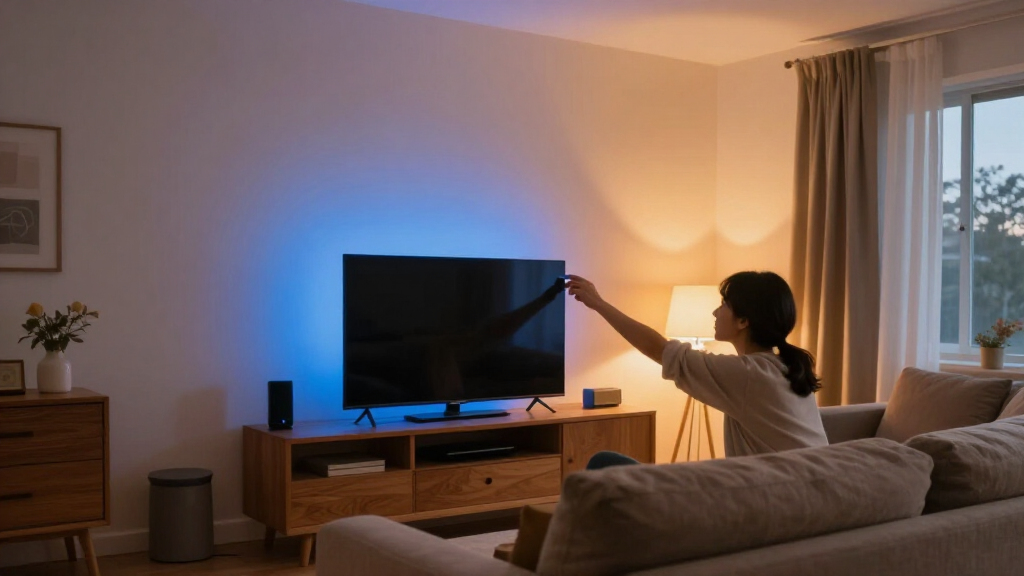

The best smart light bars add color behind a TV, brighten a gaming desk, or sync room lighting with what is on screen—but the right pick depends on how much setup and control you want. I’d start with the Govee Smart RGBIC Light Bars for 45–70-Inch TVs as the best overall choice for a dedicated TV setup, while the Philips Hue Play Base Kit stands out for buyers already invested in Hue, and the BASON LIGHTING Desk Light Bars suit a simpler desk arrangement. Across this group, the main tradeoffs are screen-sync options, app and ecosystem compatibility, placement flexibility, and how much control the included hardware provides. A low-friction USB model may be easier to install, while more elaborate syncing can call for extra setup or compatible equipment. Read on for the full breakdown, ranking logic, and advice on matching a light bar to your room and devices.

Get home appliances delivered free with Prime
- Fast, free delivery on millions of items
- Prime Video, Amazon Music and more included
- Member-only deals all year
Complete the kit



Key Takeaways
- TV size and intended placement matter: Govee’s 45–70-inch TV-focused set has a clearer fit for a living-room display than compact desk-oriented bars.
- Screen sync is not a single feature: Music-reactive lighting, app-controlled effects, and screen-matched colors serve different needs and may involve different setup requirements.
- Smart-home fit separates premium picks: Philips Hue Play makes the most sense for buyers already using Hue, while Govee options offer a different route for app-driven gaming and TV lighting.
- More effects do not automatically mean a better setup: Models advertising many modes can add variety, but buyers should check whether their preferred controls and placement are practical for daily use.
- Desk and TV bars are not interchangeable by default: Power, mounting, viewing distance, and the light’s role in the room should guide the choice before color features do.
| ECWEYAG Smart RGBICWW LED Light Bars for TV and Gaming |  | Best for Flexible Placement | Quantity: 2 light bars | Lighting technology: RGBICWW LED | Colors: 16 million | VIEW LATEST PRICE | See Our Full Breakdown |
| NEEWER NF16 Smart RGB LED Light Bars |  | Best for Scene Variety and White-Light Control | Model: NF16 | Light sources: 2 LED light bars | Color temperature: 2700K–6500K | VIEW LATEST PRICE | See Our Full Breakdown |
| Govee Smart RGBWIC Light Bars for 45–70-Inch TVs |  | Best for Matter-Compatible TV Setups | Model: H6046111 | Compatible TV size: 45–70 inches | Length: 15 inches | VIEW LATEST PRICE | See Our Full Breakdown |
| Philips Smart Lighting RGBIC Gradient Light Bars |  | Best for Gradient Effects and Apple Home | Number of bars: 2 | Lighting technology: RGBIC with seven color segments | Power: 8.4 W; 120 V corded electric | VIEW LATEST PRICE | See Our Full Breakdown |
| Govee Glide RGBIC Smart Wall Lights, 2 Panels |  | Best for Wall-Mounted Room Effects | Number of panels: 2 | Light sections: 6 total; 3 per panel | Segment length: 37.6 cm | VIEW LATEST PRICE | See Our Full Breakdown |
| RGB LED Light Bars with Music Sync and 213 Modes |  | Best for Preset Variety | Lighting modes: 213 | Control methods: App, remote control, control box | Music synchronization: Built-in microphone | VIEW LATEST PRICE | See Our Full Breakdown |
| BASON LIGHTING Smart RGBW Desk Light Bars, 2-Pack |  | Best for Adjustable White Light | Model: BZ101 | Quantity: 2 light bars | Lighting: RGBW color changing with adjustable white tones | VIEW LATEST PRICE | See Our Full Breakdown |
| Eastfine RGB LED Light Bars, 2-Pack, USB Powered with App and Music Sync |  | Best for Flexible Basic Controls | Model: DX21005-01 | Set: 2 light bars | Power: USB, 5 V DC | VIEW LATEST PRICE | See Our Full Breakdown |
| Govee Smart RGBICWW Light Bars, Silver |  | Best for Smart-Home Integration | Model: H6056 | Set: 2 light bars | Lighting: Segmented RGBIC and tunable cool-to-warm white | VIEW LATEST PRICE | See Our Full Breakdown |
| Govee Gaming Light Bars Pro, 16-Inch Smart RGBIC Wi-Fi LED Lights | 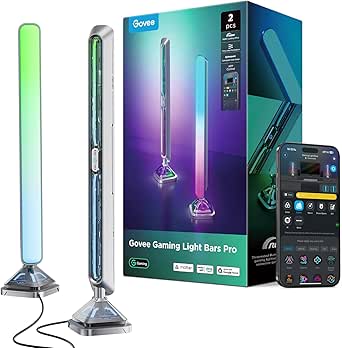 | Best for Large Gaming Displays | Model: H6048 | Set includes: 2 light bars | Dimensions: 3.1 × 3.1 × 15.7 in | VIEW LATEST PRICE | See Our Full Breakdown |
| 16.5-Inch RGB Smart Light Bar with Music Sync | 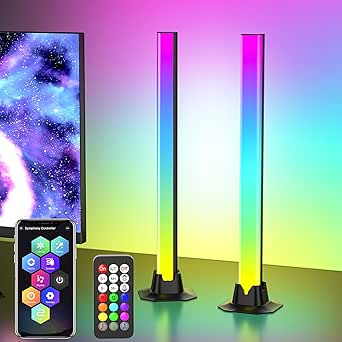 | Best for Maximum Lighting Modes | Length: 16.5 inches | Power: USB corded electric | Voltage: 12 volts | VIEW LATEST PRICE | See Our Full Breakdown |
| DAYBETTER Smart RGBICW LED Light Bars with App and Remote Control |  | Best for Flexible Placement | Light source: LED | Power: Corded electric, 5 volts | Wattage: 5 watts | VIEW LATEST PRICE | See Our Full Breakdown |
| Philips Hue Play White and Color Ambiance Smart Light Bar Base Kit, 2-Pack |  | Best for Hue Ecosystem Setups | Number of light sources: 2 | Power: Corded electric | Voltage: 240 volts | VIEW LATEST PRICE | See Our Full Breakdown |
| DAYBETTER Smart RGBICWW LED Light Bars with App and Remote Control |  | Best for Brightness on a Basic Setup | Light source: LED | Light sources: 60 | Power: 5 volts | VIEW LATEST PRICE | See Our Full Breakdown |
| Govee RGBIC Gaming Light Bars H6047 with Smart Controller |  | Best for Connected Gaming Setups | Model: H6047 | Indoor/outdoor use: Indoor | Colors: 16.8 million | VIEW LATEST PRICE | See Our Full Breakdown |
| smart light bar | Power | Controls |
|---|---|---|
| ECWEYAG Smart RGBICWW LED Ligh | USB; 5 V, 5 W | Tuya app, Smart Life app, button box, Alexa, and Google Assistant |
| NEEWER NF16 Smart RGB LED Ligh | 14 W; 12 V, 2 A | — |
| Govee Smart RGBWIC Light Bars | Corded electric; 12 V, 10 W | — |
| Philips Smart Lighting RGBIC G | 8.4 W; 120 V corded electric | WiZ app, accessories, or compatible voice assistant |
| Govee Glide RGBIC Smart Wall L | 36 W; 24 V | App, Alexa, and Google Assistant |
| RGB LED Light Bars with Music | USB, 5 V DC | — |
| BASON LIGHTING Smart RGBW Desk | USB | — |
| Eastfine RGB LED Light Bars | USB, 5 V DC | App, remote control, and buttons |
| Govee Smart RGBICWW Light Bars | Corded electric, 12 V | — |
| Govee Gaming Light Bars Pro | Corded electric, 12 V | — |
| 16.5-Inch RGB Smart Light Bar | USB corded electric | App, remote, and USB-cable buttons |
| DAYBETTER Smart RGBICW LED Lig | Corded electric, 5 volts | App, remote, and control box |
| Philips Hue Play White and Col | Corded electric | — |
| DAYBETTER Smart RGBICWW LED Li | 5 volts | App, remote, and touch |
| Govee RGBIC Gaming Light Bars | — | App, touch, voice, and desktop dial |
More Details on Our Top Picks
ECWEYAG Smart RGBICWW LED Light Bars for TV and Gaming
The ECWEYAG pair suits buyers who want TV lighting that can adapt to the room rather than stay fixed in one position. Each bar can stand upright, lie horizontally, or mount behind a screen, while USB power gives you a straightforward way to power them from a suitable USB port or adapter. App, button-box, and voice controls make it more flexible to operate than the Philips Smart Lighting RGBIC Gradient Light Bars, which rely on the WiZ app, accessories, or compatible voice assistants.
Its built-in microphone music sync and eight scenes cover casual gaming and ambient effects, but NEEWER’s NF16 offers many more preset scenes and warm-to-cool white adjustment. The tradeoff here is a modest feature set and no water resistance; these are indoor accent lights, not a choice for damp locations. I’d pick them when adaptable placement matters more than extensive scene selection.
Pros:- Three placement options: upright, horizontal, or behind-TV mounting
- USB power and app, button-box, and voice control options
- Built-in microphone enables music-responsive lighting
- Brightness and lighting speed are adjustable
Cons:- USB power requires a nearby suitable port or adapter
- Eight dynamic scenes offer less variety than NEEWER NF16’s 72 scenes
- Not water resistant
Best for: TV and gaming-room owners who want two bars they can reposition or mount behind the screen and control by app, button box, or voice.
Not ideal for: Buyers who want a large preset-scene library, adjustable warm-to-cool white light, or lighting for a damp area.
- Quantity:2 light bars
- Lighting technology:RGBICWW LED
- Colors:16 million
- Dynamic scenes:8
- Music sync modes:3
- Power:USB; 5 V, 5 W
- Controls:Tuya app, Smart Life app, button box, Alexa, and Google Assistant
- Mounting:Freestanding, horizontal placement, or behind-TV mounting
Our verdict“Choose the ECWEYAG bars if flexible placement and several control methods matter more to you than a deep scene library or adjustable white temperature.”
NEEWER NF16 Smart RGB LED Light Bars
NEEWER’s NF16 is the pick for buyers who want a smart light bar pair to do more than cycle through colors. Its 72 scenes, segmented RGB, and adjustable 2700K–6500K white light give it more range for both ambient color and everyday room lighting than the ECWEYAG pair, which lists eight dynamic scenes. Ra90+ color rendering also makes the white setting a more considered option for general illumination, rather than an afterthought beside the screen.
The aluminum bodies and freestanding bases suit a desk or TV console, and controls include the app, control box, voice assistants, and NFC pairing. That flexibility comes with a 12 V corded adapter and 2.4 GHz Wi-Fi only, so it may not fit a setup built around 5 GHz networking or minimal cables. I’d choose it over Govee’s 45–70-inch bars when scene and white-light control matter more than TV-size guidance or Matter compatibility.
Pros:- 72 scenes provide broad options for different rooms and activities
- Adjustable 2700K–6500K white light with Ra90+ color rendering
- App, control-box, voice, and NFC control options
- Aluminum bodies and included stand bases support freestanding placement
Cons:- Connects over 2.4 GHz Wi-Fi only
- Requires a corded 12 V adapter
- Freestanding design offers less mounting flexibility than the ECWEYAG bars
Best for: Desk and TV owners who want many ambient presets, adjustable white light, and several ways to control a freestanding pair.
Not ideal for: Buyers who need 5 GHz Wi-Fi, USB power, or a setup that avoids a dedicated power adapter.
- Model:NF16
- Light sources:2 LED light bars
- Color temperature:2700K–6500K
- Color rendering:Ra90+
- Scenes:72
- Power:14 W; 12 V, 2 A
- Connectivity:2.4 GHz Wi-Fi and NFC pairing
- Materials:Aluminum alloy bodies with polycarbonate diffusers
- Mounting:Freestanding with included stand bases
Our verdict“Choose the NF16 if scene variety and useful adjustable white light outweigh the need for USB power or broader Wi-Fi band support.”
Govee Smart RGBWIC Light Bars for 45–70-Inch TVs
For owners of a 45–70-inch TV who want smart ambient lighting without adding a separate hub, these Govee bars stand out for Matter compatibility alongside Alexa, Google Home, and SmartThings support. The RGBWIC LEDs are designed to produce richer colors and cleaner whites, while more than 60 app scenes and eight music modes offer more built-in variety than the ECWEYAG pair’s eight dynamic scenes. Their 15-inch length and stated TV-size range also make it easier to judge whether the pair suits a particular screen.
There is a clear limit: these lights do not match the colors on the TV screen. They respond to ambient sound and offer app effects, but buyers seeking screen-matched bias lighting should look elsewhere. Compared with the Philips Smart Lighting RGBIC Gradient Light Bars, Govee adds Matter support and TV-size guidance, but still requires corded power. I’d choose them for smart-home integration, not exact on-screen color replication.
Pros:- Matter support works with several major smart-home platforms without a hub
- RGBWIC LEDs are designed for rich colors and purer whites
- More than 60 preset scenes and eight music modes
- Specified for TVs from 45 to 70 inches
Cons:- No TV screen color-matching function
- Requires corded electric power
- Plastic construction is less substantial than the aluminum-bodied NEEWER NF16
Best for: Smart-home users with a 45–70-inch TV who want app scenes, music response, voice control, and Matter support without a hub.
Not ideal for: Viewers who want the bars to mirror on-screen colors or need a cordless lighting setup.
- Model:H6046111
- Compatible TV size:45–70 inches
- Length:15 inches
- Lighting technology:RGBWIC LEDs
- Preset scenes:60+
- Music modes:8
- Power:Corded electric; 12 V, 10 W
- Smart-home compatibility:Matter, Alexa, Google Home, and SmartThings
- Placement:Behind or beside the TV, or horizontal placement
Our verdict“Choose these Govee bars for Matter-connected ambient lighting around a mid-to-large TV, but skip them if screen color matching is a requirement.”
Philips Smart Lighting RGBIC Gradient Light Bars
These Philips bars make the most sense for buyers who prioritize multicolor gradients and a place in a Matter-compatible Apple Home, Google Home, or Alexa setup. Seven color segments let each bar display several colors at once, giving effects more depth than a basic single-color light. They can sit horizontally or mount vertically, so they can serve as TV, monitor, or room accents. Compared with the Govee Smart RGBWIC bars, Philips offers a clearly defined seven-segment gradient design and Apple Home compatibility, while Govee specifies a TV-size range and includes more than 60 preset scenes.
The main catch is that TV screen syncing requires extra hardware; music sync uses a smartphone microphone rather than a dedicated bar microphone. They also do not work with Philips Hue, despite the Philips name, so Hue owners should check compatibility before buying. I’d choose this set for app-led gradient effects and Matter integration, not for screen-matched lighting out of the box.
Pros:- Seven color segments create multicolor gradient effects
- Supports Matter-compatible Apple Home, Google Home, and Alexa systems
- Can be placed horizontally or mounted vertically
- Two-year warranty
Cons:- Not compatible with Philips Hue
- TV screen syncing requires additional hardware
- Music syncing uses a smartphone microphone
Best for: Apple Home, Google Home, or Alexa users who want multi-color gradients in a pair that can sit on a surface or mount vertically.
Not ideal for: Philips Hue owners or TV viewers expecting screen synchronization without purchasing additional hardware.
- Number of bars:2
- Lighting technology:RGBIC with seven color segments
- Power:8.4 W; 120 V corded electric
- Dimensions:11.81 × 1.81 × 1.81 inches (D × W × H)
- Controls:WiZ app, accessories, or compatible voice assistant
- Compatibility:Matter, Alexa, Google Home, and Apple Home; not Philips Hue
- Mounting:Tabletop or mounting brackets
- Warranty:2 years
Our verdict“Choose the Philips pair for gradient effects and Matter-based Apple Home integration, but not as a ready-made Hue or screen-sync solution.”
Govee Glide RGBIC Smart Wall Lights, 2 Panels
Unlike the other picks here, the Govee Glide is built around wall-mounted panels, not a pair intended primarily to stand beside a TV. Its six light sections across two rigid panels create a more defined feature-lighting layout, while RGBIC effects, more than 64 scenes, and 11 music modes give it broad scope for a gaming or entertainment wall. Compared with ECWEYAG’s two repositionable bars, the Glide makes a stronger visual statement on a wall but gives up the option to move the lights freely between upright, horizontal, and behind-TV setups.
App and voice control keep daily adjustments simple, and Wi-Fi and Bluetooth add connection options. Installation deserves more planning: the panels are rigid and not water resistant, and the included adhesive and Velcro work best on smooth surfaces with time allowed for the adhesive to set. At 36 W, it also draws more power than the Philips gradient pair’s 8.4 W. I’d pick it for a permanent decorative display, not flexible TV bias lighting.
Pros:- Six light sections across two panels create a larger wall-lighting layout
- RGBIC colors support flowing and customizable effects
- 11 music modes and more than 64 scenes
- App, Alexa, and Google Assistant control over Wi-Fi and Bluetooth
Cons:- Rigid panels cannot be flexed or freely repositioned like ECWEYAG’s bars
- Adhesive installation works best on smooth surfaces and needs setting time
- Not water resistant and uses 36 W
Best for: Gamers and entertainment-room owners who want a permanent wall-mounted RGBIC feature light with music effects and voice control.
Not ideal for: Buyers who want portable light bars, flexible installation on textured surfaces, or lighting for a damp location.
- Number of panels:2
- Light sections:6 total; 3 per panel
- Segment length:37.6 cm
- Power:36 W; 24 V
- Connectivity:Wi-Fi and Bluetooth
- Controls:App, Alexa, and Google Assistant
- Music modes:11
- Scene modes:64+
- Mounting:Wall mount with included adhesive and Velcro
Our verdict“Choose the Govee Glide for a fixed decorative wall display with music effects, rather than a compact pair of bars for adaptable TV placement.”
RGB LED Light Bars with Music Sync and 213 Modes
213 lighting modes make this pair a fit for buyers who want plenty of ready-made effects without building scenes themselves. Music response comes from a built-in microphone, while app, remote, and control-box operation offer more ways to change settings than the app-only BASON LIGHTING BZ101. Brightness adjustment and timers add practical control beyond color effects.
The tradeoff is less certainty around connected features: the product information mentions Bluetooth but does not clarify app compatibility. Its USB 5 V power suits a desk or entertainment setup, but the bars are not waterproof, so I would keep them indoors and away from moisture. Choose this model for its preset range and multiple controls; pick the Govee H6056 instead if smart-home compatibility and tunable white lighting matter more.
Pros:- Offers 213 preset lighting modes
- Built-in microphone reacts to music and ambient sound
- App, remote, and control-box operation
- Brightness adjustment and timer settings
Cons:- Bluetooth is listed, but app compatibility is not clearly specified
- Not waterproof
- USB power requires a nearby compatible power source
Best for: Desk and entertainment-space owners who want many preset effects, music response, and both app and physical controls.
Not ideal for: Buyers who need verified smart-home integration, clearly documented app compatibility, or lighting for damp areas.
- Lighting modes:213
- Control methods:App, remote control, control box
- Music synchronization:Built-in microphone
- Power:USB, 5 V DC
- Wattage:5 W
- Dimensions:2.36 × 3.54 × 13 in
- Mounting:Tabletop or hanging
- Water resistance:Not waterproof
Our verdict“Choose these bars for a broad library of effects and flexible controls, but choose the Govee H6056 if clear smart-home support matters more.”
BASON LIGHTING Smart RGBW Desk Light Bars, 2-Pack
The BASON LIGHTING BZ101 stands apart from effect-heavy options by pairing RGBW color with adjustable white tones. That makes it more useful when a desk needs softer, more neutral illumination as well as colorful monitor backlighting. Its Bluetooth app control covers color, brightness, and modes, while a built-in microphone adds music sync. Compared with the Eastfine DX21005-01, BASON lists adjustable white tones, but Eastfine offers app, remote, and onboard-button control instead of relying on the app.
These are compact, USB-powered table-mount bars, so placement is straightforward around a desk or monitor. The compromises are a plastic build and dependence on USB power; the listing also gives less detail about scene variety and mounting flexibility than the Govee H6056. I’d choose BASON for a desk where useful white settings matter more than elaborate effects or broad smart-home support.
Pros:- RGBW colors include adjustable white tones
- Bluetooth app control adjusts color, brightness, and modes
- Built-in microphone supports music sync
- Compact two-bar setup with table-mount bracket
Cons:- Requires USB power
- Plastic construction
- Listing provides limited detail about scene selection and smart-home compatibility
Best for: Monitor users who want colorful bias lighting plus adjustable white tones for everyday desk use.
Not ideal for: Buyers who want remote or physical-button operation, detailed scene libraries, or smart-home platform compatibility.
- Model:BZ101
- Quantity:2 light bars
- Lighting:RGBW color changing with adjustable white tones
- Control:Bluetooth app
- Music sync:Built-in microphone
- Power:USB
- Wattage:5 W
- Mounting:Table mount
- Material:Plastic
Our verdict“Pick BASON for a compact desk setup where adjustable white light is as useful as color, rather than for extensive controls or smart-home features.”
Eastfine RGB LED Light Bars, 2-Pack, USB Powered with App and Music Sync
Eastfine gives buyers three ways to operate its USB-powered pair: app, remote, and onboard buttons. That control mix is a practical advantage over the app-only BASON LIGHTING BZ101, especially if someone else at the desk needs to adjust the lights without opening a phone app. The bars offer dimming, dynamic color modes, and three music-sync modes, so they can respond to audio without requiring a more elaborate smart-light setup.
At 12.59 inches long, these are sized for desks and monitors, with a 270-degree beam angle for spreading light around a display. The plastic construction and USB connection keep the setup simple but limit placement to spots near power. I’d favor the Govee H6056 for voice-assistant and broader smart-home support; Eastfine is the more straightforward pick for mixed physical and app controls. One listing detail needs checking: its warranty is described as both 12 and 24 months.
Pros:- App, remote, and onboard-button controls
- Three music-sync modes
- Dimmable lighting with dynamic color modes
- 270-degree beam angle for broad nearby illumination
Cons:- Requires a USB power connection
- Plastic construction
- Warranty duration is inconsistent in the listing
Best for: Desk or TV users who want app control but also value a remote and onboard buttons for quick adjustments.
Not ideal for: Buyers seeking documented smart-home voice control, a non-USB power setup, or an unambiguous warranty term.
- Model:DX21005-01
- Set:2 light bars
- Power:USB, 5 V DC
- Controls:App, remote control, and buttons
- Music sync:Three rhythm modes
- Beam angle:270 degrees
- Dimensions:1.18 × 1.18 × 12.59 in per bar
- Mounting:Table mount
- Warranty:Listing states both 12 months and 24 months
Our verdict“Choose Eastfine if you want several simple control options for a desk or TV, but favor the Govee H6056 for voice-assistant integration.”
Govee Smart RGBICWW Light Bars, Silver
The Govee H6056 is the strongest fit here for buyers who want light bars to work as part of a wider smart-home setup. It supports Matter, Alexa, Google Home, and SmartThings, while its RGBIC colors and tunable white light handle both animated effects and more restrained viewing scenes. That makes it more versatile for everyday use than the effect-focused 213-mode bars, which do not spell out their app compatibility as clearly.
With more than 60 scene modes, music sync, and options to stand upright, lie flat, or mount behind a screen, the H6056 offers useful flexibility. Its stated recommendation for monitors under 45 inches sets a clear size limit, and corded power means this is not a placement-anywhere option. For larger gaming setups or a more pronounced light-bar presence, the 16-inch Govee Gaming Light Bars Pro are a better match, though they need Windows for screen color matching. This is the lineup’s more connected, adaptable choice for smaller screens.
Pros:- Supports Matter, Alexa, Google Home, and SmartThings
- Combines segmented RGBIC color with tunable cool-to-warm white light
- Offers more than 60 scenes and music sync
- Can stand vertically, lie flat, or mount behind a screen
Cons:- Recommended for monitors under 45 inches
- Requires corded power
- Plastic construction
Best for: Owners of monitors under 45 inches who want tunable white and color effects integrated with Matter or major voice-assistant platforms.
Not ideal for: Users with larger monitors, a preference for cordless lighting, or a need for screen color matching without a Windows computer.
- Model:H6056
- Set:2 light bars
- Lighting:Segmented RGBIC and tunable cool-to-warm white
- Smart-home compatibility:Matter, Alexa, Google Home, SmartThings
- Scenes:60+
- Power:Corded electric, 12 V
- Dimensions:4.8 × 3.9 × 11.3 in
- Mounting options:Table mount, vertical standing, or behind-screen mounting
- Monitor recommendation:Under 45 in
Our verdict“Choose the H6056 for a smaller monitor and broad smart-home control; choose the 16-inch Govee Pro bars for a larger gaming display.”
Govee Gaming Light Bars Pro, 16-Inch Smart RGBIC Wi-Fi LED Lights
For a more substantial gaming setup, the Govee Gaming Light Bars Pro pair uses 16-inch bars with triple-sided RGBIC illumination, giving the setup a broader light presence than the shorter Govee H6056. More than 60 scene modes and music sync suit animated gaming or entertainment, while Matter, Alexa, and Google Home support make voice control part of the package. The weighted base also means the bars can sit on a desk without complicated installation.
The key distinction is that these are not self-contained screen-matching lights: color matching requires Govee Desktop on Windows, and the bars do not have built-in color matching. That limits them for Mac users or buyers who expect automatic screen-reactive effects without a computer-based setup. They also need corded power and use plastic construction. Compared with the H6056, the Pro model favors size and gaming-oriented illumination over adjustable white light and flexible behind-screen mounting.
Pros:- Two 16-inch bars with triple-sided RGBIC illumination
- Offers 16 million colors, music sync, and 60+ scenes
- Supports Matter, Alexa, and Google Home
- Weighted bases allow tabletop placement without complex installation
Cons:- Screen color matching requires Govee Desktop on Windows
- No built-in screen color matching
- Requires corded power
Best for: PC gamers with larger desk displays who want longer, multi-sided RGBIC bars and already use or can run Govee Desktop on Windows.
Not ideal for: Mac users seeking screen color matching, buyers who need adjustable white light, or anyone wanting cordless placement.
- Model:H6048
- Set includes:2 light bars
- Dimensions:3.1 × 3.1 × 15.7 in
- Lighting:Triple-sided RGBIC, 16 million colors
- Maximum light output:900 lumens
- Power:Corded electric, 12 V
- Wattage:24 W
- Smart-home compatibility:Matter, Alexa, Google Home
- Screen color matching:Requires Govee Desktop on Windows
Our verdict“Pick the Pro bars for a larger Windows-based gaming desk that benefits from broad RGBIC effects, not for standalone screen matching or tunable white lighting.”
16.5-Inch RGB Smart Light Bar with Music Sync
With 213 dynamic modes, eight preset scenes, and 16 million colors, this USB-powered bar suits buyers who want variety for gaming, music, or general room ambience. It offers more listed modes than the Govee H6047, which instead brings Wi-Fi, voice control, and Razer Synapse support for a more connected gaming setup. This bar keeps the controls flexible: use its app, remote, or buttons on the USB cable, and move it easily between spaces. The tradeoff is a simpler power arrangement and fewer listed smart-home integrations; it needs a USB power source, and its specs list both 12 volts and 5 watts, so buyers should check power compatibility. Its single-bar format also differs from paired kits designed to light both sides of a display.
Pros:- Offers 213 dynamic modes and eight preset scenes
- Music-reactive lighting adds movement to games and listening sessions
- App, remote, and USB-cable button controls provide flexibility
- USB power and a portable design make repositioning straightforward
Cons:- Requires access to a USB power source
- Listed specs give both 12 volts and 5 watts, so power compatibility merits checking
- A single bar may provide less balanced screen-side lighting than a two-bar kit
Best for: Gamers and music listeners who want a portable single bar with a large selection of effects and several ways to control it.
Not ideal for: Buyers seeking voice-assistant integration, Wi-Fi control, or a paired left-and-right lighting setup.
- Length:16.5 inches
- Power:USB corded electric
- Voltage:12 volts
- Wattage:5 watts
- Colors:16 million
- Lighting modes:213 dynamic modes; 8 preset scenes
- Controls:App, remote, and USB-cable buttons
- Special features:Music sync and dimming
Our verdict“Choose this bar for a portable, effect-heavy setup, but pick the Govee H6047 if Wi-Fi and gaming-platform integration matter more.”
DAYBETTER Smart RGBICW LED Light Bars with App and Remote Control
The DAYBETTER RGBICW bars suit buyers who want to place lighting flat, upright, or behind a screen without mounting brackets. App, remote, and control-box operation gives more fallback options than relying on an app alone, while DIY effects and a timer support a setup tailored to a desk or home theater. Compared with the DAYBETTER RGBICWW bars in this roundup, this model lists 110 lumens and a built-in microphone for music response, but its audio sync does not work with TV audio. That limitation matters for movie-focused rooms: the bars react to ambient sound, not a direct television signal. They also lack water resistance, so I’d keep them indoors and away from damp areas. The listed monitor guidance covers displays under 85 inches.
Pros:- Can sit flat, stand vertically, or be placed behind a screen
- App, remote, and control box offer several control options
- DIY effects and a timer allow more tailored routines
- Built-in microphone enables music-reactive lighting
Cons:- Music sync does not work with TV audio
- Not waterproof
- Corded power and an 8.2-foot spacing specification may constrain placement
Best for: Desk and gaming-room owners who want multiple placement options, DIY effects, and app, remote, or control-box operation.
Not ideal for: TV viewers expecting lighting to follow television audio, or anyone needing bars for a damp or outdoor space.
- Light source:LED
- Power:Corded electric, 5 volts
- Wattage:5 watts
- Light output:110 lumens
- Connectivity:Bluetooth
- Controls:App, remote, and control box
- Features:Music sync, dimming, timer, and DIY mode
- Placement:Flat, vertical, or behind screens
- Water resistance:Not waterproof
Our verdict“Pick this DAYBETTER set for flexible indoor placement and control choices, but skip it if TV-audio syncing is a priority.”
Philips Hue Play White and Color Ambiance Smart Light Bar Base Kit, 2-Pack
This two-bar kit stands apart from simpler app-and-remote options such as the DAYBETTER RGBICW by offering warm-to-cool white as well as color, plus tabletop and TV-mounting options. It is the better fit for someone building a coordinated Hue room, where the Hue app, voice assistants, or Hue Sync can tie the bars into a broader lighting setup. The central tradeoff is the Hue Bridge requirement for the full smart-lighting experience, which adds setup beyond the self-contained control options on the DAYBETTER bars. The product also lists a 240-volt supply and a 6.6-watt wattage, so I’d check regional power compatibility before choosing it. Buyers who only want basic color effects may find the ecosystem setup more involved than their needs justify.
Pros:- Includes two bars for balanced lighting around a TV or setup
- Offers millions of colors and warm-to-cool white light
- Can be used on a surface or mounted behind a TV
- Compatible with Alexa, Google Assistant, and Apple HomeKit
Cons:- A Hue Bridge is required for the full smart-lighting experience
- Smart features and voice control require setup through the Hue app
- Listed 240-volt supply may limit compatibility depending on the buyer’s region
Best for: Hue owners who want two mountable accent bars with color, tunable white light, and voice or Hue Sync control.
Not ideal for: Buyers seeking a simple standalone kit without a bridge, or those who do not need Hue ecosystem features.
- Number of light sources:2
- Power:Corded electric
- Voltage:240 volts
- Wattage:6.6 watts
- Mounting options:Tabletop, floor mount, or TV mounting
- Light:Color changing and warm-to-cool white
- Compatibility:Alexa, Google Assistant, and Apple HomeKit
- Hub requirement:Hue Bridge required for the full experience
- Included:2 light bars, power supply, 2 table stands, and 2 TV mounting supports
Our verdict“Choose this kit to extend an existing Hue setup with two mountable bars; choose the DAYBETTER RGBICW set for a simpler, bridge-free approach.”
DAYBETTER Smart RGBICWW LED Light Bars with App and Remote Control
At a listed 220 lumens, this DAYBETTER version offers a clearer brightness figure than its RGBICW sibling, which lists 110 lumens. That makes it the more straightforward pick for buyers comparing output on paper, while both models support app control, remote operation, music response, timers, and flexible tabletop or behind-screen placement. Its RGBIC effects and DIY mode give desk lighting room for personalized scenes, but the feature set is less connected than the Govee H6047: this DAYBETTER model has no Wi-Fi or Alexa support. Like the other DAYBETTER bars here, music sync responds to ambient sound rather than TV audio. There is also no water resistance, so this is an indoor accent-lighting choice rather than a versatile fixture for exposed spaces.
Pros:- Lists 220 lumens of brightness
- App, remote, and touch controls support different use habits
- Music sync, DIY mode, and timers add customization
- Can sit on a tabletop, stand vertically, or go behind a screen
Cons:- Does not support Wi-Fi or Alexa
- Music sync does not work with TVs
- Not water resistant
Best for: Buyers who want a stated 220-lumen output, customizable effects, and app or remote control for a desk or indoor screen setup.
Not ideal for: Smart-home users who want Wi-Fi or Alexa, and TV viewers expecting lighting to sync directly with screen audio.
- Light source:LED
- Light sources:60
- Power:5 volts
- Wattage:5 watts
- Brightness:220 lumens
- Controls:App, remote, and touch
- Features:Music sync, dimming, timer, and DIY mode
- Placement:Tabletop, vertical, or behind screens
- Water resistance:Not water resistant
Our verdict“Choose this model for stated brightness and flexible effects without needing smart-home integration; choose the Govee H6047 for Wi-Fi and voice control.”
Govee RGBIC Gaming Light Bars H6047 with Smart Controller
The H6047 makes the most sense for PC gamers who want lighting controls tied into their wider setup: it combines Wi-Fi and Bluetooth with Alexa, Google Assistant, a desktop dial, and Razer Synapse 3 compatibility. That’s a more connected package than the DAYBETTER RGBICWW bars, which offer app and remote controls but no Wi-Fi or Alexa. Its RGBIC effects, 60-plus scene modes, and audio-reactive lighting give gamers plenty of ways to set the mood without relying on a TV camera. The limitations are clear, though: there is no camera and no screen color picking, so it cannot match lighting directly to on-screen colors. The bars are also not water resistant. I’d rank it ahead of more basic ambient bars for a gaming desk, but not for buyers whose main goal is screen-matched TV lighting.
Pros:- Wi-Fi and Bluetooth connectivity
- Supports Alexa, Google Assistant, and Razer Synapse 3
- Desktop dial, app, touch, and voice controls offer several ways to adjust lighting
- RGBIC effects, 16.8 million colors, and 60-plus scene modes suit varied gaming setups
Cons:- No camera is included
- Screen color picking is not supported
- Not water resistant
Best for: PC gamers who want Wi-Fi, voice control, a desktop dial, and lighting compatibility with Razer Synapse 3.
Not ideal for: TV viewers seeking camera-based screen color matching, or buyers who need outdoor or water-resistant lights.
- Model:H6047
- Indoor/outdoor use:Indoor
- Colors:16.8 million
- Scene modes:60+
- Connectivity:Bluetooth and Wi-Fi
- Controls:App, touch, voice, and desktop dial
- Voice compatibility:Alexa and Google Assistant
- Razer compatibility:Razer Synapse 3
- Screen color picking:Not supported
Our verdict“Choose the H6047 for connected PC gaming control and Razer integration, but pick a screen-sync-focused model if matching on-screen colors is your priority.”

How We Picked
I ranked these 15 options by how well their stated design and features fit common smart light bar jobs: adding bias lighting to a TV, creating an expressive gaming setup, or illuminating a desk. I weighed the usefulness of app and controller options, color and effect capabilities, music or screen-sync features, power and placement flexibility, and whether the product description points to a focused use case. I also considered the practical costs of complexity: a feature only helps if it fits the buyer’s devices, room, and appetite for setup.
The order favors products with a clear role and a plausible balance of control, fit, and everyday usability over models whose appeal rests mainly on a broad list of effects. TV-focused and established smart-lighting options rank well for buyers with specific needs; desk and USB-powered options can be better fits when straightforward placement matters more than immersive syncing. Product names alone do not confirm compatibility or performance, so I call out where buyers should verify requirements before choosing rather than treating every “smart” or “sync” label as equivalent.
Factors to Consider When Choosing Best Smart Light Bars
Before choosing a model, I’d work backward from the room and the job the lights need to do. A TV backlight, a desk accent, and a room-filling gaming effect can call for different placement, controls, and setup. These checks help separate genuinely useful features from ones that may not suit your space.
Match the Bar to the Screen and the Room
Start by measuring the available space, not just the screen diagonal. A set designed around a 45–70-inch TV may be a natural fit for a larger display, but small desks and narrow media consoles can leave little room for bars or cables. Decide whether you want the lights behind the screen, beside a monitor, or on the desk before picking a shape or set size. Wall color and distance from the surface affect how the glow spreads, so a light bar pressed into a corner may look different from one with open space around it. A common mistake is buying for screen size alone and discovering that the included bars do not fit the furniture layout. Choose a placement plan first, then check the product’s mounting and power details against it.
Know What “Sync” Means for Your Setup
Music sync generally reacts to sound, while screen-matching effects aim to reflect colors from video; app animations are a separate kind of effect. Those features should not be treated as interchangeable just because a listing uses the word “sync.” Before paying extra for immersive lighting, find out what signal source, controller, camera, or other hardware the setup requires. A system that reacts to music may be enough for a desk or party setup but will not necessarily match changing scenes on a TV. Buyers can avoid disappointment by identifying the exact behavior they want and checking whether it works with their display and media devices. If you mostly want a steady ambient glow, simpler app presets may be easier to live with than more elaborate synchronization.
Check Controls and Smart-Home Compatibility
Consider how you want to turn the bars on, change brightness, and switch scenes during ordinary use. App control can offer more customization, while a physical controller or remote may be handier when a phone is elsewhere or guests need a simple way to change the lights. Smart-home compatibility varies by product, so do not assume that every Wi-Fi or app-controlled model will join your preferred assistant or automation routine. Buyers who already use Philips Hue should weigh the convenience of keeping lighting in one ecosystem against the price and setup needs of adding another brand. If you prefer minimal setup, confirm whether the product can be controlled directly without extra hardware or an account. The best control scheme is the one you will actually use, not the one with the longest feature list.
Choose the Right Power and Placement Style
USB power can be convenient near a computer or TV, but it ties placement to an available port or adapter and may add cable clutter. A pair of bars also needs suitable surfaces or mounting points, with enough room to aim the light where it can bounce rather than shine directly into your eyes. Check whether the included stands, adhesive, or mounting method suit the surface you have; a setup that works on a smooth monitor stand may not work on textured walls. Think through cable routing before installation, especially where a media console or desk moves. Buyers often focus on color effects and overlook the practical job of hiding power leads. If the lights need to move between rooms, prioritize a setup that can be repositioned without damaging surfaces.
Decide How Much Color Control You Need
RGB and multizone effects can create more varied patterns, while white-light capability matters if the bars will also serve as everyday ambient or task lighting. For a TV accent, dynamic color may be the main draw; for a desk, adjustable white light may be more useful during work. Do not assume that a larger number of advertised modes gives you better control over brightness, color zones, or saved scenes. Consider whether you want a subtle glow that can stay on for hours or a vivid effect reserved for gaming and entertainment. When comparing feature-heavy models, look for controls that let you quickly return to a comfortable setting. Paying for effects you rarely use makes less sense than choosing the light quality and controls that fit your routine.
Pay More for a Clear Benefit, Not a Longer Feature List
A premium system can make sense when its ecosystem, syncing approach, or integration with existing devices solves a real need. It is harder to justify extra complexity if you only want static color behind a screen. For a first smart-lighting setup, a clearly described app-and-remote option may be less intimidating than a system with additional components or configuration steps. Conversely, buyers building a coordinated room may value matching controls more than an inexpensive standalone pair. Compare what is included and what may need to be purchased separately, especially for syncing or smart-home features. The sensible upgrade is the one that changes how well the lights work in your room, not simply the one with the most elaborate name.
Frequently Asked Questions
Do I need a camera or separate controller for TV screen syncing?
Not every light bar uses the same method to match screen colors, and some products may offer music response or app effects rather than true video color matching. Check the exact product setup before buying, including whether it needs a camera, a control box, or another component that is not part of the listed kit. Also check where that hardware would sit and whether it works with your display and viewing arrangement. If you want simple ambient color rather than scene-matched effects, you may not need a screen-sync system at all. Confirming the signal path can prevent paying for a feature that does not work with your source devices.
Can I use smart light bars as a desk light for work?
Some bars offer white-light modes, but accent lighting and task lighting are not the same job. A bar placed behind a monitor can soften the contrast around a screen without putting much useful light on a keyboard or notebook. Check whether the product supports adjustable white output and whether its stand lets you aim light onto the work surface. If you need clear task illumination, a dedicated desk lamp may be a better primary light, with bars serving as secondary ambience. For mixed work and gaming use, prioritize accessible brightness and white settings over a large collection of color effects.
Will these light bars work with my smart-home system?
Compatibility depends on the exact model and the services it supports; “smart” does not guarantee support for every assistant or home-automation platform. Check the product’s stated compatibility and whether it connects directly or depends on a hub or account. Buyers already using Philips Hue should compare the Hue Play kit with standalone app-controlled options based on whether they want one lighting ecosystem or are comfortable managing separate apps. If routines and voice control matter, verify those functions before purchase rather than relying on a general Wi-Fi label. A model that works well through its own app may still fall short of your preferred automation setup.
Are music-reactive bars a good substitute for TV bias lighting?
They can add atmosphere near a TV, but music response is designed to react to sound rather than reproduce the colors on screen. That difference matters if your main aim is a consistent glow behind the display or lighting that follows video scenes. Music-reactive effects may suit gaming, parties, and energetic desk setups better than quiet film viewing. Check whether the effect can be turned off or replaced with a steady preset when you want less visual movement. If TV viewing is the priority, choose based on the available TV-focused setup rather than assuming audio response will provide screen matching.
What should I check before mounting light bars behind a TV?
Measure the rear of the TV, the gap between the screen and wall, and the space available around the stand or mount. Then check how each bar is powered and whether its mount or adhesive suits the TV’s surface. Leave room for cables and ventilation, and avoid placing a bright source where it can shine directly into the viewing area. If the TV is wall-mounted, confirm that the bars can be positioned securely without interfering with the mount or access to ports. Planning these details first is often more useful than choosing a product for its effects alone.
Conclusion
For most shoppers focused on TV ambience, I’d choose the Govee Smart RGBIC Light Bars for 45–70-Inch TVs as the best overall because its stated size range and TV-oriented role make the choice easy to match to a larger screen. For a desk setup, the BASON LIGHTING Smart RGBW Desk Light Bars are my value-minded pick among the options with a clear desk focus; buyers who want straightforward control can compare the DAYBETTER Smart RGBICW model and verify the control features they prefer. The Philips Hue Play Base Kit is the best premium fit for people already building around Hue, while first-time buyers should favor a product with an uncomplicated placement and control plan over one chosen for a long list of effects. For gaming ambience, compare Govee’s gaming-specific bars with the music-sync models based on whether you want app-driven scenes or sound-reactive effects. Before ordering, check screen fit, included hardware, power, and ecosystem compatibility—the right bar is the one that fits your setup and the way you want to use it.
NFL season / tailgating Picks
team gear
As an affiliate, we earn on qualifying purchases.