
The best Apple home security cameras combine dependable monitoring with a setup that fits your Apple smart home. I name the Aqara Camera Hub G350 my best overall pick for its dual-lens 4K design and Matter hub role, while the Logitech Circle View stands out for a straightforward wired Apple Home setup and the Aqara G5 Pro PoE for a wired, color-night-vision approach. The main tradeoffs are Apple Home compatibility and privacy, video detail, installation effort, and whether you need indoor coverage, outdoor monitoring, or both. Some cameras add pan-and-tilt coverage or a hub, while others prioritize simple fixed-view monitoring. Read on for the full breakdown and a guide to choosing the right camera for your home.

Get home appliances delivered free with Prime
- Fast, free delivery on millions of items
- Prime Video, Amazon Music and more included
- Member-only deals all year
Complete the kit


Key Takeaways
- The Aqara G350 leads for feature range: its dual-lens 4K design and Matter camera hub make it a flexible centerpiece, but buyers should check that its ecosystem features match their setup.
- Apple Home fit matters as much as resolution: the Logitech Circle View is a more direct wired choice for Apple-focused households, while Aqara models offer broader hub and camera functions.
- Outdoor installation changes the shortlist: Eve Outdoor Cam and Logitech Circle View are weatherproof options, while Aqara G100 can serve indoors or outdoors with a more compact form.
- Pan-and-tilt models can cover more of one room: Aqara E1 and eufy E30 cameras move to follow activity, but movement does not replace having cameras aimed at separate entrances or rooms.
- Multi-camera bundles suit coverage plans, not every buyer: eufy three-packs and Arlo Ultra systems can cover several areas, while a single-camera setup may be simpler for a focused monitoring need.
| Aqara G100 2K Indoor/Outdoor Security Camera, White |  | Best Value for Flexible Placement | Resolution: 2304 × 1296 (3 MP) | Field of view: 140° | Night vision: Spotlight color and 940 nm infrared | VIEW LATEST PRICE | See Our Full Breakdown |
| Eve Outdoor Cam 2-Pack, 1080p Secure Floodlight Camera with Night Vision |  | Best Apple-First Outdoor Coverage | Pack size: 2 cameras | Resolution: 1080p | Frame rate: 24 fps | VIEW LATEST PRICE | See Our Full Breakdown |
| eufy Security Indoor Cam E30, 3-Pack, 4K Pan-Tilt Indoor Cameras |  | Best for Multi-Room Indoor Tracking | Listed pack size: 3 cameras in title; description also mentions a 2-camera kit and a solo camera | Resolution: 4K UHD wide-angle and 2K telephoto cameras | View: 360° pan and tilt | VIEW LATEST PRICE | See Our Full Breakdown |
| Eve Cam Smart Indoor Camera |  | Best Simple Apple-Only Indoor Pick | Resolution: 1080p | Field of view: 147° | Frame rate: 25 or 30 fps | VIEW LATEST PRICE | See Our Full Breakdown |
| Aqara Camera Hub G5 Pro 4MP Wi-Fi Security Camera | 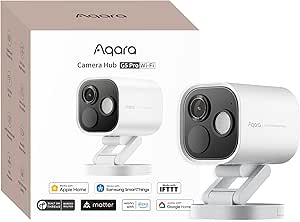 | Best Premium Smart-Home Hub Camera | Resolution: 4MP | Field of view: 133° | Night vision: True-color with dimmable 3000K LED spotlight; no infrared | VIEW LATEST PRICE | See Our Full Breakdown |
| Arlo Ultra 4K UHD Wire-Free Security 3-Camera System – Indoor/Outdoor, Color Night Vision, 180° View, 2-Way Audio, Spotlight, Siren (VMS534) – Renewed |  | Best Wire-Free Apple HomeKit Kit | Resolution: 2160p (4K UHD) | Field of view: 180 degrees | Night vision: Color | VIEW LATEST PRICE | See Our Full Breakdown |
| Logitech Circle View Weatherproof Wired Home Security Camera |  | Best for Straightforward HomeKit Secure Video | Video resolution: 1080p | Field of view: 180 degrees | Night vision range: Up to 15 feet | VIEW LATEST PRICE | See Our Full Breakdown |
| Aqara Camera E1 2K Indoor Security Camera with Pan and Tilt |  | Best Value for Indoor HomeKit Coverage | Resolution: 2304 × 1296 pixels | Viewing: 360-degree pan and tilt | Night vision range: 10 meters | VIEW LATEST PRICE | See Our Full Breakdown |
| Arlo Ultra 4K UHD Wire-Free Security 3-Camera System (Indoor/Outdoor) |  | Best Premium Wire-Free Video | Model: VMS5340-100NAS | Night vision: Color | Power: Rechargeable battery | VIEW LATEST PRICE | See Our Full Breakdown |
| Aqara G5 Pro 4MP PoE Camera Hub with True Color Night Vision | 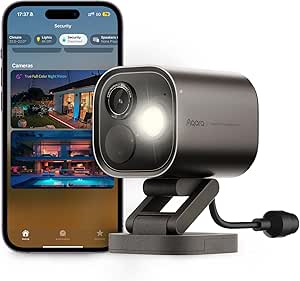 | Best for PoE and Local Smart-Home Integration | Resolution: 4 MP (1520p) | Viewing angle: 133 degrees | Spotlight: 3000K dimmable LED | VIEW LATEST PRICE | See Our Full Breakdown |
| eufy Indoor Cam E30 4K UHD Security Camera with Color Night Vision and Auto Tracking (Renewed) | 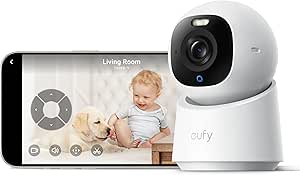 | Best for Color Night Vision | Resolution: 4K | HomeKit video resolution: Up to 1080p | Night vision: Color, with built-in spotlight | VIEW LATEST PRICE | See Our Full Breakdown |
| Aqara Indoor Security Camera G350, 4K Dual-Lens Matter Camera Hub |  | Best Smart-Home Hub | Video resolution: 4K | Lenses: 133° wide-angle 4K and 2.5K telephoto | Zoom: 9x hybrid | VIEW LATEST PRICE | See Our Full Breakdown |
| eufy Security E30 4K Indoor Pan and Tilt Camera, 2-Pack |  | Best Two-Room Bundle | Quantity: 2 cameras | Resolution: 4K UHD | Coverage: 360° pan and tilt | VIEW LATEST PRICE | See Our Full Breakdown |
| Apple home security camera | Resolution | Connectivity | Power | Night vision |
|---|---|---|---|---|
| Aqara G100 2K Indoor/Outdoor S | 2304 × 1296 (3 MP) | — | DC 5V/1A adapter required; not included | Spotlight color and 940 nm infrared |
| Eve Outdoor Cam 2-Pack | 1080p | Wi-Fi, 2.4 GHz | — | — |
| eufy Security Indoor Cam E30 | 4K UHD wide-angle and 2K telephoto cameras | — | — | Color and infrared, with built-in spotlight |
| Eve Cam Smart Indoor Camera | 1080p | Wi-Fi and Bluetooth; 2.4 GHz or 5 GHz Wi-Fi | — | — |
| Aqara Camera Hub G5 Pro 4MP Wi | 4MP | — | — | True-color with dimmable 3000K LED spotlight; no infrared |
| Arlo Ultra 4K UHD Wire-Free Se | 2160p (4K UHD) | Wi-Fi 802.11 ac/b/g/n | Rechargeable battery | Color |
| Logitech Circle View Weatherpr | — | 2.4 GHz Wi-Fi 802.11 b/g/n | Indoor USB power supply | — |
| Aqara Camera E1 2K Indoor Secu | 2304 × 1296 pixels | Wi-Fi 6, 2.4 GHz only | Corded, 5V via USB-C | — |
| Arlo Ultra 4K UHD Wire-Free Se | — | Wireless, Wi-Fi, Ethernet | Rechargeable battery | Color |
| Aqara G5 Pro 4MP PoE Camera Hu | 4 MP (1520p) | PoE, Ethernet, Zigbee, Thread, Matter bridge, Wi-Fi via hub | PoE (requires PoE switch) or 5V 2A USB-C | — |
| eufy Indoor Cam E30 4K UHD Sec | 4K | Wi-Fi | Corded electric | Color, with built-in spotlight |
| Aqara Indoor Security Camera G | — | Wi-Fi, Bluetooth, Thread, and Zigbee | — | — |
| eufy Security E30 4K Indoor Pa | 4K UHD | — | Corded electric | Color and infrared, with built-in spotlight |
More Details on Our Top Picks
Aqara G100 2K Indoor/Outdoor Security Camera, White
The Aqara G100 is a versatile pick for Apple households that want one camera to cover a porch, garage, or indoor room without committing to an Apple-only setup. Its IP65 housing, 140° view, and local microSD or NAS recording make it more adaptable than the indoor-only Eve Cam. It also offers two night modes: a spotlight for color footage and 940 nm infrared when you want illumination that is less visible. The main Apple-specific compromise is resolution: although the camera records at 2K in Aqara’s system, HomeKit Secure Video is limited to 1080p. It also needs a separate power adapter, and its 2.4 GHz-only Wi-Fi may not suit every network. I’d choose it for flexible placement and storage, not for a fully Apple-exclusive experience.
Pros:- IP65-rated design supports indoor or outdoor placement.
- Spotlight color and 940 nm infrared night vision offer different low-light approaches.
- Local motion and person detection, two-way audio, and microSD or NAS recording.
- Works with HomeKit Secure Video as well as Google, Alexa, and Home Assistant via RTSP.
Cons:- HomeKit Secure Video limits footage to 1080p rather than the camera’s full 2K resolution.
- Requires a separate DC 5V/1A power adapter and supports only 2.4 GHz Wi-Fi.
- Night vision modes must be enabled manually in the app.
Best for: Apple Home users who want an affordable-feeling, weather-resistant camera with local recording options and flexibility across smart home platforms.
Not ideal for: Buyers who need 5 GHz Wi-Fi, an included power adapter, or 2K footage inside HomeKit Secure Video.
- Resolution:2304 × 1296 (3 MP)
- Field of view:140°
- Night vision:Spotlight color and 940 nm infrared
- Weather resistance:IP65
- Wi-Fi:Wi-Fi 6, 2.4 GHz only; WPA3
- Storage:MicroSD up to 512 GB (not included) or NAS
- Power:DC 5V/1A adapter required; not included
- Smart home compatibility:Apple HomeKit Secure Video, Google, Alexa, and Home Assistant via RTSP
Our verdict“Choose the G100 if you want a weather-resistant Apple-compatible camera with local storage, and skip it if HomeKit resolution or 5 GHz connectivity is a priority.”
Eve Outdoor Cam 2-Pack, 1080p Secure Floodlight Camera with Night Vision
This two-camera Eve set is the clearest choice here for Apple households that want to watch more than one outdoor approach using HomeKit Secure Video. Each camera pairs a 157° field of view with night vision and a dimmable motion-triggered floodlight, so activity can be visible without leaving a bright light on all night. Compared with the more flexible Aqara G100, Eve is a narrower bet: it works exclusively with Apple HomeKit Secure Video, but that focus brings encrypted video and a simpler Apple-centered setup. The tradeoff is limited platform choice and 1080p resolution, while an iPhone or iPad with the latest iOS or iPadOS is required. I’d favor this bundle for coordinated outdoor coverage, but not for buyers seeking local card storage or cross-platform support.
Pros:- Two cameras cover separate outdoor areas from one set.
- Wide 157° view, night vision, and a dimmable motion-activated floodlight.
- HomeKit Secure Video provides end-to-end encrypted video.
- Detection options include people, pets, vehicles, packages, and motion, with two-way audio.
Cons:- Works exclusively with Apple HomeKit Secure Video.
- Requires an iPhone or iPad running the latest iOS or iPadOS.
- 1080p video offers less detail than the 2K and 4K options in this roundup.
Best for: Apple households with two exterior entry points who want HomeKit Secure Video, motion-triggered lighting, and one coordinated camera set.
Not ideal for: People who use Android, want broad smart home compatibility, or need local microSD or NAS recording.
- Pack size:2 cameras
- Resolution:1080p
- Frame rate:24 fps
- Field of view:157°
- Connectivity:Wi-Fi, 2.4 GHz
- Floodlight:Dimmable, with light boost
- Detection:People, pets, vehicles, packages, and motion
- Compatibility:Apple HomeKit Secure Video; latest iOS or iPadOS required
Our verdict“Pick the Eve Outdoor Cam set for two-point outdoor monitoring built around Apple Home, but choose the Aqara G100 if you want broader platform and storage options.”
eufy Security Indoor Cam E30, 3-Pack, 4K Pan-Tilt Indoor Cameras
For monitoring several rooms, the eufy Indoor Cam E30 kit emphasizes coverage and movement tracking rather than a strictly Apple-centered workflow. Its 360° pan-and-tilt view, automatic person and pet tracking, and 8× hybrid zoom can follow activity across a room in a way the fixed-view Eve Cam cannot. The dual wide-angle and telephoto cameras, 4K recording, and color or infrared night vision add detail and flexibility for indoor monitoring. HomeKit compatibility is useful for Apple households, but the listed detection and tracking features are presented as eufy capabilities, so buyers should check which functions are available through their preferred app. There is also a kit-content mismatch: the title says three cameras, while the description mentions a two-camera kit and a solo camera. I’d verify the included quantity before buying.
Pros:- 4K wide-angle and 2K telephoto cameras provide detail and 8× hybrid zoom.
- 360° pan-and-tilt viewing with automatic person and pet tracking.
- Color and infrared night vision, plus a built-in spotlight.
- Two-way audio and AI detection for people, pets, audio cues, and crying.
Cons:- Product information conflicts on whether the kit includes two or three cameras.
- Some app features require the latest app version.
- Advanced eufy detection and tracking functions may not all be available through HomeKit.
Best for: Households that want wide, trackable indoor coverage across multiple rooms and are comfortable checking app-level feature support.
Not ideal for: Buyers who need a clearly specified kit quantity or want every advanced detection and tracking feature controlled through Apple Home.
- Listed pack size:3 cameras in title; description also mentions a 2-camera kit and a solo camera
- Resolution:4K UHD wide-angle and 2K telephoto cameras
- View:360° pan and tilt
- Zoom:8× hybrid zoom
- Night vision:Color and infrared, with built-in spotlight
- Detection:AI human, pet, audio cue, and crying detection
- Tracking:Automatic person and pet tracking
- Compatibility:Apple HomeKit
Our verdict“Choose the E30 kit for tracking and detailed indoor coverage if you confirm the camera count and do not rely on HomeKit for every advanced feature.”
Eve Cam Smart Indoor Camera
The Eve Cam suits buyers who want a straightforward indoor camera tied closely to Apple Home rather than a feature-heavy pan-and-tilt system. Its HomeKit Secure Video setup uses end-to-end encryption and local video analysis, while motion detection, night vision, and two-way audio cover the basics for a shared room or entry hall. Compared with the rotating eufy Indoor Cam E30, the Eve is a fixed-view camera: it won’t follow movement around a room, but it avoids putting pan-and-tilt controls at the center of the experience. That simplicity comes with strict requirements: a compatible Apple device, a Home hub, and iCloud+ are needed, and the camera is indoor-only. I’d choose it for an Apple household that values privacy-focused HomeKit integration over 4K detail or broad ecosystem support.
Pros:- End-to-end encrypted video with local video analysis through HomeKit Secure Video.
- 147° field of view with motion detection and night vision.
- Two-way audio and Apple device notifications.
- Supports tabletop placement or magnetic wall installation.
Cons:- Requires a compatible iPhone or iPad, a HomePod or Apple TV Home hub, and iCloud+.
- Indoor-only design cannot cover a porch or other exposed area.
- Fixed view and 1080p resolution offer less coverage flexibility and detail than the eufy Indoor Cam E30.
Best for: Apple users who want a fixed-view indoor camera with encrypted HomeKit Secure Video and already have a compatible Home hub and iCloud+.
Not ideal for: Buyers without an Apple Home hub or iCloud+, or anyone needing outdoor protection, pan-and-tilt coverage, or 4K footage.
- Resolution:1080p
- Field of view:147°
- Frame rate:25 or 30 fps
- Connectivity:Wi-Fi and Bluetooth; 2.4 GHz or 5 GHz Wi-Fi
- Audio and detection:Two-way audio and motion detection
- Mounting:Tabletop; includes metal plate for magnetic wall installation
- Dimensions:2.36 × 2.55 × 4.8 inches
- Requirements:Compatible iPhone or iPad, HomePod or Apple TV with tvOS 15, and iCloud+
Our verdict“Pick the Eve Cam for privacy-focused, fixed-view indoor monitoring if your Apple Home hub and iCloud+ are already in place.”
Aqara Camera Hub G5 Pro 4MP Wi-Fi Security Camera
The Aqara Camera Hub G5 Pro is the most capable choice here for buyers building an Aqara-centered smart home as well as adding a security camera. Along with 4MP video, IP65 protection, and a dimmable spotlight for true-color night vision, it combines a Zigbee and Thread hub with a Matter bridge. That makes it more useful as a system component than the simpler Aqara G100, which offers broader local-storage options but lacks the G5 Pro’s integrated hub role. The G5 Pro adds local visual and sound detection and encrypted onboard storage, though its 8GB eMMC is not a substitute for the G100’s removable card or NAS recording. It has no infrared illumination, and 24/7 recording is supported only through RTSP to local devices. I’d pick it for hub consolidation, not for flexible continuous recording.
Pros:- 4MP video, IP65 housing, and true-color night vision with a dimmable spotlight.
- Built-in Aqara Zigbee and Thread hub with Matter bridge support.
- Local visual and abnormal sound detection can trigger events during internet outages.
- Encrypted onboard storage, HomeKit Secure Video support, and RTSP.
Cons:- No infrared light for night vision when spotlight illumination is unwanted.
- 24/7 recording is supported only through RTSP to local devices.
- HomeKit Secure Video requires an active iCloud subscription and an Apple Home hub.
Best for: Aqara-focused Apple households that want an outdoor-capable camera, local event detection, and Zigbee, Thread, and Matter hub functions in one device.
Not ideal for: Buyers who need infrared night vision, removable storage, or HomeKit-based 24/7 recording without using RTSP to a local device.
- Resolution:4MP
- Field of view:133°
- Night vision:True-color with dimmable 3000K LED spotlight; no infrared
- Weather resistance:IP65
- Hub protocols:Aqara Zigbee and Thread
- Matter support:Matter bridge; requires compatible Matter controller and ecosystem support
- Storage:Encrypted 8GB eMMC; also supports Aqara Cloud and RTSP
- Wi-Fi and power:Dual-band 2.4 GHz and 5 GHz Wi-Fi; 5V/2A USB-C
Our verdict“Choose the G5 Pro if its Zigbee, Thread, and Matter hub functions add value to your Aqara setup; choose the G100 if removable local recording matters more.”
Arlo Ultra 4K UHD Wire-Free Security 3-Camera System – Indoor/Outdoor, Color Night Vision, 180° View, 2-Way Audio, Spotlight, Siren (VMS534) – Renewed
I’d choose this renewed Arlo kit when flexible placement and broad outdoor coverage matter more than continuous recording. Three battery-powered cameras capture 4K UHD footage across a 180-degree view, while color night vision, a spotlight, and a siren add tools for identifying or responding to activity after dark. It works with Apple HomeKit, as well as Alexa, but buyers should check which features and recording options are available through their preferred setup. Compared with the Logitech Circle View, the Arlo avoids a power cable at each camera and offers higher resolution; the Logitech is the simpler fit for a permanently powered HomeKit Secure Video setup. The tradeoff here is upkeep: demanding features can shorten battery life, and weak Wi-Fi can compromise performance. As a renewed system, its condition and included accessories may also differ from a new kit.
Pros:- Three rechargeable, wire-free cameras allow flexible placement
- 4K UHD video and a 180-degree view capture detailed, broad scenes
- Color night vision, spotlight, and siren support nighttime monitoring
- Supports Apple HomeKit and Alexa
Cons:- Battery runtime can fall with frequent recording, spotlight, or siren use
- Performance depends on a strong Wi-Fi connection
- Renewed condition and included accessories may vary
Best for: Apple HomeKit households needing three outdoor-capable cameras that can be mounted away from power outlets
Not ideal for: Buyers who want continuous recording, dislike recharging batteries, or need dependable coverage where Wi-Fi is weak
- Resolution:2160p (4K UHD)
- Field of view:180 degrees
- Night vision:Color
- Audio:Two-way audio
- Power:Rechargeable battery
- Camera count:3
- Connectivity:Wi-Fi 802.11 ac/b/g/n
- Dimensions:3.5 x 2.05 x 3.09 inches
Our verdict“Choose this renewed Arlo system for flexible, high-resolution HomeKit-compatible coverage if you accept battery maintenance and can provide strong Wi-Fi.”
Logitech Circle View Weatherproof Wired Home Security Camera
The Circle View is the more focused Apple choice: it is built around HomeKit Secure Video, not a broad mix of smart-home platforms. Its 180-degree view helps cover a porch or room with one camera, and the IP64 weatherproof housing allows indoor or outdoor placement. Unlike the battery-powered Arlo Ultra, this Logitech needs an indoor USB power supply, but that trade buys a fixed-power setup without battery recharging. Its 1080p footage is a step down from the Arlo’s 4K and the Aqara Camera E1’s 2K, so it suits general monitoring better than close inspection of fine detail. Recording is motion-based rather than continuous, and HomeKit is required; buyers who want a standalone app experience or more flexible platform support should look elsewhere. A tilt-down position and rear switch provide useful physical privacy controls.
Pros:- Native HomeKit Secure Video integration
- 180-degree field of view covers a broad area
- IP64-rated housing supports indoor and outdoor use
- Tilt-down privacy position and rear recording switch
Cons:- Requires an indoor USB power supply, limiting placement
- 1080p resolution offers less detail than the Arlo Ultra or Aqara Camera E1
- Uses motion-based recording and requires Apple HomeKit
Best for: Apple households seeking a weather-resistant, permanently powered camera managed through HomeKit Secure Video
Not ideal for: Buyers who need 4K detail, continuous recording, a battery-powered camera, or operation without Apple HomeKit
- Video resolution:1080p
- Field of view:180 degrees
- Night vision range:Up to 15 feet
- Connectivity:2.4 GHz Wi-Fi 802.11 b/g/n
- Controller:Apple HomeKit
- Power:Indoor USB power supply
- Weather resistance:IP64
- Weight:253 g
Our verdict“Pick the Circle View for a fixed-power camera centered on HomeKit Secure Video, not for high-resolution footage or flexible platform support.”
Aqara Camera E1 2K Indoor Security Camera with Pan and Tilt
The Aqara Camera E1 makes sense for buyers who want pan-and-tilt coverage indoors without stepping up to an outdoor-focused system. Its 360-degree movement and person tracking can follow activity across a room, while 2K video offers more detail than the Logitech Circle View’s 1080p. It also supports HomeKit Secure Video, local microSD recording up to 512 GB, and two-way audio, giving buyers more than one recording route. The Arlo Ultra is a stronger match for outdoor placement and higher-resolution 4K footage, but its rechargeable batteries bring maintenance the corded E1 avoids. Here, the tradeoffs are a required 2.4 GHz Wi-Fi connection and a power supply that is not included. Because it is not water resistant, this camera belongs indoors, even if its broad movement makes a room feel more fully covered.
Pros:- 360-degree pan and tilt with person tracking covers a room
- 2K resolution exceeds the Logitech Circle View’s 1080p
- Supports HomeKit Secure Video and microSD cards up to 512 GB
- Two-way audio and infrared night vision support day-and-night indoor monitoring
Cons:- Not water resistant and unsuitable for outdoor installation
- Requires 2.4 GHz Wi-Fi; 5 GHz is not supported
- Compatible 5V 2A USB-A power supply is not included
Best for: Apple HomeKit users who want a corded indoor camera with room-wide pan-and-tilt coverage and local microSD recording
Not ideal for: Buyers needing outdoor protection, 5 GHz Wi-Fi support, or a camera kit with its power adapter included
- Resolution:2304 × 1296 pixels
- Viewing:360-degree pan and tilt
- Night vision range:10 meters
- Connectivity:Wi-Fi 6, 2.4 GHz only
- Storage:microSD up to 512 GB; cloud and compatible NAS support
- Compatibility:Apple HomeKit, Alexa, IFTTT
- Power:Corded, 5V via USB-C
- Water resistance:Not water resistant
Our verdict“Choose the Aqara Camera E1 for adaptable indoor HomeKit coverage and local storage, provided you have 2.4 GHz Wi-Fi and a separate power supply.”
Arlo Ultra 4K UHD Wire-Free Security 3-Camera System (Indoor/Outdoor)
This Arlo Ultra system is the premium pick for buyers who value 4K HDR detail, color night vision, and wireless placement across three indoor or outdoor cameras. Auto-zoom tracking and an integrated spotlight can help bring activity into view, while compatibility with Apple HomeKit, Alexa, and Google Assistant gives it broader voice-control reach than the HomeKit-focused Logitech Circle View. Compared with the renewed Arlo Ultra system in this roundup, the core appeal is similar: high-resolution, battery-powered coverage without running power cables to each camera. The practical cost of that freedom is periodic recharging, and the three-camera kit may not cover a larger property without additions. Spotlight activation can also produce unwanted alerts. The product description includes a year of Arlo Smart Premier service, but buyers should check current service terms and which functions depend on a subscription before choosing it.
Pros:- 4K HDR video with auto-zoom tracking captures detailed activity
- Color night vision and an integrated spotlight support nighttime viewing
- Weather-resistant, wire-free design supports flexible indoor and outdoor placement
- Compatible with Apple HomeKit, Alexa, and Google Assistant
Cons:- Rechargeable batteries need periodic charging
- Three cameras may not cover a larger property
- Spotlight activation can cause unwanted alerts
Best for: Homeowners wanting premium 4K, wire-free indoor and outdoor monitoring with Apple HomeKit and other voice assistants
Not ideal for: Buyers who need continuous runtime without recharging, want to avoid subscription-dependent features, or need more than three cameras in the kit
- Model:VMS5340-100NAS
- Night vision:Color
- Power:Rechargeable battery
- Video format:MP4
- Connectivity:Wireless, Wi-Fi, Ethernet
- Compatible devices:Alexa, Apple HomeKit, Google Assistant
- Camera count:3
- Indoor/outdoor use:Indoor and outdoor; IP54
Our verdict“Choose this Arlo Ultra kit for premium wire-free 4K coverage and broad assistant support if battery charging and service terms suit your setup.”
Aqara G5 Pro 4MP PoE Camera Hub with True Color Night Vision
The Aqara G5 Pro is the most infrastructure-minded pick here: PoE power and video over one Ethernet cable can make a permanent installation more dependable than the Wi-Fi and rechargeable-battery approach of the Arlo Ultra. Its 4 MP sensor, 133-degree view, and dimmable spotlight support detailed monitoring, while local AI can identify people, vehicles, and animals and detect sounds. That processing and its built-in storage suit buyers who want local smart-home functions rather than a camera focused only on viewing feeds. It also acts as a Zigbee and Thread hub with Matter bridge capabilities, a major distinction from the simpler Logitech Circle View. The setup asks more of the buyer: full PoE operation requires a separate PoE switch, and the camera lacks infrared LEDs, so total darkness depends on its spotlight. Buyers should also confirm the specific Apple HomeKit features they need before purchase.
Pros:- PoE carries power and video over one Ethernet cable
- Local AI detects visual categories and abnormal sounds
- Built-in storage and hub functions add local smart-home capabilities
- 4 MP video, true-color night vision, and a dimmable spotlight support detailed monitoring
Cons:- Full PoE setup requires a PoE switch sold separately
- No infrared LEDs; nighttime visibility depends on the spotlight
- Limited support for third-party Zigbee USB dongles
Best for: Apple smart-home builders comfortable with Ethernet installation who want local AI detections and a Zigbee/Thread hub alongside a security camera
Not ideal for: Renters or casual installers without PoE equipment, and buyers needing infrared night vision in total darkness without visible light
- Resolution:4 MP (1520p)
- Viewing angle:133 degrees
- Spotlight:3000K dimmable LED
- Storage:8 GB eMMC built in
- Power:PoE (requires PoE switch) or 5V 2A USB-C
- Connectivity:PoE, Ethernet, Zigbee, Thread, Matter bridge, Wi-Fi via hub
- AI detections:7 visual and 4 sound detection types
- Dimensions:3.98 x 2.87 x 3.86 inches
Our verdict“Choose the Aqara G5 Pro if you want a wired local-AI camera that can also anchor a Zigbee and Thread setup, and can handle its installation requirements.”
eufy Indoor Cam E30 4K UHD Security Camera with Color Night Vision and Auto Tracking (Renewed)
The eufy Indoor Cam E30 pairs 4K recording with a built-in spotlight, so it can capture color detail in dim rooms while drawing attention to activity. Its automatic tracking and human, pet, and cry detection make it a stronger fit for monitoring a moving subject than a fixed-view indoor camera such as the Eve Cam. Apple HomeKit compatibility is useful for Apple households, but HomeKit video is capped at 1080p, not the camera’s full 4K resolution. You’ll need a separately purchased SD card for local recording, and the spotlight may be more intrusive in a bedroom or nursery than infrared night vision. As a renewed, single-camera option, it suits buyers who value active monitoring and color night views over a simple, discreet setup.
Pros:- 4K recording provides detailed footage outside HomeKit
- Automatic tracking follows people and pets around the room
- Built-in spotlight enables color night vision
- Supports Apple HomeKit, Alexa, and Google Assistant
Cons:- HomeKit video resolution is limited to 1080p
- SD card for local storage is sold separately
- Spotlight may be disruptive in a dark bedroom or nursery
Best for: Apple households wanting a single indoor camera with automatic tracking and color night vision for pets or shared living spaces
Not ideal for: Buyers who need 4K video inside Apple HomeKit, want a camera without a visible spotlight, or expect local storage to be included
- Resolution:4K
- HomeKit video resolution:Up to 1080p
- Night vision:Color, with built-in spotlight
- Detection:Human, pet, and cry detection
- Recording:24/7 recording
- Connectivity:Wi-Fi
- Power:Corded electric
- Use:Indoor
Our verdict“Choose this renewed eufy if color night vision and subject tracking matter more than 4K viewing through HomeKit or a discreet, light-free design.”
Aqara Indoor Security Camera G350, 4K Dual-Lens Matter Camera Hub
The Aqara G350 is the most versatile choice here for buyers building an Apple-connected smart home, rather than simply adding a camera. Its 4K wide lens and 2.5K telephoto lens combine broad room coverage with 9x hybrid zoom, while 360-degree pan and tilt can follow activity across the space. Unlike the more straightforward eufy Indoor Cam E30, the G350 also works as an Aqara Zigbee and Thread hub and a Matter bridge. That extra role brings setup and compatibility caveats: Aqara Zigbee support excludes third-party devices, some pan-tilt and tracking functions rely on the Aqara app, and Matter camera support varies by platform. Local microSD storage is also not included. The retracting lens provides a tangible privacy measure when the camera is off.
Pros:- Dual lenses combine a wide 4K view with telephoto close-ups
- 360-degree pan-tilt movement and 9x hybrid zoom support room coverage
- Functions as a Matter bridge and Aqara Zigbee and Thread hub
- Physical privacy mode retracts the lens
Cons:- Aqara Zigbee hub support excludes third-party Zigbee devices
- Some tracking and pan-tilt features require the Aqara Home app
- microSD card is not included, and Matter camera support varies by platform
Best for: Apple Home users who also want a camera, local AI tracking, and an Aqara Zigbee or Thread hub in one indoor device
Not ideal for: Buyers who want a simple Apple Home-only camera, broad third-party Zigbee support, or pan-and-tilt controls entirely within Apple Home
- Video resolution:4K
- Lenses:133° wide-angle 4K and 2.5K telephoto
- Zoom:9x hybrid
- Movement:360° pan-tilt
- Frame rate:20 fps
- Connectivity:Wi-Fi, Bluetooth, Thread, and Zigbee
- Storage:Up to 512 GB microSD, NAS backup, or optional encrypted cloud storage
- Compatibility:Apple Home, SmartThings, Alexa, and Google Home
- Use:Indoor
Our verdict“Pick the G350 if you want camera coverage plus Aqara hub features, and accept app and platform limits in exchange for that added flexibility.”
eufy Security E30 4K Indoor Pan and Tilt Camera, 2-Pack
This two-camera eufy E30 bundle is a practical pick for monitoring separate indoor areas without buying cameras one at a time. Both units offer 4K recording, 360-degree pan and tilt, two-way audio, and automatic tracking for people and pets. Compared with the single eufy Indoor Cam E30, this pack makes it easier to cover, for example, a living room and entry area with matching features; the tradeoff is that both cameras need a wired power connection, which limits placement. Apple HomeKit support connects the cameras to an Apple smart home, but video there tops out at 1080p. Local storage avoids a required subscription for core features, although you must buy SD cards separately. This bundle favors coverage and shared functionality over wireless flexibility or full-resolution HomeKit viewing.
Pros:- Two cameras provide a consistent setup for monitoring separate rooms
- 4K recording with 360-degree pan and tilt
- AI detection and automatic tracking cover people and pets
- Two-way audio and color or infrared night vision
Cons:- HomeKit video resolution is limited to 1080p
- SD cards for local storage are sold separately
- Wired power limits placement flexibility
Best for: Apple households that want matching pan-and-tilt cameras in two indoor rooms and can place them near power outlets
Not ideal for: Buyers needing battery-powered cameras, 4K playback in HomeKit, or included local-storage cards
- Quantity:2 cameras
- Resolution:4K UHD
- Coverage:360° pan and tilt
- Audio:Two-way audio
- Detection:On-device AI for humans, pets, audio cues, and crying
- Night vision:Color and infrared, with built-in spotlight
- Storage:Local storage via separately sold SD card
- Smart home compatibility:Amazon Alexa, Apple HomeKit, and Google Assistant
- Power:Corded electric
Our verdict“Choose this two-pack over the single eufy E30 when you need matching coverage in two rooms and have convenient power outlets.”
How We Picked
I compared these cameras through the needs of an Apple Home buyer: compatibility and privacy, useful video and night monitoring, installation demands, and the flexibility to cover the places people actually want to watch. I also weighed whether each option is a fixed-view camera, a pan-and-tilt model, a floodlight camera, or part of a multi-camera system. Those distinctions affect day-to-day use more than a resolution figure alone.
The ranking favors products that pair a clear role with a credible Apple-home fit and practical coverage. The Aqara G350 ranks first for its broad feature set; Logitech and Eve earn attention for Apple-oriented wired or outdoor use; Aqara and eufy pan-and-tilt models suit room coverage; and Arlo and bundled eufy options target buyers who need several cameras. Renewed listings rank below comparable new options because condition and support can vary. Buyers should confirm current Apple Home feature support, recording requirements, and regional compatibility before purchase.
| Apple home security camera | Night vision | Power |
|---|---|---|
| Aqara G100 2K Indoor/Outdoor S | Spotlight color and 940 nm infrared | DC 5V/1A adapter required; not included |
| Eve Outdoor Cam 2-Pack | — | — |
| eufy Security Indoor Cam E30 | Color and infrared, with built-in spotlight | — |
| Eve Cam Smart Indoor Camera | — | — |
| Aqara Camera Hub G5 Pro 4MP Wi | True-color with dimmable 3000K LED spotlight; no infrared | — |
| Arlo Ultra 4K UHD Wire-Free Se | Color | Rechargeable battery |
| Logitech Circle View Weatherpr | — | Indoor USB power supply |
| Aqara Camera E1 2K Indoor Secu | — | Corded, 5V via USB-C |
| Arlo Ultra 4K UHD Wire-Free Se | Color | Rechargeable battery |
| Aqara G5 Pro 4MP PoE Camera Hu | — | PoE (requires PoE switch) or 5V 2A USB-C |
| eufy Indoor Cam E30 4K UHD Sec | Color, with built-in spotlight | Corded electric |
| Aqara Indoor Security Camera G | — | — |
| eufy Security E30 4K Indoor Pa | Color and infrared, with built-in spotlight | Corded electric |
Factors to Consider When Choosing Best Apple Home Security Cameras
Apple compatibility is only one part of choosing a camera. I would start by matching the camera’s installation, coverage pattern, and recording approach to the place it will monitor, then check how it fits the rest of your smart home.
Check What Apple Home Features You Actually Need
A camera described as compatible with Apple Home may not expose every feature through Apple’s app. Before choosing, check whether you need live viewing, motion alerts, recording, or access to camera controls from a specific Apple device. Recording may depend on a supported home hub, a subscription, or the camera’s own storage options, so compatibility alone does not settle the question. A common mistake is buying for a logo or protocol name without checking the exact functions available in your region and setup. If you already use a smart-home hub, look for how the camera’s hub features interact with it rather than assuming they replace it. This check can make a simpler camera a better fit than a feature-heavy model.
Match Fixed, Pan-and-Tilt, and Multi-Camera Coverage
A fixed camera is usually easier to aim at a doorway or a particular corner, while pan-and-tilt models can scan a wider indoor area from one position. Movement can leave a spot uncovered while the camera turns elsewhere, so it is not the same as continuous views from multiple angles. For a large home or several entry points, a multi-camera kit may make more sense than asking one moving camera to cover everything. Think about whether you need overlapping views, separate rooms, or simply a wider look at one room. Avoid choosing by camera count alone: placement and power access determine whether each unit will be useful. A quick sketch of the areas you want covered can prevent buying cameras that all watch the same space.
Plan Power and Installation Before You Buy
Wired cameras avoid routine battery charging but need an outlet, cable route, or suitable PoE network connection. Wireless systems make placement more flexible, though you still need to plan for charging or battery upkeep and a reliable connection. Outdoor installation adds practical checks: weather exposure, mounting surface, Wi-Fi reach, and whether a floodlight or spotlight is useful at that location. A PoE camera can be a strong choice where Ethernet is already available, but it asks for more planning than a plug-in indoor model. Do not assume a camera marketed for indoor and outdoor use will be equally easy to install in both settings. Decide where power and networking can realistically reach before settling on a model.
Choose Resolution for the Details You Need
Higher resolution can preserve more detail in a scene, but it does not guarantee useful footage if the camera is poorly placed or the lighting is weak. For identifying activity near a doorway, field of view, distance, and night performance can matter as much as the headline resolution. Color night vision may help retain scene context, while infrared night vision can still provide a usable monochrome view. Wide-angle coverage captures more of a room or yard, though objects near the edges may appear smaller. A common buying mistake is paying attention to 4K while overlooking whether the camera can clearly cover the intended distance. Choose based on the detail and area you need to see, not the largest number on the box.
Compare Privacy, Storage, and Ongoing Requirements
Indoor cameras can capture sensitive spaces, so consider where footage is stored, who can access it, and how easily you can disable or reposition the camera. Some buyers prefer local storage or a privacy-focused platform; others value remote access and cloud features. Recording options and alert features can differ between Apple Home, a manufacturer’s app, and a paid plan. Check whether the camera needs a separate hub or subscription for the functions you expect, and whether footage remains available if a service changes. Place cameras to monitor entrances and shared areas rather than private spaces. A clear privacy and storage plan can be more valuable than an extra smart feature.
Frequently Asked Questions
Will every camera in this list work with Apple Home in the same way?
No. Apple Home support and the features available through it can vary by camera, model, software, and region. Some cameras may offer a different set of controls or recording options in the manufacturer’s app than in Apple Home. Before buying, check the exact model’s current compatibility details and whether it needs a home hub or another bridge. If you rely on a particular feature, verify that it works through the app you plan to use rather than assuming general compatibility covers it.
Should I choose a 4K camera or a camera with pan and tilt?
Choose based on the scene you need to monitor. A fixed 4K camera can preserve detail across a carefully framed view, while pan-and-tilt can look across a larger room from one mounting point. A moving camera cannot show every direction at once, so it may miss activity outside its current view. For a doorway or fixed outdoor approach, a well-aimed camera may be the better fit; for a room where activity can happen in different corners, movement may matter more. Placement and lighting still affect the footage you get.
Is a wired outdoor camera better than a wire-free camera?
Neither suits every home. A wired camera avoids battery charging and can offer dependable continuous power, but installation may require an outlet, cabling, or network work. A wire-free system is easier to place where wiring is difficult, though you must plan for battery maintenance and a strong wireless connection. Consider how exposed the mounting point is and whether you can safely reach it for maintenance. If you already have suitable wiring or Ethernet, a wired option can simplify ongoing upkeep; otherwise, flexibility may be worth the extra maintenance.
Do I need a multi-camera bundle if I already have one indoor camera?
Only if you have separate areas that need independent views. A bundle can cover multiple rooms or entry points, but it adds setup and upkeep for every camera and may not help if your current camera already covers the main area. A pan-and-tilt model can broaden coverage within one room, while several fixed cameras can watch separate locations at once. Map the blind spots in your current setup before adding units. This makes it easier to decide whether a bundle solves a real gap or simply adds overlapping views.
What should I check before buying a renewed security camera?
Confirm the seller’s return terms, included accessories, warranty coverage, and how the camera’s condition is described. For a security device, also check whether it can be reset and added to your account without the previous owner’s credentials. Renewed products can be a sensible route for buyers comfortable with those checks, but condition and included parts may vary. Compare the renewed model with a new alternative on installation needs and Apple Home support, not just the product name. If you need predictable support for a permanent outdoor installation, a new unit may be the lower-hassle choice.
Conclusion
For the broadest feature mix, I recommend the Aqara Camera Hub G350 as the best overall pick, while Apple-focused buyers who want a wired camera should start with the Logitech Circle View. The best value depends on how many locations you need to monitor: the eufy E30 multi-camera bundles make the most sense when several indoor views are genuinely useful. For a premium, multi-area security setup, compare the Arlo Ultra 4K systems with your installation and Apple Home requirements before committing. Beginners may prefer a single-camera setup, such as the Eve Cam for indoor use, rather than a hub or multi-camera system. For specific needs, choose the Eve Outdoor Cam for floodlight coverage, the Aqara G5 Pro PoE when Ethernet power suits your site, or the Aqara E1 for pan-and-tilt room monitoring. Match the camera to its location and the Apple Home features you will use, and the shortlist becomes much clearer.