
TL;DR

Get home appliances delivered free with Prime
- Fast, free delivery on millions of items
- Prime Video, Amazon Music and more included
- Member-only deals all year
Building an AI workstation isn’t always cheaper anymore. Prebuilt systems now often match or beat DIY prices thanks to bulk buying and component shortages. Your choice depends more on control, speed, and support than just cost.
If you’ve ever thought building your own AI workstation was the easiest way to save money, think again. The landscape has shifted dramatically in 2026, making building vs buying a prebuilt AI workstation an important consideration. Now, prebuilt systems often match or even beat DIY prices because of supply chain shortages and bulk buying power. This isn’t just about saving a few bucks — it’s about what you want from your machine: control, reliability, and speed.
Whether you’re an AI hobbyist, a researcher, or a startup founder, this decision shapes your workflow. Should you spend your time sourcing parts, assembling, and tuning? Or pay a premium for a ready-to-run system that’s been tested and validated? Let’s unpack what matters most in 2026, so you can make the right call.
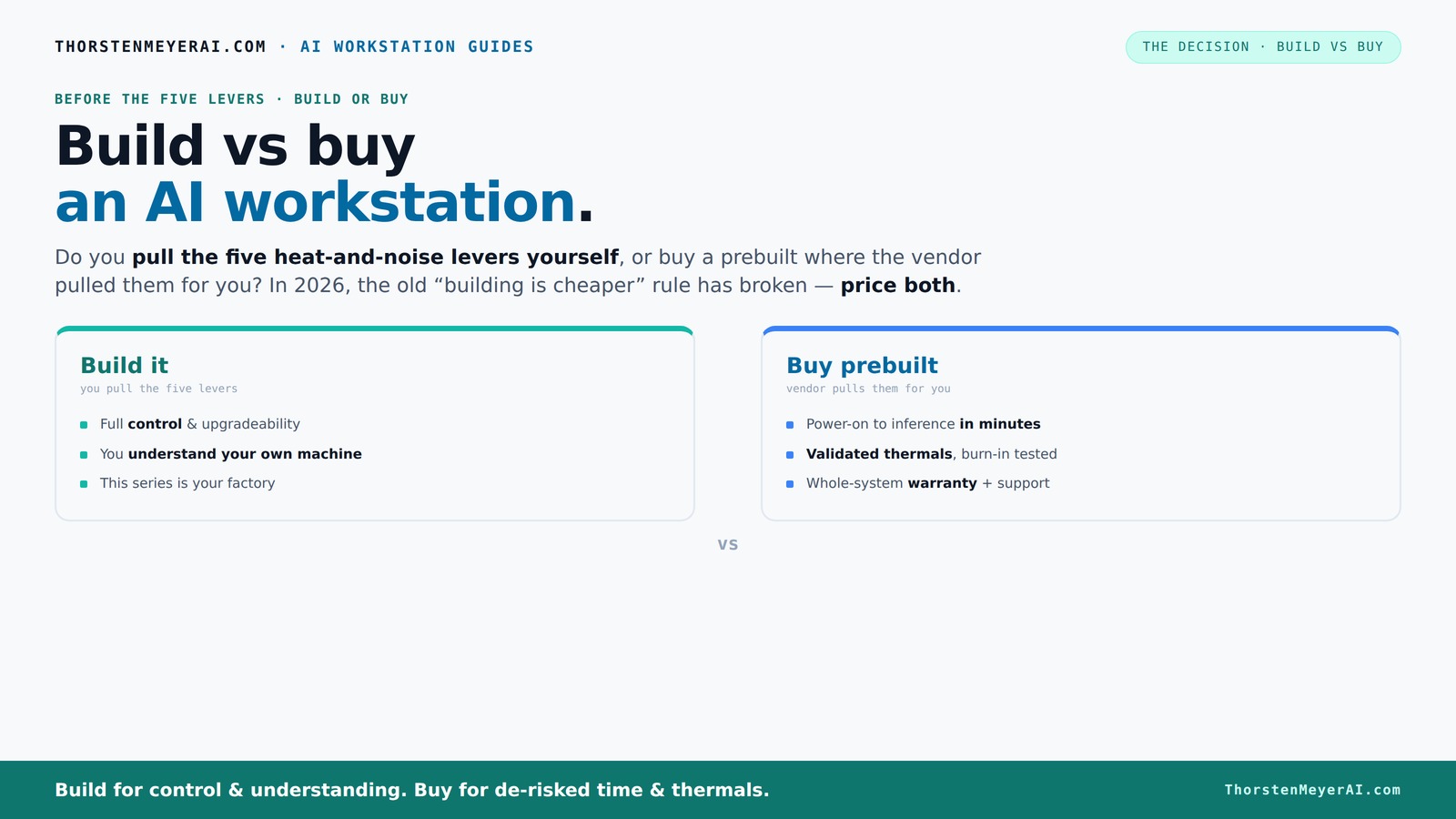
Build vs buy
an AI workstation.
The real question behind this whole series: do you pull the five heat-and-noise levers yourself, or buy a prebuilt where the vendor pulled them for you? And in 2026, the old “building is cheaper” rule has broken. Match your situation in Part 3.
Key Takeaways
- In 2026, prebuilt AI workstations often match or beat DIY prices due to bulk purchasing and component shortages.
- Thermal tuning and noise reduction are critical; prebuilts validate these at the factory, while DIY requires hands-on effort.
- Choosing between build and buy hinges on your control needs, technical skills, and how quickly you want to deploy.
- Upgradeability and support are stronger with DIY, but prebuilts offer peace of mind and fewer setup headaches.
- Always price both options for your exact specs — don’t assume DIY is cheaper without comparison.
As an affiliate, we earn on qualifying purchases.
Why the old rule of 'build cheaper' no longer applies in 2026
Building your own AI workstation used to be the clear winner on price. But today, component shortages and price spikes have changed the game. DDR5 RAM, high-end GPUs, and fast SSDs now cost 20-30% more than just a year ago.
In fact, some prebuilt vendors managed to buy components in bulk before prices skyrocketed. As a result, they can offer systems at prices that are often hard to beat, even when you factor in assembly and support. So, the old 'DIY is always cheaper' rule is broken — at least for now.
Imagine you want a system with a RTX 4090, 64GB RAM, and a fast NVMe SSD. Building it yourself might cost you $2,000 in parts. But a vendor might offer a similar system for $1,900, including support, warranty, and pre-installed software. That’s a game changer.
Beyond raw costs, this shift impacts decision-making. The traditional advantage of DIY was control over each component and potential cost savings. Now, with supply chain disruptions, even experienced builders face delays and price volatility, making prebuilt options more appealing for those who need reliable, quick deployment. This tradeoff underscores that in 2026, the value of time and certainty may outweigh the marginal savings of DIY.
As an affiliate, we earn on qualifying purchases.
The five levers that make or break your AI workstation’s thermal and noise performance
Heat and noise are your biggest enemies in a high-power AI rig. Tuning these factors isn’t just about cooling — it’s about pulling five levers: undervolting the GPU, matching the cooler, optimizing airflow, tuning the fans, and choosing the right placement.
Prebuilts often handle these levers at the factory, similar to what you can learn from airflow optimization guides. They validate thermals, set fan curves, and sometimes even use water cooling for quieter operation. You pay for this expertise, but you get reliability and peace of mind, much like the benefits discussed in build vs buy a prebuilt AI workstation articles.
If you build your own, you’re the one pulling these levers. You pick a quiet GPU, undervolt it using guides like [this](https://thorstenmeyerai.com/undervolt-gpu-local-inference/), choose a case with good airflow ([see here](https://thorstenmeyerai.com/low-noise-pc-cases-airflow/)), and set up your fans for quiet operation. The control is yours, but so is the work. This process matters because thermal management directly impacts performance longevity and noise levels, which in turn affect your ability to run intensive workloads without overheating or excessive fan noise. The tradeoff is between convenience and the hands-on effort required to optimize your system’s thermals and acoustics.
As an affiliate, we earn on qualifying purchases.
When a prebuilt AI workstation makes sense — and when it doesn’t
Prebuilt AI workstations excel when you need to deploy fast and want proven, reliable performance. Imagine launching a deep learning project on Monday — you don’t want to spend weeks sourcing parts, waiting for shipping, or troubleshooting BIOS bugs.
Reputable vendors like Lambda or BIZON test their systems for hours under heavy load, validate thermals, and back their work with support and warranties. If downtime costs you thousands, paying a bit more for peace of mind makes sense.
But if you’re comfortable with hardware and want maximum control, building might still be your jam. You can customize every component, match your exact workload, and upgrade parts as needed, similar to advice found in build vs buy guides. Just expect to spend time and effort tuning and troubleshooting. The key is understanding that prebuilt systems are optimized for quick deployment and reliability, which is critical when project timelines are tight or when your team lacks the time or expertise to troubleshoot hardware issues.
As an affiliate, we earn on qualifying purchases.
When a DIY build beats a prebuilt: control, customization, and cost
Building your own AI workstation shines if you’re a hobbyist or researcher who loves the process. You pick every component—say, a 24GB VRAM GPU like the RTX 4080, a 128GB RAM kit, and a custom cooling solution. This lets you tailor the system for your specific needs. The ability to select each part means you can prioritize features like lower noise, higher overclocking headroom, or specific compatibility, which might not be available in preconfigured systems. This customization can lead to better performance-per-dollar when done thoughtfully, as discussed in technology guides.
Plus, DIY can be cheaper if you're willing to do the work. You can hunt for deals, buy in phases, and avoid vendor markup. For example, sourcing a high-quality PSU and quiet CPU cooler ([see options here](https://thorstenmeyerai.com/quiet-cpu-coolers-ai-workstation/)) can save hundreds. The tradeoff is that this process requires a certain level of technical skill and patience. Compatibility issues, BIOS setup, and initial troubleshooting can take time, but the end result is a machine built precisely to your specifications, often with better cooling and noise profiles than some prebuilt options.
Comparison table: Build vs Buy — what really matters in 2026
| Feature | Build | Buy |
|---|---|---|
| Cost | Variable; depends on deals and time spent | Often comparable or lower due to bulk buying |
| Time to deploy | Weeks of sourcing, building, tuning | Minutes to days, ready to run |
| Control over components | High — pick every part | Limited — depends on vendor options |
| Thermal tuning | DIY control; requires effort | Factory validated, tested, optimized |
| Support & warranty | Limited; depends on individual parts | Full support, warranty included |
| Upgradeability | Easy — accessible parts | Variable; proprietary parts may limit upgrades |
The long-term game: upgrading, repairs, and support
Building your own system means you control upgrades and repairs. Swap out a GPU or add more RAM without hassle. You understand every component, so troubleshooting is straightforward.
Prebuilts often use proprietary connectors or non-standard parts, making upgrades or repairs trickier. They may limit your options or require sending the whole system back for service, which costs time and money.
Support can be a game-changer. A vendor offering a 3-5 year warranty with on-site repair or quick replacement reduces downtime — crucial for AI workloads that can’t afford interruptions. This support not only minimizes downtime but also offers peace of mind, especially when dealing with complex hardware configurations that might be difficult for an individual to troubleshoot or repair without guidance.
Final thoughts: The smart choice depends on your needs
In 2026, the decision is less about saving money and more about what you value—control, speed, or support. If you thrive on tweaking and customizing, building your own AI workstation still makes sense. For rapid deployment and guaranteed performance, a prebuilt can be smarter.
Imagine a future where your AI rig is a finely tuned machine, humming quietly under a desk, ready at a moment’s notice. Whether built or bought, remember: your choice shapes how smoothly your AI projects unfold. Choose wisely.
Frequently Asked Questions
Is it cheaper to build or buy an AI workstation in 2026?
It depends on your specific config and market conditions. Due to component shortages, prebuilts often match or beat DIY prices now, especially when bulk buying. Always price both options for your exact needs.Which option offers better performance for AI training and inference?
Both can deliver top-tier performance if built or bought with high-end GPUs and adequate cooling. Prebuilts often include validated thermals, ensuring sustained performance, while DIY allows for tailored component choices. The key is selecting components that meet your workload demands and ensuring proper thermal management to sustain peak performance without overheating.How much VRAM do I need for local AI models?
For most modern AI workloads, 24-48GB of VRAM is recommended. High-end models like GPT-4 require around 48GB to run comfortably on local hardware. This amount of VRAM influences your ability to handle larger models and datasets without resorting to memory swapping, which can significantly slow down training and inference.Can I upgrade a prebuilt later without replacing everything?
It varies. Some prebuilts use proprietary parts, limiting upgrades. Others use standard components, making upgrades easier. Always check the vendor’s upgrade policy before buying. Consider how accessible the interior is and whether key components like GPU, RAM, and storage can be upgraded without voiding warranties or requiring extensive disassembly.What specs matter most for machine learning and LLMs?
GPU VRAM, number of CUDA cores, RAM size, and fast NVMe storage are critical. Prioritize GPUs with ample VRAM and CPUs that won’t bottleneck your GPU. The more VRAM, the larger models you can train or run inference on simultaneously. High core counts and fast storage reduce data loading bottlenecks, improving overall training throughput.Conclusion
Deciding whether to build or buy your AI workstation boils down to what you prioritize—control, speed, or support. In 2026, the best choice isn’t always the cheapest; it’s the one that best fits your workflow and comfort level. Think about how much time you want to spend tuning versus launching.
Picture your ideal setup: a machine humming quietly, ready to unleash your AI projects at a moment’s notice. Whichever path you choose, make it a decision that fuels your productivity, not hampers it.
Fall Picks
fall essentials
As an affiliate, we earn on qualifying purchases.