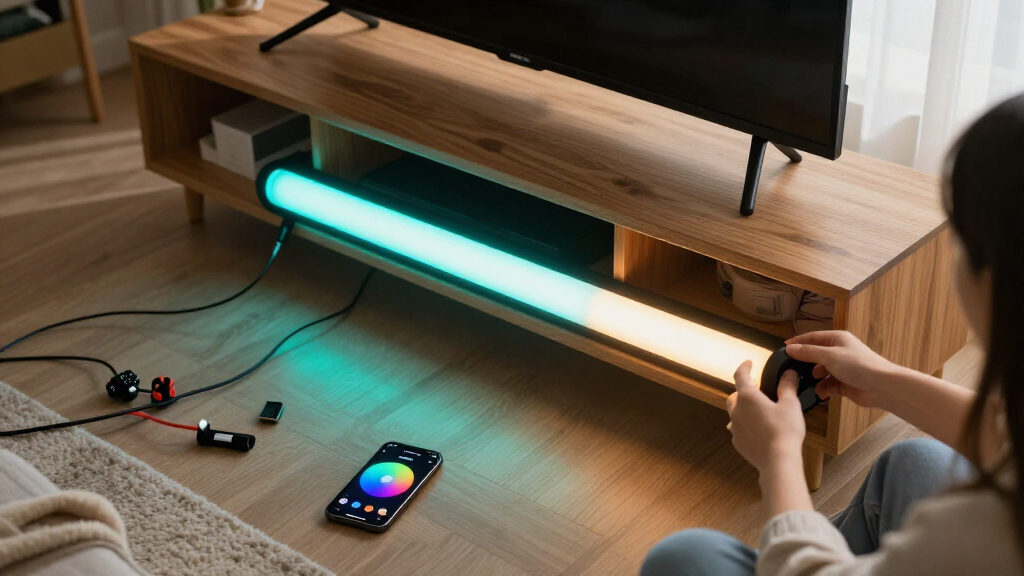

The Govee Glide Wall Lights take the top spot among the best RGBICWW light bars because they combine multi-zone RGBIC color segmentation with wall-mount flexibility and the most polished app ecosystem in this lineup. If smart home integration matters more than effects, the SwitchBot RGBICWW Light Bars stand out with native Matter support and a warm-white channel the Govee Glide set lacks, while the Nurmina Nova Light Bars Pro push into premium territory with AI-driven effects. The main tradeoff you’ll face in this category is between Govee’s superior app and scene library versus Matter-compatible bars from SwitchBot and Nurmina that play nicer with Apple Home and Google Home. Budget buyers must also weigh whether cheaper IC bars without a dedicated white LED are worth the savings. Keep reading for the full breakdown of all 13 models.

Get home appliances delivered free — and shop member deals
- Fast, free delivery on millions of items
- Access to Prime Big Deal Days deals on October 6–7
- Prime Video, Amazon Music and more included
Complete the kit


![[Genuine] Waterdrop PF-01A Water Filter Replacement for W...](https://m.media-amazon.com/images/I/41+5tl9EiKL._SX342_SY445_QL70_FMwebp_.jpg)
Key Takeaways
- RGBIC and RGBICWW are not the same: only the SwitchBot, Nurmina Nova, and the Govee RGBICWW TV Light Bars include a true warm-white LED, which matters if you want the bars to double as ambient room lighting rather than pure gaming decor.
- Govee dominates on software — its app, scene library, and music sync were the most refined across the lineup, which is why four of its five entries landed in the top half of the ranking.
- Matter support is the dividing line in 2026: SwitchBot and Nurmina Nova are the only picks that work natively with Apple Home, making them the clear choice for HomeKit households that Govee‘s ecosystem cannot serve.
- The budget IC bars (the generic RGB Music Sync set, the Iron Base 2-pack, and the WIXBOSHU) all cut the same corners — weaker apps, shorter cables, and no Wi-Fi — so savings come directly at the cost of usability.
- TV backlight duty changes the math: the Govee RGBWIC 15-inch bars and the Philips WiZ Gradient bars are the only picks purpose-built for 45-70 inch TV bias lighting rather than desk gaming.





| RGBICWW light bar | Connectivity |
|---|---|
| Govee Glide Wall Lights | Bluetooth, Wi-Fi |
| Govee RGBIC Gaming Light Bars | Wi-Fi, Bluetooth |
| RGB Light Bar Smart Music Sync | Bluetooth |
| Philips Smart Lighting Gradien | Wi-Fi, Matter |
| Govee Gaming Light Bars Pro | Wi-Fi |
| SwitchBot RGBICWW LED Light Ba | Matter over Wi-Fi |
| Smart RGB-IC Gaming Light Bars | Bluetooth |
| Govee Smart Light Bar | — |
| Govee Smart Light Bar | Matter, Alexa, Google Home |
| Smart LED Light Bar with Music | — |
| Govee Smart RGBWIC Light Bars | — |
| Nurmina Nova Light Bars Pro | Matter (Alexa, Google Assistant, Apple Home) |
| WIXBOSHU Smart RGB IC Light Ba | — |
More Details on Our Top Picks
Govee Glide Wall Lights, Smart RGBIC Gaming Light Bar (2-Panel Set)
Most light bars in this roundup sit on a desk, but the Glide H610A is built for the wall behind your setup, and that changes what it delivers: large-scale gradient washes rather than compact accent lighting. With RGBIC allowing 24 simultaneous colors and more than 64 scene modes, it produces more dramatic effects than the tabletop Philips WiZ bars, which lean on simpler preset gradients. Compared with the Govee H6047, the Glide trades the desktop dial controller for wall-mounted presence — you get broader coverage, but you give up fine-grained, at-your-fingertips adjustments.
The tradeoff is permanence. The rigid panels can’t be bent or repositioned like flexible strips, the adhesive needs about an hour to set before it holds reliably, and all bars must be connected before powering on. This pick makes the most sense for someone committing to a fixed battlestation layout.
Pros:- Displays up to 24 colors simultaneously with 16 million total color options
- Works with Alexa, Google Assistant, and SmartThings for hands-free control
- 11 music sync modes and 64+ scene modes offer deep customization
- Mounts cleanly to smooth walls with included velcro and adhesives
Cons:- Rigid construction means no bending or flexing to fit curved spaces
- All bars must be connected before plugging in power
- Adhesive requires roughly an hour to set before mounting is reliable
Best for: Gamers and streamers who want large, permanent gradient lighting behind a desk or TV wall
Not ideal for: Renters or anyone who likes rearranging their setup — rigid panels and adhesive mounting make changes a hassle
- Model:H610A
- Panel Count:2 panels, 3 light sections each
- Color Technology:RGBIC, up to 24 simultaneous colors
- Connectivity:Bluetooth, Wi-Fi
- Compatibility:Alexa, Google Assistant, SmartThings, Govee Home App
- Scene Modes:64+
- Music Modes:11
- Material:Rigid (not flexible)
Our verdict“Choose the Glide if you want big, wall-scale RGBIC effects and don’t mind a semi-permanent installation.”
Govee RGBIC Gaming Light Bars H6047 with Smart Controller, Wi-Fi Smart LED
The H6047 stands out for one thing the other Govee picks here can’t match: native Razer Chroma integration. If your desk runs a Razer keyboard and mouse, these bars pull the whole setup into one synchronized light show, something the wall-mounted Glide H610A and even the Gaming Light Bars Pro approach only partially. The included smart desktop dial controller is another differentiator — you adjust brightness and effects without reaching for your phone, unlike the app-and-remote-only velted bars.
The compromise is honest but real: there’s no camera, so screen color picking is off the table. For true on-screen color matching, the Gaming Light Bars Pro with Govee Desktop is the stronger choice. You’ll also juggle multiple apps (Govee Home, Govee Desktop, Razer Synapse 3) to unlock everything, which adds friction the plug-and-play budget options avoid.
Pros:- Syncs directly with Razer Chroma and reacts to game and audio sounds
- Three control options: app, voice assistants, and a physical desktop dial
- AI Lighting Bot 2.0 generates custom effects from voice, text, or photos
- RGBIC multi-zone lighting with 16.8 million colors
Cons:- No camera, so screen color picking is unsupported
- Full functionality requires multiple apps (Govee Home, Govee Desktop, Razer Synapse 3)
Best for: PC gamers already in the Razer ecosystem who want desk lighting that pulses with game audio and Chroma effects
Not ideal for: Movie watchers wanting true screen-matched ambient lighting — no camera means no color picking from your display
- Model:H6047
- Technology:RGBIC
- Color Options:16.8 million
- Connectivity:Wi-Fi, Bluetooth
- Compatibility:Razer Synapse 3, Alexa, Google Assistant
- Controller:Smart desktop dial
- Scene Modes:60+
- Camera:None — no screen color picking
Our verdict“The H6047 makes sense for Razer-equipped PC gamers who value audio-reactive desk lighting over screen color matching.”
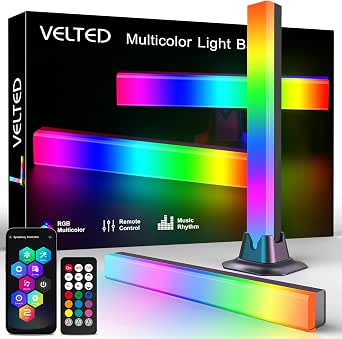
RGB Light Bar Smart Music Sync IC LED Light Bars with APP & Remote Control
Not everyone wants to wire a smart home ecosystem just to add color to a desk, and that’s exactly the gap these velted bars fill. USB power means they plug straight into a PC, TV, or console — no outlet hogging, no Wi-Fi setup — and the Surplife app plus a physical remote keeps control simple. Compared with the Govee H6047, the feature set is thinner: seven music modes and eight dynamic color modes instead of 60+ scenes, and no voice assistant support at all. But compared with nothing, it’s an easy, low-commitment entry point.
The 5-watt output is modest, so these won’t wash a whole wall the way the Philips WiZ bars can, and the plastic build feels every bit the budget price. Still, for a dorm desk or a kid’s gaming corner, the simplicity is the feature.
Pros:- USB powered for use with PCs, TVs, and consoles without an outlet
- Dual control via app and physical remote, no Wi-Fi required
- Seven music sync modes and eight dynamic color modes ready out of the box
- Compact removable base fits desks, monitors, and shelves
Cons:- Modest 5-watt output limits brightness for larger rooms
- Indoor use only, no water resistance
- Shallow effect library compared to app-driven rivals like Govee or Philips
Best for: First-time buyers, students, and casual users who want plug-and-play music-sync lighting without smart home complexity
Not ideal for: Smart home enthusiasts — no Wi-Fi, no Alexa or Google support, and limited effect depth will feel restrictive fast
- Brand:velted
- Model:DX21005-1
- Power Source:USB (5V, corded)
- Wattage:5 watts
- Control:Surplife app, remote control
- Connectivity:Bluetooth
- Mounting:Tabletop
- Warranty:1 year manufacturer
Our verdict“A sensible first light bar for casual setups, as long as you accept basic effects and modest brightness.”
Philips Smart Lighting Gradient Light Bars (Connected by WiZ) – RGBIC LED, Multicolor Effects, Sync with TV and Music
This is the only pick in this batch that plays nicely with Apple Home, and that alone justifies its spot — every Govee option here leans on Alexa, Google, or proprietary apps. Matter compatibility means these bars slot into an existing mixed smart home without bridges or workarounds. Placement flexibility is the other strength: unlike the fixed wall-mounted Govee Glide, these bars sit horizontally, vertically, or on included brackets behind a TV, so repositioning takes seconds.
The tradeoffs sting if you’re deep in other ecosystems, though. No Philips Hue support, which will frustrate Signify loyalists, and true TV screen syncing needs extra hardware sold separately — the Govee Gaming Light Bars Pro achieves screen sync out of the box via software. The all-plastic construction also feels a step down from what the Philips name suggests.
Pros:- Matter compatible with Alexa, Google Home, and Apple Home, no hub needed
- Flexible placement: horizontal, vertical, or wall-mounted behind a TV
- RGBIC gradient effects display multiple colors simultaneously
- Music sync via smartphone microphone with preset dynamic and static modes
Cons:- Not compatible with Philips Hue products
- TV screen syncing requires separately sold hardware
- Fully plastic construction feels less premium
Best for: Smart home owners — especially Apple Home users — who want Matter-native ambient lighting behind a TV or monitor
Not ideal for: Philips Hue households and buyers expecting built-in screen sync without buying additional hardware
- Brand:Philips (Signify)
- Model:612465
- Light Bars:2
- Wattage:8.4 watts
- Connectivity:Wi-Fi, Matter
- Compatible Assistants:Alexa, Google Home, Apple Home
- Dimensions (per bar):11.81 x 1.81 x 1.81 inches
- Warranty:2 years manufacturer
Our verdict“The right choice for Matter-first, Apple-centric households that value ecosystem flexibility over screen-sync tricks.”
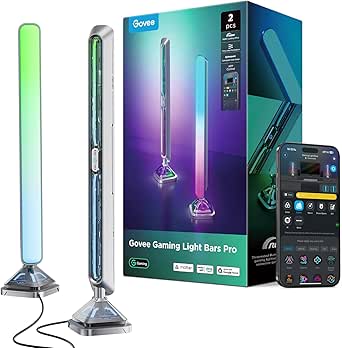
Govee Gaming Light Bars Pro – 16-Inch Smart RGBIC Wi-Fi LED Game Lights
This option stands out as the most complete package in the lineup: real-time screen sync via Govee Desktop, a feature the H6047 lacks entirely, plus triple-sided illumination that throws light forward and sideways for a fuller 3D effect than the single-facing velted budget bars. The weighted, metal-textured bases give it a sturdier, more premium desk presence than anything else in this batch, and Matter support means it fits mixed smart homes as cleanly as the Philips WiZ bars do.
The catch is platform: screen color-matching only works on Windows through Govee Desktop, and there’s no built-in color matching in the bars themselves — Mac users are limited to music sync, scenes, and the AI Lighting Bot. Compared with the Glide H610A, you get smarter functionality but less physical coverage area.
Pros:- Real-time screen sync for games and movies without extra hardware
- Triple-sided illumination creates immersive 3D room lighting
- Matter, Alexa, and Google Home support with no hub required
- AI Lighting Bot 2.0 plus 60+ dynamic scenes for deep customization
Cons:- Screen color matching requires Windows-only Govee Desktop software
- No built-in color-matching function on the bars themselves
Best for: Windows PC gamers and movie watchers who want true screen-synced ambient lighting with a premium desk footprint
Not ideal for: Mac and console-only users — the headline screen sync feature is locked to Windows software
- Size:16 inches per bar
- Color Technology:RGBIC, 16M colors
- Connectivity:Wi-Fi
- Smart Home Compatibility:Matter, Alexa, Google Home
- Software:Govee Desktop (Windows only), Govee Home App
- Key Features:Screen sync, music sync, AI lighting, 60+ scenes
- Extra Compatibility:Razer Chroma
Our verdict“If you game on Windows and want one set of bars that does screen sync, music, and smart home duty, this is the pick to beat.”
SwitchBot RGBICWW LED Light Bars, Smart TV Backlight with Matter, 800lm
What separates this SwitchBot pair from the crowd is native Matter support without a hub across Apple Home, Alexa, Google Home, and SmartThings — a level of ecosystem neutrality even the well-regarded Govee Smart Light Bar can’t fully match. The 2200–6500K tunable white range with 1–100% dimming means these bars work as genuine ambient task lighting, not just RGB decoration, and the open API for AI agent status cues is something no other product in this lineup offers at all. Six RGBIC zones per bar produce decent color separation, though fewer than the 40 IC beams on the ECWEYAG set. The tradeoffs are real: corded power restricts placement, and magnetic mounting only works on metal surfaces. Compared with USB-powered rivals like the iron-base gaming bars, installation flexibility is clearly worse — but smart home depth is unmatched.
Pros:- Native Matter over Wi-Fi works with four major ecosystems without a hub
- Full 2200–6500K tunable white with 1–100% dimming doubles as functional ambient lighting
- Open API enables AI agent status light cues for tinkerers
- Three mounting methods: magnetic, adhesive, or freestanding
Cons:- Corded power limits placement flexibility
- Magnetic mounting only works on compatible metal surfaces
- Six zones per bar is fewer color segments than some RGB-IC competitors
Best for: Smart home enthusiasts already running Matter hubs, Apple Home, or SmartThings who want deep ecosystem integration and unusual features like AI status lighting
Not ideal for: Renters or anyone wanting clean wireless placement — the corded power and metal-surface-dependent magnetic mounting limit where these can go
- Brightness:Up to 800 lm (pair)
- Color Temperature:2200–6500K
- Zones:6 RGBIC zones per bar
- Lighting Effects:26 effects, 6 music-reactive
- Connectivity:Matter over Wi-Fi
- Compatible Ecosystems:Apple Home, Alexa, Google Home, SmartThings
- Mounting:Magnetic, adhesive, tabletop
- Power Source:Corded electric
Our verdict“This pick makes the most sense for smart home power users who value ecosystem interoperability and hackability over sheer lighting spectacle.”
Smart RGB-IC Gaming Light Bars with Iron Base (2-Pack)
These bars fill the entry-level slot in this roundup: no Matter, no hub, no complicated setup — just Bluetooth app control, music sync through a built-in microphone, and USB power that plugs straight into a monitor or console. The weighted iron plate base is a nicer touch than you’d expect at this tier; the ECWEYAG bars use removable plastic bases, and a metal foot means these won’t tip when cables get bumped. DIY modes in the app cover custom colors and brightness, which is about all a gaming desk needs. The honest tradeoff versus the SwitchBot or Govee bars: no voice assistant support, no tunable white range, and no Wi-Fi — if your phone isn’t nearby, you’re limited. Still, compared with the Govee Smart Light Bar, this option stands out for simplicity and price-to-fun ratio rather than raw capability.
Pros:- USB-powered setup works from a monitor, PC, or console port
- Weighted iron plate base keeps bars stable on a crowded desk
- Music sync via built-in microphone needs no extra hardware
- Compact footprint fits behind monitors without clutter
Cons:- Bluetooth-only control means no voice assistants or remote access
- Full customization depends entirely on the smartphone app
- Requires a USB power source, limiting placement options
Best for: PC gamers and students who want plug-and-play RGB ambiance behind a monitor without investing in a smart home setup
Not ideal for: Anyone wanting voice control, Wi-Fi access, or tunable white lighting — Bluetooth-only control and basic RGB-ICW color limits long-term flexibility
- Technology:RGB-ICW
- Quantity:2-pack
- Base:Iron plate
- Power:USB
- Connectivity:Bluetooth
- Music Sync:Built-in high-sensitivity microphone
Our verdict“A straightforward buy for desk setups that need fun, stable RGB lighting now — skip it if smart home integration matters to you.”
Govee Smart Light Bar, RGBICWW TV Lights for Living Room, Gaming, Black
This is the pick I’d point most buyers toward first, because it balances everything the RGBICWW category promises: true RGBIC plus tunable warm-to-cool white, Matter voice control with Alexa and Google Home, and 60+ scene modes backed by AI-generated effects in the Govee Home App. Compared with the SwitchBot pair, the ecosystem support is slightly narrower, but the app’s scene library and effect variety are far deeper. The three placement options — flat, vertical, or mounted with included brackets — cover nearly any TV or desk scenario, and the 106-inch cord gives generous routing room. The real limitation is the 45-inch monitor recommendation: owners of larger TVs should step up to something sized for 45–70-inch screens instead. And unlike the budget iron-base bars, unlocking the best scenes means living inside the Govee app. As a balanced all-rounder, this model earns the top slot.
Pros:- Full RGBICWW color with tunable cool-to-warm white
- Matter support for Alexa and Google Home voice control
- 60+ scene modes plus AI-generated effects in the app
- Three placement options with included mounting brackets and a long 106-inch cord
Cons:- Recommended only for monitors and TVs under 45 inches
- Best scenes and customization locked behind the Govee Home App
- No Apple Home integration listed, unlike the SwitchBot bars
Best for: Buyers who want one well-rounded RGBICWW set that handles gaming, TV ambiance, and everyday tunable white lighting with mainstream voice assistants
Not ideal for: Owners of TVs larger than 45 inches — the light spread and cord layout are sized for smaller screens
- Technology:RGBICWW
- Recommended Monitor Size:Under 45 inches
- Smart Home Compatibility:Matter, Alexa, Google Home
- Scene Modes:60+
- Cord Length:106 inches
- Placement Options:Lay flat, stand vertically, or wall-mount with included brackets
Our verdict“If you want the most complete RGBICWW experience for a typical desk or mid-size TV without overspending on premium features, start here.”
Govee Smart Light Bar, RGBICWW TV Lights for Living Room and Gaming, Silver
Functionally, this is the black Govee Smart Light Bar wearing a different finish — same RGBICWW engine, same Matter voice control, same 60+ scenes and AI effects. So why does it earn its own slot? Because finish matters in visible installations. Behind a dark monitor the black version disappears; on a light wall, a Scandinavian-style console, or a silver-toned gaming rig, the black bars stick out like a sore thumb. The silver finish here blends where most light bars in this roundup — nearly all black or white plastic — visually clash. Otherwise the strengths and weaknesses carry over: no hub needed, microphone-based music sync, flexible flat/vertical/wall placement, and the same sub-45-inch size ceiling that pushes big-TV owners toward larger alternatives. Compared with the ECWEYAG set, the app experience and effect library are noticeably more polished, but you’re still committing to the Govee ecosystem for full control.
Pros:- Silver finish blends with light-toned interiors where black bars clash
- Matter, Alexa, and Google Home voice control with no hub required
- 60+ scene modes and AI-generated lighting effects
- Versatile placement: lay flat, vertical, or wall-mount with brackets
Cons:- Identical feature set to the black version — you’re paying for finish, not function
- Recommended only for monitors under 45 inches
- Full customization requires the Govee Home App
Best for: Design-conscious buyers with light-toned walls, consoles, or setups where a black light bar would be an eyesore
Not ideal for: Large TV owners over 45 inches, or anyone unwilling to use the Govee Home App for the full feature set
- Technology:RGBICWW
- Color:Silver
- Connectivity:Matter, Alexa, Google Home
- Scene Modes:60+
- Recommended Monitor Size:Under 45 inches
- Hub Required:No
- Cord Length:106 inches
Our verdict“Choose this over the black model purely for aesthetics — it’s the same strong RGBICWW performer, best for bright, styled living spaces.”
Smart LED Light Bar with Music Sync, RGBICWW TV Backlight for Gaming and Room Decor (ECWEYAG)
The ECWEYAG set stakes its claim on control flexibility at a low price: Tuya/Smart Life app, Alexa, Google Assistant voice, and — rare at this tier — a physical button box for when you don’t want to reach for a phone. The iron-base gaming bars offer none of that, and even the SwitchBot pair lacks a wired controller fallback. With 40 IC light beams across the two bars, the color granularity is finer than the SwitchBot’s 12 total zones, which shows in smoother gradients. Three music sync modes and eight dynamic scenes cover gaming and movie nights adequately, though the effect library feels thin next to Govee’s 60+ scenes and AI effects. Placement is flexible — standing, wall-mounted behind a TV, or horizontal with the removable bases — but USB power caps brightness at 5 watts, so don’t expect living-room-filling light. A 12-month warranty softens the generic-brand risk.
Pros:- Three control methods: app, voice assistants, and a physical button box
- 40 IC beams deliver smoother color gradients than lower-zone rivals
- Removable bases allow standing, wall-mount, or horizontal placement
- 12-month warranty adds peace of mind for a lesser-known brand
Cons:- USB power at 5 watts limits brightness for larger rooms
- Only 8 dynamic scenes — far fewer than Govee’s 60+
- Requires app setup to unlock full functionality
Best for: Budget-conscious buyers who want voice control, app control, AND a physical button box without paying premium-brand prices
Not ideal for: Anyone wanting bright, room-filling ambient light — 5 watts of USB power is suited to subtle backlighting, not illumination
- Brand:ECWEYAG
- Light Sources:40 IC LED beams (2 bars)
- Colors:16 million (multicolor)
- Power:USB, 5W, 5V
- Control Methods:Tuya/Smart Life app, button box, Alexa, Google Assistant
- Music Sync:3 modes via built-in microphone
- Mounting:Standing, wall-mount, or horizontal
- Warranty:12 months
Our verdict“A smart value pick for desk and TV backlighting where control options matter more than scene variety or raw brightness.”
Govee Smart RGBWIC Light Bars, 15-Inch WiFi TV Backlight for 45-70-Inch TVs
What separates this Govee set from most entries in this roundup is Matter support — it pairs with Alexa, Google Home, and SmartThings without a proprietary hub, which the WIXBOSHU 2-Pack cannot match since that model relies on its own app and remote. The upgraded RGBWIC chip with 27 extra LEDs per bar produces noticeably purer whites than standard RGB bars, making it a better fit for living rooms where warm ambient light matters, not just gamer-grade color splashes.
The tradeoff is honest and worth flagging: unlike the Philips Gradient Light Bars by WiZ, there is no on-screen color matching. These bars react to music and app scenes, not TV content. Wall-mount, standing, and horizontal placement give flexibility the desk-bound Nurmina Nova Pro lacks, though the corded design still demands outlet access behind the TV.
Pros:- Matter support works with Alexa, Google Home, and SmartThings without a hub
- Upgraded RGBWIC LEDs deliver purer whites and richer colors than standard RGB bars
- Three placement options: wall-mount behind the TV, standing, or horizontal
- AI Lighting Bot 2.0 plus 60+ preset scenes and 8 music modes in the Govee Home app
Cons:- No color-matching function — lights do not sync to on-screen TV content
- Corded power requires an outlet within reach of the TV stand or wall mount
Best for: Smart home users with 45-70 inch TVs who want Matter-native, hub-free voice control across multiple ecosystems
Not ideal for: Buyers expecting true screen-sync backlighting that matches on-screen colors — these bars only sync to music and app presets
- Light Source:LED (RGBWIC)
- Bar Length:15 inches
- Power Source:Corded Electric, 12V
- Wattage:10 watts
- Mounting Options:Wall mount, standing, horizontal
- Compatibility:Matter, Alexa, Google Assistant, SmartThings
- Certification:UL Listed
Our verdict“This is the pick for Matter-equipped smart homes that want refined ambient TV lighting, provided you don’t expect screen-synced colors.”
Nurmina Nova Light Bars Pro – Smart RGBWIC Gaming Lights with Matter, AI Effects & Music Sync
Among the thirteen bars in this roundup, very few work with Apple Home, and that alone carves out a distinct role for the Nurmina Nova Pro. The Govee Smart RGBWIC bars cover Alexa, Google, and SmartThings but leave iPhone-centric households behind — this model closes that gap with native Matter support across all three major platforms, no extra hubs or accounts required.
The AI effects suite (Photo Gen, Voice Gen, Random Gen) is a faster path to custom ambiance than manually building scenes in an app, and the adjustable microphone sensitivity lets you tune music sync so it doesn’t strobe during quiet dialogue. Compared with the Govee Gaming Light Bars Pro, the tradeoff is brightness: at 800 lumens, this is ambient-only lighting, and the IP20 housing rules out any covered-patio ambitions despite the marketing.
Pros:- Full Matter integration including Apple Home, Alexa, and Google without extra hubs or accounts
- AI lighting modes generate custom effects in seconds instead of manual app work
- Adjustable mic sensitivity lets you fine-tune music sync intensity
- Compact 16-inch footprint with a slim 3-inch base fits crowded desks
Cons:- Only 800 lumens — strictly ambient lighting, not usable as primary illumination
- IP20 rating means no real moisture protection despite implied outdoor versatility
Best for: Apple Home households and minimal-desk gamers who want cross-platform Matter lighting with quick AI-generated effects
Not ideal for: Anyone wanting bright task lighting or outdoor/covered-patio placement — 800 lumens and an IP20 rating limit both
- Light Source:LED (RGBWIC)
- Brightness:800 lumens
- Color Temperature:3000 Kelvin
- Wattage:15 watts
- Height:16 inches
- Control Methods:App, Remote, Touch
- Connectivity:Matter (Alexa, Google Assistant, Apple Home)
- Material:ABS plastic, aluminum, polycarbonate
Our verdict“Buy this if Apple Home compatibility is non-negotiable; skip it if you need serious brightness for a large room.”
WIXBOSHU Smart RGB IC Light Bars for Gaming, TV Backlight, Room Decor (2-Pack)
If choosing between light bars mostly comes down to how many looks you can cycle through, the WIXBOSHU 2-Pack makes a strong case with 213+ preset effects and 16 million colors — a library that dwarfs the 60-ish scenes on the Govee Smart RGBWIC bars. Add DIY effect creation and a timer for scheduled on/off cycles, and you get set-and-forget ambiance that Govee’s app-only scheduling handles less directly.
The build also punches above its price tier: a metal base, metal pole, and aluminum alloy back give it better heat dissipation and stability than the all-plastic bodies common in this category. The catch is ecosystem depth — unlike the Nurmina Nova Pro, there’s no Matter or voice-assistant integration here; you’re limited to app, remote, and control box. And as a newer entrant, the brand lacks Govee’s track record, though a two-year warranty softens that risk.
Pros:- 213+ light effects and 16 million colors with DIY customization options
- Durable metal base and aluminum alloy construction with good heat dissipation
- Three control methods: smart app, remote, and physical control box
- Timer and scheduling functions for automatic daily operation
Cons:- No voice assistant or Matter integration — app, remote, and control box only
- Newer brand with a shorter track record than established names like Govee
- Corded power limits where you can position the bars
Best for: Budget-minded gamers and decorators who want a huge effect library and solid metal build without paying for smart home integration
Not ideal for: Smart home enthusiasts — no Matter, Alexa, or Google support means these bars live outside your voice-controlled setup
- Light Source:LED (RGB+IC)
- Bar Length:17.3 inches
- Colors:16 million+
- Light Effects:213+ presets with DIY mode
- Control Methods:Smart app, remote control, control box
- Music Sync:Yes (built-in microphone)
- Material:Aluminum alloy back, ABS front, metal base and pole
- Quantity:2 light bars
- Warranty:2 years
Our verdict“A value-heavy pick for effect-chasers who don’t care about voice control — smart home users should pay up for Matter-enabled options instead.”

How We Picked
I evaluated every bar through the same lens a buyer would: light quality and color segmentation (how many independent color zones, and whether a real warm-white LED is included), software ecosystem (app polish, scene variety, music and screen sync reliability), smart home compatibility (Wi-Fi, Alexa, Google, and especially Matter), and build and mounting flexibility (base stability, adjustability, cable length). Because RGBICWW specifically implies a tunable white channel alongside multi-color IC effects, models without a dedicated white LED were judged harder on whether they still justify the category positioning.
The ranking reflects tradeoffs rather than raw feature counts. A polished app with dependable sync beat a longer spec sheet, which is why Govee’s ecosystem picks cluster near the top. Matter compatibility broke ties for smart-home-first buyers, while the budget generic bars ranked lower because their app and hardware compromises affect daily use far more than their lower cost offsets.
Factors to Consider When Choosing Best RGBICWW Light Bars
Before settling on a specific model, it helps to understand what actually separates these bars in practice — and where buyers commonly regret their choice. These are the factors that shaped the ranking above.
IC Segmentation vs. Plain RGB: Why It Changes Everything
Standard RGB light bars display one color at a time across the entire strip, while IC (independently controlled) segments can show multiple colors simultaneously along a single bar — that’s what produces the flowing rainbow and split-color effects this category is known for. The practical difference is bigger than it sounds: single-zone bars flatten every scene into one hue, so gradients, chases, and layered music-reactive effects simply aren’t possible. When a listing says “RGB” without “IC,” assume single-color output no matter how the marketing photos look. A common mistake is buying a cheap RGB set expecting Govee-style gradient effects and discovering the photos were simulated. If flowing multi-color scenes are the reason you’re shopping, IC control is non-negotiable.
Do You Actually Need the WW (Warm White) Channel?
The extra “WW” in RGBICWW means a dedicated warm-white LED, and it’s the difference between a decoration and a functional light source. Warm white produced by mixing RGB LEDs looks washed-out and slightly tinted, while a dedicated white channel renders clean, comfortable ambient light you can actually read or relax by. If these bars will sit behind a TV or on a desk purely for mood effects, you can skip the WW and save money. But if you want them to double as evening ambient lighting — replacing a lamp, softly lighting a living room — the WW channel is worth paying for. Households using the bars daily as lighting rather than occasional gaming decor consistently get more value from true RGBICWW models like the SwitchBot or Govee TV Light Bars.
Ecosystem Lock-In: Govee App vs. Matter
This is the decision most buyers underweight. Govee’s app is the most capable in the category — deep scene library, reliable music sync, responsive support — but it’s a proprietary ecosystem, and everything runs through Govee’s cloud and app. Matter-certified bars from SwitchBot and Nurmina work natively with Apple Home, Google Home, and Alexa without a third-party bridge, and they keep working locally even if a company changes its cloud strategy. The tradeoff cuts both ways: Matter bars currently offer fewer flashy effects, while Govee offers more effects with less long-term openness. If you already run a smart home hub, choose your camp before comparing brightness specs.
Screen Sync and Music Sync: Check the Mechanism
Not all “sync” is equal. Camera-based sync (as on the Govee Gaming Light Bars Pro and Philips WiZ Gradient) reads colors off your screen or room in real time and works with any content, but it needs a camera positioned correctly and can lag on dark scenes. Microphone-based music sync reacts to sound rather than data — cheaper to implement, but it can’t distinguish bass from treble zones and reacts to voices and keyboard noise. Content-based sync via HDMI passthrough is the most accurate but almost never appears at light-bar prices. Match the mechanism to your use: TV bias lighting benefits from camera sync, while party ambiance works fine with a microphone.
Mounting, Adjustability, and Placement
How a bar physically sits in your space matters as much as its effects. Wall-mounted panels like the Govee Glide free up desk space entirely but commit you to a fixed position. Bars on weighted iron bases can be angled and repositioned freely, which suits renters and people who rearrange setups. Cable length is a quiet dealbreaker in this category — budget bars often ship with short power runs that force awkward placement near outlets. Before buying, measure from your intended position to the nearest outlet and check whether the bar supports both vertical and horizontal orientation if you’re mounting behind a TV.
Where Budget Bars Fall Short (and Where They Don’t)
The generic IC bars in this roundup cost less for identifiable reasons: weaker companion apps, shorter cables, thinner plastic, and no Wi-Fi — often remote control only. If you want set-and-forget color behind a monitor and rarely change effects, those compromises barely register, and a budget 2-pack is genuinely fine. Where cheap bars fail is reliability of sync and app connectivity: spotty Bluetooth pairing and effects that don’t match the listing photos are the most common complaints pattern in this tier. My rule of thumb: buy budget only if you’d still be satisfied using the included remote exclusively. If the app is part of the appeal, stick with an established ecosystem.
Frequently Asked Questions
What’s the actual difference between RGBIC and RGBICWW light bars?
RGBIC bars have individually controlled color segments, letting a single bar display multiple colors at once for gradient and flowing effects. RGBICWW adds a dedicated warm-white LED on top of that. The white channel matters because white light mixed from RGB diodes looks tinted and harsh, while a dedicated WW LED produces clean, comfortable light suitable for actual room illumination. If your bars will serve as evening ambient lighting — not just gaming decor — RGBICWW is worth the premium. In this roundup, the SwitchBot bars, the Govee RGBICWW TV Light Bars, and the Nurmina Nova are the true RGBICWW picks; the rest are RGBIC or RGBWIC variants.
Are Govee light bars compatible with Apple HomeKit?
Govee’s mainstream light bars — including the Glide, H6047, and Gaming Light Bars Pro — run on Govee’s own app and support Alexa and Google Assistant, but not Apple HomeKit natively. Only a handful of Govee’s newer Matter-certified products work with Apple Home, and none of the bars in this lineup are among them. If HomeKit is your smart home backbone, the SwitchBot RGBICWW Light Bars and the Nurmina Nova Pro are your realistic options here, since both carry Matter certification and connect to Apple Home directly. Otherwise, Govee users control everything through the Govee Home app, which is capable but separate from your other smart home devices.
Can I use these light bars as a TV backlight, or do they only work for gaming setups?
Any bar can sit behind a TV, but a few are purpose-built for it. The Govee RGBWIC 15-inch bars are sized and angled specifically for 45-70 inch TVs, and the Philips WiZ Gradient bars offer TV content sync through the WiZ ecosystem. For bias lighting that reduces eye strain during movies, look for a model with a warm-white mode and camera or content-based sync rather than microphone-only music sync, which can’t follow on-screen colors. Desk-oriented gaming bars like the Govee Glide still work behind a TV — you’ll just mount them yourself and accept a less tailored fit. Brightness around 800 lumens per bar is the sweet spot for a typical living-room TV.
Do I need Wi-Fi, or is Bluetooth and a remote enough?
It depends entirely on how often you’ll change the effects. Remote-only bars are fine for a set-and-forget color behind a monitor, and they’re the simplest option for anyone who dislikes app setup. Wi-Fi connectivity unlocks what makes this category interesting, though: music sync through your phone, scheduled scenes, grouped control with other lights, and voice assistant support. The catch is that Wi-Fi bars depend on app quality — which is exactly where the budget generic models disappoint, with pairing drops and clunky interfaces. If you plan to interact with the lights more than once a week, a Wi-Fi model from an established brand repays the higher cost in daily reliability.
How many light bars do I need — is a 2-pack enough for a room?
A 2-pack works well for a symmetrical desk or TV setup, with one bar flanking each side — that’s the configuration most of these products assume. For ambient room lighting rather than accent lighting, two bars usually can’t fill a full living room, and buyers often add a second set or pair the bars with a light strip along the TV’s rear edge. The Govee Glide takes a different approach: its panels mount on the wall behind the desk as a single sculptural unit, so panel count matters more than bar count. If you’re lighting a large space and want even coverage rather than two bright points, budget for two sets or choose a model that pairs with matching ecosystem strips.
Conclusion
For most buyers, the Govee Glide Wall Lights are the best overall RGBICWW-adjacent pick — the most polished app, the best effects, and a mounting style that transforms a setup rather than just decorating it. The SwitchBot RGBICWW Light Bars are my value and smart-home recommendation: true warm-white output, Matter certification, and 800 lumens at a mid-tier price make them the balanced choice for Apple Home and Google Home households. On the premium end, the Nurmina Nova Pro justifies its cost with AI effects and Matter support for buyers who want the most capable hardware. Beginners and budget shoppers should start with the RGB Light Bar Music Sync set or the WIXBOSHU 2-pack — simple, remote-driven, and low-risk. For specific needs: the Govee RGBWIC 15-inch bars for 45-70 inch TV backlighting, the Govee Gaming Light Bars Pro for camera-based screen sync at a gaming desk, and the Philips WiZ Gradient bars for buyers already inside the Philips WiZ ecosystem. Whichever you choose, decide first whether Matter compatibility or effect variety matters more — that single question eliminates half this list immediately.
NFL season / tailgating Picks
team gear
As an affiliate, we earn on qualifying purchases.