Smart home voice assistants are now the control layer for most connected homes, and choosing one is less about speaker quality and more about which ecosystem will run your lights, locks, and routines. My top pick overall is the Amazon Echo Show 5, because its screen plus Alexa+ support handles both voice commands and at-a-glance device status better than anything else here. The Amazon Echo Dot (4th Gen) remains the best value thanks to its built-in Zigbee hub, while the Third Reality Voice Dev Edition is the standout for anyone committed to local, privacy-first Home Assistant control. The main tradeoff you’ll face is convenience versus control: Alexa and Google-based devices are easy and cloud-dependent, while Home Assistant options demand more setup but keep everything in your home. Read on for the full breakdown of all six.

Get home appliances delivered free — and shop member deals
- Fast, free delivery on millions of items
- Access to Prime Big Deal Days deals on October 6–7
- Prime Video, Amazon Music and more included
Complete the kit


Key Takeaways
- Half of this lineup is amazon.com/dp/B09B94RL1R?tag=theintellihome-20&ascsubtag=dc-1021129″ target=”_blank” rel=”nofollow sponsored noopener”>amazon.com/dp/B0BFCBKXWL?tag=theintellihome-20&ascsubtag=dc-1021129″ target=”_blank” rel=”nofollow sponsored noopener”>Amazon hardware, so the real decision is less about brand and more about form factor: screen (Echo Show 5), hub-enabled puck (Echo Dot), or bedside clock (Echo Spot).
- Only the Echo Dot (4th Gen) includes a built-in smart home hub, which can eliminate the need for a separate Zigbee bridge — a hidden value no other pick matches.
- The Third Reality Dev Edition is the only truly local option; every other assistant here sends voice processing to the cloud, which matters if privacy or internet outages are a concern.
- The Tapo P210M is the only pick that isn’t a speaker at all — it makes an existing ‘dumb’ outlet voice-controllable, which is the cheapest path into voice control if you already own any assistant.
- The Gemini Home Speaker represents the newest AI generation but has the thinnest accessory ecosystem, so buyers should weigh cutting-edge conversational ability against device compatibility today.



| smart home voice assistant | Color | Voice Assistant | Display |
|---|---|---|---|
| Tapo P210M Smart In-Wall Outle | — | — | — |
| Amazon Echo Spot | Glacier White | Alexa built-in | Customizable screen with clock faces |
| Third Reality Voice/Music Assi | — | — | — |
| Amazon Echo Dot | Glacier White | Alexa built-in | — |
| Gemini Home Speaker with AI Vo | — | — | 12-hour LED clock |
| Amazon Echo Show 5 | Cloud Blue | Alexa+ (designed for) | 5.5 inches |
More Details on Our Top Picks
Tapo P210M Smart In-Wall Outlet, Matter Compatible Wi-Fi Control
Not every pick in a voice assistant roundup has a microphone — this one earns its place by being the device your assistant actually controls. The Tapo P210M stands out because it is Matter-certified, which means Alexa, Google Home, Apple HomeKit, and SmartThings can all command it without platform lock-in. Compared with the Amazon Echo Dot (4th Gen), which works best inside Amazon’s ecosystem, the P210M is the better foundation for a multi-assistant household. Its energy monitoring and automatic shutoff translate directly into lower bills and safer charging of devices like e-bikes or power banks. The tradeoffs are real: you need neutral wiring and 2.4GHz Wi-Fi, and in-wall installation will intimidate renters. This pick makes the most sense for owners wiring a whole-home setup rather than someone wanting a desk gadget.
Pros:- Matter certification means it works with Alexa, Google Home, HomeKit, and SmartThings interchangeably
- Energy monitoring plus automatic overcharge shutoff adds measurable safety and savings
- Two independently controllable outlets in a single gang box
- Durable 15A load rating handles demanding appliances
Cons:- Requires neutral wiring and 2.4GHz Wi-Fi, complicating installation in older homes
- Limited to 125V power, so it won’t work in most non-US regions
Best for: Homeowners building a cross-platform smart home who want voice-controllable outlets that work with any assistant
Not ideal for: Renters or apartment dwellers — the in-wall installation requires neutral wiring and permanent modification
- Compatibility:Matter, Alexa, Google Home, Apple HomeKit, SmartThings
- Control:2 devices independently or simultaneously
- Energy Monitoring:Yes
- Overcharge Prevention:Yes, automatic shutoff
- Maximum Load:15A at 125V~, 50/60Hz
- Operating Range:32°F–104°F, 10%–90% humidity
- Certifications:FCC, ETL, RoHS
Our verdict“Buy this if you want your voice assistant’s commands to actually switch things on and off across any ecosystem — skip it if you can’t modify your wiring.”
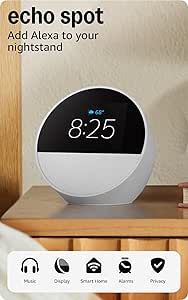
Amazon Echo Spot (newest model), Smart Alarm Clock with Alexa, Glacier White
The Echo Spot carves out a niche the other Alexa devices in this lineup don’t fully own: the nightstand. Its curved display with customizable clock faces gives you glanceable information the speaker-only Echo Dot (4th Gen) can’t provide, while its vibrant sound with surprisingly deep bass outclasses what a clock radio has any right to deliver. The built-in eero Wi-Fi extender is a quiet bonus — it strengthens the connection in a bedroom that’s far from your router. Compared with the Amazon Echo Show 5, the Spot trades screen real estate for a friendlier bedside form factor, so expect to squint at recipes but smile at sunrise alarms. The tradeoff is focus: this is a compact companion, not a whole-home command center.
Pros:- Customizable display and clock faces make it genuinely useful at a glance
- Vibrant sound with clear vocals and deep bass for its footprint
- Doubles as an eero Wi-Fi extender to improve bedroom connectivity
- Full Alexa smart home control from the bedside
Cons:- Small screen limits it to glanceable info rather than rich content
- Most features are dead without a Wi-Fi connection
Best for: Anyone who wants Alexa, music, and a smart alarm clock in one stylish nightstand device
Not ideal for: Users who want a primary smart display for video calls, recipes, or camera feeds — the screen is simply too small
- Model:Newest Echo Spot
- Color:Glacier White
- Voice Assistant:Alexa built-in
- Display:Customizable screen with clock faces
- Smart Home Control:Yes, via Alexa
- Wi-Fi Extender:eero built-in
- Privacy:Multiple privacy controls
- Sustainability:Made from recycled materials
Our verdict“This is the bedside Alexa pick — the one to buy if morning routines and sleep sounds matter more than screen size.”
Third Reality Voice/Music Assistant Dev Edition – Preloaded with Home Assistant Voice and Music Assistants, Dual Microphones, 3W Speaker, WiFi
This is the roundup’s enthusiast wildcard. The Third Reality Dev Edition comes preloaded with Home Assistant’s voice and music engines, meaning your voice commands can be processed entirely locally — no audio ever leaving your house. That’s a fundamentally different proposition from the Echo Spot or Echo Dot, both of which depend on Amazon’s cloud. The tradeoffs are equally fundamental: a 3W speaker and 256MB of RAM put this firmly in utility territory, not entertainment, and unlocking its potential assumes you’re comfortable poking at Linux and Home Assistant configuration. With only 512MB of storage and Wi-Fi but no Ethernet, it’s a development toy with genuine daily-driver potential. Compared with everything else here, it demands the most from its owner and rewards them with the most control.
Pros:- Preloaded Home Assistant voice and music assistants get you running quickly
- Local processing keeps voice data entirely off the cloud
- Dual microphones deliver reliable wake-word capture
- Open Linux platform invites customization and development
Cons:- 3W speaker and modest hardware limit audio quality and headroom
- Wi-Fi only, with no Ethernet option for rock-solid reliability
- Advanced features require Linux and Home Assistant know-how
Best for: Home Assistant users and hobbyists who want a local, cloud-free voice interface they can customize and develop on
Not ideal for: Mainstream buyers who want plug-and-play convenience — this demands Linux familiarity and patience
- Connectivity:Wi-Fi (no Ethernet)
- Compatible Platform:Home Assistant
- Operating System:Linux
- Memory:256MB RAM
- Storage:512MB
- Audio:3W speaker, dual microphones
- Dimensions:2.56 x 2.56 x 2.56 inches
Our verdict“If you already run Home Assistant and want privacy-first voice control you can hack on, this is your pick; everyone else should stick with an Echo.”
Amazon Echo Dot (4th Gen) – Smart speaker with Alexa, Voice Control, and Built-in Smart Home Hub
For pure voice-assistant value, the Echo Dot (4th Gen) remains the default answer. It packs a built-in Zigbee smart home hub, meaning it can talk directly to compatible bulbs and locks without a separate bridge — something the Tapo P210M outlet and the Third Reality Dev Edition both lack as turnkey features. The fabric-wrapped sphere also sounds better than its price suggests, though it can’t match the display-driven utility of the Echo Spot or the richer audio of larger speakers. Motion and temperature sensors quietly add automation triggers, and a physical mic-off button addresses privacy without digging through menus. The catch is Amazon’s ecosystem gravity: it only orchestrates compatible devices, and its small frame runs out of volume in big rooms. As a first voice assistant, though, the value case is hard to beat.
Pros:- Built-in Zigbee hub eliminates the need for a separate smart home bridge
- Vibrant, full sound for a compact speaker
- Motion and temperature sensors enable automations for free
- Physical mic-off button and privacy controls
Cons:- Smart home control limited to Alexa-compatible devices
- Small speaker struggles to fill large rooms with sound
Best for: First-time smart home buyers who want an affordable Alexa entry point with a built-in device hub
Not ideal for: Large open-plan rooms or buyers who want visual feedback — the small speaker and speaker-only design hit their limits fast
- Model:4th Generation Echo Dot
- Color:Glacier White
- Voice Assistant:Alexa built-in
- Smart Home Hub:Built-in Zigbee hub
- Sensors:Motion and temperature
- Wi-Fi Extender:eero built-in
- Privacy:Mic-off button and privacy controls
Our verdict“The smartest first purchase in this lineup — affordable, capable, and hub-equipped — as long as you’re happy living inside Alexa’s world.”
Gemini Home Speaker with AI Voice Assistant, Clock, Black
The Gemini Home Speaker approaches the bedside from a different angle than the Echo Spot: instead of a full smart display, it pairs a 12-hour LED clock, 16 built-in sleep sounds, and RGB night light modes into a single cord-optional device. Its dedicated AI button routes voice requests to Google or Siri on your phone — a clever workaround that means no app, no account, and no ecosystem lock-in, but also no true built-in assistant. That’s the honest tradeoff versus Alexa hardware: you get flexibility and simplicity at the cost of native smart home control. The 6-hour rechargeable battery covers a night unplugged, though it won’t survive a weekend off the charger. For sleepers who value wind-down rituals over home automation, this is the gentler, simpler choice.
Pros:- Combines speaker, 16 sleep sounds, clock, and RGB night light in one device
- Dedicated AI button accesses Google or Siri without an app or account
- Rechargeable battery allows cord-free bedside use
- Simple operation with no setup friction
Cons:- 6-hour battery life limits unplugged sessions
- No built-in assistant means no direct smart home or music streaming control
Best for: Sleep-focused buyers who want white noise, a night light, and casual voice access without signing up for an ecosystem
Not ideal for: Smart home power users — there’s no native assistant or device control, just a phone-pairing shortcut
- Connectivity:Bluetooth
- Sleep Sounds:16 built-in
- Light Modes:RGB night lights
- Battery Life:Up to 6 hours
- Display:12-hour LED clock
- Charging:USB-C rechargeable
- Colors:White, Black, Green
Our verdict“Choose this for a calmer bedroom — better sleep features, weaker smarts — and pick the Echo Spot instead if Alexa control matters.”
Amazon Echo Show 5 (newest model), Smart display, Designed for Alexa+, 2x bass, Clearer sound, Cloud Blue
When a voice assistant needs to run an entire smart home, a screen changes the game — and that’s where this option stands out. The 5.5-inch display turns dimming lights or checking a camera feed into a two-tap task instead of a voice-command guessing game, something audio-only picks like the Echo Dot (4th Gen) simply can’t match. Compared with the Echo Spot, the Show 5 trades the alarm-clock focus for a proper camera, making it workable for video calls and security monitoring from a nightstand or kitchen counter. The 2x bass improvement is real but won’t replace a dedicated speaker. The honest tradeoff: that small screen is fine for controls and weather, yet cramped for recipes or sustained video, and you’re locked into the Alexa ecosystem — buyers invested in Google or Home Assistant setups should look at the Third Reality dev edition instead.
Pros:- Touchscreen makes smart home control and camera feeds visual and fast
- Built-in 2 MP camera supports video calls and drop-in security monitoring
- Strong privacy toolkit: physical camera shutter, mic/camera off button, encrypted Ring video
- Built with recycled aluminum and polyester yarn in recyclable packaging
Cons:- 5.5-inch screen is cramped for detailed viewing like recipes or long video sessions
- Fully tied to the Alexa ecosystem with no meaningful cross-platform support
- Requires constant Wi-Fi — offline functionality is minimal
Best for: Alexa households who want a visual command center for cameras, thermostats, and routines in a compact footprint
Not ideal for: Android/Google-centric users or anyone wanting a large screen for recipes and streaming — the display is too small and the ecosystem too Amazon-focused
- Display:5.5 inches
- Camera:2 MP
- Bass:2x
- Voice Assistant:Alexa+ (designed for)
- Privacy Features:Mic/camera off button, camera shutter, end-to-end encrypted Ring video
- Materials:Recycled polyester yarn, recycled aluminum
- Packaging:Recyclable
- Color:Cloud Blue
Our verdict“If you want one bedside or counter device that both talks back and shows you your smart home, this is the compact pick — just don’t expect a home theater screen or ecosystem flexibility.”
How We Picked
I evaluated each product through one lens: how well it functions as a voice control hub for a smart home, not as a general gadget. That meant weighing ecosystem breadth (how many third-party devices it can control), the presence or absence of a built-in hub, voice recognition reliability, sound quality for its size, and whether processing happens locally or in the cloud. Setup friction and ongoing costs — subscriptions, bridges, or extra hardware — factored into value, since a cheap speaker that requires a $50 hub isn’t actually cheap.
The ranking favors devices that reduce total system complexity. That’s why the Echo Show 5 leads: a screen answers questions voice-only devices can’t, like camera feeds and thermostat status. The Echo Dot follows on raw value, the Echo Spot slots in for bedroom-specific use, and the Gemini speaker, Third Reality, and Tapo outlet fill niche roles — AI-forward, privacy-first, and retrofit respectively — rather than competing head-on with the leaders.
| smart home voice assistant | Color | Voice Assistant |
|---|---|---|
| Tapo P210M Smart In-Wall Outle | — | — |
| Amazon Echo Spot | Glacier White | Alexa built-in |
| Third Reality Voice/Music Assi | — | — |
| Amazon Echo Dot | Glacier White | Alexa built-in |
| Gemini Home Speaker with AI Vo | — | — |
| Amazon Echo Show 5 | Cloud Blue | Alexa+ (designed for) |
Factors to Consider When Choosing Smart Home Voice Assistants
Before picking a specific device, it helps to understand the structural decisions that shape a smart home voice setup. These are the mistakes and tradeoffs that trip buyers up most often.Ecosystem Lock-In Is the Real Purchase
The speaker is cheap; the ecosystem is what you’re buying into. Once you’ve paired two dozen devices to Alexa, moving to Google or Home Assistant means re-pairing everything, rebuilding routines, and often replacing incompatible accessories. My advice is to inventory the devices you already own — bulbs, locks, thermostats — and confirm native support before choosing an assistant. Buyers who mix brands casually tend to regret it within a year, when a favorite device simply won’t respond to their chosen voice. The cheapest assistant with the wrong ecosystem is a worse buy than a pricier one that controls everything you own.
Cloud Versus Local Processing
Most voice assistants record, process, and respond in the cloud, which means an internet outage can silence your entire home. Local-first platforms like Home Assistant keep commands on your network, improving both privacy and reliability, but demand real technical setup and ongoing maintenance. Cloud assistants, by contrast, get smarter and add features without any effort from you. If you live somewhere with unstable internet or you’re uncomfortable with audio leaving your house, this single factor should outweigh sound quality and price in your decision. It’s the difference between the Third Reality and everything Amazon makes in this lineup.
Screen or No Screen
A display changes what an assistant can actually do for a smart home: camera feeds, doorbell answers, thermostat sliders, and recipe timers all work better visually. Screens also add cost, glow at night, and create another surface to clean and eventually replace. Voice-only devices are better suited to hallways, bathrooms, and anywhere you just want hands-free control. A common mistake is buying screens for every room when one or two central locations would serve better. Match the form factor to the room, not to the marketing.
The Hidden Cost of Hubs and Bridges
Zigbee and Z-Wave devices still dominate budget smart home accessories, and they need a hub to connect. Some assistants build that radio in, which quietly saves you $40–$60 and one fewer box on your shelf. Others assume you’ll buy a separate bridge, and buyers routinely discover this only after unboxing. Before purchasing, check whether the devices on your wishlist use Wi-Fi, Matter, Zigbee, or Thread, and whether your assistant covers those radios natively. Matter compatibility helps, but it doesn’t yet make every protocol difference disappear.
Sound Quality Versus Voice Clarity
These are different goals, and manufacturers blur them deliberately. A device can have rich bass for music yet mediocre far-field microphones that struggle across a noisy kitchen. For smart home control, microphone array and wake-word accuracy matter more than speaker wattage — a muffled response is annoying, but a missed command defeats the purpose entirely. If music is a priority, buy one better-sounding unit for the main room and cheap voice pucks elsewhere. Spreading one premium speaker’s budget across three basic ones is usually the smarter layout.
Subscription Creep and AI Upsells
The newest generation of assistants increasingly gates advanced AI features behind monthly plans, and 2026’s models are pushing this harder than ever. Read the fine print on what works free versus what requires a subscription, especially for conversational AI, enhanced routines, or music services. Some buyers happily pay for smarter natural-language control; others end up paying monthly for features they never use. Factor a year of subscription costs into the true price of any AI-forward device. A ‘free’ assistant with a mandatory plan can cost more over three years than a pricier standalone unit.
Frequently Asked Questions
Do I need a smart display, or is a voice-only speaker enough for smart home control?
It depends on what you control most often. If your setup is mostly lights, plugs, and music, a voice-only device handles everything a screen does, and usually costs half as much. Displays earn their price when you add cameras, video doorbells, or thermostats you want to check at a glance, since asking Alexa to describe a camera feed verbally is clunky. Bedrooms and kitchens benefit most from screens; hallways and bathrooms rarely do. A reasonable starting strategy is one display at your home’s hub point and voice-only pucks everywhere else.
Is the built-in hub in the Echo Dot (4th Gen) enough to skip buying a separate smart hub?
For many homes, yes — the 4th Gen Dot’s Zigbee radio can pair directly with bulbs, plugs, and locks that would otherwise need a bridge, which saves real money and setup time. The catch is range: Zigbee devices need to be reasonably close to the Dot or chained through repeaters, whereas a dedicated hub placed centrally often covers a whole house better. It also locks you into Alexa as your control layer. If your device count stays under fifteen or so and they’re clustered near the Dot, the built-in hub genuinely eliminates the extra purchase. Larger or spread-out homes will still want dedicated hub hardware.
Is the Third Reality Dev Edition realistic for someone who isn’t a hobbyist?
Honestly, it’s a stretch for a first-time buyer. The device ships with Home Assistant’s voice stack preloaded, which removes the hardest installation step, but you still need to run Home Assistant somewhere in your home and connect your devices to it. The payoff is substantial: local processing, no subscription, no cloud dependency, and control that keeps working when your internet doesn’t. If you’re comfortable following setup guides and already own a Raspberry Pi or mini PC, it’s a rewarding choice. If the phrase ‘YAML configuration’ means nothing to you, start with an Echo or Gemini device and revisit local control later.
Why would I buy the Tapo P210M outlet if it doesn’t have a voice assistant built in?
Because voice control is a two-part system: something to listen and something to act. The P210M is the acting half — it makes any plugged-in appliance voice-controllable through any assistant you already own, including Alexa, Google Home, and Matter-based setups. That makes it the cheapest way to bring a lamp, fan, or coffee maker into an existing voice setup without replacing the appliance or buying a new speaker. It’s also a smart buy for renters who can’t swap light switches or hardwired fixtures. Buy it as an expansion of a system you have, not as a starting point.
Do the newer AI assistants like the Gemini Home Speaker actually control smart homes better than Alexa?
Conversational ability, yes; device control, not yet. AI-forward assistants handle nuanced natural-language requests — ‘make it cozy in here’ — far more gracefully than older assistants, which mostly respond to rigid command patterns. But smart home control depends on integrations, and Alexa currently supports a much wider catalog of third-party devices, routines, and skills. The practical gap matters most if you own niche brands or want complex automations. My suggestion: choose the AI assistant if conversations and general questions drive your usage, and Alexa if deep device control is the priority. Check your specific devices against each platform’s compatibility list before committing.
Conclusion
The right pick here depends less on specs and more on what kind of smart home you’re building. For best overall, the Amazon Echo Show 5 balances screen utility, Alexa+ intelligence, and sound in a package that works as a genuine command center. The best value is the Amazon Echo Dot (4th Gen), whose built-in Zigbee hub quietly saves you the cost of separate bridge hardware. For best premium, the Gemini Home Speaker offers the most advanced conversational AI of the group, provided your devices are supported. Beginners should start with the Amazon Echo Spot — its alarm-clock format keeps things simple while covering all the Alexa basics. And for a specific need, two niche winners stand out: the Third Reality Dev Edition for privacy-focused, local-first control, and the Tapo P210M for cheaply voice-enabling appliances you already own. Whatever you choose, commit to one ecosystem first — that decision matters more than any single device on this list.
Fall yard work Picks
leaf blowers
As an affiliate, we earn on qualifying purchases.