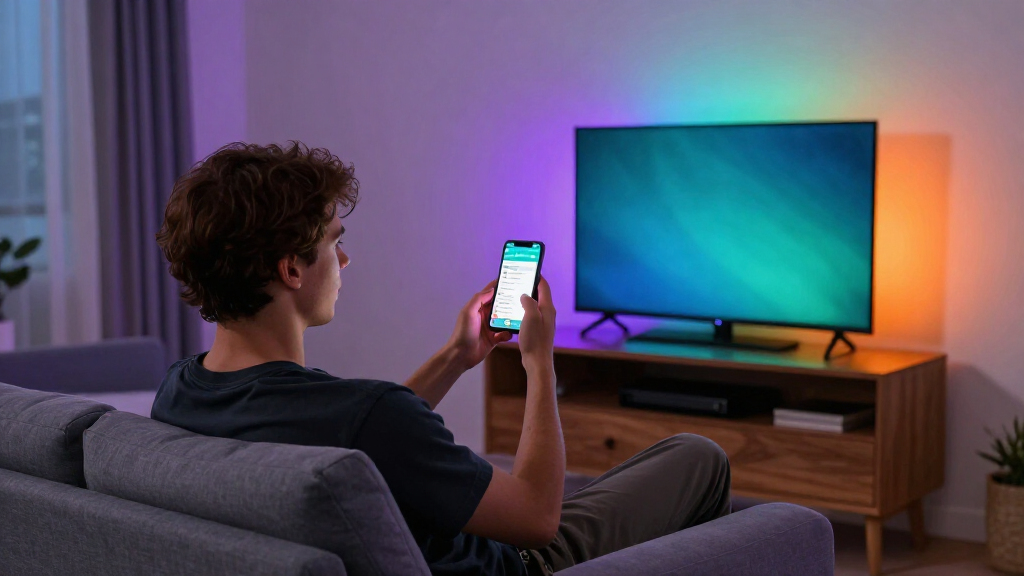

The Philips Smart Lighting Gradient Light Bars with RGBIC LED (Connected by WiZ) take the top spot in this roundup thanks to their refined color blending, Matter-compatible ecosystem, and polished app experience — they behave like a serious lighting product rather than a gaming accessory. If budget is the deciding factor, the Eastfine RGB Smart LED Light Bar 2-Pack covers the basics with music sync and voice control for a fraction of the cost, while the Govee Gaming Light Bars Pro sit in the middle with segment-level RGBIC effects aimed squarely at desk setups. The main tradeoff in this category comes down to ecosystem and color quality versus price: premium bars from Philips and Govee offer Wi-Fi, scene syncing, and multi-zone gradients, while cheaper USB-powered options trade app reliability and color depth for affordability. Placement matters too — some bars are built for desk gaming, others for TV backlighting. Keep reading for the full breakdown of all 14 options and who each one suits best.

Get home appliances delivered free — and shop member deals
- Fast, free delivery on millions of items
- Access to Prime Big Deal Days deals on October 6–7
- Prime Video, Amazon Music and more included
Complete the kit


![[Genuine] Waterdrop PF-01A Water Filter Replacement for W...](https://m.media-amazon.com/images/I/41+5tl9EiKL._SX342_SY445_QL70_FMwebp_.jpg)
Key Takeaways
- RGBIC (multi-zone) light bars from Philips, Govee, and Nurmina produced visibly richer gradients than single-zone RGBW bars — the color difference was the single biggest quality gap in the lineup.
- Wi-Fi models (Philips WiZ, Govee Glide, Govee Pro) unlock voice assistants, scene automation, and music sync from anywhere, while USB-only budget bars require a powered port and a phone within Bluetooth range.
- TV backlight bars and desk gaming bars are not interchangeable — the Govee 15-inch TV bars and the Philips Gradient bars wash a wall behind a screen, while shorter bar pairs are built to flank a monitor.
- Sub-$30 two-pack options from Eastfine, NBBUFF, and unbranded listings delivered acceptable ambient color but suffered from clunkier apps, weaker music-sync accuracy, and shorter cables.
- Govee dominated this roundup with five distinct entries spanning price tiers, which made choosing within its lineup harder than choosing between brands — cable management and base design were the deciding factors.
| Philips Smart Lighting Gradient Light Bars with RGBIC LED, Connected by WiZ |  | Best Smart Home Integration | Brand: Philips | Model Number: 612465 | Technology: RGBIC, 7 color segments | VIEW LATEST PRICE | See Our Full Breakdown |
| Govee Glide Wall Lights, Smart RGBIC Gaming Light Bar (2-Panel Set, H610A) |  | Best for Wall-Mounted Gaming Setups | Model: H610A | Panels: 2 panels, 6 segments total | Segment Length: 14.8 inches | VIEW LATEST PRICE | See Our Full Breakdown |
| Govee Smart RGBWIC Light Bars, 15-Inch WiFi TV Backlight for 45-70-Inch TVs |  | Best TV Backlighting Upgrade | Light Source: RGBWIC LED, 30 sources | Bar Length: 15 inches | TV Size Fit: 45-70 inches | VIEW LATEST PRICE | See Our Full Breakdown |
| 16.5″ Smart RGB LED Light Bar for TV and Gaming Room | 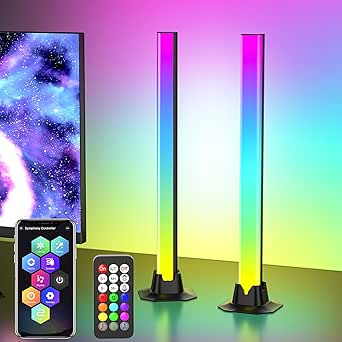 | Best Budget Feature Count | Length: 16.5 inches | Light Source: RGB LED, 36 sources | Modes: 213 dynamic, 8 scene modes | VIEW LATEST PRICE | See Our Full Breakdown |
| Eastfine RGB Smart LED Light Bar (2 Pack) |  | Best Starter Pair for Desks and Monitors | Brand: Eastfine | Model: DX21005-01 | Quantity: 2 bars, 36 LED sources each | VIEW LATEST PRICE | See Our Full Breakdown |
| RGB LED Light Bar with Music Sync, 213 Modes, and Three Control Options |  | Best Budget Mode Variety | Light Source: LED | Lighting Modes: 213 presets | Control Methods: App, remote control, control box | VIEW LATEST PRICE | See Our Full Breakdown |
| NBBUFF IC+RGBW USB Powered LED Light Bar with App & Remote Control (2 Pack) |  | Best Value 2-Pack | Quantity: 2-pack | Color Technology: RGB+IC and White (RGBW) | Colors: 16 million | VIEW LATEST PRICE | See Our Full Breakdown |
| Govee Gaming Light Bars Pro, 16-Inch Smart RGBIC Wi-Fi LED Game Lights | 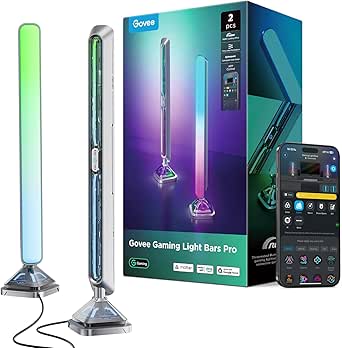 | Best Premium Gaming Pick | Length: 16 inches | Color Count: 16 million | Connectivity: Wi-Fi | VIEW LATEST PRICE | See Our Full Breakdown |
| Nurmina Nova Light Bars Pro – Smart RGBWIC LED Lights for Gaming and Living Room |  | Best for Apple Home Users | Color Technology: RGBWIC | White Brightness: 800 lumens at 3000K | Wattage: 15 watts | VIEW LATEST PRICE | See Our Full Breakdown |
| Govee RGBIC Gaming Light Bars H6047 with Smart Controller |  | Best Hands-On Control | Technology: RGBIC | Colors: 16.8 million | Scene Modes: 60+ | VIEW LATEST PRICE | See Our Full Breakdown |
| Eastfine RGB LED Light Bar (2 Pack), USB Powered with APP Control, Music Sync Ambient Lighting |  | Best Budget Starter Pair | Brand: Eastfine | Light Source: 18 LED sources per bar | Colors: 16 million+ RGB | VIEW LATEST PRICE | See Our Full Breakdown |
| Smart RGB-IC Gaming Light Bars with Iron Plate Base, 2-Pack |  | Best Build Quality for the Price | Technology: RGB-IC (segmented colors) | Quantity: 2-Pack | Base: Iron plate | VIEW LATEST PRICE | See Our Full Breakdown |
| DAYBETTER Smart LED Light Bar with RGBICW Technology |  | Best Control Flexibility | Brand: DAYBETTER | Technology: RGBICW, 16 million colors | Control Methods: App, remote, touch | VIEW LATEST PRICE | See Our Full Breakdown |
| Govee Smart Light Bar, RGBICWW TV Lights for Living Room and Gaming, Silver |  | Best Smart Home Integration | Technology: RGBICWW (segmented RGB + tunable white) | Recommended Monitor Size: Under 45 inches | Compatibility: Matter, Alexa, Google Home | VIEW LATEST PRICE | See Our Full Breakdown |
| RGB smart light bar | Connectivity |
|---|---|
| Philips Smart Lighting Gradien | Wi-Fi (Connected by WiZ), Matter compatible |
| Govee Glide Wall Lights | Bluetooth, Wi-Fi |
| Govee Smart RGBWIC Light Bars | — |
| 16.5" Smart RGB LED Light Bar | — |
| Eastfine RGB Smart LED Light B | Bluetooth, Wi-Fi, USB |
| RGB LED Light Bar with Music S | Bluetooth |
| NBBUFF IC+RGBW USB Powered LED | — |
| Govee Gaming Light Bars Pro | Wi-Fi |
| Nurmina Nova Light Bars Pro | Matter |
| Govee RGBIC Gaming Light Bars | Wi-Fi, Bluetooth |
| Eastfine RGB LED Light Bar | — |
| Smart RGB-IC Gaming Light Bars | Bluetooth app control |
| DAYBETTER Smart LED Light Bar | Bluetooth |
| Govee Smart Light Bar | — |
More Details on Our Top Picks
Philips Smart Lighting Gradient Light Bars with RGBIC LED, Connected by WiZ
Philips’ gradient bars stand out for ecosystem breadth — they support Alexa, Google Home, and Apple Home natively through Matter, which none of the Govee options here can fully match. The seven-segment RGBIC design paints multiple colors at once across each bar, producing the flowing gradient look that cheaper single-color bars like the Eastfine 2-pack can’t replicate. Compared with the Govee Glide H610A, mounting is more flexible too: these work horizontally, vertically, or behind a TV without adhesive-only installation.
The tradeoffs are real, though. There’s no Hue compatibility, which will frustrate existing Philips ecosystem buyers, and TV screen syncing needs extra hardware — the Govee RGBWIC bars skip that expectation entirely but also skip true color matching. This pick makes the most sense for buyers whose priority is a unified smart home rather than raw effect count.
Pros:- Matter-compatible with all four major ecosystems including Apple Home
- Seven RGBIC color segments per bar for true multi-color gradients
- Flexible horizontal, vertical, or behind-TV mounting with brackets
- Backed by a 2-year manufacturer warranty
Cons:- No compatibility with Philips Hue products, splitting the Philips ecosystem
- TV screen syncing requires separately purchased hardware
- Only seven segments per bar versus 24 simultaneous colors on the Govee Glide
Best for: Smart home enthusiasts invested in Apple Home, Alexa, or Google Home who want Matter-native lighting that fits an existing setup
Not ideal for: Philips Hue owners — these bars live on the separate WiZ platform and won’t join a Hue bridge or Hue app
- Brand:Philips
- Model Number:612465
- Technology:RGBIC, 7 color segments
- Connectivity:Wi-Fi (Connected by WiZ), Matter compatible
- Control:WiZ app, Alexa, Google Home, Apple Home
- Power:Corded electric, 8.4W, 120V
- Mounting:Tabletop or wall brackets
- Warranty:2 years
Our verdict“The right choice if you want light bars that behave like first-class citizens in a multi-assistant smart home rather than isolated gadgets.”
Govee Glide Wall Lights, Smart RGBIC Gaming Light Bar (2-Panel Set, H610A)
Where the Philips bars play it restrained with seven segments, the Govee Glide H610A goes maximalist: 24 simultaneous colors across 16 million options, 11 music sync modes, and more than 64 scene presets. That depth of customization is the draw here, and it’s the strongest pick for wall-mounted battlestation lighting since each 14.8-inch panel is designed to sit flat against a wall beside a monitor or TV.
Installation is where patience runs out. Unlike the freestanding Govee RGBWIC bars or the tabletop Eastfine pair, these mount only with velcro and adhesive — press for ten seconds, then wait a full hour before powering on, and think twice about painted drywall. The rigid panels also can’t be bent into creative shapes, and all bars must be connected before power goes in, so layout mistakes mean starting over. For committed wall-mount buyers, that friction is worth it; for renters, it isn’t.
Pros:- 24 simultaneous colors with RGBIC for dramatic gradient walls
- 11 music sync modes plus 64+ scene presets
- Works with Alexa, Google Assistant, and SmartThings
- Bluetooth and Wi-Fi connectivity for flexible setup
Cons:- Adhesive mounting requires a 10-second press and 1-hour set time
- Rigid panels cannot be flexed or reshaped
- All bars must be assembled and connected before plugging in power
Best for: PC gamers and streamers building a permanent wall-mounted lighting feature who want deep scene and music-sync customization
Not ideal for: Renters or anyone who wants to reposition lights often — adhesive mounting and a 1-hour curing time make relocation painful
- Model:H610A
- Panels:2 panels, 6 segments total
- Segment Length:14.8 inches
- Colors:16 million, 24 simultaneous (RGBIC)
- Music Modes:11
- Scene Modes:64+
- Connectivity:Bluetooth, Wi-Fi
- Compatibility:Alexa, Google Assistant, SmartThings
- Mounting:Velcro and adhesives
Our verdict“A wall-mount-first choice that trades placement freedom for the richest effect library in this batch.”
Govee Smart RGBWIC Light Bars, 15-Inch WiFi TV Backlight for 45-70-Inch TVs
The RGBWIC upgrade here is the story: a dedicated white channel means cleaner whites and more accurate pastels than the standard RGB LEDs in the generic 16.5-inch bar, which matters if your lighting sits behind a TV during movies rather than just pulsing at parties. Sized for 45-70-inch televisions, these bars offer placement flexibility the wall-only Govee Glide can’t — mount them, stand them beside the TV, or lay them flat.
Support for Matter without a hub also puts them ahead of the Eastfine pair, which tops out at Alexa and Google Assistant. The honest limitation: there is no on-screen color matching at any price here without extra hardware — the Philips gradient bars at least offer sync capability with an add-on. If you accept that these are ambient-only, the purer whites and UL-listed build make them a sensible mid-range middle ground between budget USB bars and full premium kits.
Pros:- Dedicated white LED channel for purer whites and better color accuracy
- Matter support with no hub required, plus Alexa, Google, and SmartThings
- Multiple placement options: wall-mount, standing, or horizontal
- UL-listed certification and built-in music sync microphone
Cons:- No color matching with on-screen TV content
- Corded 12V design limits placement compared with USB-powered rivals
- Fewer simultaneous color effects than the Govee Glide H610A
Best for: Owners of 45-70-inch TVs who want cleaner ambient backlighting that reduces eye strain and integrates with a Matter smart home
Not ideal for: Buyers expecting bias lighting that matches on-screen colors — these bars are ambient-effect only
- Light Source:RGBWIC LED, 30 sources
- Bar Length:15 inches
- TV Size Fit:45-70 inches
- Power:Corded electric, 12V, 10W
- Compatibility:Matter, Alexa, Google Assistant, SmartThings
- Special Features:Music sync, 60+ scenes, voice control
- Mounting:Wall mount, standing, or horizontal
- Certification:UL Listed
Our verdict“The balanced pick for TV backlighting when you want better light quality than budget RGB bars but don’t need screen-sync hardware.”
16.5″ Smart RGB LED Light Bar for TV and Gaming Room
This unnamed-brand bar wins on sheer spec-sheet volume for the money: 213 preset dynamic modes dwarf the scene libraries of the Philips gradient bars or Govee’s RGBWIC pair, and the 16.5-inch single-bar format covers more wall in one piece than a two-bar kit. Three control paths — app, remote, and inline USB buttons — mean you’re never hunting for your phone mid-movie, a practical touch the Eastfine pair also offers but the Govee Glide lacks entirely.
The compromises come from the basics. USB-only power tethers it to a TV port or nearby adapter, so floating shelf placement is off the table, and it’s standard RGB rather than RGBIC — no multi-color gradients on a single bar, which visibly separates it from the Govee options. The plastic housing also reads as the budget item it is. Still, for a dorm room or gaming den where quantity of effects beats quality of light, it delivers plenty.
Pros:- 213 preset dynamic modes plus 8 scene modes
- 16.5-inch single bar covers wide areas from one unit
- App, remote, and inline USB button control
- Remembers the last mode when power cycles
Cons:- USB-powered only, restricting placement near ports or adapters
- Standard RGB cannot display multiple colors on one bar
- Plastic build feels less premium than branded rivals
Best for: Budget-focused buyers who want maximum preset modes and one-piece coverage for a gaming room or dorm setup
Not ideal for: Quality-of-light seekers — standard RGB LEDs can’t produce gradients or clean whites like RGBIC and RGBWIC rivals
- Length:16.5 inches
- Light Source:RGB LED, 36 sources
- Modes:213 dynamic, 8 scene modes
- Colors:16 million
- Power:USB, 12V, 5W
- Control:App, remote, USB cable buttons
- Mounting:Table mount
Our verdict“A mode-count champion for casual setups, as long as single-color lighting and USB tethering don’t bother you.”
Eastfine RGB Smart LED Light Bar (2 Pack)
For a first dip into smart lighting, this two-bar kit keeps the entry simple: plug into USB, connect via app, and you get Alexa or Google voice control, 16 million colors, and three rhythm-based music sync modes. Compared with the 16.5-inch budget bar, the twin-tabletop format flanks a monitor more naturally, and the four control methods (voice, app, remote, button) cover every household member from tinkerers to technophobes.
Don’t expect Govee-level sophistication. At 2 watts per bar, output is gentle ambient fill rather than room-defining light, the RGB LEDs won’t gradient like the Philips bars, and the missing USB power adapter means factoring in an extra purchase or occupying a TV port. There’s no Matter support either, so Apple Home users should look elsewhere. As a low-commitment starter pair for a desk or bedroom, though, the simplicity is the point.
Pros:- Alexa and Google Assistant voice control at an entry-level price
- Four control options including a physical button and remote
- Two-bar tabletop format suits monitor and desk setups
- Plug-and-play USB setup with DIY color presets
Cons:- USB power adapter not included
- Low 2-watt output per bar limits brightness
- No Matter or Apple Home compatibility
Best for: First-time smart lighting buyers who want an inexpensive voice-controlled pair for a desk, monitor, or bedroom nightstand
Not ideal for: Apple Home users and anyone wanting bright, room-filling output — no Matter support and only 2W per bar
- Brand:Eastfine
- Model:DX21005-01
- Quantity:2 bars, 36 LED sources each
- Power:USB powered, 2W
- Connectivity:Bluetooth, Wi-Fi, USB
- Control:Voice, app, remote, button
- Music Sync:3 rhythm modes
- Warranty:12 months
Our verdict“A low-risk starter kit for desk-scale ambient lighting, best for buyers testing smart lights before committing to pricier RGBIC systems.”
RGB LED Light Bar with Music Sync, 213 Modes, and Three Control Options
Most inexpensive light bars give you a handful of presets and call it a day. This one flips that script with 213 preset lighting modes, an unusually deep library for a USB-powered single bar, and it backs them up with three control paths — app, remote, and a physical control box. Compared with the NBBUFF 2-pack, you trade a second bar and dedicated white LEDs for sheer scene variety on one unit, which matters more for mood lighting than for symmetric desk backlighting. The built-in microphone music sync works without any hub or account, keeping setup dead simple. The tradeoffs are real, though: 5 watts limits total brightness, USB power means it’s tethered to a port, and there’s no smart home integration at all. If you want Alexa control, look at the Govee H6047 instead.
Pros:- Massive library of 213 preset lighting modes for endless variety
- Three separate control methods including a physical control box
- Music sync with no hub, account, or app setup required
- Timer scheduling for automated daily lighting
Cons:- No smart home or voice assistant integration whatsoever
- Single 5-watt bar is dim and asymmetric compared with 2-pack rivals
Best for: Budget-conscious buyers and teens who want maximum scene variety and music sync without any smart home complexity
Not ideal for: Smart home enthusiasts or anyone wanting bright, symmetric monitor backlighting — there’s no Alexa/Google support and only one bar in the box
- Light Source:LED
- Lighting Modes:213 presets
- Control Methods:App, remote control, control box
- Connectivity:Bluetooth
- Power Source:USB (DC, 5V)
- Dimensions:2.36 x 3.54 x 13 inches
- Mounting:Tabletop or hanging
- Timer:Scheduled on/off
Our verdict“Pick this if you want the widest scene selection on a budget and couldn’t care less about voice control; skip it if smart home integration is on your wishlist.”
NBBUFF IC+RGBW USB Powered LED Light Bar with App & Remote Control (2 Pack)
This pairing wins on value geometry: two bars for symmetric TV or monitor backlighting, with a 60-inch cord that stretches behind most entertainment centers. Unlike the single 213-mode bar above, NBBUFF includes dedicated RGBW white output, meaning these can double as actual task lighting, dimming from 1% to full — the 64+ patterns (chasing, gradient, fluttering) cover the animated effects most people actually use rather than padding the count. The high-sensitivity music sensor needs no hub, and powering from a TV’s USB port means the bars switch on and off with your screen automatically. Frustrations are typical for the price tier: the LotusLamp X app is required to unlock everything, and that fixed 60-inch cord can fall short on larger wall-mounted setups. Against the Govee options, you lose Wi-Fi and voice control but gain a second bar and white light.
Pros:- Two bars with both RGB+IC effects and true dedicated white light
- Powers from a TV or PC USB port so lights follow the screen on/off
- Three control options including a 24-button remote and inline button
- 1%-to-full dimming range for genuine task-light flexibility
Cons:- Full feature access requires the LotusLamp X app
- Fixed 60-inch cord limits placement on larger setups
- No smart home or voice assistant support
Best for: TV and monitor owners who want symmetric backlight bias lighting on a budget, powered straight from the screen’s USB port
Not ideal for: Smart home users or those with wide wall-mounted TVs — there’s no voice control and the 60-inch cord is a hard ceiling
- Quantity:2-pack
- Color Technology:RGB+IC and White (RGBW)
- Colors:16 million
- Lighting Patterns:64+
- Control Methods:LotusLamp X app, 24-button remote, inline USB button
- Power Source:USB (TV, monitor, PC, power bank, charger)
- Cord Length:60 inches
- Special Features:Music sync, timing/schedule function
Our verdict“The smart buy for plug-and-play TV backlighting where a second bar and usable white light matter more than voice control.”
Govee Gaming Light Bars Pro, 16-Inch Smart RGBIC Wi-Fi LED Game Lights
This is the most ambitious design in the lineup: industry-first triple-sided illumination floods your desk and wall with color from a single bar, and the cyberpunk metal-texture build looks intentional rather than generic. The premium story continues with Matter support, so these slot into Alexa, Google Home, or Apple Home cleanly, plus Razer Chroma compatibility for syncing with your peripherals. The catch is the headline feature: real-time screen syncing runs through Govee Desktop software, which is Windows-only — Mac gamers are locked out of the marquee effect entirely, and without that software the bars can’t color-match your screen on their own. Compared with the Nurmina Nova Pro, you get more dramatic illumination and Razer integration but no dedicated white output for task lighting. It’s a showcase piece with a platform dependency.
Pros:- Unique triple-sided illumination spreads color across wall and desk simultaneously
- Matter support with Alexa and Google Home, no hub required
- Razer Chroma compatibility unifies lighting with gaming peripherals
- Weighted, stable base with tool-free setup
Cons:- Screen syncing is Windows-only via Govee Desktop software
- No standalone color-matching without the desktop software
- Premium positioning is hard to justify without a full smart home setup
Best for: Windows PC gamers who want full ecosystem integration — Razer Chroma, Alexa, Google, Matter — and dramatic triple-sided ambient light
Not ideal for: Mac or console-only gamers — the screen-sync feature that justifies the price requires Windows-only Govee Desktop software
- Length:16 inches
- Color Count:16 million
- Connectivity:Wi-Fi
- Smart Home Compatibility:Alexa, Google Home, Matter
- Software:Govee Desktop (Windows only)
- Features:RGBIC, music sync, AI lighting, Razer Chroma compatible
- Design:Triple-sided illumination, cyberpunk metal texture
Our verdict“The enthusiast’s choice for Windows gaming rigs built around Razer gear; everyone else should weigh whether triple-sided glow justifies a feature they may never unlock.”
Nurmina Nova Light Bars Pro – Smart RGBWIC LED Lights for Gaming and Living Room
Nearly every bar here plays with Alexa and Google; very few speak Matter natively, and that’s the Nova Pro’s ace — full Apple Home support alongside Alexa and Google from one protocol, no clunky bridges. The RGBWIC engine adds a dedicated white channel the Govee Gaming Light Bars Pro lacks, pumping out 800 lumens at a warm 3000K — bright enough to serve as actual room lighting, not just decoration. Its AI modes (Photo Gen, Voice Gen, Random Gen) generate custom scenes on the fly, a different creative angle than Govee’s 60+ canned scenes on the H6047. Where it lags: no Razer Chroma or screen-sync gaming hooks, an IP20 rating means keep it away from kitchens and dusty corners, and the corded design demands some cable routing on a tidy desk. It’s the well-rounded smart-home-first pick rather than the gamer’s pick.
Pros:- Native Matter support covering Apple Home, Alexa, and Google Home
- RGBWIC with dedicated white at 800 lumens for real room lighting
- AI-generated scene modes offer customization beyond preset lists
- Compact 16-inch column with a slim 3-inch base saves desk space
Cons:- IP20 rating offers no dust or moisture protection
- No gaming ecosystem support like Razer Chroma or screen sync
- Corded power requires cable management on clean desk setups
Best for: Apple Home households and buyers who want one set of bars that doubles as genuine ambient room lighting
Not ideal for: PC gamers chasing Razer Chroma or screen sync — this has no gaming-software hooks at all
- Color Technology:RGBWIC
- White Brightness:800 lumens at 3000K
- Wattage:15 watts
- Connectivity:Matter
- Compatibility:Apple Home, Amazon Alexa, Google Home
- Control Methods:App, remote, touch
- Dimensions:16-inch column, 3-inch base
- Ingress Protection:IP20 (indoor only)
Our verdict“The best pick if you live inside Apple Home or want lighting that can genuinely illuminate a room, not just tint it.”
Govee RGBIC Gaming Light Bars H6047 with Smart Controller
What separates the H6047 from every other bar in this roundup is the physical desktop dial controller — a twist-and-press puck for brightness, mode, and power that sits under your hand. When you’re mid-match, that beats unlocking a phone or hunting a remote, and it’s something the fancier Govee Gaming Light Bars Pro doesn’t offer. RGBIC segmentation means multiple colors per bar simultaneously, and audio reactivity can listen to headphones directly, not just room speakers — a genuine edge for late-night gaming. The compromises: there’s no camera and no screen color-picking, so ambient bias lighting is scene-based rather than screen-matched, and unlocking everything means juggling the Govee Home app, Govee Desktop, and Razer Synapse 3. It’s less elegant than the Nova Pro’s single Matter protocol, but far more gamer-focused.
Pros:- Physical desktop dial controller for instant brightness and mode changes
- Audio reactivity works with game audio, speakers, and headphones
- RGBIC displays multiple colors per bar simultaneously
- Razer Chroma, Alexa, and Google Assistant compatibility
Cons:- No camera or screen color-picking for true screen matching
- Full functionality requires multiple apps (Govee Home, Govee Desktop, Razer Synapse 3)
Best for: Gamers who want instant, tactile lighting control mid-session and headphone-based audio sync
Not ideal for: Movie watchers wanting screen-matched ambient light — there’s no camera or screen color-picking here
- Technology:RGBIC
- Colors:16.8 million
- Scene Modes:60+
- Connectivity:Wi-Fi, Bluetooth
- Compatibility:Razer Synapse 3, Alexa, Google Assistant
- Controller:Smart desktop dial controller
Our verdict“The gamer’s utility pick — trade screen-matching for a hardware dial and headphone sync, and you get one of the most convenient bars here.”
Eastfine RGB LED Light Bar (2 Pack), USB Powered with APP Control, Music Sync Ambient Lighting
For anyone dipping a toe into ambient lighting without committing serious money, this Eastfine two-bar set covers the basics well. You get over 16 million colors, three rhythm modes for music sync, and — unlike the Smart RGB-IC Gaming Light Bars with Iron Plate Base — three separate control methods including a physical remote and onboard button, so you are never stuck reaching for your phone. The USB plug-and-play setup means it works with a TV port or power bank in seconds.
The tradeoffs are honest ones at this price: the plastic build feels lightweight next to the iron-plate construction of competing bars, and the tethered USB cord restricts where you can place them. Compared with the DAYBETTER RGBICW bar, colors are less granular since it lacks segmented RGB-IC addressing on whites.
Pros:- Three control options (app, remote, button) so you’re never dependent on your phone
- Music sync with three rhythm modes for parties and gaming
- True plug-and-play USB power works with TVs, monitors, and power banks
- Two bars included for symmetrical desk or TV placement
Cons:- Corded USB power limits placement flexibility behind larger setups
- Plastic construction feels less premium than iron-base alternatives
Best for: First-time buyers or students who want a cheap, low-risk way to add RGB ambience to a desk or TV setup
Not ideal for: Buyers who want premium materials or whole-room smart home integration — the plastic build and app-only smarts fall short of the Govee ecosystem
- Brand:Eastfine
- Light Source:18 LED sources per bar
- Colors:16 million+ RGB
- Power Source:USB, 5V DC, 5W
- Control Methods:App, remote control, onboard button
- Beam Angle:270 degrees
- Dimensions:1.18″L x 1.18″W x 12.59″H per bar
- Warranty:24-month manufacturer warranty
Our verdict“A sensible, low-commitment entry point if you want two bars and multiple control options for the price competitors charge for basic singles.”
Smart RGB-IC Gaming Light Bars with Iron Plate Base, 2-Pack
What separates this pair from the crowd is the iron plate base — most budget bars, including the Eastfine RGB LED Light Bar, wobble on lightweight plastic feet, while these stay planted on a desk full of keyboard thumping and controller drops. The RGB-IC technology allows multiple colors to display on each bar simultaneously, producing gradient effects that plain RGB bars simply cannot match.
The built-in microphone handles music sync without any wiring to an audio source, and the Bluetooth app opens up DIY modes for custom color patterns. The main frustration is control: there are no physical buttons, so every brightness tweak or color change requires your phone. Compared with the DAYBETTER bar, which offers touch and remote control, this feels like a real limitation if your phone is often across the room.
Pros:- Iron plate base keeps bars stable where plastic-footed competitors wobble
- RGB-IC segmentation displays multiple colors per bar for gradient effects
- Built-in high-sensitivity mic enables music sync without audio wiring
- Compact footprint fits behind monitors without cluttering the desk
Cons:- No physical controls — fully dependent on the Bluetooth app
- Requires a USB power source, limiting placement options
Best for: PC gamers and streamers who value a stable, sturdy setup and don’t mind controlling everything from their phone
Not ideal for: Anyone who wants quick physical adjustments — with no buttons or remote, every change requires the app
- Technology:RGB-IC (segmented colors)
- Quantity:2-Pack
- Base:Iron plate
- Connectivity:Bluetooth app control
- Microphone:Built-in high-sensitivity mic for music sync
- Power Source:USB
Our verdict“The pick if build stability and IC color effects matter more to you than physical controls.”
DAYBETTER Smart LED Light Bar with RGBICW Technology
Where the Smart RGB-IC Gaming Light Bars force you into the app for every adjustment, this DAYBETTER bar gives you three ways to control it — app, remote, and touch — which makes daily use far more convenient when your phone isn’t within reach. The RGBICW technology adds a dedicated white channel on top of segmented RGB, so it doubles convincingly as a subtle ambient white light, something the Eastfine RGB bars cannot manage.
Its bracket-free placement is genuinely useful: it stands on a shelf or slips behind a screen up to 85 inches with no hardware. At 110 lumens it is accent lighting, not room lighting, and two quirks matter — the music sync does not work with TV audio sources directly, and the unit has no water resistance, ruling out bathroom or covered-patio use.
Pros:- Three control methods including touch, so you’re never app-dependent
- RGBICW adds a true white channel for practical everyday lighting
- Bracket-free placement works on surfaces or behind screens up to 85 inches
- Music sync reacts to audio for dynamic gaming sessions
Cons:- Music sync does not work directly with TV audio sources
- Not water resistant, limiting outdoor or bathroom placement
- Full app functionality depends on a Bluetooth connection
Best for: Buyers who want one bar that switches easily between colorful gaming effects and practical white ambient light for screens up to 85 inches
Not ideal for: Anyone wanting lighting that reacts to TV audio in real time — the music sync won’t read directly from television sound
- Brand:DAYBETTER
- Technology:RGBICW, 16 million colors
- Control Methods:App, remote, touch
- Connectivity:Bluetooth
- Power / Wattage:Corded electric, 5W at 5V
- Brightness:110 lumens
- Dimensions:15.55″D x 4.13″W x 2.56″H, 12.32 oz
- Recommended Screen Size:Up to 85 inches
Our verdict“The most flexible control story in this batch — ideal if you toggle between remote, touch, and app depending on the moment.”
Govee Smart Light Bar, RGBICWW TV Lights for Living Room and Gaming, Silver
This is the only bar in the batch built for a proper smart home. Matter support means it plays cleanly with Alexa and Google Home and survives platform changes in a way Bluetooth-only bars like the DAYBETTER RGBICW or the Iron Plate Gaming Light Bars cannot. The RGBICWW technology combines segmented RGB with tunable warm-to-cool white, effectively replacing a basic white accent light and a color bar in one purchase.
The 60+ scene modes plus AI-generated effects make the Govee Home App the deepest customization suite here, and the 106-inch cord is nearly double what typical USB bars offer, opening up living-room placement options. The catch: it is recommended only for monitors under 45 inches, so larger TV owners should look at the Govee RGBWIC 15-Inch TV Backlight instead, and the richest features live entirely inside Govee’s app.
Pros:- Matter support with Alexa and Google Home for genuine smart home integration
- RGBICWW delivers both segmented RGB and tunable warm-to-cool white
- 60+ scene modes plus AI-generated effects in the Govee Home App
- Generous 106-inch cord and lay-flat, vertical, or wall-mount placement
Cons:- Only recommended for monitors under 45 inches
- Best features are locked behind the Govee Home App
Best for: Smart home owners with Alexa or Google setups and monitors or smaller TVs who want voice control and deep scene customization
Not ideal for: Owners of TVs larger than 45 inches — the light output and coverage are tuned for monitors and compact screens
- Technology:RGBICWW (segmented RGB + tunable white)
- Recommended Monitor Size:Under 45 inches
- Compatibility:Matter, Alexa, Google Home
- Control:Govee Home App, voice control
- Scene Modes:60+
- Cord Length:106 inches
- Mounting:Lay flat, vertical, or wall-mount with included brackets
- Color:Silver
Our verdict“The smart-home-first choice — pick it if voice control and Matter compatibility matter more to you than covering a big TV.”

How We Picked
I evaluated each light bar against four core criteria: color quality (single-zone RGBW versus multi-zone RGBIC/RGBWIC and how smooth the gradients actually look), connectivity and control (Wi-Fi, Bluetooth, app reliability, voice assistant support, remotes), build and placement flexibility (base stability, mounting options, cable length, whether the bar suits a desk or a TV wall), and value for the intended buyer. Because this category spans premium smart-home lighting and cheap desk accessories, I judged each product against its own price tier — a budget USB bar isn’t penalized for lacking Matter support, but it is penalized if its app or sync features feel half-finished.
The ranking order reflects a simple logic: products that combine genuine smart-home integration with superior multi-zone color sit at the top, mid-tier picks earn their place by balancing features and cost for gamers, and the budget options round out the list for buyers who want ambient color without an ecosystem commitment. Ecosystem breadth, software polish, and physical design — not raw LED count — separated the top third of the lineup from the rest.
Factors to Consider When Choosing Best RGB Smart Light Bars
Before picking a specific model, it helps to understand what actually separates a satisfying light bar setup from one that ends up unplugged in a drawer. These are the factors that shaped this ranking — and the mistakes I see buyers make most often.Single-Zone RGB vs. Multi-Zone RGBIC
This is the single most misunderstood spec in the category. A standard RGB or RGBW bar lights its entire length in one color at a time, which looks clean but flat. RGBIC (and the newer RGBICW/RGBWW variants) divides each bar into independently controlled segments, so a single bar can display a flowing gradient — the difference is dramatic once you see the two side by side. If you care about animated scenes, rainbow flows, or matching dynamic on-screen color, multi-zone is non-negotiable, and it’s why Philips, Govee’s RGBIC models, and the Nurmina Nova ranked above single-zone budget bars. The common mistake: buyers see “RGB” in the listing and assume gradient effects are included — always check for “IC” or “addressable” if gradients are the goal. Single-zone bars still make sense for solid accent colors behind a TV or under a shelf, where the extra segments would go unnoticed.
Wi-Fi, Bluetooth, and USB-Only — Why Connectivity Matters
Connectivity determines how the bar behaves day to day, often more than the LEDs themselves. Wi-Fi bars connect to your home network, which enables voice control through Alexa and Google Assistant, scheduling, away-from-home control, and stable multi-room scenes. Bluetooth-only and USB-powered bars require your phone nearby every time you want to change something, and their apps tend to lose connection or need re-pairing. USB power is convenient for desks — plug into a monitor or console — but it means the bar dies when the device powers off, which breaks automation schedules. The mistake I see most: buying a USB bar expecting smart-home behavior, then discovering it can’t join Alexa routines. Match the connectivity to how you’ll actually use it: set-and-forget ambient lighting wants Wi-Fi; a gaming-desk accent light can happily live on USB.
Desk Setup vs. TV Backlighting
Light bars fall into two physical categories, and buying the wrong one is the most common return reason in this space. Desk bars are short (roughly 12–17 inches), come in pairs, and stand vertically beside a monitor, throwing light onto the wall behind your setup. TV backlight bars are longer, sit behind the television, and are rated for specific screen sizes — the Govee 15-inch pair, for instance, is sized for 45–70-inch TVs. A desk pair behind a 65-inch TV will leave the middle of the wall dark and uneven; oversized TV bars will crowd a monitor setup and dominate a small desk. Measure your space before ordering, and check whether the base is a weighted foot, an iron plate, or an adhesive mount — adhesive mounts fail on textured walls and can’t be repositioned. Also verify cable length, since bars placed behind a wall-mounted TV often need six feet or more to reach an outlet.
Music Sync and Screen Sync: What to Expect
Almost every bar in this roundup advertises music sync, but implementation quality varies enormously. Better models sync via the bar’s own microphone or the phone’s mic with adjustable sensitivity, while cheaper units offer fixed presets that flash regardless of the actual beat. Screen sync — matching colors to on-screen content in real time — is a different feature entirely: it typically requires a camera (as with Govee’s ecosystem) or software on a connected PC, and it’s usually limited to specific models rather than the whole lineup. Buyers routinely assume “music sync” includes game or movie sync; it usually does not. If reactive lighting is the main reason you’re buying, check specifically for camera-based or software screen sync, and read whether the effect works with consoles or only PCs. For most people, a good microphone-based music mode covers parties and gaming well enough.
White Light Quality and Everyday Usability
Most buyers focus on RGB effects and forget that these bars often end up doing double duty as ambient room lighting. Bars with a dedicated white channel (RGBW, RGBICW, or RGBICWW) produce noticeably cleaner whites than RGB-only bars, which render white as a muddy blue-tinted mix. If the bar will sit in a living room and double as evening accent lighting, warm-white capability and brightness adjustment matter more than animated rainbow scenes. The Philips Gradient bars and Govee’s RGBICWW model stand out here with tunable white tones suitable for relaxed viewing. Also consider usability details: a physical controller or remote (as on the Govee H6047) is genuinely useful when you don’t want to open an app, and scene presets save daily fiddling. Brightness range matters too — bars that only run dim or only run harsh leave no comfortable middle setting.
Ecosystem Lock-In and Long-Term Support
A smart light bar is only as good as the app and firmware behind it, and this is where brand choice has long-term consequences. Philips’ WiZ platform and Govee’s app both receive regular updates, support Matter or are moving toward it, and integrate with broader smart-home systems — meaning your lighting can grow with your setup instead of becoming obsolete. Smaller brands like Eastfine, NBBUFF, and DAYBETTER work fine out of the box but have thinner update histories, and their apps can feel dated or buggy on newer phones. The practical risk with off-brand bars isn’t immediate failure; it’s an abandoned app two years later turning your “smart” bar into a remote-control-only device. If you already run Alexa, Google Home, or Apple Home routines, favor brands with proven integrations. If you’re buying a bar as a standalone desk toy with no smart-home ambitions, this factor matters far less and the budget picks become much easier to justify.
Frequently Asked Questions
Are Govee light bars worth the extra cost over generic RGB bars?
For most buyers, yes — but it depends on what you’re buying them for. Govee’s RGBIC models divide each bar into multiple color zones, so you get flowing gradients that generic single-zone RGB bars physically cannot reproduce, and the Govee app is more stable and frequently updated than the apps bundled with unbranded bars. Govee also offers features generic brands don’t match, like camera-based screen sync, DreamView coordination with other Govee lights, and solid Alexa and Google integration. That said, if you just want a solid accent color behind a monitor with basic music sync, the Eastfine or NBBUFF two-packs deliver most of that experience for considerably less. The premium mainly buys color depth, software longevity, and smart-home reliability — decide how much those matter to your setup.
Can I use desk gaming light bars as a TV backlight instead?
You can, but the results are usually disappointing, and it’s the mistake behind a lot of returns in this category. Desk bar pairs are short and designed to stand vertically beside a monitor, so behind a 55 or 65-inch TV they leave a dark gap in the middle of the wall and produce uneven coverage that reads as two separate glows rather than one ambient wash. TV-specific bars like the Govee 15-inch model are longer, angled to sit behind the screen, and rated for specific size ranges for exactly this reason. If your TV sits on a stand with limited depth, also check that the bars’ bases actually fit behind it — some weighted bases need several inches of clearance. The reverse works better: TV backlight bars flanking a monitor look oversized but functional. If one purchase needs to serve both purposes, prioritize the TV-sizing and accept the desk compromise.
Do USB-powered light bars work with smart assistants like Alexa?
Generally no, and this trips up a lot of buyers. USB-powered bars draw power from a monitor, TV, or console port, but power alone doesn’t give them network access — most rely on Bluetooth or a simple remote, so Alexa and Google Assistant have no way to reach them. Voice control requires a Wi-Fi-connected bar, which means models like the Philips WiZ bars or Govee’s Wi-Fi line plugged into wall power. There are workarounds: plugging a USB bar into a smart plug lets you turn it on and off by voice, but you can’t change colors, scenes, or brightness that way. Also remember that a USB bar powers off when the host device sleeps, which breaks any schedule you were imagining. If voice control and automation are part of your plan, buy a Wi-Fi model from the start.
Is music sync actually useful, or just a gimmick?
It sits somewhere in between, and quality of implementation decides which side it lands on. On the better bars — the Govee Pro, Nurmina Nova, and Philips Gradient — the microphone-driven sync responds to rhythm with adjustable sensitivity, so it works well for parties, music-listening sessions, and adding energy to gaming. On cheaper bars, sync modes often flash on a fixed pattern regardless of the actual music, which gets old within minutes. Where music sync consistently shines is at low brightness as background ambiance rather than a centerpiece effect; at full brightness in a small room it becomes fatiguing fast. Screen-based sync for movies and games is a separate feature, usually requiring a camera, so don’t conflate the two when comparing listings. If reactive lighting is your main draw, favor bars with sensitivity controls and read how the mode is actually implemented.
How many light bars do I need for a good setup?
For a desk setup, a pair of bars flanking the monitor is the standard and works well — this is why most options in this roundup ship as two-packs. A single bar can work as a subtle accent on a shelf, but it won’t create the symmetrical glow most people picture when they imagine a gaming setup. For a TV, two longer bars behind the panel cover a 45–70-inch screen adequately, though adding a bias-lighting strip along the TV’s back edge fills the center gap more evenly than bars alone. Living rooms are more flexible: two bars behind the media console or a sofa often beat four, because too many sources of colored light start fighting each other visually. A good rule is to start with one pair, live with it for a week, and only add more if a specific area still feels dark — coordinated ecosystems like Govee’s make expanding later easy since new lights can share scenes.
Conclusion
After comparing all 14 options, the right choice comes down to how you plan to live with these lights. For the best overall pick, the Philips Smart Lighting Gradient Light Bars (Connected by WiZ) offer the best combination of multi-zone gradient color, smart-home maturity, and everyday usability — they’re the pick for buyers who want lighting that behaves like part of the home rather than a desk toy. The Govee Gaming Light Bars Pro and Govee Glide Wall Lights are close runners-up for anyone already invested in the Govee ecosystem or who wants stronger gaming effects.
For best value, the Eastfine RGB Smart LED Light Bar 2-Pack delivers music sync, app control, and voice compatibility at a budget-tier price — the smart choice for a first setup or a dorm desk. For a best premium setup behind a large TV, the Govee Smart Light Bar RGBICWW (Silver) adds tunable white light and refined color that suits living rooms, not just battle stations. Beginners who want the simplest possible start should look at the Govee H6047 with its physical smart controller — no app required for everyday changes. And for specific needs: the Govee 15-inch TV bars for 45–70-inch screens, the iron-plate-base RGB-IC 2-pack for uneven surfaces where adhesive fails, and the Nurmina Nova Pro for a mid-price RGBWIC alternative to the big brands. Whatever you choose, decide first whether you need Wi-Fi smart-home behavior or simple USB ambient color — that single decision narrows this list faster than any spec sheet.
Fall Picks
fall essentials
As an affiliate, we earn on qualifying purchases.